
Six graphics cards that survived a hard filter: a live price with a real seller behind it, a 4.0 star minimum with enough reviews to mean something, and enough video memory to still be worth owning in three years.
- Best graphics card for most people: the ASUS Dual RX 9060 XT 16GB at $529.00, because 16GB at that price is the whole argument.
- Best value: the ASUS Prime RTX 5060 8GB at $489.99, the cheapest current-generation NVIDIA card here.
- Cheapest sensible entry: the ASUS Dual RTX 3050 at $257.22, a 1080p card and honest about it.
- All six are sold and shipped by Amazon.com, which is rarer in this category than it should be.
Choosing the best graphics card in 2026 is less about finding the fastest silicon than about not overpaying for performance your monitor cannot display. The card is the single most expensive part of a gaming PC and the one that decides almost everything you will actually notice, and it is also the part most often bought a tier too high or a generation too old.
We verified six cards on their own Amazon product pages: the price, the list price, the star rating, the number of reviews behind that rating, whether it was in stock, and who holds the buy box. Nothing below was copied off a search results grid, and no figure here was typed from memory.
This guide is the companion to our best gaming PCs guide. If you would rather buy a whole machine than a single component, start there. If you already have a PC and the graphics card is the thing holding it back, you are in the right place.
The best graphics cards at a glance
Every price, rating and review count below was read off the live Amazon product page. Graphics card pricing moves week to week and stock moves faster, so treat these as accurate at the time of writing and check the current figure before you buy.
| GPU | RX 9060 XT |
| Memory | 16GB GDDR6 |
| Size | 2.5 slot |
| Rating | 4.7 (339) |

| GPU | RTX 5060 |
| Memory | 8GB GDDR7 |
| Slots | 2.5-slot |
| Rating | 4.7 (181) |

| GPU | RTX 3050 |
| Memory | 6GB GDDR6 |
| Slots | 2-slot |
| Rating | 4.7 (1,129) |

| GPU | RX 9070 XT |
| Memory | 16GB GDDR6 |
| Rating | 4.4 (632) |
| GPU | Intel Arc B580 |
| Memory | 12GB GDDR6 |
| Extra | Metal backplate |
| Rating | 4.4 (217) |

| GPU | RTX 5080 |
| Memory | 16GB GDDR7 |
| Bus | 256-bit |
| Rating | 4.6 (187) |
How we chose the best graphics card at each price
Picking the best graphics card is mostly a process of elimination, and memory did more of the eliminating than raw speed ever did.
A best graphics card list is easy to pad. There are hundreds of board variants, most of them the same GPU with a different cooler and a different sticker, and a roundup can look thorough while telling you nothing. We applied four filters and named everything that failed them.
A live price, with a real seller behind it
A card with no buy box is not a purchase, it is a listing. One board we had shortlisted, a GIGABYTE RTX 5070, showed a price in search but returned no live offer at all when we checked the product page, so it is not on this list. Every card that made it is sold and shipped by Amazon.com, not a third-party reseller. That matters more here than in most categories, because graphics cards attract marked-up third-party listings with unclear return handling.
A 4.0 star minimum, and the review count has to be real
A rating is only as good as the sample behind it. A 5.0 from three buyers tells you nothing; a 4.7 from over a thousand is strong evidence. We set a floor of 4.0 stars and, more importantly, we looked at how many people were behind each average. Two otherwise reasonable cards were cut for having 32 and 40 reviews respectively.
Video memory, because it is what runs out first
This is the filter that shaped the list most. Two cards can carry the same model name and ship with different amounts of memory, and the cheaper one is frequently the worse buy. When video memory runs out you do not get gracefully lower frame rates, you get stutter, and no settings slider fixes it cleanly.
Discounts that are actually discounts
Only two cards here carry a real reduction. The rest show no list price at all, which is more honest than showing a struck-through number identical to the selling price. Where a discount is real we say the percentage; where there is not one, we say that too.
Reading a graphics card name, because that is where the money goes
Almost everything you need is encoded in the name, and once you can read it the whole category gets simpler.
Take the RTX 5070 Ti. The first digit, 5, is the generation, so a 50-series card is current and a 30-series card is two generations old. The next two digits are the tier within that generation: 50 is entry, 60 is mainstream, 70 is upper mainstream, 80 is enthusiast. A Ti suffix means a faster version of the same tier.
The trap is that generation and tier pull against each other. An RTX 3050 is on shelves today at a tempting price, but it is an entry-level part from two generations back, and it will not perform like a current 50-series card. That is not a reason to avoid it, it is a reason to buy it only for what it is: a 1080p card.
AMD names work the same way. In an RX 9070 XT, the 9 is the generation, the 70 is the tier, and XT is AMD’s equivalent of Ti.
The number the name does not tell you is the memory, and that is the one that decides how long the card stays useful. Two cards can both be called RTX 5060 Ti and ship with 8GB or 16GB. The 16GB version costs meaningfully more and is worth it, which is why every card we recommend for 1440p carries 16GB.
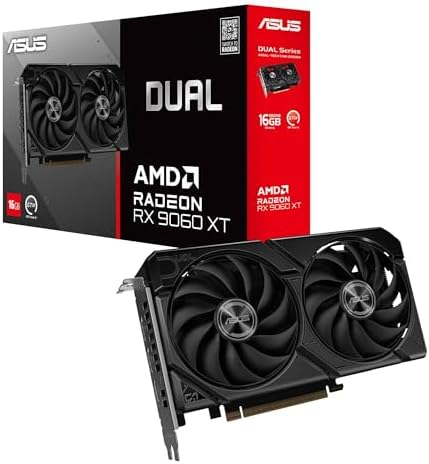
1. ASUS Dual RX 9060 XT 16GB: the best graphics card for most people
16GB GDDR6, PCIe 5.0, a 2.5-slot card eight inches long. $529.00. 4.7 stars from 339 ratings.
- Axial-tech fans now feature a smaller fan hub that facilitates longer blades and a barrier ring that increases downward …
- 2.5-slot design allows for greater build compatibility while maintaining cooling performance
- 0dB technology lets you enjoy light gaming in relative silence
This is the card that makes the strongest case for itself in the whole lineup, and the reason is memory. It carries 16GB at $529.00, where the 8GB NVIDIA card below it sits at $489.99. Double the memory for a modest step up in price.
That gap is the clearest illustration of the argument we make throughout this guide. Video memory is what dates a card first. A 16GB card at 1440p has headroom for higher texture settings for years; an 8GB card at the same resolution is already close to its ceiling in the most demanding recent titles. Spending a little more once, at purchase, buys that headroom permanently. Spending it later means buying a whole new card.
The rest of the specification is current rather than exciting, which is the correct trade at this price. PCIe 5.0, two DisplayPort 2.1a outputs and HDMI 2.1b, a 2.5-slot cooler eight inches long, Axial-tech fans on dual ball bearings, and a 0dB mode that stops them entirely under light load.
The honest caveat is evidence. At 339 ratings this is a thinner sample than the older cards further down the page, because it is a newer listing rather than a less trusted one. The 4.7 average is solid, but it rests on fewer buyers than the 3050s below it.
Buy it if: you play at 1440p, or you play at 1080p and want the machine to still be comfortable in three years.
Skip it if: the games you play lean heavily on DLSS. That is NVIDIA territory, and we cover the trade below.
- 16GB of memory, the specification that decides how long a card stays useful
- A modest step up over the 8GB card for double the memory
- PCIe 5.0 with HDMI and DisplayPort 2.1
- A 2.5-slot cooler, slimmer than the three-slot cards in its class
- 339 ratings is a thinner sample than the older cards here
- FSR rather than DLSS, which matters in some titles
- More card than a 1080p 60Hz monitor can use
2. ASUS Prime RTX 5060 8GB: the best value graphics card here
8GB GDDR7, PCIe 5.0, DLSS 4, 2.5-slot. $489.99. 4.7 stars from 181 ratings.
- AI Performance: 630 AI TOPS
- Powered by the NVIDIA Blackwell architecture and DLSS 4
- SFF-Ready Enthusiast GeForce Card. OC Mode: 2527 MHz/ Defult Mode: 2497 MHz (Boost clock)
The cheapest current-generation NVIDIA card here, and the one to take if DLSS 4 is what you are after. It is a three-fan card in a 2.5-slot body, sold and shipped by Amazon directly, which keeps the return path simple on the part most likely to arrive faulty.
Eight gigabytes is the compromise, and it is a real one. At 1080p it remains sufficient in 2026 and will stay workable for a while. At 1440p it is already the limiting factor in the most demanding recent titles. If your monitor is 1440p, the card above it is the better spend.
What you get for the money is genuinely current: PCIe 5.0, GDDR7 memory, DLSS 4 support, a 2.5-slot cooler and a dual BIOS switch for quiet or performance profiles.
Buy it if: you play at 1080p and the titles you play have strong DLSS support.
Skip it if: you have a 1440p monitor. Eight gigabytes will be the bottleneck before the GPU is.
- The cheapest current-generation NVIDIA card in this guide
- DLSS 4 and GDDR7 memory on PCIe 5.0
- 4.7 stars, the joint highest rating here
- Dual BIOS switch for quiet or performance
- 8GB is already limiting at 1440p
- Only a little less than the 16GB card above it
3. ASUS Dual RTX 3050 6GB: the best budget graphics card on evidence
6GB GDDR6, PCIe 4.0, 2-slot. $257.22. 4.7 stars from 1,129 ratings, the deepest sample in this entire guide.
- NVIDIA Ampere Streaming Multiprocessors: The all-new Ampere SM brings 2X the FP32 throughput and improved power efficien…
- 2nd Generation RT Cores: Experience 2X the throughput of 1st gen RT Cores, plus concurrent RT and shading for a whole ne…
- 3rd Generation Tensor Cores: Get up to 2X the throughput with structural sparsity and advanced AI algorithms such as DLS…
Nothing else here comes close on evidence. A 4.7 star average across 1,129 ratings is the kind of number that stops being an opinion and starts being a fact, and it is worth more than a spec sheet advantage when you are spending under $260.
Be clear about what you are buying. The RTX 3050 is an entry-level card from two generations ago. It plays current titles at 1080p with settings turned down in the more demanding ones, and it is not a 1440p card in any meaningful sense. It also lacks DLSS 4, which the 50-series cards support.
What you get in return is a small, quiet, 2-slot card that fits almost anything, draws little power, needs no exotic power supply, and has more owner feedback behind it than any other card on this page. For a first build, an older prebuilt that shipped with integrated graphics, or a second machine, it is a sensible and well-evidenced choice.
Buy it if: you play at 1080p, your budget is firm, and you want the safest-rated card here.
Skip it if: you want DLSS 4 or you have any 1440p ambitions.
- 1,129 ratings at 4.7 stars, more owner evidence than anything else on this page
- Compact 2-slot card that fits almost any case
- Low power draw, no exotic power supply needed
- Under $260
- Two generations old
- No DLSS 4 support
- A 1080p card, and will bottleneck a 1440p screen
- 6GB of memory
4. GIGABYTE RX 9070 XT Gaming OC 16G: the AMD step up
16GB GDDR6, PCIe 5.0, RDNA 4. $855.59. 4.4 stars from 632 ratings.
- Powered by Radeon RX 9070 XT
- WINDFORCE Cooling System
- RGB Lighting
AMD’s RX 9070 XT is the most interesting card in this guide, because it puts 16GB of memory on the AMD side of this guide. The RX 9060 XT above it has the same 16GB for less money, and the RTX 5080 below it has the same 16GB for a great deal more.
We checked four RX 9070 XT boards from four different brands. This GIGABYTE model carries the deepest review sample of the four at 632 ratings, which is the reason it is the one listed here. The ASUS, ASRock and Sapphire versions are all reasonable and all cost more.
The honest caveat is software rather than hardware. NVIDIA’s DLSS is more widely implemented than AMD’s FSR, and if you play titles that lean on upscaling and frame generation, that gap is real. Against that, you get more memory for the money than anything comparably priced from NVIDIA, and memory is the thing that ages.
Buy it if: you want 16GB without paying 5080 money and you are not tied to DLSS.
Skip it if: the specific games you play have strong DLSS support and weak FSR support.
- 16GB of memory, the same capacity as the RTX 5080 for far less
- A triple-fan WINDFORCE cooler and a three-year warranty
- 632 ratings, the deepest sample of the four
- Current RDNA 4 architecture
- FSR is less widely implemented than DLSS
- RGB lighting, which not every build wants
- A triple-fan WINDFORCE cooler, so check the clearance in your case before ordering
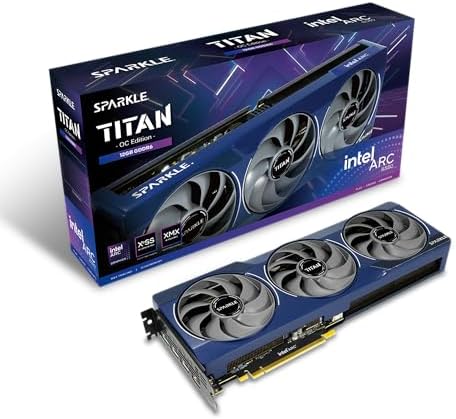
5. Sparkle Intel Arc B580 Titan OC: the cheapest route to 12GB
Intel Arc B580, 12GB GDDR6, metal backplate. $369.99. 4.4 stars from 217 ratings.
- OC Edition Boost Clock: 2760MHz
- TORN Cooling 2.0
- Metal Backplate
This is the only Intel card in this guide, and it earns its place on one specification: it is the cheapest way to put twelve gigabytes of video memory in a machine. Nearly everything else at this price ships with eight.
That gap matters more than it used to. Eight gigabytes is what modern games run out of first, and running out shows up as stutter rather than as a lower average frame rate, which is the more irritating of the two failures. The B580 gives you headroom that the cards around its price simply do not.
Be clear about the trade, because it is a real one. The GIGABYTE RTX 5060 WINDFORCE higher up this page costs more and has less memory, and we still rank it above this card. NVIDIA is faster at this tier in most titles, DLSS is far more widely implemented than Intel’s XeSS, and Arc drivers, though hugely improved, are still rougher in older games. What you are buying here is capacity, not the fastest card for the money.
Buy it if: you want 12GB for under four hundred dollars, or you mostly play recent titles where memory is the limit.
Skip it if: your library is largely older games, or you want the most predictable driver experience available.
- 12GB of memory at a price where 8GB is the norm
- The cheapest route to 12GB anywhere in this guide
- 4.4 stars from 217 ratings, sold by Amazon directly
- Metal backplate and a sag bracket included
- Slower than the NVIDIA cards near its price
- XeSS is less widely supported than DLSS
- Arc drivers remain rougher in older titles
6. GIGABYTE RTX 5080 Gaming OC 16G: the enthusiast pick
16GB GDDR7, 256-bit, WINDFORCE cooling. $1,653.99. 4.6 stars from 187 ratings.
- Powered by the NVIDIA Blackwell architecture and DLSS 4
- Powered by GeForce RTX 5080
- Integrated with 16GB GDDR7 256bit memory interface
The fastest card in this guide, and the one that needs the least explanation. If you are running 4K at high refresh and the budget is not the constraint, this is the pick.
Sixteen gigabytes on a 256-bit bus is the combination that matters at 4K, and the WINDFORCE cooling system is GIGABYTE proven design rather than anything experimental. What you are buying above the rest of this guide is headroom, not a different class of experience.
Two honest notes. The 4.6 average sits mid-pack in this guide, and 187 ratings is a modest sample for a card at this price, so there is less evidence behind it than behind the cheaper picks. And the price is roughly three times the card at the top of this page for performance most monitors cannot show.
Buy it if: you have a 4K high-refresh monitor and want the GPU to match it.
Skip it if: you play at 1440p or below. You would be paying for headroom your screen cannot display.
- The fastest card in this guide
- 16GB GDDR7 on a 256-bit bus, the right pairing for 4K
- WINDFORCE cooling on a proven design
- 4.6 stars, mid-pack in this guide
- 187 ratings is a modest sample at this price
- Roughly three times the price of the card at the top of this page
The best graphics card picks compared side by side
| Card | GPU | Memory | Price | Rating | Best for |
|---|---|---|---|---|---|
| ASUS Dual RX 9060 XT 16GB | RX 9060 XT | 16GB GDDR6 | $529.00 | 4.7 (339) | 1440p, futureproofing |
| ASUS Prime RTX 5060 8GB | RTX 5060 | 8GB GDDR7 | $489.99 | 4.7 (181) | 1080p on a budget |
| ASUS Dual RTX 3050 6GB | RTX 3050 | 6GB GDDR6 | $257.22 | 4.7 (1,129) | Most owner evidence |
| GIGABYTE RX 9070 XT Gaming OC | RX 9070 XT | 16GB GDDR6 | $855.59 | 4.4 (632) | The AMD step up |
| Sparkle Intel Arc B580 Titan OC | Intel Arc B580 | 12GB GDDR6 | $369.99 | 4.4 (217) | Cheapest 12GB |
| GIGABYTE RTX 5080 Gaming OC | RTX 5080 | 16GB GDDR7 | $1,653.99 | 4.6 (187) | 4K high-refresh |
What we left out of the best graphics card shortlist, and why
One card with no live price at all
A GIGABYTE RTX 5070 board showed a price in search results but returned no live offer on its own product page. A listing without a buy box is not something you can buy, so it is not something we will recommend. This is exactly why we verify on the product page rather than the search grid.
The 8GB RTX 5060 Ti
There is an RTX 5060 Ti with 8GB of memory at roughly $440. It is the memory trap this guide is built around in its purest form: the same model name as a 16GB card, half the memory, and a price close enough to look like a bargain. It also carried only 32 ratings. Both facts disqualify it.
A card with one unit in stock
A GIGABYTE RTX 5050 at around $310 had 40 ratings and a single unit in stock. Either one of those would have kept it off the list.
Three other RX 9070 XT boards we liked
ASRock, ASUS and Sapphire all sell RX 9070 XT cards that clear our filters comfortably. None has a deeper review sample than the GIGABYTE we listed, so they are mentioned rather than carded. If the GIGABYTE goes out of stock, any of them is a reasonable substitute.
How much graphics card do you actually need
This is the question that decides everything else, and the answer is set by your monitor, not by your budget. Buying above your screen is the most common and most expensive mistake in this category.
The best graphics card for 1080p
At 1920×1080 you do not need to spend much. An RTX 3050 at $257.22 plays current titles well with some settings adjusted, and an RTX 5060 at $489.99 plays them comfortably with DLSS 4 available. Anything above that is headroom you cannot see unless you are chasing very high frame rates for competitive play.
The best graphics card for 1440p
At 2560×1440 the sensible entry point is the RX 9060 XT 16GB at $529.00, and the reason is memory rather than raw speed. The RX 9070 XT at $855.59 gives you real headroom for high refresh rates, and the Intel Arc B580 at $369.99 is the cheapest way onto 12GB if the budget will not stretch that far. This is the resolution where most people are and where the money is best spent.
The best graphics card for 4K
At 3840×2160 you want 16GB of memory and the bandwidth to use it. The RTX 5080 at $1,653.99 is the comfortable option if the budget allows. Below that tier, 4K means turning settings down far enough that a 1440p monitor would have looked better.
AMD, NVIDIA or Intel in 2026
The short answer is that AMD gives you more memory per dollar and NVIDIA gives you better upscaling support, and which matters more depends on what you play.
Both of our AMD picks carry 16GB. The RX 9060 XT at $529.00 is the cheapest 16GB card in this guide by a wide margin, and the RX 9070 XT at $855.59 adds a 256-bit bus on top of it. NVIDIA has nothing with 16GB below the RTX 5070 Ti, which costs considerably more. On paper that is the better buy, and for titles without heavy upscaling reliance it usually is in practice too.
NVIDIA’s advantage is DLSS 4, which is more widely implemented than AMD’s FSR and, in the games that support it well, meaningfully improves both frame rates and image quality. If the specific titles you spend your evenings in have strong DLSS support, that is worth paying for. If they do not, you are paying for a feature you will not use.
Intel is a third option now, and a narrower one. The Arc B580 at $369.99 undercuts everything here on memory per dollar, twelve gigabytes at a price where eight is normal, and XeSS is a respectable upscaler. What Intel does not yet have is the driver maturity of the other two, particularly in games that are a few years old. It suits someone buying on a tight budget who mostly plays current releases.
No single brand is the right answer for everyone, and anyone telling you otherwise is arguing rather than advising. The same brand question comes up for processors, and we answer it in our best gaming CPUs guide, and our guide to what CPU to pair with your GPU matches a processor to each card above.
How much video memory do you need
More than the card manufacturers would like you to accept at the lower tiers, and this is the single most useful thing to understand before you spend.
At 1080p, 8GB remains sufficient in 2026 and will stay workable for a while. At 1440p, 8GB is already the limiting factor in the most demanding recent titles, and 12GB is comfortable rather than generous. At 4K, 16GB is the sensible floor.
The reason this matters more than a raw performance number is how running out of memory feels. A slower GPU gives you lower frame rates, which is smooth and predictable and can be tuned away with a settings slider. A GPU that has run out of memory gives you stutter, which is neither smooth nor predictable, and the only real fix is turning textures down, which is the setting with the most visible effect on how a game looks.
Will it fit, and will your power supply run it
Two practical checks that catch people out after the card has arrived.
Physical length and slot width. Cards in this guide range from compact 2-slot designs to much larger triple-fan coolers. Measure the clearance in your case before ordering, particularly if you have a small form factor build or a front-mounted radiator.
Power supply headroom. A power supply that was adequate for an older card may not be adequate for a current one, and this is the component budget builders cut hardest. The rule of thumb worth following is to have real headroom rather than the bare minimum, because a supply running near its limit is the one that causes the reboot you spend a weekend diagnosing. If your supply is the original unit in a prebuilt machine, check its rating before you buy anything above the mainstream tier.
When to buy, and when to wait
Graphics card pricing does not follow a neat seasonal pattern, but a few things are reliably true.
Prices move most around new generation launches, and not always downward: outgoing cards sometimes hold value because supply of the new ones is short. Genuine discounts on current-generation cards, like the two in this guide, tend to be short lived. And a struck-through list price identical to the selling price is not a sale, it is a display choice.
If you need a card now, buy the right tier for your monitor and stop watching prices. If you do not need one, the only thing worth waiting for is a real discount on the specific card you already decided you wanted.
Frequently asked questions
What is the best graphics card in 2026?
For most people it is the ASUS Dual RX 9060 XT 16GB. It is the cheapest card on this list that carries 16GB of memory, which is what decides whether a card is still comfortable at 1440p in three years. It is rated above 4.5 by its owners and is sold directly by Amazon.
How much should I spend on a graphics card?
Let your monitor decide. Around $210 to $260 covers 1080p properly. Roughly $550 to $770 is the sensible range for 1440p. Below about $1,100 you are not really equipped for 4K. Spending above what your screen can display is the most common way to waste money in this category.
Is 8GB of VRAM enough in 2026?
At 1080p, yes, and it will stay workable for a while. At 1440p it is already the limiting factor in the most demanding recent titles, and at 4K it is not enough. The important part is how running out feels: you get stutter rather than lower frame rates, and the only real fix is turning textures down.
What graphics card do I need for 1440p?
The RX 9060 XT 16GB is the sensible entry point, and the RX 9070 XT gives you real headroom for high refresh rates. The deciding factor at this resolution is memory rather than raw speed, which is why the 16GB cards are worth their premium.
Is AMD or NVIDIA better in 2026?
Neither is better for everyone. AMD gives you more memory per dollar: the RX 9070 XT carries 16GB for less than NVIDIA charges for 16GB. NVIDIA gives you DLSS 4, which is more widely implemented than AMD FSR and genuinely helps in the games that support it. Choose based on the titles you actually play.
Do I need to upgrade my power supply for a new graphics card?
Possibly, and it is worth checking before you order rather than after. The power supply is the component budget builders cut hardest, and a supply running near its limit causes the random reboot you then spend a weekend diagnosing. If yours is the original unit in a prebuilt machine, check its rating before buying anything above the mainstream tier.
Is the RTX 5080 worth it?
It is the fastest card in this guide and the 15 percent discount is real, but it costs more than most complete gaming PCs and measured per frame it is poor value, as every flagship is. It makes sense if you run 4K at high refresh or do GPU-accelerated work. At 1440p the RX 9070 XT costs around $670 less and your monitor cannot tell the difference.
What does the Ti or XT in a graphics card name mean?
Both mean a faster version of the same tier. In an RTX 5070 Ti the 5 is the generation, the 70 is the tier, and Ti marks the uprated model. AMD uses XT the same way, so an RX 9070 XT is the faster version of the RX 9070. The name does not tell you the memory, which is the specification that decides how long the card stays useful.
Is a higher star rating always better?
No, and this is the most useful thing to understand about review scores. A rating is only as reliable as the number of people behind it. A 5.0 from three buyers tells you almost nothing, while a 4.7 from over a thousand is strong evidence. A practical threshold is around 100 ratings before an average means much, and several hundred before it is genuinely dependable.
The bottom line on the best graphics card
The best graphics card for most people in 2026 is the ASUS Dual RX 9060 XT 16GB at $529.00, because it is the cheapest card here that will still be comfortable at 1440p in three years, and memory is what decides that.
If your budget stops lower, the ASUS Prime RTX 5060 8GB at $489.99 is the cheapest current-generation NVIDIA card here and the right choice for a 1080p screen. If evidence matters more to you than generation, the ASUS Dual RTX 3050 at $257.22 has 1,129 ratings behind it, more than anything else on this page.
Above that, match the card to the monitor: the RX 9070 XT at $855.59 for high-refresh 1440p and the RTX 5080 at $1,653.99 if you want the top of the stack and the price is not the deciding factor.
Whichever you choose, check the current price before you buy. Prices and ratings on this page update automatically. Every other figure was accurate when this guide was last reviewed and carries no guarantee beyond that.
One thing worth knowing before you spend: no current graphics card saturates PCIe 4.0, so you do not need an expensive PCIe 5.0 board to run one of these. Our guide to the best gaming motherboards explains what the chipset tiers actually buy you.
Whichever card you land on, the resolution and refresh rate you should target are set by what it can realistically push. Our best gaming monitors guide pairs panels to that decision rather than the other way round.
The card renders the world; the headset tells you what is behind you. Our best gaming headsets guide explains why the connection type matters more than the price.
The card decides what you see; the keyboard decides how fast you respond to it. Our best gaming keyboards guide covers layouts, switch types and Hall Effect actuation.
The card draws the target; the mouse is how you reach it. Our best gaming mice guide explains why weight matters far more than the DPI figure on the box.
A card is replaced every few years; a good chair outlasts several of them. Our best gaming chairs guide compares six on weight capacity, recline and real owner ratings.
Want to see this card in a complete machine? Our $2,000 gaming PC build is built around the RTX 5060 Ti 16GB, with the full parts list and costings.
Not every machine justifies a card at these prices. Our budget gaming PC build costs about $930 complete and uses an RTX 3050 6GB, which we treat as a deliberate floor rather than a recommendation, and the article is explicit about what that card gives up at 1080p.
Whichever card you land on decides your power supply, not the other way around. Our best gaming power supply guide covers how to size one from the card manufacturer’s recommended wattage, and why the 12V-2×6 connector now matters more than the wattage number itself.
Before you order any of these cards, check it physically fits. Length is the specification that most often forces a return, and most case listings do not publish a clearance figure at all. Our best PC case guide covers which cases state their limit, and why you need another 30 to 40mm behind the card for the power cable to bend.
If you are costing a whole machine around one of these cards rather than buying it alone, our $3,000 build is built around a card from this class, and shows how much of a build’s budget a graphics card should take.
One warning if you are cross-shopping laptops. NVIDIA uses these same names for laptop chips, and they are different silicon with far tighter power budgets. A laptop RTX 4060 does not perform like the desktop card above it in this list. Our gaming laptop guide explains how far down to adjust, and why no listing publishes the wattage that decides it.
Video memory is the specification underneath most of the decisions on this page. If you are weighing an 8GB card against a 16GB one, our guide to how much VRAM you need explains what changes at each resolution, and why running out causes stutter rather than a lower frame rate.
The card you need is decided by the screen you are feeding. Our guide to 1080p vs 1440p vs 4K pairs each resolution with the cards that drive it properly.
Whichever card you choose here, it decides the power supply. Our guide to what PSU wattage you need pairs each tier of card with the units that run it comfortably.
Which upscaler a card gives you is decided the moment you pick a brand. Our DLSS vs FSR vs XeSS explainer compares all three and pairs each with four cards you can buy today.
Also worth reading: video memory matters even more once you move past gaming. Our guide to the best VR and AI gear for 2026 covers which cards carry enough VRAM to run local AI models and drive a VR headset.
Gamers Tech Guide participates in the Amazon Services LLC Associates Program. As an Amazon Associate we earn from qualifying purchases.