
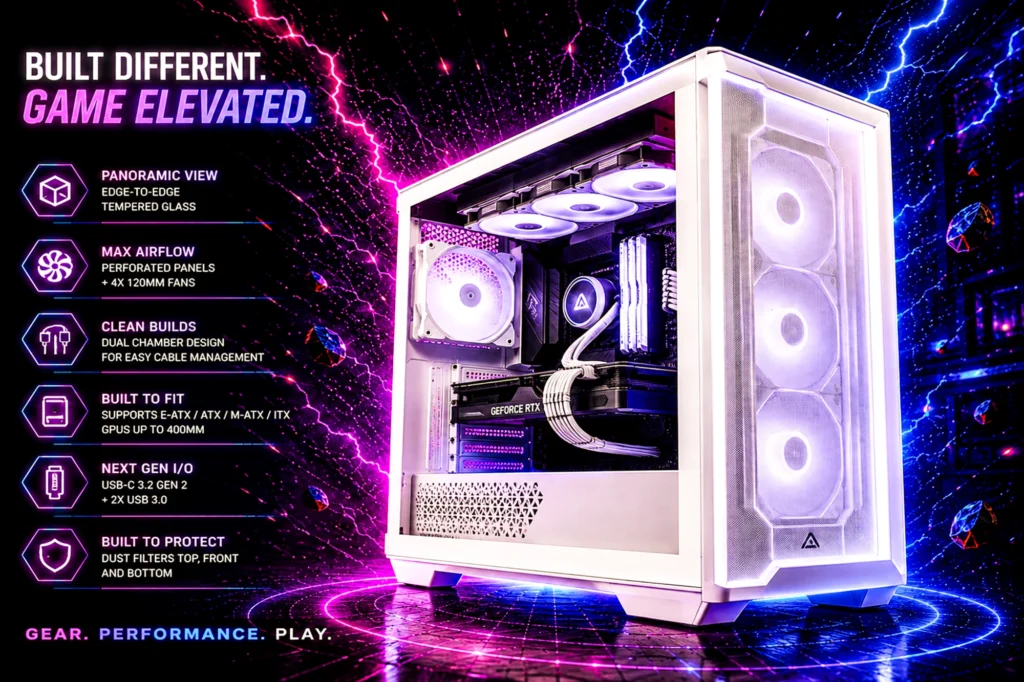
Eight cases from $54.99 to $124.99, and one comparison that reframes the whole category: two of these cases sit close together on price. The cheaper one ships with seven fans. The pricier one ships with none.
- Count the fans before you compare the prices. Our eight picks include anywhere from zero to seven.
- Measure your graphics card first. Clearance is the specification that actually stops a build.
- Two of these need a specific motherboard to look the way the photos look.
Choosing the best PC case is the one component decision where the specification sheet and the photograph disagree most often. The picture sells you a clean, glowing machine. The specification sheet quietly tells you how many fans are in the box, whether your graphics card fits, and whether that tidy cable-free look requires a motherboard you do not own.
The eight cases below run from $54.99 to $124.99. All eight have a tempered glass panel. Beyond that they diverge sharply, and the divergence is mostly in the parts nobody photographs.
The clearest example sits in the middle of our list. The Antec C8 at $99.99 states plainly that it includes no fans. The MUSETEX K2 at $89.99 arrives with seven of them. The case with nothing in it costs more, and if you compare those two on price alone you will reach exactly the wrong conclusion.
The best PC case picks at a glance
| Case | Fans included | Glass | Notable | Price | Rating |
|---|---|---|---|---|---|
| NZXT H5 Flow | 2 x 120mm | Tempered | 360mm front radiator | $94.99 | 4.7 (1,240) |
| MUSETEX K2 | 7 PWM ARGB | Dual tempered | Type-C, full-view glass | $89.99 | 4.6 (1,221) |
| MONTECH XR Panoramic | 3 ARGB PWM | Dual tempered | 420mm GPU, up to 9 fans | $69.99 | 4.7 (791) |
| Antec C8 | None | Tempered front and side | Dual-chamber, 360mm radiator | $99.99 | 4.8 (461) |
| Lian Li V100-ATX | 4 x 120mm ARGB | Tempered | LED strip, display platform | $74.99 | 4.8 (646) |
| NZXT H6 Flow | 3 x 120mm non-LED | Panoramic | No RGB at all | $109.99 | 4.8 (3,141) |
| DARKROCK EC2 | 1 x 120mm | Tempered side | Up to 8 fans, 360mm rad | $49.99 | 4.4 (603) |
| Lian Li O11 Vision Compact | Not stated | Tempered | Back-connect support | $119.99 | 4.6 (372) |
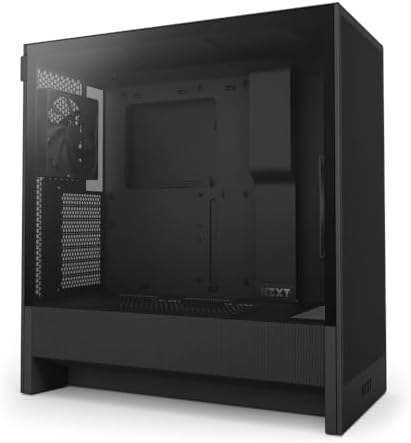
| Fans | 2 x 120mm |
| Radiator | 360mm front |
| Size | Compact ATX |
| Rating | 4.7 (1,240) |
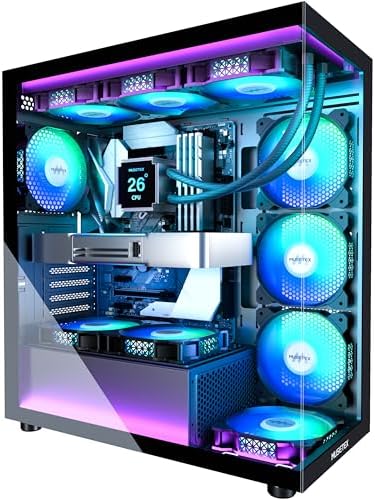
| Fans | 7 PWM ARGB |
| Front I/O | Type-C |
| Glass | Dual tempered |
| Rating | 4.6 (1,221) |

| Fans | 3 ARGB PWM |
| GPU | Up to 420mm |
| Capacity | Up to 9 fans |
| Rating | 4.7 (791) |

| Fans | None included |
| Glass | Front and side |
| Layout | Dual-chamber |
| Rating | 4.8 (461) |

| Fans | 4 x 120mm ARGB |
| Lighting | LED RGB strip |
| Color | Black (V100RX) |
| Rating | 4.8 (646) |

| Fans | 3 x 120mm non-LED |
| Glass | Panoramic |
| Front I/O | USB-C |
| Rating | 4.8 (3,141) |

| Fans | 1 pre-installed |
| Capacity | Up to 8 x 120mm |
| Radiator | 360mm |
| Rating | 4.4 (603) |

| Build | Steel and glass |
| Boards | Back-connect support |
| Color | White |
| Rating | 4.6 (372) |
NZXT H5 Flow, the case we would recommend without qualification
- EXCEPTIONAL GPU COOLING-The PSU shroud is perforated on the side and bottom, enabling optimal air intake from two 120mm …
- LARGE RADIATOR SUPPORT-Supports up to a 360mm radiator in front and a 240mm radiator up top for powerful liquid cooling …
- HIGH-PERFORMANCE AIRFLOW-Ultra-fine mesh on the top, front, and side panels creates maximum airflow and filters dust.
The H5 Flow is the case we would hand to somebody building for the first time and not worry about it. It is a compact ATX mid-tower with two 120mm fans included, support for a 360mm front radiator, and a tempered glass panel. Its own listing describes it as a great first airflow build, and for once the marketing and the reality agree.
At 4.7 stars from 1,240 ratings it has a deep owner sample, and NZXT’s build quality is consistent in a way that budget brands are not. Panels line up, thumbscrews stay captive, and the manual is comprehensible.
Two fans is not many. It is enough for a sensible build with a mid-range card, and the case has room to add more. If you want a full complement out of the box, the MUSETEX below gives you seven for five dollars more.
- 4.7 stars from 1,240 ratings, a large and consistent sample
- Compact footprint that still takes a full ATX board
- 360mm front radiator support for a liquid cooler later
- Genuinely good build quality, which is not a given at $94.99
- Only two fans included, the second-fewest here
- Compact means less room for cable management than a full tower
- No ARGB, if that matters to you
MUSETEX K2, seven fans in the box
- 【MUSETEX presents the K2 gaming pc case】both a visual experience and a first-class installation experience,high configur…
- 【Tower Case Powerful Space Layout】The internal structure of the MUSETEX ATX chassis is clearly partitioned, with each in…
- 【Upgrade High Speed IO Panel】1 x Type-C, 2 x USB 3.0, Microphone & Audio, Power Button, Restart Button
Seven PWM ARGB fans, pre-installed, for $89.99. Buying seven decent 120mm ARGB fans separately would cost a meaningful fraction of that on its own, which makes this the most straightforwardly good value on the page for anyone who wants a fully populated case without a second shopping trip.
It adds a Type-C front port and full-view dual tempered glass, and it holds 4.6 stars from 1,221 ratings, a substantial owner sample.
The honest caveat with any bundled-fan case is that the fans are built to a price. They move air and they light up; they are not the quietest units you can buy. If silence matters more than quantity, the be quiet! approach in our power supply guide applies to fans too, and you would be better served by fewer, better ones.
- Seven pre-installed PWM ARGB fans, the most here by a distance
- 1,221 ratings, a large sample
- Type-C front I/O at $89.99
- Full-view dual tempered glass
- Bundled fans are built to a price and are not the quietest
- Seven fans is a lot of cabling to route
- 4.6, below the Lian Li, Antec and NZXT H6 Flow on score
MONTECH XR Panoramic, the one that publishes GPU clearance
- Turn Your Gaming Rig Into a Showcase – Panoramic front and side tempered-glass panels keep the GPU, cooling and lighting…
- Keep the Best Side in View – 2 side-mounted reverse-blade ARGB PWM fans present their illuminated faces toward the inter…
- Fit High-End Hardware With Confidence – This ATX PC case has 420 mm GPU clearance to fit compatible large graphics cards…
At 4.7 stars from 791 ratings, this is one of the best-rated cases on the page with a substantial sample behind it, and at $69.99 it is also below our average. It ships three ARGB PWM fans and takes up to nine.
More usefully than any of that, it is the only case in our eight that publishes a graphics card clearance figure: 420mm. That is the specification most likely to sink a build, and most listings leave you to guess. It also states 360mm radiator support, USB-C, reverse blade fans and magnetic dust filters.
A listing that tells you the numbers is telling you something about the manufacturer as well as the product.
- 4.7 stars from 791 ratings, a strong combination of score and sample
- States 420mm GPU clearance, which nothing else here does
- $69.99, below most of the cases here
- Magnetic dust filters and USB-C
- Three fans in a case that holds nine, so expect to add more
- Panoramic glass means heat has one less escape route than mesh
- MONTECH is a smaller brand than NZXT or Corsair
Check the buy box before you order this one. Amazon is not currently showing a default Buy Now offer on the Antec C8 listing, so you may need to open See All Buying Options and choose a seller yourself. The case is genuine and still sold, but it is not the one-click purchase the others on this page are.
Antec C8, and the sentence you must not skip
- Fans not included.Full-View PC Case with Seamless Edge on Front & Side Panel.
- Dual Chamber Design.
- Space for Three 140mm Fans or Two 160mm Fans on Top and Bottom.
This is a genuinely good case, and it is the one most likely to disappoint somebody who buys on the photograph. Its own title contains the words “No Fans”, and at $99.99 that puts it above a case that arrives with seven.
What you are paying for instead is the shell: a dual-chamber full-tower layout that hides the power supply and cabling behind the motherboard tray, tempered glass on the front and side, E-ATX board support, and room for a 360mm radiator. It is the roomiest case on this page by a wide margin.
That roominess carries its own condition. This is a full tower, not a mid tower: measure your desk and your floor space before you commit, and remember that a bigger box with no fans in it needs more of them, not fewer, to move air through all that volume. Budget for three intake and one exhaust on top of the $99.99.
- Dual-chamber layout hides the power supply and the cabling
- E-ATX support and room for a 360mm radiator
- 4.8 stars from 461 ratings, the joint-highest here
- Tool-free panels and front USB Type-C
- No fans included, which is a real cost on top of the price
- A full tower needs more fans than a mid tower, not fewer
- Largest footprint here, so check your desk before you buy
Lian Li V100-ATX, four ARGB fans and a display platform
- Comes with 4x pre-installed PWM-controlled 120mm ARGB fans, ensuring adaptable airflow and vibrant lighting with daisy-c…
- Integrated 26-LED ARGB strip offers full spectrum color control and synchronization with motherboard software, enhancing…
- Supports ATX, Micro-ATX, Mini-ITX, and back-connect ATX or Micro-ATX motherboards for cleaner routing and flexible build…
Four 120mm ARGB PWM fans, an LED RGB strip and a display platform with tempered glass, from a brand whose case engineering is genuinely respected. At 4.8 stars from 646 ratings it is tied for the best score here.
There is a detail worth noticing on this listing that says something about the whole category. The identical case in white costs $79.99 against $74.99 for the black. Same case, same fans, same score — the finish is the only difference. Lian Li’s cheaper Vector V100 line does the same thing: $59.99 in black against $65.99 in white. The color is never free here, which is exactly why it is worth checking both listings before you order.
- Strong owner ratings
- Four ARGB PWM fans and an LED strip included
- Lian Li build quality, which is a step above the budget brands
- Display platform is a genuinely nice touch at this price
- The white version of the same case costs more, for the finish alone
- 646 ratings is a smaller sample than the NZXT or MUSETEX
- Four fans, where the MUSETEX gives seven for a little more
NZXT H6 Flow, three fans and no lighting at all

- Wraparound glass panels with a seamless edge provides an unobstructed view of the inside to highlight key components.
- Compact dual-chamber design improves overall thermal performance and creates a clean, uncrowded aesthetic.
- Includes three pre-installed 120mm fans positioned at an ideal angle for superb out-of-the-box cooling.
Not every build wants to glow. The H6 Flow ships three non-LED 120mm fans, a USB-C front port and wraparound panoramic glass, for $79.99. It is the only case here that has deliberately left the lighting out, and the only one with more than three thousand ratings behind it.
That is a harder product to find than it should be. Most cases at this price treat ARGB as mandatory, and turning lights off in software is not the same as not having them. If the machine sits in a bedroom or a shared office, this is the sensible choice, and 3,141 ratings at 4.8 stars make it a well-evidenced choice.
- Three fans included and no lighting to disable
- 3,141 ratings at 4.8 stars behind it
- USB-C front I/O, which many cheaper cases omit
- Dual-chamber layout keeps the cabling out of sight
- Non-LED fans cannot be lit later without replacing them
- Panoramic glass shows the interior, so cable management still matters
- The MUSETEX K2 includes seven fans at the same price
DARKROCK EC2, the budget pick
- Meshed Front Panel: ATX PC Case features a mesh front panel for efficient airflow and optimal cooling performance for PC…
- Tempered Glass Design: The chassis features tempered glass side panels, providing a comfortable visual experience while …
- Type-C Ready: Stay in the know with this Type-C Ready Black PC Case that features the latest connectivity options for al…
At $49.99 this is the budget pick here. If you are building on a tight budget, see the case in our $1,000 build too.
For the money it is well specified: Type-C ready, a tempered glass side panel, room for up to eight 120mm fans and a 360mm radiator, and the listing states support for current-generation graphics cards.
The compromises are visible in the numbers. One pre-installed fan in a case that holds eight means you are buying fans, and 4.4 stars is at the lower end of this page across 603 ratings. That is still a good score, and at $49.99 it is a fair trade, but it is the pick where you are most obviously getting what you pay for.
- $49.99, a genuine budget price
- Takes up to eight 120mm fans and a 360mm radiator
- Type-C ready and tempered glass at a budget price
- One fan included, so budget for at least two or three more
- 4.4 stars, at the lower end of this group
- Build quality is adequate rather than good
Lian Li O11 Vision Compact, if the build is the point
- In collaboration with PCMasterRace
- The case included tempered glass panels on the front, top, and left side
- A top mesh panel included for the installation of a 360 AIO.
The O11 line is what people picture when they picture a showcase build, and the Vision Compact is the version that fits on a normal desk. Steel and tempered glass, white, with back-connect motherboard support. At $124.99 it is about 50 percent more than our average and it is not pretending otherwise.
Buy this if the machine is meant to be looked at. The same warning as the Corsair applies with more force: back-connect support is only worth paying for if you are buying a back-connect board to go with it, and the listing does not state a fan count, so assume you are buying those too.
- The showcase case, with the build quality to match
- Back-connect support for a completely cable-free interior
- Compact enough for a desk rather than the floor
- 4.6 stars from 372 ratings
- $124.99, well above everything else here
- No fan count stated, so budget for fans on top
- Back-connect only pays off with a matching motherboard
Fans included, and the extra you pay for none of them
Form factor: ATX, micro-ATX and ITX
Every case on this page takes a full ATX motherboard, which is the size most gaming builds use and the safe default. The distinction that catches people is the other direction: a smaller board fits in a larger case, but never the reverse.
If you have already chosen a micro-ATX board, any of these will house it, and you will have empty mounting holes and a bit more room to work. If you have chosen a full ATX board, do not buy a micro-ATX case to save fifteen dollars, because it will not go in. Check the board size in our motherboard guide against the case listing before ordering either.
Mid-tower, which is what all eight of these are, is the size that balances build room against desk space. Full towers make sense for extensive liquid cooling; ITX cases are a specialist pursuit with real compromises in cooling and cost.
Graphics card clearance is what actually stops a build
This is the measurement that sends cases back. Modern graphics cards are long, and a card that is 30mm too long for the case does not fit at any angle. The frustrating part is that most case listings do not state the figure, and most card listings bury it.
Of our eight, only the MONTECH XR publishes a number, and it is 420mm, which is generous enough for essentially anything. The DARKROCK EC2 says it supports current-generation cards without giving a measurement. The other six leave you to find it on the manufacturer’s own site.
Look up the exact length of the card you are buying in our graphics card guide and confirm the case clears it with room for the power cable to bend. A cable needs 30 to 40mm behind the connector, and that is the part people forget. It matters more with a native 12V-2×6 cable than with an adapter, which is one more reason to read our power supply guide alongside this one.
Back-connect cases need back-connect motherboards
One of our eight advertises it: the Lian Li O11 Vision Compact calls it back-connect support. The motherboard’s power and data connectors face backwards, through a cutout in the tray, so the front of the build has no visible cables at all.
It only works with a motherboard built that way. A conventional board in a back-connect case works perfectly well, but the cables come out of the front exactly as they always did, and the reason you paid for that case disappears.
These boards exist from most major manufacturers and cost slightly more. The decision has to be made for the case and the board together, which is the same class of mistake as buying an AM4 board for a current processor, covered in our motherboard guide. Buy the pair or buy neither.
Airflow, mesh and tempered glass
All eight of these cases have tempered glass, because that is what sells. Glass is not the enemy of cooling that it is sometimes made out to be, but the front panel matters: a mesh front lets a fan pull cool air straight in, while a solid glass front makes it work through a narrower gap.
The NZXT H5 Flow and the MONTECH XR both lead on airflow, and the MONTECH adds magnetic dust filters, which are the difference between cleaning a case in two minutes and cleaning it with compressed air and regret. Glass-fronted designs like the Antec C8 trade a little intake for the look.
For a mid-range build none of this is critical. For a hot processor and a large card, prefer mesh at the front and pay attention to how many fans the case actually came with.
What we left out of the best PC case shortlist, and why
A MUSETEX six-fan case with 1,383 ratings, more than any other case our searches returned, is not here. We could not verify a live price for it: the listing returned an empty price and no usable rating when we validated it, twice. A product we cannot price is a product we cannot recommend, and that is a data problem rather than a criticism of the case.
The Lian Li V100-ATX in white at $79.99 is excluded as a duplicate of the black at $74.99. Identical case, identical score, and the white carries a premium for the finish alone. If you prefer white, buy it knowingly.
The CORSAIR AIR 5400 LX-R at $264.99 is a triple-chamber panoramic case with reverse-rotor fans and it is very good. It is also more than three times our average price and rests on 117 ratings, which is a lot of money against a thin sample.
How we chose the best PC case for each build
Twenty-one distinct cases came back across six searches, and the best PC case for any given build was never the one with the longest specification list. Every one was a genuine case rather than an accessory, so nothing was filtered out on that basis. We then validated each candidate individually against the retailer page for price, rating, review count and availability, which is how the unpriceable MUSETEX was caught.
The eight that remain span $54.99 to $124.99 and cover the decisions people actually make when choosing the best PC case: most fans, no fans, no lighting, lowest price, highest rating, and the showcase option. A list of eight near-identical mid-towers at $75 would look tidier and help nobody.
Where a case appears in one of our builds we say so. For how a case fits a complete machine, see the case in our $1,000 build, where the reasoning for every part is set out the same way; the $2,000 build takes the same approach at a higher budget.
Frequently asked questions
The bottom line on the best PC case
There is no single best PC case, only the right size, the right fan count and the right clearance for the parts going into it. That said, buy the NZXT H5 Flow if you want the decision made for you: 1,240 ratings, good build quality, and nothing about it will surprise you badly.
If you want a fully populated case for one price, the MUSETEX K2 gives you seven fans for $89.99. If you want the only case here honest enough to publish its GPU clearance, take the MONTECH XR at $69.99. On a tight budget the DARKROCK EC2 at $49.99 does the job, provided you buy fans with it.
And before you order anything: measure your graphics card, check your motherboard size, and count the fans in the box. Those three checks turn the best PC case on paper into the right one for your build, and they prevent almost every case return. The parts that go inside are covered in our graphics card, processor and power supply guides, and if you would rather not build at all, our prebuilt guide covers that path.
Prices and ratings on this page update automatically. Every other figure was accurate when this guide was last reviewed and carries no guarantee beyond that. Component prices move quickly. Check each one before you buy.
Cooler height is the constraint we mentioned above, and it is worth putting a number on. The best-reviewed air cooler on the market is 168mm tall, which several mid-towers will not close on. Our best CPU cooler guide covers eight coolers, five air and three liquid, and which of them publish a height at all.
The MONTECH XR is the case in our $3,000 build, chosen over prettier options for one reason: it is the only case here that publishes a graphics card clearance figure, and with a triple-fan RTX 5070 Ti going in, guessing is not an option. At 3 percent of that budget it is also the cheapest way to be certain.
Gamers Tech Guide participates in the Amazon Services LLC Associates Program. As an Amazon Associate we earn from qualifying purchases.