
Nine graphics cards across all three camps, from $169.99 to $937.39, every one verified on its own product page and sold through Amazon rather than a marketplace reseller.
- Best image quality: DLSS 4, and it is not close. But it needs an NVIDIA RTX card.
- Works on everything: FSR. It is the only one of the three that runs on a competitor’s hardware.
- The value play: XeSS on an Intel Arc card, where entry pricing starts at $169.99.
- Upscaling and frame generation are different things. One makes your game run faster. The other makes the number go up. Know which you are turning on.
The DLSS vs FSR vs XeSS argument has quietly become the most important decision in PC gaming, because none of these three is optional any more. Every card sold today expects you to use one, most modern games ship assuming you will, and the performance figures on the box were measured with it switched on.
This guide settles DLSS vs FSR vs XeSS on what each one actually does to your game, and pairs each one with three graphics cards you can buy today. Nine cards in total (three DLSS, three FSR, three XeSS), each verified for price, rating and owner count on the day of writing.
The finding that runs through this guide: the upscaler you should care about is decided by the card you buy, not the other way round. You do not choose DLSS. You choose an NVIDIA card and DLSS comes with it.
DLSS vs FSR vs XeSS: the 30-second answer
DLSS looks the best. NVIDIA has the largest head start, the most games, and with DLSS 4 it moved to a transformer model that holds fine detail better than anything else here. The cost of entry is that it only runs on GeForce RTX cards.
FSR is the most useful. It is the only upscaler of the three that runs on hardware from all three vendors, including NVIDIA and Intel cards. That matters more than it sounds: if a game only implements FSR, everyone can still use it. AMD also moved to a machine-learning model with FSR 4, which closed a large part of the image-quality gap, but that version needs an RDNA 4 card.
XeSS is the quiet middle. It runs cross-vendor like FSR, but on an Intel Arc card it uses a better path through Intel silicon and looks noticeably cleaner than it does on a competitor card. It is the only one of the three whose quality depends on whose hardware you run it on.
The practical answer: buy the card that suits your budget and your resolution, and use whichever upscaler it came with. All three are good enough in 2026 that the card decision matters far more than the upscaler decision.
What DLSS vs FSR vs XeSS all actually do
DLSS vs FSR vs XeSS all perform the same basic trick, and understanding it is the difference between using them well and being disappointed by them.
Your graphics card renders the game at a lower resolution than your monitor. If your screen is 1440p, the card might actually be drawing 960p. Drawing fewer pixels is less work, so the frame rate goes up. Then the upscaler reconstructs the missing pixels to fill your screen, using information from previous frames and, in the modern versions, a trained model that has learned what game imagery is supposed to look like.
The important consequence: because the card is genuinely doing less work, upscaling improves frame rate and reduces input latency. The game feels faster as well as looking smoother. This is the honest, uncomplicated win, and it is why upscaling went from a curiosity to a default in about four years.
It is also why the quality setting matters. Quality mode renders closer to your native resolution and reconstructs less. Performance mode renders much lower and asks the model to invent much more. The lower you go, the more you are trusting the reconstruction rather than the render.
Frame generation is not upscaling, and the difference matters
This is the single most misunderstood thing in the category, and the marketing does nothing to help.
Upscaling reduces the work per frame. You get more real frames, and the game responds faster because each one arrives sooner.
Frame generation does something different. It leaves the rendering work alone and inserts additional invented frames between the real ones. The frame counter goes up, sometimes dramatically. Your input latency does not improve, and can get slightly worse, because a generated frame carries no new information about what you just did with the mouse.
That does not make frame generation useless. On a high-refresh monitor, going from a real 70fps to a displayed 140fps genuinely looks smoother, and smoothness is worth something. But it is a visual improvement rather than a responsiveness one.
The rule worth remembering: if your frame rate is already comfortable and you want it to look silkier, frame generation helps. If your game feels sluggish, frame generation will not fix it and may disguise the problem. Turn on upscaling for that.
DLSS 4: what NVIDIA actually offers
DLSS has the longest history of the three and the widest game support, and DLSS 4 is the version currently shipping. The headline change is architectural: NVIDIA moved from the convolutional model earlier versions used to a transformer model, the same broad family of AI architecture behind modern language models.
In practice that shows up in the places upscalers traditionally struggled. Fine detail at distance, thin structures like fences and power lines, and the shimmering that used to appear on high-contrast edges when the camera moved. The transformer model holds those together noticeably better.
DLSS 4 also brought Multi Frame Generation, which inserts more than one generated frame between real ones. Read the previous section before deciding how much that is worth to you.
The catch, stated plainly: DLSS runs only on GeForce RTX cards, and the frame generation features have tighter requirements again. Every NVIDIA card in this guide is an RTX 50-series, so all of them support the current feature set. An older GTX card supports none of it.
FSR 4: what changed for AMD
FSR spent its first three generations at a real disadvantage, and it is worth being honest about why. FSR 1 through 3 used hand-tuned spatial and temporal algorithms rather than a trained model. They were open, they ran on almost anything, and in motion they were visibly softer than DLSS.
FSR 4 is AMD’s first machine-learning upscaler, and it closes most of that gap. Where FSR 3 smeared fine detail in motion, FSR 4 holds it. This is the single biggest change in the upscaling landscape in the last two years and it is the reason an AMD card is a straightforward recommendation again.
The catch: FSR 4 needs an RDNA 4 card. In this guide that means the RX 9060 XT and RX 9070 XT. An RDNA 3 card such as the RX 7700 XT runs FSR 3 only, which is the concrete example of what the generational split costs you.
And the thing FSR still has that neither rival matches: the earlier versions run on NVIDIA and Intel hardware too. If a game ships FSR support and nothing else, every reader of this article can use it. That is a genuine advantage and it is why FSR support in a game is worth more to the industry than DLSS support.
XeSS 2: Intel’s version, and the part nobody explains
XeSS is the least discussed of the three and it has a genuinely interesting design. It ships in two paths from the same implementation.
On an Intel Arc card, XeSS runs through Intel’s XMX matrix engines, which is the hardware-accelerated path and the one that looks best. On an NVIDIA or AMD card, the same XeSS drops to a more portable path that works but does not look as sharp.
That makes XeSS the only upscaler here whose image quality depends on whose card you are running it on. A reviewer testing XeSS on a GeForce card and a reader running it on an Arc card are not looking at the same thing, which is a large part of why XeSS has a mixed reputation.
The practical read: on an Arc card XeSS is very good and is the one you should use. On any other card it is a useful fallback when a game offers it and nothing better.
DLSS vs FSR vs XeSS: which runs on which card
This is the table that actually decides the argument for most people, and it is short.
| Upscaler | NVIDIA RTX | AMD Radeon | Intel Arc |
|---|---|---|---|
| DLSS | Yes | No | No |
| FSR (1-3) | Yes | Yes | Yes |
| FSR 4 | No | RDNA 4 only | No |
| XeSS (portable path) | Yes | Yes | Yes |
| XeSS (XMX accelerated) | No | No | Yes |
Read down the columns rather than across the rows. An NVIDIA card can use two of the three. An Intel Arc card can use two. An AMD RDNA 4 card can use two, and one of them is the only ML upscaler that runs on AMD at all. Nobody gets all three, and nobody is locked out entirely.
Every card at a glance
Nine cards (three DLSS, three FSR, three XeSS), each verified on its own product page. Sorted by camp rather than by price.

| Upscaler | DLSS 4 |
| Memory | 8GB GDDR7 |
| Interface | PCIe 5.0 |
| Rating | 4.7 (187) |

| Upscaler | DLSS 4 |
| Memory | 16GB GDDR7 |
| Tier | 5060 Ti |
| Rating | 4.6 (429) |

| Upscaler | DLSS 4 |
| Memory | 12GB GDDR7 |
| Tier | RTX 5070 |
| Rating | 4.7 (539) |

| Upscaler | FSR 4 |
| Memory | 16GB GDDR6 |
| Arch | RDNA 4 |
| Rating | 4.7 (357) |
| Upscaler | FSR 4 |
| Memory | 16GB GDDR6 |
| Cooling | Triple fan |
| Rating | 4.6 (406) |

| Upscaler | FSR 4 |
| Memory | 16GB GDDR6 |
| Bus | 256-bit |
| Rating | 4.4 (644) |
| Upscaler | XeSS 2, XMX |
| Memory | 12GB GDDR6 |
| Cooling | Torn Cooling 2.0 |
| Rating | 4.4 (219) |

| Upscaler | XeSS 2, XMX |
| Memory | 10GB GDDR6 |
| Arch | Battlemage |
| Rating | 4.6 (133) |

| Upscaler | XeSS, Alchemist |
| Memory | 6GB GDDR6 |
| Size | Single fan |
| Rating | 4.6 (223) |
The three DLSS cards
All three are RTX 50-series, so all three support the current DLSS 4 feature set including the transformer model and Multi Frame Generation. The differences between them are cooling, size and tier, not upscaling capability.
1. ASUS Prime RTX 5060 — the DLSS pick

- AI Performance: 630 AI TOPS
- Powered by the NVIDIA Blackwell architecture and DLSS 4
- SFF-Ready Enthusiast GeForce Card. OC Mode: 2527 MHz/ Defult Mode: 2497 MHz (Boost clock)
At $489.99 this is an inexpensive and sensible way into DLSS 4, carrying 4.7 stars from 187 ratings. It runs 8GB of GDDR7 over PCIe 5.0 on a 2.5-slot card, with Axial-tech fans, dual ball bearings and a dual BIOS switch.
The 8GB figure is the thing to think about rather than the upscaler. At 1080p it is fine. At 1440p with texture settings pushed up, 8GB is where modern games start making compromises for you, and no amount of DLSS changes how much memory a texture needs. If 1440p is the target, look at the 16GB card at position two.
- 4.7 stars from 187 ratings
- Full DLSS 4 support including the transformer model
- GDDR7 memory and PCIe 5.0
- Dual BIOS switch and a 0dB idle mode
- 8GB on a 128-bit bus limits texture settings at 1440p
- 187 ratings, a modest sample
- No FSR 4 or XMX-accelerated XeSS, as with every NVIDIA card
2. ASUS Dual RTX 5060 Ti 16GB — the 16GB DLSS card
- AI Performance: 767 AI TOPS
- OC mode: 2632 MHz (OC mode)/ 2602 MHz (Default mode)
- Powered by the NVIDIA Blackwell architecture and DLSS 4
The Ti steps up the GPU tier and, more importantly, doubles the memory to 16GB of GDDR7. It carries more memory than any other NVIDIA card in this guide, including the faster 5070 below it.
That 16GB is the reason to pay the difference over the card above it. DLSS reduces how many pixels the GPU has to render; it does nothing about how much memory a texture occupies. At 1440p with textures turned up, the 8GB card above starts making quality compromises for you and this one does not.
- 16GB GDDR7, more memory than any other NVIDIA card here
- Full DLSS 4 including Multi Frame Generation
- 4.6 stars across 429 owner ratings
- Costs more than the 16GB AMD cards below it
- 128-bit bus, narrower than the AMD cards below
- Slower than the RTX 5070 below it
3. ASUS TUF Gaming RTX 5070 — the 12GB DLSS card

- Powered by the NVIDIA Blackwell architecture and DLSS 4 OC mode: 2640MHz/Default mode: 2610MHz (Boost Clock)
- Military-grade components deliver rock-solid power and longer lifespan for ultimate durability
- Protective PCB coating helps protect against short circuits caused by moisture, dust, or debris
At $937.39 this is the RTX 5070 tier, a step above the two cards before it. Twelve gigabytes of GDDR7 on a 192-bit bus, a wider path to memory than either of them.
The TUF line is built for sustained load rather than for looks. Military-grade components, a protective PCB coating against moisture and dust, a phase-change thermal pad in place of paste, and a 3.125-slot cooler with three Axial-tech fans. It is a physically large card, so check your case clearance before you buy.
The caveat is the price. It costs substantially more than the 5060 and 5060 Ti above it, and DLSS 4 works identically on all three. You are paying for frame rate, not for features.
- RTX 5070 tier, a step above the other NVIDIA cards here
- Military-grade components and a protective PCB coating
- 192-bit bus, wider than every other NVIDIA card here
- 4.7 stars from 539 ratings
- A big outlay next to the rest of this guide
- 12GB, less memory than the 5060 Ti above it
- DLSS 4 is identical on the cheaper cards in this camp
The three FSR cards
All three are RDNA 4 and run FSR 4. That architecture requirement is the thing to check before you buy any AMD card: RDNA 3 and older run FSR 3 only, and the machine-learning upscaler is simply not available to them, whatever the model number suggests.
4. ASUS Dual RX 9060 XT — the FSR 4 value pick
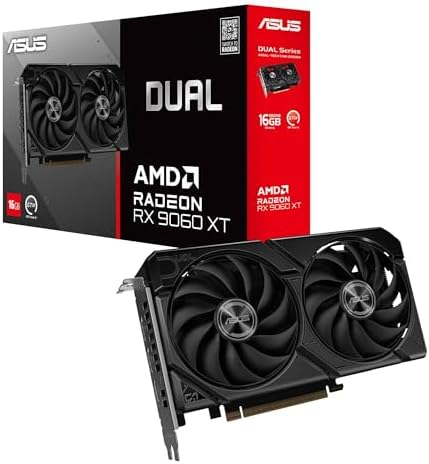
- Axial-tech fans now feature a smaller fan hub that facilitates longer blades and a barrier ring that increases downward …
- 2.5-slot design allows for greater build compatibility while maintaining cooling performance
- 0dB technology lets you enjoy light gaming in relative silence
At $542.99 this is an inexpensive route to FSR 4, and the specification that matters against the NVIDIA cards above is 16GB of GDDR6 where they have 8GB. It boosts to 3290MHz, runs PCIe 5.0, and rates 4.7 across 357 ratings.
That memory difference is the honest counter-argument to DLSS being the better upscaler. A better reconstruction of a texture the card had to load at reduced quality is still a reduced-quality texture. At 1440p, 16GB removes a constraint that no upscaler can fix.
- 16GB of memory against 8GB on the NVIDIA cards near this price
- RDNA 4, so full FSR 4 machine-learning upscaling
- 4.7 stars from 357 ratings
- Also runs XeSS in its portable path
- FSR 4 image quality still trails DLSS 4 in the hardest scenes
- 128-bit memory bus despite the 16GB capacity
- No DLSS, ever
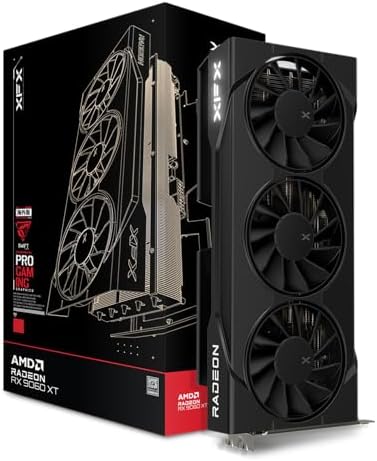
5. XFX Swift RX 9060 XT — the Swift-cooled 9060 XT
- Chipset: AMD RX 9060 XT
- Memory: 16 GB GDDR6
- XFX SWFT Triple Fan Cooling Solution
Same chip and same 16GB at $659.99, in a triple-fan cooler with 406 owner ratings at 4.6. The extra fan is the reason to choose it: more cooling surface means lower noise at the same load.
If your case has the clearance, this is the version to buy. If it does not, the ASUS Dual above is the same GPU in a two-fan body.
- 406 ratings, the deeper sample of the two RX 9060 XT cards here
- Triple-fan cooling, quieter under sustained load
- Full 16GB and FSR 4
- Physically longer, needs case clearance
- Same 128-bit bus as the ASRock
- No price advantage over the ASRock
6. GIGABYTE RX 9070 XT — the RDNA 4 flagship
- Powered by Radeon RX 9070 XT
- WINDFORCE Cooling System
- RGB Lighting
At $929.99 this is the most capable card in the guide and the only one with a 256-bit memory bus, which is what actually separates it from the 9060 XT rather than the capacity number. 16GB GDDR6, 3060MHz core, PCIe 5.0, 644 owner ratings at 4.4.
This is the card for 1440p at high refresh or an honest attempt at 4K, and it is the point where FSR 4 stops being a way to rescue frame rate and becomes a way to spend it on higher settings instead.
- 256-bit bus, wider than anything else here
- 644 ratings behind it
- 16GB and full FSR 4
- The only card here genuinely aimed at 4K
- A large outlay for a card of this class
- 4.4 stars across 644 ratings
- Needs a bigger power supply and more case room
The three XeSS cards
Two Battlemage cards and one Alchemist. All three run XeSS through Intel’s XMX engines, which is the accelerated path and the reason XeSS looks better here than it does on anyone else’s hardware.
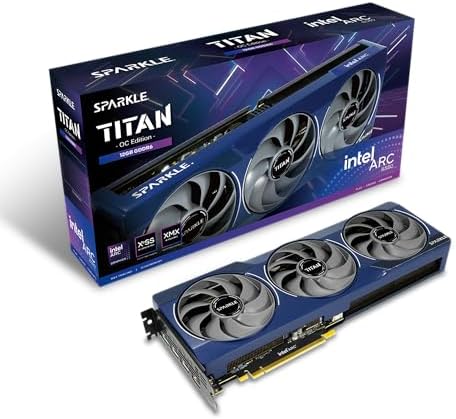
7. Sparkle Arc B580 Titan — the XeSS pick
- OC Edition Boost Clock: 2760MHz
- TORN Cooling 2.0
- Metal Backplate
At $369.99 this is B580 silicon in Sparkle’s Titan cooler, with Torn Cooling 2.0, an axial fan arrangement and a metal backplate, carrying 4.4 stars from 219 ratings.
Running XeSS on Intel silicon is the whole argument for this card. The XMX path is sharper than the portable version other vendors get, so the upscaler you are handed is genuinely competitive rather than a fallback, and 12GB of GDDR6 on a 192-bit bus is a better memory configuration than the NVIDIA cards near this price.
- 12GB on a 192-bit bus, better memory than the NVIDIA cards near this price
- XeSS runs on the accelerated XMX path
- 4.4 stars from 219 ratings
- Fewer games implement XeSS than DLSS or FSR
- Arc driver maturity still trails both rivals
8. ASRock Arc B570 — the 1080p XeSS card
- Advanced Intel Arc Performance: Intel Arc B570 GPU with 10GB GDDR6 memory on 160-bit bus delivers excellent 1440p gaming…
- Next-Gen Xe2-HPG Architecture: Features Intel Xe2-HPG architecture with Xe Matrix Extensions (XMX) for advanced AI accel…
- High Clock Speeds: GPU clock speed of 2600 MHz with 19 Gbps memory speed ensures smooth, responsive gaming experiences
At $289.99 the B570 is an inexpensive way onto current-generation Battlemage and the XMX path. 10GB of GDDR6 at 19 Gbps, 2600MHz, dual fan with 0dB cooling, and 4.6 stars from 133 ratings.
10GB rather than 12GB and a narrower bus than the B580, though still more memory than the 8GB NVIDIA card here. For 1080p with XeSS doing the reconstruction, this is a lot of card for the money.
- An inexpensive route to current-generation Battlemage
- 4.6 stars from 133 ratings
- 10GB beats the 8GB NVIDIA card in this article
- Full XMX-accelerated XeSS
- 133 ratings, a modest sample
- Narrower bus and less memory than the B580 above it
- 1080p card, not a 1440p one
9. Sparkle Arc A380 ELF — the entry point
- Intel Arc A380 Chipset
- 6GB, 96-bit, GDDR6 memory, 15.5 Gbps graphics memory speed
- 3x DisplayPort 2.0 ready, up to 8K@60Hz, 1x HDMI 2.0
At $169.99 this is the entry point of the guide, and it is here for honesty rather than as a gaming recommendation. 6GB of GDDR6, single fan, and it is Alchemist rather than Battlemage, so it is the previous Arc generation.
It still runs XeSS through XMX, which is the point: the accelerated path is not a Battlemage exclusive. 223 owners rate it 4.6, and as a low-power card for light gaming, media work or a second machine it is genuinely useful.
Do not buy it expecting to play current AAA titles at 1440p. 6GB and Alchemist are not that, and no upscaler makes them that.
- Entry pricing at $169.99
- Still gets XMX-accelerated XeSS
- 4.6 stars from 223 ratings
- Single-fan and low power, fits almost anything
- Previous-generation Alchemist, not Battlemage
- 6GB is the least memory in this guide
- Not a card for modern AAA gaming at any resolution above 1080p
DLSS vs FSR vs XeSS compared side by side
Prices are live from each product page. Ratings and owner counts are read from the listing, not estimated.
| Card | Upscaler | Memory | Price | Rating |
|---|---|---|---|---|
| ASUS Prime RTX 5060 | DLSS 4 | 8GB GDDR7 / 128-bit | $489.99 | 4.7 (187) |
| ASUS Dual RTX 5060 Ti 16GB | DLSS 4 | 16GB GDDR7 / 128-bit | $765.99 | 4.6 (429) |
| ASUS TUF Gaming RTX 5070 | DLSS 4 | 12GB GDDR7 / 192-bit | $937.39 | 4.7 (539) |
| ASUS Dual RX 9060 XT | FSR 4 | 16GB GDDR6 / 128-bit | $542.99 | 4.7 (357) |
| XFX Swift RX 9060 XT | FSR 4 | 16GB GDDR6 / 128-bit | $659.99 | 4.6 (406) |
| GIGABYTE RX 9070 XT | FSR 4 | 16GB GDDR6 / 256-bit | $929.99 | 4.4 (644) |
| Sparkle Arc B580 Titan | XeSS 2 XMX | 12GB GDDR6 / 192-bit | $369.99 | 4.4 (219) |
| ASRock Arc B570 | XeSS 2 XMX | 10GB GDDR6 | $289.99 | 4.6 (133) |
| Sparkle Arc A380 ELF | XeSS XMX | 6GB GDDR6 | $169.99 | 4.6 (223) |
DLSS vs FSR vs XeSS quality modes, and which to pick
DLSS vs FSR vs XeSS all offer the same broad ladder of presets, and the names are more or less interchangeable between them.
Quality renders closest to native and reconstructs the least. This is the setting to use by default. On a 1440p screen it is doing real work while asking the model to invent relatively little.
Balanced drops the internal resolution further. Still very usable, and on a 4K screen it is often the sensible default because 4K gives the reconstruction far more information to work with.
Performance and Ultra Performance render dramatically lower. On a 4K screen Performance mode can look genuinely good. On a 1080p screen it frequently does not, and this is the single most useful rule in the category: the lower your screen resolution, the less aggressive your upscaling should be. A 1080p Performance mode is reconstructing from a very small image and it shows.
Which is worth stating plainly for anyone buying at the cheaper end of this guide. If you game at 1080p on an Arc B570 or an RTX 5060, use Quality mode and expect a modest gain. The dramatic before-and-after figures you see quoted are usually 4K Performance mode, where there are far more pixels to work from.
When you should not use upscaling at all
The honest answer is that there are cases, and nobody selling you a graphics card will mention them.
When you are already comfortably above your monitor’s refresh rate. If your card renders 160fps natively on a 144Hz screen, upscaling costs you image quality to produce frames the monitor cannot display. Turn it off and raise your settings instead.
In competitive shooters at low settings. Players who drop settings for visibility are often better served by native rendering at a low preset than by upscaled high settings. Reconstruction can smear exactly the small, fast-moving details you are trying to see.
In games with heavy transparency effects. Foliage, chain-link, rain and particle effects are the hardest cases for every upscaler, and the ones where FSR 3 in particular shows its age. If a game looks wrong with upscaling on, this is usually why.
For screenshots and video capture. If you are recording footage that will be compressed again by YouTube, starting from a reconstructed image rather than a native one compounds the loss.
What about the card you already own?
Most people reading this are not building from nothing, so the practical question is what your existing card can do.
If you have any GeForce RTX card, you have DLSS. Older RTX generations do not get every DLSS 4 feature, particularly the frame generation modes, but the core upscaler is there and it is good.
If you have a GTX card, you have no DLSS at all and you never will. FSR and XeSS both run, which is precisely the argument for their existence, and FSR is the more widely implemented of the two.
If you have an AMD card older than RDNA 4, you have FSR 3 and not FSR 4. That is the situation for the whole RX 7000 series, and it is the most common upgrade trigger right now: people are replacing perfectly capable cards to get the newer upscaler.
If you have an Arc card of any generation, you have the XMX-accelerated XeSS path, including on Alchemist. The A380 in this guide proves that.
The upgrade question, answered honestly: a newer upscaler is not on its own a good reason to replace a working card. It becomes one when it arrives alongside more memory, which is exactly what the RDNA 4 and Battlemage cards in this guide do. Buy the card for the memory and the raw performance, and treat the better upscaler as what comes with it.
DLSS vs FSR vs XeSS: which one for which situation
DLSS vs FSR vs XeSS, stripped to the decisions people actually face:
You game at 1080p on a budget. The Arc B570 or an RTX 5060. XeSS on Intel silicon at 1080p Quality is strong, and the B570 gives you 10GB where NVIDIA gives you 8GB.
You game at 1440p and want the best image. An RTX card for DLSS 4, accepting 8GB at this price tier, or a 16GB RDNA 4 card for FSR 4 and more memory headroom. This is the genuine trade in 2026 and there is no wrong answer.
You want 4K. The RX 9070 XT is the only card in this guide with the bus width for it, and 4K is where upscaling is most convincing because reconstruction has the most information to work from.
You play older or indie games. Upscaler support is thin outside recent AAA titles, so buy on raw performance and memory and treat any upscaling as a bonus.
Does upscaling actually hurt image quality?
Less than it used to across DLSS vs FSR vs XeSS alike, and in some specific ways it now helps, which is the part that surprises people.
A modern upscaler is a temporal system: it accumulates information across successive frames rather than guessing from a single image. That gives it more real data about a scene than one native frame contains, which is why upscaled output can resolve fine detail better than native rendering with traditional anti-aliasing in some scenes. That is not marketing, it is a consequence of how temporal reconstruction works.
Where it still costs you is motion and transparency. Fast camera movement, thin geometry, particles and foliage are the hard cases, because the temporal history the model relies on is least reliable exactly when things are moving fast. Ghosting, a faint trail behind a moving object, is the classic artefact and it is the one to look for when judging a setting.
The practical test: load a game, stand still, and toggle the upscaler. You will struggle to see a difference. Then run past a fence with foliage behind it and toggle again. That is where the three differ, and it is where DLSS 4 currently has its clearest lead.
The five-point check before you buy any card here
Upscaling is one line on a longer list, and it is not the first line.
1. Memory first. 8GB is a real constraint at 1440p in 2026 regardless of which upscaler you run. Four cards in this guide have 16GB, two have 12GB, and the price gap is smaller than you would expect.
2. Architecture, not model number. An RX 7000-series card can look like a peer of the 9060 XT and still not run FSR 4. Check RDNA 4 for AMD and Battlemage or Alchemist for Intel.
3. Your resolution. A 1080p screen does not need a 9070 XT and will not show off Performance-mode upscaling. Match the card to the panel.
4. Physical fit and power. The triple-fan cards are long.
5. The games you actually play. Upscaler support is concentrated in recent AAA releases. If your library is older, competitive or indie, buy raw performance.
What we would not worry about
Which brand of the same GPU. The two RX 9060 XT cards here are the same chip with different coolers. Buy the cheapest that fits your case, unless quiet operation or a color scheme genuinely matters to you.
Small clock speed differences. An OC edition running a hundred megahertz higher is not a meaningful difference and never has been.
Which upscaler will win. They are all improving, all three are good enough now, and games increasingly ship all three. You are not making a decade-long bet.
PCIe 4.0 versus 5.0. The Arc cards here are PCIe 4.0 and it costs them nothing measurable at these performance tiers.
Frequently asked questions
DLSS vs FSR vs XeSS: which one actually looks best?
DLSS 4 does, and the gap is clearest in the hardest scenes: fast motion, thin geometry like fences and foliage, and high-contrast edges. Its transformer model holds fine detail better than the alternatives. FSR 4 closed most of that gap when AMD moved to a machine-learning model, and XeSS on Intel hardware is competitive. All three are good enough in 2026 that the card matters more than the upscaler.
Can I use DLSS on an AMD or Intel graphics card?
No. DLSS runs only on NVIDIA GeForce RTX hardware and there is no workaround. This is the single biggest practical difference between the three. FSR runs on all three vendors, and XeSS runs on all three but only reaches its best quality on an Intel Arc card.
Is FSR 4 available on my older AMD card?
Only if it is RDNA 4. FSR 4 requires that architecture, which in this guide means the RX 9060 XT and RX 9070 XT. An RX 7000-series card like the RX 7700 XT runs FSR 3, which is visibly softer in motion. Check the architecture rather than assuming a recent model number includes it.
Is frame generation the same as upscaling?
No, and confusing them is the most common mistake here. Upscaling renders the game at a lower resolution and reconstructs it, so you get more real frames and lower input latency. Frame generation inserts invented frames between real ones, which raises the frame counter and makes motion look smoother but does not improve responsiveness.
Does upscaling make my game feel more responsive?
Yes, genuinely, because the card is doing less work per frame and each frame arrives sooner. This is the honest win and it is why upscaling became a default. Frame generation is the one that does not help responsiveness, so do not conflate the two.
Which quality mode should I use?
Quality mode by default. The lower your monitor resolution, the less aggressive your upscaling should be, because reconstruction has less information to work from. Performance mode can look excellent at 4K and frequently looks poor at 1080p.
Why does XeSS look different on different cards?
Because it takes two paths from the same implementation. On an Intel Arc card it runs through Intel XMX matrix engines, the hardware-accelerated route. On an NVIDIA or AMD card it falls back to a more portable path that works but is not as sharp. It is the only upscaler here whose quality depends on whose hardware runs it.
Is 8GB of video memory still enough in 2026?
At 1080p, generally yes. At 1440p with high texture settings it is where modern games start compromising for you, and no upscaler fixes that, because reconstruction happens after the texture has already been loaded at reduced quality. Four cards in this guide carry 16GB for similar money.
Do all games support all three upscalers?
No. DLSS has the widest support, FSR is next and has the advantage that everyone can use it, and XeSS has the thinnest. Many recent AAA titles now ship all three, but older, indie and competitive games often ship none, which is why raw performance still matters.
How to find out what your game actually supports
Before the DLSS vs FSR vs XeSS question matters at all, check what is in front of you, because the answer is often not what the marketing implies.
Open the game and go to the graphics or display settings. Upscalers usually appear under a heading like Upscaling, Super Resolution or Image Scaling, and the game will list only the ones it implements and your hardware supports. An NVIDIA card in a game with all three will show DLSS, FSR and XeSS. The same game on an Arc card will show FSR and XeSS but no DLSS.
If you see no upscaling option at all, the game does not implement one. That is common outside recent AAA releases and it is the reason raw card performance still decides most of your experience.
If you see a version number, read it. A game listing FSR 3 on an RDNA 4 card is telling you the game has not been updated to FSR 4, not that your card cannot do it. The upscaler is implemented per game, so support arrives title by title.
What the numbers on a graphics card box actually mean
Three figures decide far more than where a card lands in DLSS vs FSR vs XeSS, and this guide has a clean example of each.
Memory capacity is how much the card can hold. 16GB on the RDNA 4 cards and the RTX 5060 Ti, 12GB on the B580 and the RTX 5070, 10GB on the B570, 8GB on the RTX 5060, 6GB on the A380. This decides what texture settings you can use, and upscaling does nothing for it.
Bus width is how fast memory moves. It is the number nobody quotes and it matters. The RX 9070 XT runs a 256-bit bus. The B580 and the RTX 5070 run 192-bit. The NVIDIA cards and both 9060 XTs run 128-bit, and the two smaller Arc cards are narrower again. A 16GB card on a 128-bit bus is a different proposition from 16GB on 256-bit, and the price gap between the 9060 XT and 9070 XT is largely that.
Memory type is generational. The NVIDIA cards use GDDR7, the AMD and Intel cards here use GDDR6. GDDR7 is faster per pin, which is part of how 128-bit NVIDIA cards stay competitive against wider GDDR6 rivals.
Read all three together. A card with a big capacity number, a narrow bus and older memory is not the bargain the capacity implies, and a card with less memory on a wide bus with fast modules can outrun it.
A note on drivers, which the spec sheets never mention
This is the least glamorous factor and one of the most real, particularly if you are considering Intel.
NVIDIA and AMD have been shipping gaming drivers for decades and their day-one support for major releases is dependable. Intel entered the discrete market recently, and although Arc drivers have improved enormously since launch, they remain the least mature of the three. That shows up most in older titles built on older graphics APIs rather than in current releases.
Which is worth weighing honestly against the hardware value. The Arc B580 offers 12GB on a 192-bit bus at a price where NVIDIA offers 8GB on 128-bit. That is a real advantage. The counterweight is that you are more likely to meet a game where the driver, not the card, is the limitation. If your library is mostly current titles, that risk is small. If you play a lot of older games, it is not.
Related buying guides
This explainer covers the upscalers. If you are choosing the rest of the machine around them:
- Best Graphics Cards 2026 — the full card roundup, ranked on performance rather than on upscaler
- How Much VRAM Do You Need? — the 8GB question this guide keeps running into, answered properly
- 1080p vs 1440p vs 4K — because your resolution decides how aggressive your upscaling should be
- Best Gaming Monitors 2026 — the panel that all of this ends up on
- Best Gaming CPUs 2026 — the other half of a frame rate
More questions about upscaling
Should I upgrade my card just to get a newer upscaler?
On its own, no. A better upscaler is not worth replacing a working card for. It becomes worth it when it arrives alongside more memory and more performance, which is exactly what the RDNA 4 and Battlemage cards do. Buy for the memory and the raw speed, and treat the newer upscaler as what comes with it.
Is an Intel Arc card a safe buy for gaming?
On hardware value, yes: the B580 gives you 12GB on a 192-bit bus at a price where NVIDIA gives 8GB on 128-bit. The honest counterweight is driver maturity. Intel entered the discrete market recently and its drivers are the least seasoned of the three, which shows up most in older games rather than current releases.
Does upscaling reduce input lag or add it?
Upscaling reduces it, because the card renders fewer pixels so each frame completes sooner. Frame generation is the opposite case: it does not improve latency and can add a little, because an invented frame carries no new information about your input. If a game feels sluggish, reach for upscaling and not frame generation.
Why do fences and foliage look worse with upscaling on?
Because thin geometry and transparency are the hardest cases for temporal reconstruction. The model builds its picture from previous frames, and those are least reliable exactly where detail is fine and moving. This is where the three upscalers differ most, and where DLSS 4 currently has its clearest advantage.
Can I use two upscalers at once?
No, they do the same job and games let you pick one. What you can sometimes combine is an upscaler with a separate frame generation feature, which are different systems. Read the settings carefully, because the menus often present them together as though they were one option.
Is native resolution always better than upscaled?
Not always, which surprises people. A temporal upscaler accumulates detail across successive frames, so it can resolve fine detail better than a single native frame with traditional anti-aliasing. Where native still wins is fast motion and transparency, where the temporal history is least dependable.
Which upscaler should I use if my game offers all three?
Whichever your hardware runs best. On a GeForce card use DLSS. On an Arc card use XeSS, because you get the accelerated path. On an RDNA 4 Radeon use FSR 4. On an older Radeon it is worth trying both FSR 3 and XeSS and picking the one that looks better to you in the scenes you actually play.
Does upscaling help if my processor is the bottleneck?
Barely, and this is a common disappointment. Upscaling reduces work for the graphics card. If your frame rate is limited by the processor, rendering fewer pixels does not help, because the card was not the constraint. Check whether your usage sits pinned on the processor before expecting upscaling to fix it.
Will these upscalers still be supported in a few years?
All three are actively developed and all three are now central to how their vendors sell hardware, so support is not the risk. The more realistic risk is version fragmentation, where your card runs an older version of an upscaler because a newer one requires newer silicon. That is exactly the FSR 3 and FSR 4 split happening right now.
The bottom line: DLSS vs FSR vs XeSS
If you take one thing from this guide, take this: you do not choose an upscaler, you choose a graphics card and the upscaler comes with it. Nobody buys a GeForce card for DLSS and then regrets not having FSR 4. They buy a card for what it costs, how much memory it has and how fast it renders, and the upscaler follows.
DLSS 4 is the best-looking of the three, and the ASUS Prime RTX 5060 at $489.99 is an honest way into it, at 4.7 stars from 187 ratings. The compromise you accept is 8GB of memory.
FSR 4 is the best balance, and the ASUS Dual RX 9060 XT at $542.99 gives you a machine-learning upscaler and 16GB, twice the memory of the NVIDIA card at the nearest price. If you game at 1440p, that memory is worth more than the image-quality gap.
XeSS on Intel silicon is the value play, and the Sparkle Arc B580 Titan at $369.99 is 12GB on a 192-bit bus at a price where the competition offers 8GB on 128-bit. You accept less mature drivers and thinner game support in exchange for clearly better hardware for the money.
And the trap to avoid for the reason nobody mentions: a last-generation AMD card can be a perfectly good piece of hardware and still not run FSR 4, because FSR 4 needs RDNA 4. Those cards often sit at close to the price of an RDNA 4 card that does run it. Check the architecture, not the model number.
Gamers Tech Guide participates in the Amazon Services LLC Associates Program. As an Amazon Associate we earn from qualifying purchases.