
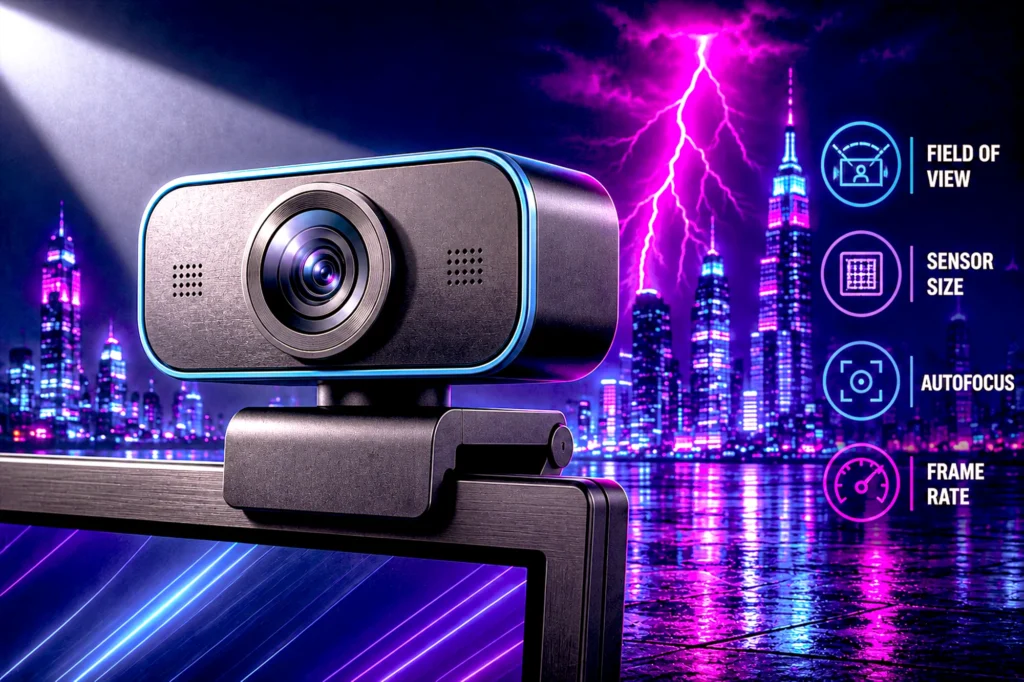
Eight webcams from $16.89 to $169.99, every one verified on its own product page for price, rating and owner count. The entry-priced camera here carries a remarkable number of owner ratings for its money.
- Best overall: the Logitech C920x at $69.99, rated 4.6 across 22,060 owners, a strong score on a very deep sample.
- Best budget: the Logitech C270 at $16.89, which costs less than a game.
- Best for streamers: the Elgato Facecam MK.2 at $119.99, with uncompressed 1080p60 and manual control.
- Do not pay for 4K. Your face occupies a small box on a stream, and no viewer ever sees those pixels. Light matters more than resolution.
Your webcam is the one piece of gear your audience looks directly at. They will forgive a dropped frame and they will not forgive a dim, grainy, orange-tinted face, and the depressing part is that most people fix that by buying a more expensive camera when the actual fault is the lamp behind them.
We compared eight contenders, from $16.89 to $169.99, each verified on its own product page on the day of writing. They range from a 720p camera that has been on sale for over a decade to a 4K model costing nearly ten times as much.
The finding that runs through this guide: resolution is the specification these cameras are always sold on and it is close to the least important thing about them. One of the best-scoring cameras in this comparison is also one of the least costly, and it shoots 1080p.
The 8 best streaming webcams at a glance
Eight contenders, each verified on its own product page. Sorted by the job they do rather than by price.

| Resolution | 1080p / 30fps |
| Audio | Stereo, dual mics |
| Focus | Autofocus |
| Rating | 4.6 (22,060) |

| Resolution | 720p / 30fps |
| Field of view | 55 degrees |
| Mic | Noise-reducing |
| Rating | 4.4 (21,439) |

| Resolution | 1080p |
| Privacy | Sliding shutter |
| Light | RightLight balance |
| Rating | 4.4 (8,005) |
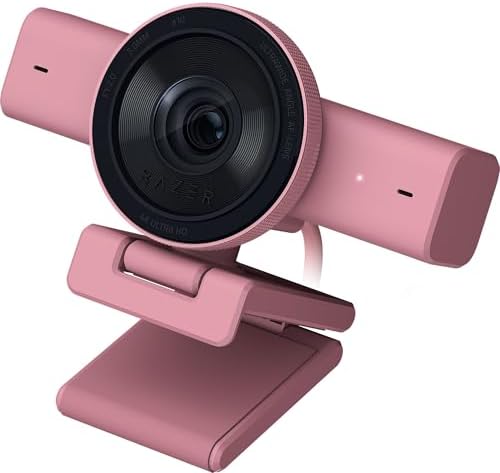
| Resolution | 4K / 30fps |
| Framing | AI auto-framing |
| Lens | Ultrawide |
| Rating | 3.9 (183) |

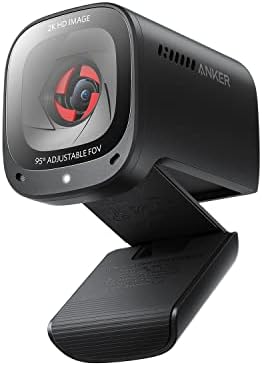
| Resolution | 2K |
| Field of view | 65 / 78 / 95 deg |
| Audio | Dual mics, AI NC |
| Rating | 4.4 (9,546) |

| Frame rate | 1080p / 100fps |
| Sensor | 1/2.8 inch stacked |
| Extras | AI framing, gestures |
| Rating | 4.3 (1,817) |

| Video | Uncompressed 1080p60 |
| Range | HDR at 1080p30 |
| Software | Camera Hub |
| Rating | 4.3 (1,607) |

| Resolution | 4K / 30fps |
| Field of view | 65 / 78 / 90 deg |
| Extras | Windows Hello, 5x zoom |
| Rating | 4.5 (1,331) |
The 30-second answer
Buy the Logitech C920x. It shoots 1080p at 30fps, it autofocuses, it fixes its own exposure in bad light, and it has been the default answer for so long that 22,060 owners have rated it 4.6 stars. That is a strong score on a deep sample, and it costs well under what the 4K models do.
Buy the Logitech C270 if the budget is genuinely tight. It is 720p and it is not pretending otherwise, but 21,439 owners rate it 4.4 and it costs less than a game. A well-lit 720p face reads better on a stream than a badly lit 4K one, which is the whole argument of this guide in a single comparison.
Buy the Elgato Facecam MK.2 if you stream seriously and want to stop fighting automatic settings. It gives you uncompressed 1080p60 and manual control through Camera Hub, which is a different proposition from a sharper picture.
Why 4K is the wrong thing to pay for
Every webcam list is sold on resolution, because resolution is the one number that fits on a box. It is close to the least useful thing about a streaming camera, for a reason that has nothing to do with the camera.
Your face is not full screen. On a stream your camera feed sits in a corner box, often a few hundred pixels across. Gameplay occupies the rest. Every pixel your camera captures beyond that box size is discarded before a single viewer sees it. Paying for 4K to fill a small window is paying for detail that is thrown away at the point of delivery.
The number that matters is the sensor, not the pixel count. A larger sensor collects more light per pixel, and light is what actually separates a good webcam image from a bad one. This is why the specifications worth reading on this list are the ones most listings bury: the OBSBOT Meet SE states a 1/2.8 inch stacked CMOS with dual native ISO. Those tell you far more about how you will look at 9pm than 4K does.
And the evidence is in our own table. The camera the table points at is the $69.99 C920x at 4.6 stars, and it is 1080p. Every 4K model in this comparison rates lower. That is owner satisfaction, not a lab test, but it is 22,060 people rather than a spec sheet.
Where 4K genuinely earns its money is recording rather than streaming: capturing footage you will crop, zoom or reframe in an editor later, where the extra pixels give you room to work. That is the honest case for the Brio Ultra, and it is why it is in this guide at all.
Lighting beats resolution, and it costs nothing
Almost every complaint about a webcam is a complaint about light. Grainy, dim, orange, washed out, noisy in the shadows: all lighting, none of it resolution.
The single most common mistake is sitting with a window or a lamp behind you. The camera meters for the brightest thing in frame, which is now the window, and turns you into a silhouette. Every camera here fights this automatically and none of them wins it outright. Logitech calls its version RightLight, and the C270 and Brio 100 both carry it; Logitech states RightLight boosts brightness by up to 50 percent on the Brio 100 against its previous generation. Anker states low-light correction on the C200. That processing is real and it is still cleaning up a problem you can eliminate for free.
Put your light source behind the camera, pointing at you. A desk lamp bounced off a white wall will improve your image more than the entire price gap between the least and most costly camera in this guide. Then, if your face is still noisy, that is when a larger sensor is worth paying for.
What actually matters when choosing a streaming webcam
Four things separate these cameras once you stop reading the resolution.
Field of view. This decides how much of your room is in shot, and narrower is usually better for streaming. The C270 is fixed at 55 degrees diagonal, which is tight and flattering and shows very little behind you. The Anker C200 and the Brio Ultra both let you choose: 65, 78 or 95 degrees on the Anker, 65, 78 or 90 on the Brio. A wide default is the reason so many webcam shots include half a bedroom.
Autofocus. Cheap cameras use fixed focus or slow contrast-detection autofocus, which hunts every time you move. The Logitech C920x and Brio Ultra both specify autofocus rather than fixed focus, which locks faster and holds more reliably. If you lean in and out of frame while you play, this matters more than it sounds.
Frame rate. Almost everything here is 30fps, which is fine for talking and visibly stutters when you move quickly. The OBSBOT Meet SE runs 1080p at 100fps and the Elgato Facecam MK.2 delivers uncompressed 1080p60. Higher frame rates look smoother on camera in exactly the moments a gaming stream cares about.
The microphone, which you should ignore. Every camera here has one and every one of them is a fallback. They sit at arm’s length pointing at your whole room, which is the wrong place for a microphone. Use them for meetings; for streaming, a real microphone is a bigger upgrade than any camera on this page.
A privacy shutter is worth having and costs nothing. The Brio 100, Razer Kiyo V2, Anker C200 and Elgato Facecam MK.2 all build one in.
1. Logitech C920x — Best overall
- Compatible with Nintendo Switch 2’s new GameChat mode
- HD lighting adjustment and autofocus: The Logitech webcam automatically fine-tunes the lighting, producing bright, razor…
- Advanced capture software: Easily create and share video content with this Logitech camera that is suitable for use as a…
The C920 line has been the default webcam recommendation for over a decade, and the C920x is the version still being sold. At $69.99 it captures 1080p at 30fps with autofocus and automatic lighting adjustment, and Logitech is explicit that the correction is aimed at low light rather than ideal conditions.
Audio is stereo through dual microphones, which is unusual at this price and makes it a genuinely usable fallback if your main microphone fails mid-stream.
What makes it the pick is not any single specification. It is 4.6 stars across 22,060 owners, a strong rating on a very deep sample. Only the C270 is anywhere near it on volume. When a camera has been in the market this long and still rates that high, the failure modes are known and rare.
- 4.6 stars from 22,060 owners, the best score and sample in this guide
- Autofocus and automatic low-light correction
- Stereo audio from dual mics, rare at this price
- Costs well under the 4K models, at 4.6 stars
- 30fps only, so fast movement stutters slightly
- No privacy shutter built in
- Fixed field of view with no presets to narrow the shot
2. Logitech C270 — Best budget
- Compatible with Nintendo Switch 2’s new GameChat mode
- Crisp HD 720p/30 fps video calls with diagonal 55° field of view and auto light correction. Compatible with popular plat…
- The built-in noise-reducing mic makes sure your voice comes across clearly up to 1.5 meters away, even if you’re in busy…
At $16.89 this is the least costly way to put a real camera on your desk, and the important thing is what it does not pretend to be. It is 720p at 30fps with a fixed 55 degree diagonal field of view, and Logitech states it plainly.
That narrow field of view is quietly an advantage. It frames head and shoulders and shows very little of the room behind you, which is exactly what a streaming shot wants and what most wide-angle cameras get wrong. RightLight 2 handles exposure, and the noise-reducing microphone is specified to pick up your voice from up to 1.5 meters.
21,439 owners rate it 4.4. In a well-lit room the gap between this and a camera costing ten times more is far smaller than the price difference suggests.
- Entry-priced by a wide margin and still 4.4 stars from 21,439 owners
- Tight 55 degree field of view flatters a head-and-shoulders shot
- RightLight 2 exposure correction
- Clip folds so it can sit on a shelf instead of a monitor
- 720p, the only sub-1080p camera in this guide
- No privacy shutter
- Fixed focus, so it will not sharpen if you lean in
3. Logitech Brio 100 — Best cheap 1080p
- Compatible with Nintendo Switch 2’s new GameChat mode
- Full Clarity: Look clearer in video calls with Full HD 1080p resolution
- Auto-Light Balance: RightLight boosts brightness by up to 50%, reducing shadows so you look your best—compared to previo…
The Brio 100 is the straight upgrade from the C270: same simplicity, $36.95, and Full HD 1080p instead of 720p. Logitech states its RightLight auto-balance boosts brightness by up to 50 percent against its previous-generation cameras, which is a claim about their own older models rather than the market, and worth reading that way.
The addition that matters day to day is the integrated sliding privacy shutter. It is a physical cover, not a software toggle, and on a camera that lives on top of your monitor that is worth more than a specification bump.
4.4 stars from 8,005 owners. Note that Logitech sells this camera as the Brio 100 and the Brio 101 with identical specifications and ratings; they are the same camera in different finishes, so buy whichever is cheaper on the day.
- 1080p for around half the price of the C920x
- Physical sliding privacy shutter built in
- RightLight auto light balance
- 8,005 ratings at 4.4 stars
- Fixed focus rather than autofocus
- Single microphone rather than the C920x stereo pair
- Sold under two model numbers, which makes price comparison confusing
4. Razer Kiyo V2 — the budget 4K pick
- CRYSTAL-CLEAR 4K 30FPS VIDEO — Powered by a high-performance Sony STARVIS sensor, create professional content that stand…
- AI POWERED AUTO-FRAMING — This webcam catches every clip worthy moment with natural face tracking and intelligent pan, t…
- ONE-CLICK IMAGE ENHANCEMENT — Experience superior low-light performance; from low-light RGB battlestations to backlit se…
If you want 4K without paying Logitech or Elgato prices, this is the one that survived our checks. It undercuts the Brio Ultra, which makes it the affordable route to genuine 4K on this page.
What you get for the money is AI-powered auto-framing, which keeps you centered as you move rather than requiring you to sit still, plus an ultrawide lens, a built-in microphone and a privacy cover. Razer lists it as working with OBS, Discord, Zoom and Teams, so it fits a streaming setup without extra software.
The sample is the caveat and we are not burying it. 183 owner ratings at 3.9 stars is the thinnest evidence on this page by a wide margin, on a recent product. Everything else here has more than a thousand ratings behind it. Read it as an early signal rather than a settled verdict, and if you want 4K with a proven track record the Brio Ultra below is the safer option.
- Genuine 4K without Logitech or Elgato pricing
- AI auto-framing keeps you centered while you move
- Ultrawide lens, built-in mic and a privacy cover
- Listed as working with OBS, Discord, Zoom and Teams
- Only 183 ratings, by far the thinnest sample on this page
- 3.9 stars, the softest score of the eight
- 4K at 30fps only, so 60fps streaming means dropping resolution
5. Anker PowerConf C200 — Best 2K
- 2K Ultra-Clear Resolution: Enjoy sharp, detailed video with this 2K resolution webcam for professional-grade conferences…
- Advanced Audio Clarity with AI Noise Cancellation: This webcam features dual mics to ensure voices are crystal clear, ev…
- Superior Low-Light Performance: This webcam captures crisp images in dim settings without extra lighting, perfect for an…
The C200 sits between 1080p and 4K at 2K, and at $69.99 it is priced against the 1080p cameras rather than the 4K ones. The feature that earns its place is the adjustable field of view: 65, 78 or 95 degrees, selectable in software.
That range covers the two situations webcams usually fail at. 65 degrees crops tight to your face for a streaming box, and 95 opens up when someone else joins you. Most cameras at this price pick one angle and make it your problem.
Anker specifies low-light correction and dual microphones with AI noise cancellation, and a sliding privacy cover is built in. 9,546 owners rate it 4.4, a deep sample by any standard outside the two Logitech veterans.
- Three selectable fields of view, 65, 78 and 95 degrees
- 9,546 ratings at 4.4 stars, a deep sample
- Low-light correction and dual noise-canceling mics
- 2K priced against 1080p cameras
- Field of view changes need Anker software installed
- 2K is an awkward middle ground that neither platform nor editor really wants
- Marketed at meetings rather than streaming
6. OBSBOT Meet SE — Best for movement
- 【OBSBOT × EWC 2025 Official Partnership】 OBSBOT is thrilled to be the 2025 Esports World Cup (EWC) Official Camera & Web…
- 【Brilliance in Every Frame】The OBSBOT Meet SE webcam combines style with high performance. Enjoy ultra-high frame rates …
- 【Intelligent AI Framing】Activate our computer camera’s group mode and intelligently recognize individuals or groups, opt…
Every other camera in this guide shoots 30fps, with two exceptions, and this is the faster of them. The Meet SE runs 1080p at 100fps, with 1080p60 and 720p150 also available, at $69.00.
Frame rate is the specification that shows up when you move, and a gaming stream is mostly movement: leaning in, reacting, gesturing. At 30fps that smears slightly. At 100fps it does not.
The sensor is a 1/2.8 inch stacked CMOS with dual native ISO and staggered HDR, which is a more serious low-light specification than anything else near this price states. AI framing tracks and reframes you automatically, and gesture control lets you toggle it without touching the keyboard.
1,817 owners at 4.3 stars, a younger sample than the mid-range picks around it, which is the trade for the newest technology here.
- 1080p at 100fps, by far the highest frame rate in this guide
- 1/2.8 inch stacked sensor with dual native ISO and staggered HDR
- AI framing keeps you centered without a camera operator
- Gesture control avoids reaching for software mid-stream
- 1,817 ratings, a modest sample next to the Logitech cameras
- AI framing and beauty mode need OBSBOT software running
- Automatic reframing is not always wanted on a fixed streaming shot
7. Elgato Facecam MK.2 — Best for streamers
- Pro Image performance: Achieve lifelike visuals with smooth motion on camera, complemented by professional-grade image c…
- Set the shot: Features Camera Hub software, offering extensive customization options to enhance video quality, akin to t…
- HDR-enabled: Seamlessly conquer high-contrast lighting challenges with stunning clarity in 1080p30 resolution.
Elgato builds for streamers specifically, and the MK.2 at $119.99 is the only camera here that sells control rather than resolution. It is Full HD, not 4K, and that is a deliberate choice consistent with everything this guide argues.
Two things justify the price. The first is uncompressed video at 1080p60, 1080p30, 720p60 and below, so the image is not being squeezed before it reaches your encoder. Elgato notes that USB 2.0 compresses, so the connection you plug into matters. The second is Camera Hub, which exposes DSLR-style manual settings rather than leaving you at the mercy of auto-exposure that hunts every time your screen brightness changes.
HDR is supported at 1080p30 for high-contrast lighting, and there is an easy-slide privacy shutter. 1,607 owners rate it 4.3, a softer score than the Logitech veterans, so the manual control is the reason to buy it rather than a broad consensus that it is the best picture.
- Uncompressed 1080p60, so nothing is squeezed before your encoder sees it
- Camera Hub gives DSLR-style manual control over exposure and color
- HDR at 1080p30 for backlit rooms
- Built by a company whose entire product line is streaming
- 4.3 stars, a softer score than the Logitech pair
- $119.99 against the C920x at $69.99, for the same 1080p resolution
- Uncompressed modes need USB 3.0; USB 2.0 compresses
8. Logitech Brio Ultra 4K — Best 4K
- Spectacular video quality: superb resolution, frame rate, color, and detail, featuring autofocus and 5x digital zoom; th…
- Look great in any light: RightLight 3 automatically adjusts exposure and contrast to compensate for glare and backlighti…
- Adjustable field of view: Choose from three dFOV presets to perfectly frame your video; frame an ideal head and shoulder…
If you have read this far and still want 4K, buy this one. The Brio Ultra supports 4K at 30fps through a glass lens, with autofocus and 5x digital zoom, and 1,331 owners rate it 4.5 which is the best score of any 4K camera here.
RightLight 3 handles glare and backlighting, three selectable fields of view cover 65, 78 and 90 degrees, and dual omnidirectional microphones with noise cancellation are specified to capture clearly from up to 1.2 meters. It also supports Windows Hello face sign-in, which none of the others here do.
The honest case for it is recording, not streaming. If you shoot footage you will later crop, zoom or reframe in an editor, those extra pixels are headroom you actually use. If your camera output goes straight into a corner box on a live stream, you are paying $169.99 against the C920x at $69.99 for detail the viewer never receives.
- 4.5 stars, the strongest score of the 4K cameras
- Glass lens, autofocus and 5x digital zoom
- Three fields of view and RightLight 3 glare handling
- Windows Hello face sign-in
- The premium pick here, and 4K is wasted on a live stream
- 4K caps at 30fps, so no smooth motion at full resolution
- 1,331 ratings against the C920x’s 22,060
The best streaming webcams compared side by side
Prices are live from each product page. Ratings and owner counts are read from the listing, not estimated.
| Webcam | Resolution | Standout | Price | Rating |
|---|---|---|---|---|
| Logitech C920x | 1080p / 30fps | Best rating and biggest sample | $69.99 | 4.6 (22,060) |
| Logitech C270 | 720p / 30fps | Tight 55 degree framing | $16.89 | 4.4 (21,439) |
| Logitech Brio 100 | 1080p | Privacy shutter, cheap 1080p | $36.95 | 4.4 (8,005) |
| Razer Kiyo V2 | 4K / 30fps | AI auto-framing, ultrawide | Check price | 3.9 (183) |
| Anker PowerConf C200 | 2K | Three fields of view | $69.99 | 4.4 (9,546) |
| OBSBOT Meet SE | 1080p / 100fps | Highest frame rate here | $69.00 | 4.3 (1,817) |
| Elgato Facecam MK.2 | 1080p60 uncompressed | Manual DSLR-style control | $119.99 | 4.3 (1,607) |
| Logitech Brio Ultra | 4K / 30fps | Best 4K, Windows Hello | Check price | 4.5 (1,331) |
Setting it up so it actually looks good
A camera you have positioned badly will lose to a cheaper one positioned well. Four things do most of the work, and none of them costs anything.
Put it at eye level, not below it. A webcam sitting on a desk or a low monitor shoots upward, which is the least flattering angle there is and puts your ceiling in shot. On top of the monitor is the minimum. Slightly above eye level, angled down a few degrees, is better still. Every camera here clips to a monitor, and the C270 also folds flat to stand on a shelf if your monitor is too low.
Get closer than feels natural. Most people sit too far back, which pushes them into the middle of a wide frame and fills the shot with room. If your camera has selectable fields of view, like the Anker C200 or the Brio Ultra, start at the narrowest setting and only widen if you are cut off. If it does not, move the chair.
Kill the light behind you, then add one in front. This is the single biggest improvement available and it is free. A window behind you turns the camera into a silhouette machine. Close the blind, then put a lamp behind your monitor bounced off a wall or ceiling so the light is soft rather than a spotlight. Once you have done that, the automatic correction in these cameras stops working overtime and the picture cleans up on its own.
Check which USB port you used. This matters more than it used to. Elgato states that USB 2.0 compresses the Facecam MK.2 output, which means the uncompressed modes you paid for are unavailable on the wrong port. Blue or labeled ports are USB 3.0. It is a thirty second check that can undo a hundred dollar decision.
One more thing worth saying plainly: a webcam is a smaller upgrade to a stream than a microphone is. Viewers tolerate a mediocre picture and leave over bad audio. If you are choosing between spending on a camera and spending on a microphone, spend it on the microphone first, then come back to this page. Our gaming microphone guide covers eight from $40 to $169.
What we left out of our best streaming webcam picks
Three groups were excluded deliberately.
Cameras that failed our rating floor. The Elgato Facecam Neo sits at 3.8 stars and came off despite being an obvious budget candidate from a good brand. A well-known name does not earn a place here.
Conference-room and PTZ systems. Panoramic meeting cameras rank in webcam searches and cost several times these picks while solving a problem no streamer has.
Anything we could not verify. A camera needed a live price and a real owner rating on its own product page to appear. The Logitech StreamCam, a genuinely popular streaming camera, would not resolve on the day and was dropped rather than listed from reputation.
Frequently asked questions
Do I need a 4K webcam for streaming?
No. On a live stream your camera sits in a small box beside the gameplay, and every pixel beyond that box size is discarded before a viewer sees it. The camera we recommend here is 1080p and costs less than the 4K models. Buy 4K only if you record footage you will crop or zoom in an editor afterwards.
What actually makes a webcam look better?
Light, then sensor size, then resolution, in that order. Most complaints about grain, dimness and orange skin tones are lighting problems that no camera fixes fully. Put a light source behind the camera pointing at you before spending anything.
Why does my webcam make me look like a silhouette?
You almost certainly have a window or lamp behind you. The camera meters for the brightest thing in frame, so it exposes for the window and leaves your face dark. Every camera here has automatic correction for this and none of them wins outright. Move the light in front of you.
Is the microphone in a webcam good enough for streaming?
For meetings, yes. For streaming, no. A webcam microphone sits at arm length pointing at your whole room, which is the wrong place for it. A dedicated microphone is a bigger upgrade to a stream than any camera on this page.
What field of view should I want?
Narrower than you think. A tight field like the C270 at 55 degrees frames head and shoulders and hides most of your room. Wide angles above 90 degrees are why so many webcam shots include half a bedroom. Cameras like the Anker C200 and Brio Ultra let you choose.
What frame rate do I need on a webcam?
30fps is fine for talking and visibly smears when you move quickly. If you gesture and react a lot on camera, 60fps or higher is a real improvement. The OBSBOT Meet SE runs 1080p at 100fps and the Elgato Facecam MK.2 delivers uncompressed 1080p60.
Does a privacy shutter matter?
It costs nothing and it is the only guarantee that is not software. On a camera permanently pointed at your desk, a physical cover is worth having. The Brio 100, Razer Kiyo V2, Anker C200 and Elgato Facecam MK.2 all build one in.
Is the Logitech C920 still worth buying in 2026?
Yes, and that is the surprise of this comparison. The C920x holds 4.6 stars across 22,060 owners, a strong rating on a deep sample, while costing less than the 4K cameras. A long-lived product with that rating has known and rare failure modes.
Do I need USB 3.0 for a webcam?
For most cameras no, but it matters for uncompressed video. Elgato states that USB 2.0 compresses the Facecam MK.2 output, so the uncompressed modes you are paying for need a USB 3.0 port. Check the port, not just the cable.
The bottom line: the best streaming webcam for most setups
The specification webcams are sold on is the one that matters least. Resolution fits on a box; light does not, and light is what decides whether you look good on camera.
The Logitech C920x at $69.99 is the camera to buy. It pairs a strong rating with deep owner evidence, it shoots 1080p, and it costs less than the 4K models that rate below it.
The Logitech C270 at $16.89 is the one to buy if money is tight. It is 720p and honest about it, and in a well-lit room the gap to a camera ten times its price is far smaller than the price suggests.
The Elgato Facecam MK.2 at $119.99 is the one to buy if you stream seriously, because it sells manual control rather than a bigger number, and control is what stops your exposure shifting every time the game gets bright.
Gamers Tech Guide participates in the Amazon Services LLC Associates Program. As an Amazon Associate we earn from qualifying purchases.