
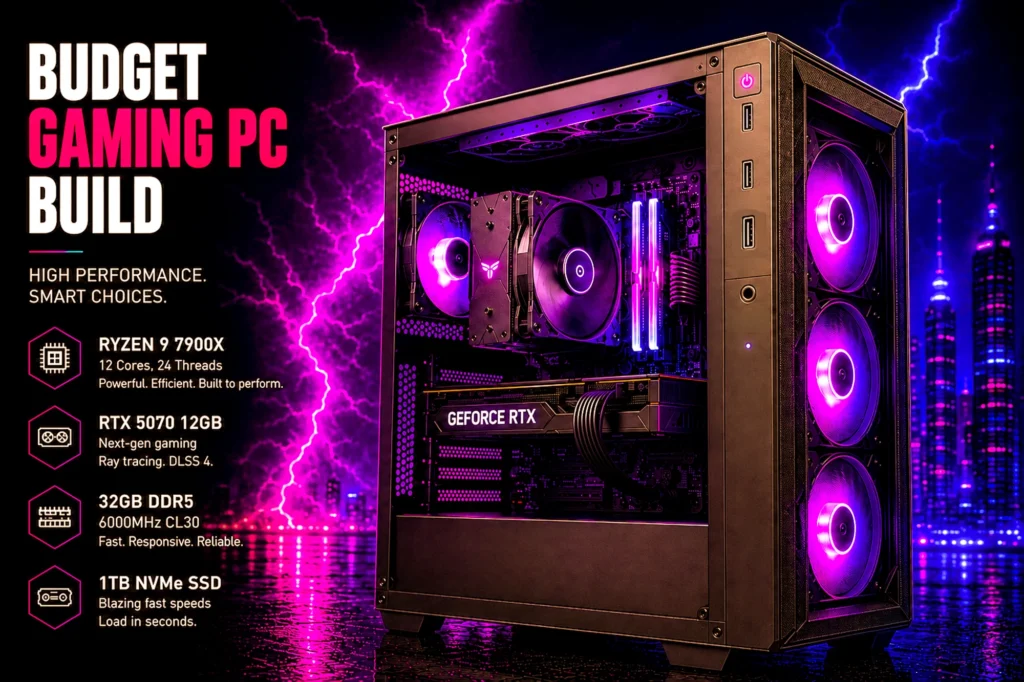
Six prebuilt gaming PCs that survived a hard filter: a real graphics card, a 4.0 star minimum with enough reviews to mean something, and a check on who is actually selling it.
- Best overall: Alienware Gaming Desktop at $1,699.99 — a current-generation RTX 5060 Ti, a Core Ultra 7 and a 1TB SSD.
- Best budget: iBUYPOWER Element SE at $1,399.99 — a keyboard and mouse in the box, on last-generation graphics.
Buying the best gaming PC for your money in 2026 is easier than building one and harder to get right. The spec sheets all look similar, the discounts are frequently theater, and the machine that arrives is often held together by whichever part the builder got cheap that month. We went through what is actually on sale right now, checked every price and rating on the product page itself, and cut anything that could not survive the scrutiny.
Six machines made it. The short version: the Alienware Gaming Desktop at $1,699.99 is the one most people should buy, because it pairs a current-generation RTX 5060 Ti with a Core Ultra 7 265F, Amazon ships it directly, and Dell’s service network stands behind it. The iBUYPOWER Element SE at $1,399.99 is the one to look at if you want a keyboard and mouse in the box, and we will be blunt about what you give up to get there.
- The best gaming PCs at a glance
- How we chose the best gaming PC for each budget
- Reading the graphics card names, because that is where the money goes
- 1. Alienware Gaming Desktop: the best gaming PC for most people
- 2. CyberPowerPC Gamer Master: current-generation graphics on a budget
- 3. iBUYPOWER Element SE: the starter bundle, with a caveat
- 4. MSI Codex Z2: the one with room for your library
- 5. Lenovo Legion Tower 5i: the high-end pick
- 6. Skytech King 95: the fastest gaming processor here
- The best gaming PC picks compared side by side
- What we left out of the best gaming PC shortlist, and why
- What actually matters when you buy a prebuilt
- The rest of the setup, and why it decides what your PC is worth
- When to buy, and when to wait
- Should you build one instead?
- Frequently asked questions
- The bottom line on the best gaming PC
The best gaming PCs at a glance
Every price, rating and review count below was read off the live Amazon product page. Prices on prebuilt PCs move constantly, so treat these as accurate at the time of writing and check the current figure before you buy.

| GPU | RTX 5060 Ti |
| CPU | Core Ultra 7 265F |
| Memory | 16GB DDR5 |
| Rating | 4.5 (78) |

| GPU | RTX 5060 Ti 8GB |
| CPU | Ryzen 7 8700F |
| Memory | 16GB DDR5 |
| Rating | 4.3 (495) |

| GPU | RTX 3050 6GB |
| CPU | Ryzen 5 8400F |
| Memory | 16GB DDR5 |
| Rating | 4.0 (331) |

| GPU | RTX 5070 |
| CPU | Ryzen 7 8700F |
| Memory | 32GB DDR5 |
| Rating | 4.3 (266) |

| GPU | RTX 5070 Ti |
| CPU | Core Ultra 7 265F |
| Memory | 32GB |
| Rating | 4.6 (100) |

| GPU | RTX 5070 Ti 16GB |
| CPU | Ryzen 7 9800X3D |
| Memory | 32GB DDR5 |
| Rating | 4.2 (73) |
How we chose the best gaming PC for each budget
Picking the best gaming PC is mostly a process of elimination. Every machine below had to clear four filters before it could be called the best gaming PC for anyone, and most candidates failed at least one of them.
There are hundreds of prebuilt gaming desktops on Amazon and most of them are noise. We applied four filters, in this order, and the list got short quickly.
A real graphics card, or it is not a gaming PC
This one removes more machines than you would expect. Two of the highest-ranking results for “gaming desktop prebuilt” were a Dell Tower running Intel UHD graphics and a Dell Slim running Radeon 660M. Both are integrated graphics, meaning the GPU shares system memory and has no dedicated video RAM. They are competent office computers. They are not gaming PCs, and no amount of search ranking changes that. Every machine on our list has a discrete NVIDIA card.
A 4.0 star minimum, and the review count has to be real
A star rating without a sample size is close to meaningless. A 5.0 star average from three buyers tells you nothing; a 4.4 from several hundred buyers tells you a great deal. We set a hard floor at 4.0 stars and then weighted heavily toward machines with hundreds or thousands of ratings.
This cut a Skytech Storm sitting at 3.0 stars and a Skytech King 95 configured with an RX 9070 XT at 3.6. It also demoted a Lenovo Legion Tower 5-2026 that shows a perfect 5.0, because that average rests on three reviews.
Who is actually selling it
On Amazon, the seller holding the buy box is not always Amazon. Third-party sellers can list the same machine at a markup, with different return handling and, occasionally, single-digit stock. We checked the buy box on every machine here.
All six are sold and shipped by Amazon.com itself, with Prime delivery on the buy box when we checked. That is a strong result for this category and it is worth knowing, because it decides whose returns policy you are dealing with if a machine arrives faulty.
Discounts that are actually discounts
A struck-through list price is a marketing decision, not a fact. The Lenovo Legion Tower 5i, for example, displays a list price identical to its selling price, so there is no saving there at all, and we do not present it as one. Where we quote a discount below, the two numbers were genuinely different on the page.
Reading the graphics card names, because that is where the money goes
The graphics card decides more about the best gaming PC for you than every other component combined, and its model number is the least readable part of the listing.
The graphics card determines more about your experience than every other component combined, and its name tells you almost everything if you know how to read it. Every card in this roundup is an NVIDIA GeForce RTX, so the pattern is consistent.
Take the RTX 5070 Ti. The first digit, 5, is the generation: the 50 series is current, the 30 series is two generations old. The next two digits are where the card sits within its own generation, running roughly from 50 at the entry point through 60, 70, 80 and 90 at the top. The Ti suffix marks a slightly faster version of that same tier.
The trap is that generation and tier pull against each other. An RTX 3050 is on shelves today but is an entry-level part from an older generation, which is why machines carrying one land under $1,000. Compare the tier digits first and the generation second.
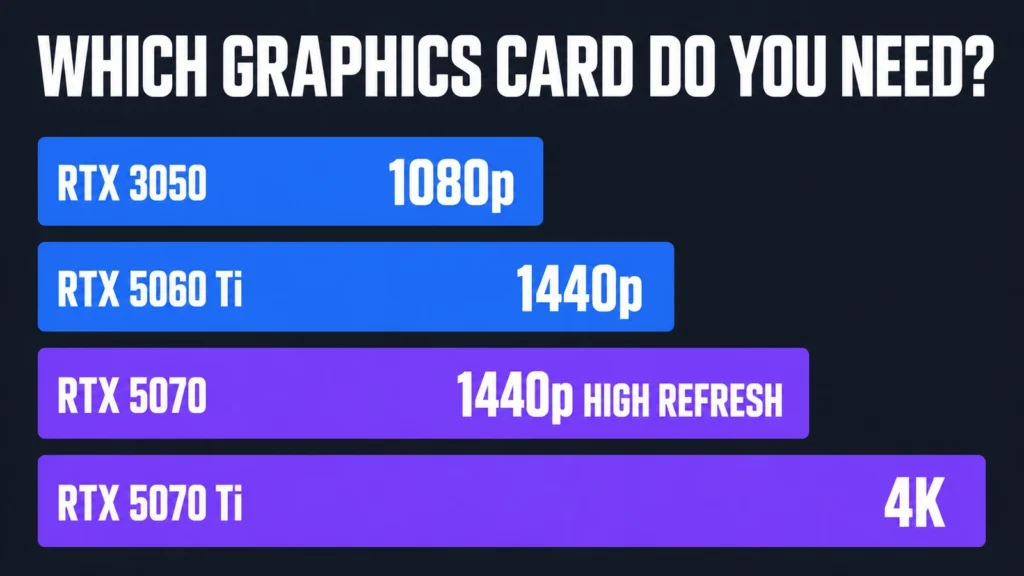
As a working guide: an RTX 3050 is built for 1080p, and you will turn settings down in the most demanding recent titles. An RTX 5060 Ti is comfortable at 1080p and capable at 1440p. An RTX 5070 is a 1440p card with real headroom, which is why it appears in the two machines we recommend most. An RTX 5070 Ti is where 4K starts to become reasonable rather than aspirational.
We are deliberately not quoting frame rate figures. Frame rates depend on the specific game, the settings, the resolution and the processor alongside the card, and any single number quoted without all four is close to meaningless. Match the tier to your monitor and you will be in the right place.
1. Alienware Gaming Desktop: the best gaming PC for most people
- Legend perfected: Modern design with a matte “basalt black” finish in an optimized chassis with customizable AlienFX lig…
- Game changing graphics: Step into the future of gaming and creation with the NVIDIA GeForce RTX 5060Ti graphics, powered…
- Marathon gaming unlocked: This high-performance technology ensures clean energy is consistently available, unleashing th…
Intel Core Ultra 7 265F, RTX 5060 Ti, 16GB DDR5, 1TB SSD. $1,699.99. 4.5 stars from 78 ratings.
The RTX 5060 Ti is the card most gamers actually want. It is current generation, comfortably ahead of the RTX 5060 below it, and enough for 1440p in most titles without the price jump to a 5070.
What you are also buying is the support arrangement. Alienware is Dell gaming brand, which means a real service network behind the machine rather than a boutique builder warranty. On a prebuilt that counts for more than it does on a component, because the failure you actually care about is the one in month fourteen, not the one in week one.
The specification has a gap worth naming: 16GB of memory rather than 32GB. Games rarely need more than 16GB today, but the moment you have a browser open, a Discord call running and a recording in the background, 16GB starts swapping and you feel it as stutter rather than as a low frame rate. Memory is the easiest thing in this machine to add later, and on this one you probably will.
It is also the only machine here with Wi-Fi 7 and 2.5Gb Ethernet, which is a real advantage if your router is current and a irrelevance if it is not.
Buy it if: you play at 1440p and want a brand-name machine with a service network behind it.
Skip it if: you multitask heavily and do not want to add memory in the first year.
- Current-generation RTX 5060 Ti, the right card for 1440p
- Dell service network rather than a boutique builder warranty
- Wi-Fi 7 and 2.5Gb Ethernet, the only machine here with either
- 4.5 stars from 78 ratings
- 16GB of memory where the machines around it carry 32GB
- 78 ratings is a thin sample for a machine at this price
2. CyberPowerPC Gamer Master: current-generation graphics on a budget
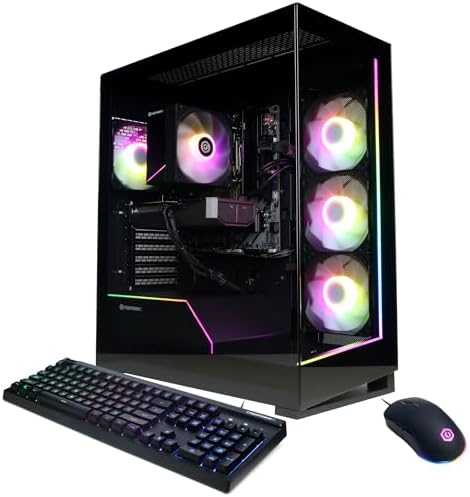
- System: AMD Ryzen 7 8700F 4.1GHz 8 Cores | AMD B850 Chipset | 16GB DDR5 | 1TB PCIe 4.0 NVMe SSD | Windows 11 Home
- Graphics: NVIDIA GeForce RTX 5060 Ti 8GB Graphics | 1x HDMI | 2x DisplayPort
- Connectivity: 2 x USB-C 3.2 | 4 x USB-A 3.2 | 2 x USB-A 2.0 | 1 x LAN | WiFi 6 | Bluetooth 5.3 | 7.1 Channel Audio
AMD Ryzen 7 8700F, RTX 5060 Ti 8GB, 16GB DDR5, 1TB PCIe 4.0 NVMe SSD. $1,489.00. 4.3 stars from 495 ratings.
This is the budget way onto current-generation graphics on this page. The RTX 5060 Ti is a 50-series card, which matters more than the model number suggests: it brings the current feature set, where the older RTX 3050 in the budget pick below it does not.
The rest is sensible rather than exciting. The Ryzen 7 8700F is an eight-core processor on an AMD B850 board, memory is 16GB of DDR5, and storage is a 1TB PCIe 4.0 NVMe drive. A keyboard and mouse come in the box, and connectivity includes Wi-Fi 6, Bluetooth 5.3 and two USB-C ports. Against the Element SE below it, what you are buying is a generation of graphics rather than a bigger number anywhere else.
Two honest notes. The graphics card carries 8GB of video memory, which is comfortable at 1080p and starts to pinch in the heaviest games at 1440p. And 16GB of system memory is the first thing you may want to add to later. Amazon sells and ships it directly, so returns run through Amazon.
Buy it if: you play at 1080p and want current-generation graphics without paying mid-range prices.
Skip it if: you already have a 1440p monitor and play the most demanding games.
- Current-generation RTX 5060 Ti on a budget
- Eight-core Ryzen 7 8700F, DDR5 and a 1TB PCIe 4.0 NVMe
- Sold and shipped by Amazon, with a keyboard and mouse in the box
- A full graphics generation newer than the budget pick
- 8GB of video memory, tight for the heaviest games at 1440p
- 16GB of system memory, the first thing to upgrade
- A 1080p machine first: a 1440p monitor will push it hard
3. iBUYPOWER Element SE: the starter bundle, with a caveat
- AMD Ryzen 5 8400F, NVIDIA GeForce RTX 3050 6GB, 16GB DDR5 4800MHz 16×1 1TB NVMe SSD, WIFI Ready, Windows 11 Home
- Connectivity: 6 x USB 3.1 | 1x RJ-45 Network Ethernet 10/100/1000 | Audio: On board audio
- Special Add-Ons: Tempered Glass RGB Gaming Case | 802.11AC Wi-Fi Included | 16 Color RGB Lighting Case | Free iBuyPower …
Ryzen 5 8400F, RTX 3050 6GB, 16GB DDR5, 1TB NVMe. $1,399.99. 4.0 stars from 331 ratings.
The headline here is the peripheral bundle: a gaming keyboard and mouse are included. If you are buying your first desktop and do not already own either, that is real money you do not have to spend twice.
Be clear-eyed about the 4.0 star rating. It clears our floor and it comes from a healthy 331 ratings, so the number is trustworthy. Across a sample that size, a 4.0 generally indicates a machine that works as advertised for most buyers with a meaningful minority who hit problems, rather than one that quietly delights everybody.
Against the CyberPowerPC above it, the choice is straightforward. That machine costs more and gives you a current-generation RTX 5060 Ti in place of this one last-generation RTX 3050, and it also ships with a keyboard and mouse. If the budget is truly fixed, take this and accept the older card. If you can stretch, the graphics generation is the better place to spend it than anywhere else on this page.
Buy it if: you need peripherals in the box.
Skip it if: you already own a keyboard and mouse you like.
- AM5 socket, so the processor has an upgrade path
- Gaming keyboard and mouse included
- 331 ratings, a large enough sample to trust
- 16GB DDR5 and a 1TB NVMe drive
- RTX 3050 6GB is entry level and a generation behind everything else here
- 1080p only: a 1440p monitor will bottleneck it from day one
4. MSI Codex Z2: the one with room for your library
- POWERHOUSE 8-CORE GAMING PERFORMANCE — Driven by the AMD Ryzen 7 8700F with 8 cores and 16 threads, boosting up to 5.0 G…
- NEXT-GEN BLACKWELL ARCHITECTURE — The NVIDIA GeForce RTX 5070 is powered by NVIDIA’s cutting-edge Blackwell GPU architec…
- Simplistic Design: Enjoy the latest generation of Windows 11 Home for your everyday needs. *MSI recommends Windows 11 Pr…
Ryzen 7 8700F, RTX 5070, 32GB DDR5, 2TB NVMe. $2,079.00. 4.3 stars from 266 ratings.
The Codex Z2 is the only machine here with a 2TB drive, and that is a more practical advantage than it appears on a spec sheet. Modern games are enormous. A single flagship title can occupy 150GB, and a 1TB drive that is also holding Windows realistically stores six or seven of them before you start uninstalling to make room. Doubling that is the difference between managing your library and just having it.
The rest of the specification is strong for the money: RTX 5070 class graphics and 32GB of DDR5, which is double the memory in the Alienware above it. The processor is a Ryzen 7 8700F, and in games the gap to a higher core count is narrower than the model numbers suggest, because most titles cannot use twelve cores anyway.
Amazon lists this as an Overall Pick in the category and reports more than 200 bought in the past month, which is a useful independent signal that the machine sells and does not come back.
Buy it if: you keep a large installed library and you are tired of uninstalling things.
Skip it if: you are comfortable managing 1TB, or you would rather have Amazon handle delivery and returns directly.
- A full 2TB drive, twice the storage in the Alienware above it
- RTX 5070 class graphics with 32GB of DDR5
- An Amazon Overall Pick with more than 200 bought in the past month
- 4.3 stars from 266 ratings
- A big step up in price from the iBUYPOWER Element
- No advantage if you are comfortable managing 1TB
5. Lenovo Legion Tower 5i: the high-end pick
- EMPOWER YOUR PASSIONS ELEVATE YOUR GAME – Whether you’re dominating the leaderboard, streaming your gameplay live, or ta…
- BEYOND FAST – The Intel Core Ultra 7 265F CPU is designed to give you the power boost you need to dominate the latest an…
- GAME CHANGER – The NVIDIA GeForce RTX 5070 Ti GPU is beyond fast for gamers and creators. Experience lifelike virtual wo…
Intel Core Ultra 7 265F, RTX 5070 Ti, 32GB, 1TB. $2,545.00. 4.6 stars from 100 ratings.
The Legion Tower 5i holds 4.6 stars from 100 ratings, and it pairs that with an RTX 5070 Ti. If you are driving a high-refresh 1440p monitor or stepping up to 4K, this is one of the two machines here built for it.
Two honest notes. First, 100 ratings is a respectable sample but not a deep one, so that 4.6 carries less weight than the Element SE’s 4.0 from 331. Second, and more importantly: Amazon displays a list price on this machine identical to the selling price. There is no discount. We mention it because a struck-through number that matches the price it is struck against is the kind of thing that makes a deal look better than it is.
Set against the Alienware at $1,699.99, you are paying more for a stronger GPU tier and twice the memory. Whether that is worth it depends on your monitor. On a 1080p screen it is not.
Buy it if: you have a 1440p high-refresh or 4K monitor and want the GPU to match.
Skip it if: you are gaming at 1080p. You would be paying for headroom your screen cannot show you.
- 4.6 stars from 100 ratings
- RTX 5070 Ti
- Built for high refresh 1440p and 4K
- Brand name build with tidier cabling and better support
- 100 ratings is a moderate sample behind that 4.6
- No discount at all: the list price equals the selling price
- Far more expensive than the budget machines
- Wasted on a 1080p screen
6. Skytech King 95: the fastest gaming processor here

- AMD Ryzen 7 9800X3D 4.7GHz (5.2GHz Turbo Boost) CPU Processor | 1TB Gen4 NVMe M.2 SSD – Up to 30x Faster Than Traditiona…
- NVIDIA GeForce RTX 5070 Ti 16GB GDDR7 Graphics Card (Brand may vary) | 32GB DDR5 RAM 6000 RGB Gaming Memory with Heat Sp…
- Wi-Fi 5 802.11ac & Bluetooth Support | No Bloatware | Graphic output options: 1 x HDMI, 1 x DisplayPort (additional port…
AMD Ryzen 7 9800X3D, RTX 5070 Ti 16GB, 32GB DDR5, 1TB Gen4 NVMe SSD. $2,799.99. 4.2 stars from 73 ratings.
This machine is built around the Ryzen 7 9800X3D, and for gaming specifically that is the processor to want. The 3D V-Cache stacked on top of the chip feeds the graphics card faster in exactly the situations that produce stutter: large open worlds, heavy simulation, and competitive shooters at high refresh. No other machine here carries an X3D chip.
The graphics card is the same tier as the Legion Tower 5i above it, an RTX 5070 Ti with 16GB of video memory, so the difference between the two is the processor and the build. Skytech pairs it with 32GB of DDR5, a 360mm liquid cooler and an 850W Gold power supply, and a keyboard and mouse come in the box.
Two honest notes. 73 ratings is a real but not deep sample for a machine at this price, and the Element SE at 4.0 from 331 owners tells you more about long-run reliability. And the storage is 1TB, which a large game library will fill; the Codex Z2 is the machine here with room for one. Amazon sells and ships it directly, and Skytech covers parts and labor for a year.
Buy it if: you play at high refresh rates at 1440p or 4K and want the processor that keeps frame times steady.
Skip it if: you game at 1080p, or you would rather have a deeper review history behind a purchase this size.
- Ryzen 7 9800X3D, the only X3D gaming processor here
- RTX 5070 Ti with 16GB
- 32GB of DDR5 and a 360mm liquid cooler
- Sold and shipped by Amazon, with a keyboard and mouse in the box
- A thin review sample for a machine at this price
- 1TB of storage fills fast with modern games
- Same graphics tier as the Legion Tower 5i
- Wasted on a 1080p screen
The best gaming PC picks compared side by side
| Machine | GPU | CPU | RAM | Storage | Price | Rating |
|---|---|---|---|---|---|---|
| iBUYPOWER Element SE | RTX 3050 6GB | Ryzen 5 8400F | 16GB DDR5 | 1TB | $1,399.99 | 4.0 (331) |
| CyberPowerPC Gamer Master | RTX 5060 Ti 8GB | Ryzen 7 8700F | 16GB DDR5 | 1TB | $1,489.00 | 4.3 (495) |
| Alienware Gaming Desktop | RTX 5060 Ti | Core Ultra 7 265F | 16GB DDR5 | 1TB | $1,699.99 | 4.5 (78) |
| MSI Codex Z2 | RTX 5070 | Ryzen 7 8700F | 32GB DDR5 | 2TB | $2,079.00 | 4.3 (266) |
| Lenovo Legion Tower 5i | RTX 5070 Ti | Core Ultra 7 265F | 32GB | 1TB | $2,545.00 | 4.6 (100) |
| Skytech King 95 | RTX 5070 Ti 16GB | Ryzen 7 9800X3D | 32GB DDR5 | 1TB | $2,799.99 | 4.2 (73) |
What we left out of the best gaming PC shortlist, and why
A recommendation is only as trustworthy as the things it rejects, so here is what did not make the list and the reason in each case.
Two machines that rank for “gaming desktop” and are not gaming desktops
A Dell Tower at $1,099.99 and a Dell Slim at $699.99 both appear prominently for this search. Neither has a dedicated graphics card. The Tower runs Intel UHD graphics and the Slim runs Radeon 660M, which are integrated chips sharing system memory rather than having video memory of their own. They are perfectly good computers for work. Buying either expecting to game would be a genuine disappointment, and the Slim in particular is priced low enough to look like a bargain entry into gaming. It is not one.
Two machines that failed the ratings floor
A Skytech Storm at $1,199.99 sits at 3.0 stars and a Skytech King 95 with an RX 9070 XT sits at 3.6, both below our 4.0 minimum. The King 95 we do recommend is a different configuration, a Ryzen 7 9800X3D with an RTX 5070 Ti, with its own rating. We name them because a brand name on the box tells you far less than the specific configuration inside it does. Configurations vary within a range.
One machine with a perfect score and no evidence
A Lenovo Legion Tower 5-2026 at $2,811.90 shows a flawless 5.0 star rating. It rests on three reviews. Three buyers cannot tell you whether a machine runs hot after a year, whether the power supply whines, or whether support answers the phone. A 5.0 from three people carries less information than a 4.4 from several hundred, and treating the higher number as the better signal is the most common way review scores mislead.
What actually matters when you buy a prebuilt
Four things separate the best gaming PC for your situation from the one with the loudest spec sheet, and none of them is the headline number on the box.
Match the graphics card to your monitor, not your budget
This is the single most common mistake, and it costs real money in both directions. Buying more GPU than your screen can display does nothing at all: an RTX 5070 Ti on a 1080p 60Hz monitor produces frames the monitor throws away. Buying less means a screen you paid for sitting idle, which is the quieter version of the same waste.
The number to check is your monitor’s native resolution and its refresh rate, both of which are printed in its settings menu. Those two figures decide the graphics tier, and everything else in the specification is secondary to getting that pairing right.
Video memory is what runs out first
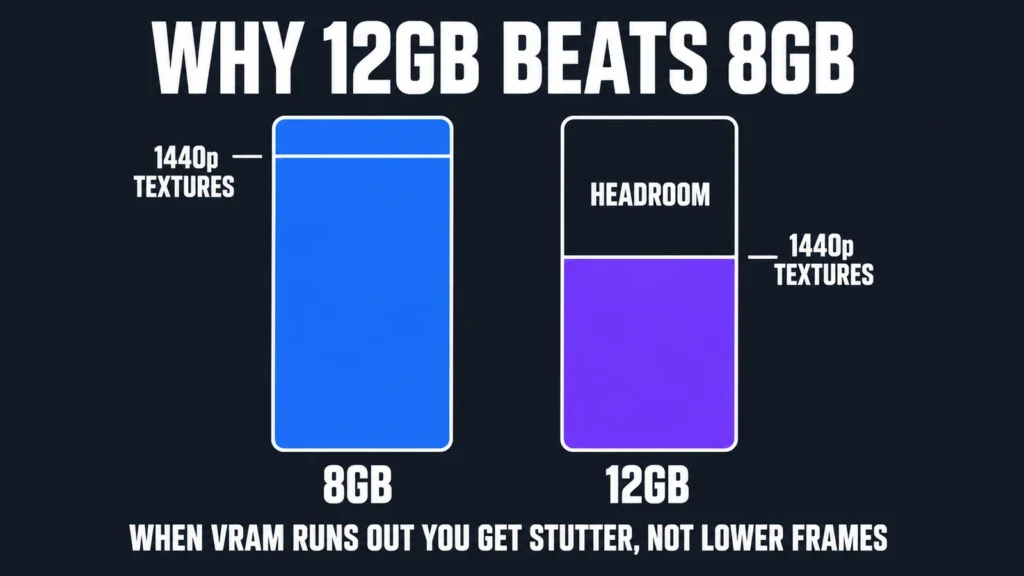
VRAM, the memory on the graphics card itself, is separate from your system RAM and it is frequently the real limit. The failure is distinctive and worth recognizing: when a game exceeds available VRAM you do not get a smooth, lower frame rate. You get stuttering, and textures that load in blurry and sharpen a second later. If you have seen that in a game and assumed the whole machine was too slow, the card’s memory was the actual culprit.
This is why an 8GB card and a 12GB card can benchmark closely and feel different in use, and why the gap widens rather than narrows over time. Game texture budgets only go one direction. It is also why we weight video memory heavily at 1440p specifically: at 1080p an 8GB card has room, and at 4K almost nothing in this price range is comfortable anyway. If the graphics card is the part you are actually shopping for, our guide to the best graphics cards compares them on price, memory and real owner ratings.
The power supply decides whether you can upgrade
Prebuilt manufacturers save money on power supplies because buyers do not read that line. It matters for one specific reason: if the unit is barely adequate for the card that shipped, you cannot fit a stronger card later without replacing it. A quality 650W or larger unit, ideally 80 Plus Gold rated, leaves you a real upgrade path. It is the difference between a machine you can improve and one you can only replace. Our guide to upgrading a prebuilt gaming PC works through what that unit actually lets you fit later.
Two terms are worth decoding. The wattage is the total power the unit can deliver, and you want headroom above what the current parts draw rather than a number that exactly matches them. 80 Plus Gold is an efficiency certification: it means the unit wastes less energy as heat, which in practice makes it run cooler and quieter and tends to indicate better internal components. A Gold rating is not a guarantee of quality, but its absence on a budget machine is usually a sign of where the corners were cut.
This is the specification we weighted most heavily on the cheapest machines here, and it is the reason we look at the power supply before the graphics card on a budget build. On a build you intend to upgrade rather than replace, the power supply is the component that decides whether that is even possible.
Storage fills faster than you think
A 1TB drive holding Windows leaves roughly 900GB usable, and large modern titles run 100GB to 150GB each. That is six or seven games. If your library is bigger than that, either buy 2TB up front or budget for a second drive, which on most of these machines is a straightforward addition. If you are adding or upgrading memory yourself, our best RAM for gaming guide covers what to buy. Storage is the easiest part to add later, and our best M.2 NVMe SSD guide covers what to buy.
The rest of the setup, and why it decides what your PC is worth
A gaming PC is not a complete purchase, and the parts around it change the experience more than most buyers expect. If you are coming from a laptop or a console, budget for these before you stretch to a more expensive tower.
The monitor is the other half of the machine
This is the upgrade that changes the most and gets thought about the least. A powerful graphics card feeding a 60Hz display is producing frames the screen physically cannot show you. Refresh rate, measured in hertz, is how many times per second the monitor redraws: 60Hz is standard office equipment, 144Hz is the practical gaming baseline, and the difference between them is immediately visible in a way that a spec sheet cannot convey.
If your budget is fixed and you are choosing between a stronger tower on a 60Hz screen or a moderate tower on a 144Hz screen, take the screen. The order of operations that wastes the least money is: decide your resolution and refresh rate, then buy the graphics tier that feeds it.
Peripherals are cheap relative to what they change
A mechanical keyboard and a decent mouse cost a fraction of any machine here and you touch them every second you play. Two of our picks, both iBUYPOWER models, include a keyboard and mouse in the box, which is worth factoring into the comparison if you are starting from nothing. The bundled sets are entry level rather than exceptional, but they are functional and they mean you are not buying twice on day one.
Headsets matter more in competitive games than most people admit
In shooters and anything with positional audio, hearing where a sound came from is information. A headset that renders direction accurately is a competitive input, not a comfort purchase, and the two qualities are not the same thing.
A chair is the least exciting line in any setup budget and the one you keep longest. Every machine on this page will be superseded within a few years. A good chair will not.
When to buy, and when to wait
Timing changes what the best gaming PC costs more than most buyers expect, so it is worth knowing which weeks are worth waiting for.
Prebuilt pricing moves constantly and unevenly. Several machines here carry genuine reductions right now, including 17 percent off the Element, while the Lenovo Legion Tower 5i displays a list price identical to its selling price and is therefore not discounted at all despite appearing to be.
Two practical rules. First, always compare the selling price against the struck-through price yourself rather than trusting a percentage badge, because a badge is generated from whatever list price the seller supplied. Second, treat a low stock warning as information rather than pressure: our mid-range pick showed only five units available at the time of writing, which is a real constraint on availability but not a reason to buy something less suitable in a hurry.
Should you build one instead?
Building can beat the best gaming PC you can buy assembled, but only on price, and only if you are willing to do the work and own the troubleshooting.
Building your own is usually cheaper for the same parts and it is the better choice if you enjoy the process. It is not the better choice for everyone, and the honest tradeoffs are these.
Building saves money, typically enough to move up one graphics card tier at the same total spend, and you choose every component including the power supply. Against that, you have a single warranty per part rather than one for the whole machine, so a fault means diagnosing which component failed yourself. A prebuilt from a seller like these gives you one point of contact and, because each of these is sold direct by the retailer rather than a marketplace seller, that retailer’s standard returns.
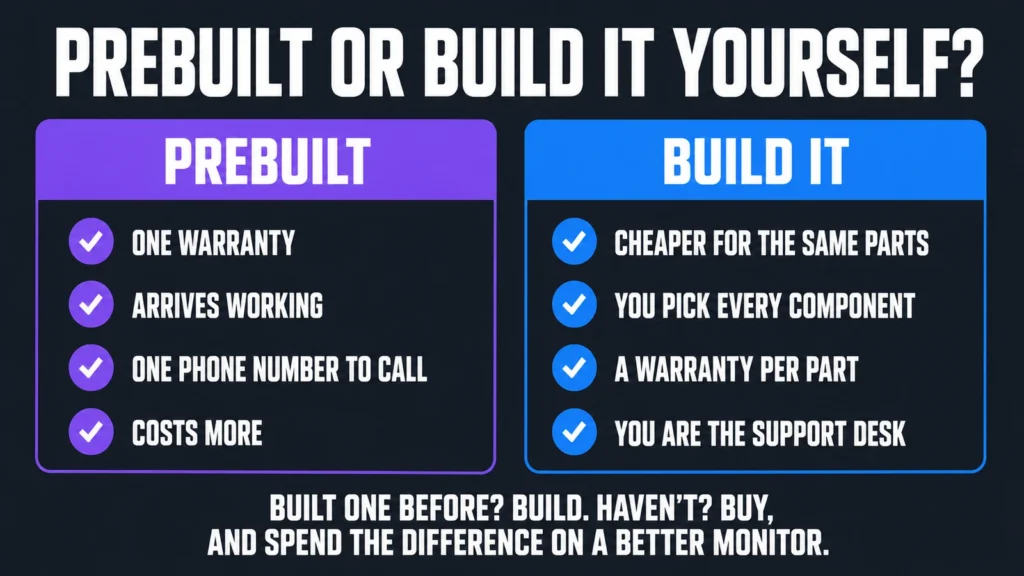
Our position: if you have built before, build. If you have not, and the idea of troubleshooting a machine that will not boot fills you with dread rather than interest, buy prebuilt and spend the difference on a better monitor. If you do build, our best gaming CPUs guide covers the processor side of that decision.
Frequently asked questions
What is the best gaming PC for most people in 2026?
The Alienware Gaming Desktop. It pairs a current-generation RTX 5060 Ti with an Intel Core Ultra 7 265F, 16GB of DDR5 and a 1TB SSD, it is sold and shipped by Amazon, and Dell backs it with a real service network. Its current price is shown in the comparison table above.
How much should I spend on a gaming PC?
Around $1,000 buys competent 1080p gaming. Roughly $1,650 moves you to comfortable 1440p. Beyond about $2,500 you are buying headroom for 4K or very high refresh rates. Spending more than your monitor can display is the most common way to waste money in this category.
Is a prebuilt gaming PC worth it?
Yes, if you value a single warranty and not having to assemble or troubleshoot the machine yourself. Building the same specification is usually cheaper, often by enough to move up a graphics card tier, so the premium buys convenience and support rather than performance.
Can I upgrade a prebuilt gaming PC later?
Usually yes, and there is a clear order of difficulty. Adding a second drive is the easiest and needs no planning at purchase. Adding memory is nearly as simple, though check how many slots are already occupied, because two 16GB sticks in a two-slot board means replacing rather than adding. Swapping the graphics card is the upgrade that actually extends the machine’s life, and it is the one your power supply either permits or forbids. The processor is last: it is usually possible and rarely worth it, because the socket limits you to that generation anyway.
Do I need 32GB of RAM for gaming?
Not for games alone, where 16GB remains sufficient in 2026. You want 32GB if you stream, record, or keep a browser and a voice call running while you play. That combination is where 16GB starts to swap, which you notice as stutter rather than as lower frame rates.
What graphics card do I need for 1440p?
An RTX 5060 Ti is the sensible entry point for 1440p and an RTX 5070 gives you real headroom there. Below that, an RTX 3050 is a 1080p card and will be the limiting factor on a 1440p screen from the day you plug it in. Match the card to the monitor you own, or to the one you are buying alongside it.
How long will a gaming PC last?
Expect three to five years of comfortable play before you feel real pressure to upgrade, and the graphics card is almost always the part that ages first. Two things extend that window: video memory, where 12GB dates more slowly than 8GB, and a power supply with enough headroom to accept a stronger card later without being replaced itself.
Is a higher star rating always better?
No, and this is the most useful thing to understand about review scores. A rating is only as reliable as the number of people behind it: a 5.0 from three buyers tells you almost nothing, while a 4.4 from several hundred is strong evidence. A practical threshold is around 100 ratings before an average means much, and several hundred before it is genuinely dependable. Below that you are reading noise. It is also worth checking whether reviews are recent, since prebuilt makers change components inside the same product listing.
Does it matter who sells it on Amazon?
It does. The seller holding the buy box is not always Amazon, and third-party sellers can list the same machine at a markup with different return handling and limited stock. Every machine on this page was sold and shipped by Amazon.com at the time of writing, which is worth re-checking yourself since buy box ownership can change.
Are the discounts on prebuilt gaming PCs real?
Sometimes. Several machines here carry genuine reductions, including 17 percent off the Element. Others display a list price identical to the selling price, which is not a discount at all. Always compare the two numbers rather than trusting the percentage badge.
The bottom line on the best gaming PC
If you want one recommendation and no further reading, the best gaming PC here is the Alienware Gaming Desktop at $1,699.99. It pairs a current-generation RTX 5060 Ti with a Core Ultra 7 265F and a 1TB SSD, Amazon ships it directly, and Dell backs it with a real service network. Memory is 16GB, and that is the one thing you may want to add to later.
On a tighter budget, the CyberPowerPC Gamer Master at $1,489.00 is the honest choice for current-generation graphics, and Amazon ships it directly. The iBUYPOWER Element SE at $1,399.99 costs less but its graphics card is a generation old; it earns its place only if you need the bundled keyboard and mouse. If you play at 1440p, the Alienware at $1,699.99 is the best balance here.
Whichever you choose, check the current price before you buy. Prebuilt pricing moves week to week, and prices and ratings on this page update automatically. Every other figure was accurate when this guide was last reviewed and carries no guarantee beyond that.
Building one yourself instead of buying prebuilt? The motherboard is where that decision starts, because it fixes which processor you can install and how much you can add later. Our best gaming motherboards guide compares the boards worth buying across both current sockets.
A prebuilt only gets you halfway. Whatever the machine renders still has to be displayed, and the panel decides how much of that work you actually see. Our best gaming monitors guide covers screens from 1080p to ultrawide.
One thing a spec sheet will not tell you: audio changes how a machine feels more per dollar than almost any component in it. Our best gaming headsets guide covers the sets worth buying.
A prebuilt rarely ships with a keyboard worth keeping. Our best gaming keyboards guide covers the boards worth buying, and explains how to spot a membrane keyboard sold as mechanical.
A prebuilt ships with whatever mouse was cheapest that quarter. Our best gaming mice guide covers the mice worth replacing it with.
The rig matters less than you think if you cannot sit at it comfortably. Our best gaming chairs guide covers six seats carrying over 115,000 owner ratings between them.
Building it yourself instead gets you more hardware for the money. Our $2,000 gaming PC build is a complete parts list with every price verified and every compatibility question worked through.
If none of the prebuilts above line up with your budget, assembling the parts yourself is materially cheaper. Our budget gaming PC build reaches a complete 1080p machine for about $930 in components, with every price checked against Amazon on the day of writing.
A prebuilt arrives with a power supply you did not choose, and it is one of the most common places a manufacturer quietly saves money. If you are weighing a prebuilt against building, our best gaming power supply guide shows what a decent unit costs on its own.
A prebuilt arrives in a case somebody else chose, and it is a common place for a manufacturer to economize where you cannot see it. If you are weighing a prebuilt against building, our best PC case guide shows what a good one costs on its own, and how many fans actually come in the box.
Prebuilt machines almost always ship the stock cooler that came with the processor, and it is one of the least visible places a builder saves money. If you are comparing a prebuilt against building yourself, our best CPU cooler guide shows what a real cooler costs.
At the top of our range, the $3,000 build shows what a self-assembled high end machine costs in parts. Compare that against the prebuilts above at similar prices and the difference in specification is usually where the value question gets settled.
The third option is a laptop, and it is the right one if the machine has to move. Our gaming laptop guide covers the picks worth buying, and the review counts behind them, which is the number that should decide which one you buy.
Whichever machine you land on, it will want a controller for some games. Our gaming controller guide covers the picks worth buying, and explains the one failure that ends most of them: stick drift, and the magnetic sensors that prevent it.
The other route is not a PC at all. Our gaming console guide covers the machines worth buying, and the honest comparison is that a console is finished and supported where a PC is upgradeable and more capable. If you only want to plug something into a television, that page is the shorter decision.
Not sure a prebuilt is the right call at all? Our guide to prebuilt vs building your own PC prices a full parts list against these machines and names the four things a prebuilt actually buys you.
Whichever machine you pick, the connection feeding it matters more than most buyers expect. Our gaming router guide covers the routers we recommend, and the budget pick with a dedicated gaming port fixes the most common lag complaint with no configuration at all.
Also worth reading: if you want a machine that also handles a VR headset or local AI models, our guide to the best VR and AI gear for 2026 covers the headsets, the graphics cards and the prebuilt machines that do both.
Gamers Tech Guide participates in the Amazon Services LLC Associates Program. As an Amazon Associate we earn from qualifying purchases.