
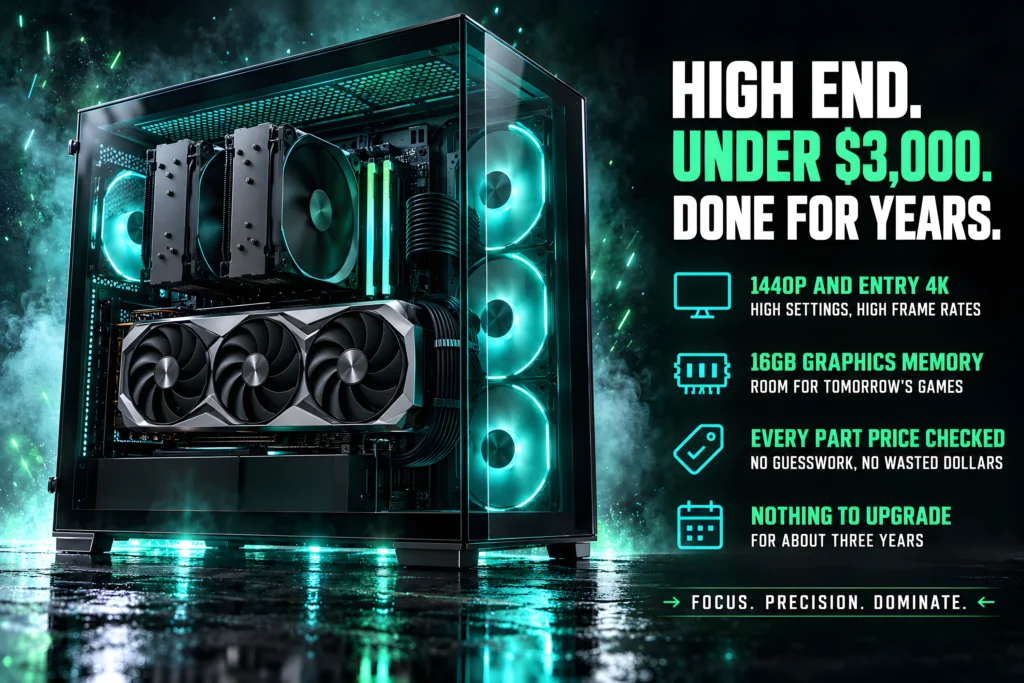
Eight parts, $2,303.75 total, and one line item that says everything about building in 2026: the memory costs $210.99 more than the processor.
- Total: $2,303.75. Against a $3,000 ceiling, which leaves $696.25 of headroom.
- This is the first of our three builds that can afford 32GB in dual channel. The $2,000 machine could not.
- 1TB, not 2TB. A deliberate trade, and we show you exactly what it bought.
- The cooler is 1 percent of the build and it is the one our $2,000 machine names as its first upgrade.
This high end gaming PC build costs $2,303.75 and it is the machine our other two build guides keep pointing at. It is a 1440p and entry-4K system built around an RX 9070 XT and a Ryzen 7 9700X, and it is the first budget at which the memory question that shaped both cheaper builds finally stops being a compromise.
That question is worth stating plainly, because it is the single most useful thing on this page. Our $1,000 build runs 16GB of DDR4 as a matched pair for $112.97. Our gaming PC build under $2,000 runs 16GB of DDR5 as a single stick, because a matched pair cost more than the graphics card upgrade it would have displaced. This build runs 32GB of DDR5 in dual channel at CL30, and it pays $549.99 for the privilege, which is about 5 times what the $1,000 machine spends on memory for twice the capacity.
Every price below was checked against Amazon. Where we made a trade, we say what it cost.
The full parts list
| Part | Component | Key spec | Price | Rating | Share |
|---|---|---|---|---|---|
| Graphics card | ASUS Prime RX 9070 XT 16GB | 16GB GDDR6, PCIe 5.0 | $829.99 | 4.6 (481) | 36% |
| Memory | CORSAIR Vengeance RGB DDR5 | 32GB (2×16) 6000 CL30 | $549.99 | 4.7 (4,298) | 24% |
| Processor | AMD Ryzen 7 9700X | 8-core, 16-thread | $339.00 | 4.8 (2,700) | 15% |
| Storage | Samsung 990 PRO 1TB | PCIe 4.0, 7,450 MB/s | $239.99 | 4.7 (13,411) | 10% |
| Motherboard | GIGABYTE B650 AORUS Elite AX | AM5, 14+2+1 phases | $159.99 | 4.4 (1,560) | 7% |
| Power supply | CORSAIR RM750e | 750W, ATX 3.1, modular | $89.99 | 4.6 (476) | 4% |
| Case | MONTECH XR Panoramic | 420mm GPU, 3 ARGB fans | $69.90 | 4.7 (780) | 3% |
| CPU cooler | Thermalright Peerless Assassin 120 SE | 6 heat pipes, dual fan | $34.90 | 4.7 (3,313) | 2% |
| Memory | 16GB GDDR6 |
| Interface | PCIe 5.0 |
| Cooling | 2.5-slot Axial-tech |
| Rating | 4.6 (481) |

| Capacity | 32GB (2×16) |
| Speed | 6000MHz CL30 |
| Profiles | AMD EXPO and XMP |
| Rating | 4.7 (4,298) |

| Cores | 8, 16 threads |
| Socket | AM5 |
| Multiplier | Unlocked |
| Rating | 4.8 (2,700) |

| Capacity | 1TB |
| Interface | PCIe 4.0 x4 |
| Read | 7,450 MB/s |
| Rating | 4.7 (13,411) |
| Socket | AM5 |
| Form | ATX |
| Network | WiFi 6E, 2.5Gb |
| Rating | 4.4 (1,560) |

| Capacity | 750W |
| Standard | ATX 3.1 |
| Cable | 12V-2×6 included |
| Rating | 4.6 (476) |

| GPU | Up to 420mm |
| Fans | 3 ARGB PWM |
| Radiator | 360mm |
| Rating | 4.7 (780) |

| Type | Dual tower air |
| Heat pipes | 6 |
| Fans | 2 x 120mm PWM |
| Rating | 4.7 (3,313) |
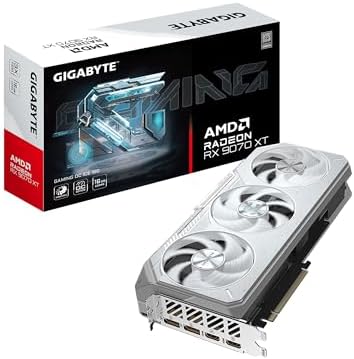
The graphics card: ASUS Prime Radeon RX 9070 XT 16GB

- Axial-tech fans now feature a smaller fan hub that facilitates longer blades and a barrier ring that increases downward …
- Phase-change GPU thermal pad helps ensure optimal heat transfer, lowering GPU temperatures for enhanced performance and …
- 2.5-slot design allows for greater build compatibility while maintaining cooling performance
Thirty-six percent of the budget, which is where it belongs. 16GB of GDDR6 is what makes this a 1440p card with genuine 4K capability rather than a 1440p card that struggles above it, and 16GB of video memory means it will not be the first thing to age out.
This is the 9070 XT we would buy, and the reason is the seller as much as the price: 4.6 stars across 481 owner ratings, sold by Amazon directly. Cheaper listings for this class of card exist and we checked them; the ones materially below this price were shipping through third-party sellers with no Prime delivery, which is a different product to buy even when the box is identical.
ASUS builds it as a 2.5-slot card with Axial-tech fans and a dual BIOS switch, on PCIe 5.0 with DisplayPort 2.1a and HDMI 2.1b. ASUS rates it for a 750W system on three 8-pin connectors, which is exactly the supply chosen below, and the MONTECH case and its 420mm of clearance leave room to spare. If you would rather compare the alternatives, they are in our best graphics cards 2026 guide.
- 16GB of GDDR6, which ages well
- PCIe 5.0 with DisplayPort 2.1a and HDMI 2.1b
- Sold by Amazon directly rather than a marketplace seller
- 2.5-slot cooler, and the case below clears it comfortably
- Over a third of the budget sits in this one component
- 481 ratings, a younger sample than the other parts here
- ASUS rates it for a 750W system, which sets the supply floor
The memory: CORSAIR Vengeance RGB 32GB DDR5-6000 CL30

- Disclaimer: Maximum Speed requires overclocking/PC BIOS adjustments. Maximum speed and performance depend on system comp…
- Dynamic Ten-Zone RGB Lighting: Illuminate your system with ten individually addressable, ultra-bright RGB LEDs per modul…
- Onboard Voltage Regulation: Enables easier, more finely-tuned, and more stable overclocking through CORSAIR iCUE softwar…
Twenty-four percent of the budget, on memory. That sentence would have been absurd two years ago and it is simply the market now. This is 32GB as a matched pair, 2x16GB, running at 6000MHz with CL30-36-36-76 timings at 1.40V.
The kit carries 4.7 stars across 4,298 owner ratings and is sold by Amazon directly. It lists both AMD EXPO and Intel XMP profiles, so the 6000MHz CL30 figure is one setting in the board firmware rather than something you tune by hand. Our guide to how to enable EXPO and XMP shows which BIOS page it sits on for MSI, ASUS, Gigabyte and ASRock. On an AM5 board with a Ryzen chip, EXPO is the profile you want.
Dual channel is the part that matters and the reason this build exists. Our $2,000 machine runs a single stick because a matched pair costs more than a graphics card tier; this is the first budget where that compromise goes away.
- 32GB as a matched pair, so dual channel from the start
- CL30-36-36-76 at 6000MHz, the timings this class is bought for
- AMD EXPO and Intel XMP profiles, one setting in firmware
- 4,298 ratings, a deep sample for a memory kit
- It costs more than the processor, which is the story of 2026
- 1.40V, so it wants a board that handles EXPO cleanly
- RGB you may not want, though it can be turned off
The processor: AMD Ryzen 7 9700X
- This dominant gaming processor can deliver fast 100+ FPS performance in the world’s most popular games
- 8 Cores and 16 processing threads, based on AMD “Zen 5” architecture
- 5.5 GHz Max Boost, unlocked for overclocking, 40 MB cache, DDR5-5600 support
Fifteen percent of the budget, and the right shape for a gaming machine. Eight cores and sixteen threads, unlocked, on the current AM5 socket. Games use a handful of cores well and the rest barely at all, so eight is the point where you stop losing frames to a core count problem and start paying for capability you will not use.
It holds 4.8 stars across 2,700 owner ratings, sold by Amazon directly. It shares the AM5 socket with the B650 board below, so the platform you buy today takes a faster chip later without a new motherboard.
One honest note. This is not an X3D part, so a chip with AMD stacked cache will produce more frames in games for the same money. We chose the 9700X here because it is the version of this processor you can actually buy from Amazon with Prime delivery today, and a part you cannot buy is not a recommendation. If the X3D premium interests you, our X3D explainer works through when it pays.
- Eight current-generation cores, the shape games actually use
- 2,700 ratings at 4.8 stars
- Unlocked, on the current AM5 socket with a real upgrade path
- Sold by Amazon directly rather than a marketplace seller
- No stacked 3D V-Cache, so an X3D chip games better for the money
- Costs less than the memory, which should not be normal
- Needs a cooler, which is the line item below
The storage: Samsung 990 PRO 1TB
- HUGE SPEED BOOST: Get random read/write speeds that are 40%/55% faster than 980 PRO; Experience up to 1400K/1550K IOPS, …
- BREAKTHROUGH POWER EFFICIENCY: Use less power and get more performance; Enjoy up to 50% improved performance per watt ov…
- SMART THERMAL CONTROL: Samsung’s own nickel-coated controller delivers effective thermal control; With its slim size, 99…
PCIe 4.0, up to 7,450 MB/s, and 13,411 ratings at 4.7 stars, which is the largest sample of any part in this build. The 990 PRO is the drive other drives get compared against.
It is 1TB, and that is the trade we made. We explain it in full below, but the short version is that a 2TB NVMe drive of this class costs $339.99 or more right now, and the extra $100.00 went into the memory instead.
- 13,411 ratings at 4.7 stars, near-total confidence
- 7,450 MB/s read, at the top of what PCIe 4.0 offers
- Samsung’s controller and firmware are the reference point
- The motherboard below has spare M.2 slots for expansion
- 1TB fills fast: six or seven current titles plus Windows
- 2TB of the same drive costs $150.00 more
- PCIe 4.0 rather than Gen5, though Gen5 changes nothing in games
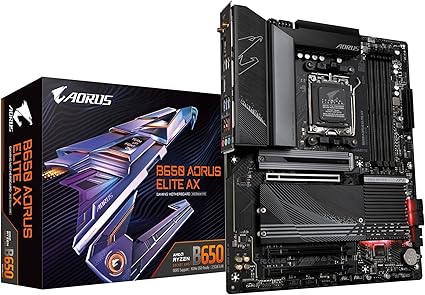
The motherboard: GIGABYTE B650 AORUS Elite AX

- AMD Socket AM5: Supports AMD Ryzen 9000/Ryzen 8000/Ryzen 7000 Series Processors
- DDR5 Compatible: 4*DIMMs with AMD EXPO & Intel XMP Memory Module Support
- Commanding Power Design: Twin 14+2+1 Phases with 70A Power Stage Digital VRM Solution, 8-Layer 2X Copper PCB
Five percent of the build, 1,560 ratings, and a 14+2+1 power phase design, which is the specification that actually matters when you are feeding an unlocked 8-core processor. It has PCIe 5.0 M.2, DDR5, WiFi 6E and 2.5 Gb Ethernet.
B650 rather than X870 is deliberate. The premium chipsets add PCIe lanes and connectivity that a single graphics card and a single drive will never use, and that money is better spent on the memory. Our best gaming motherboards 2026 guide makes the same argument at every budget: buy the chipset your parts need, not the one at the top of the range.
- 14+2+1 power phases, ample for an 8-core Ryzen
- 1,560 ratings, a deep sample for an AM5 board at this price
- WiFi 6E, 2.5 Gb Ethernet and PCIe 5.0 M.2 included
- Spare M.2 slot for the storage upgrade you will eventually want
- 4.4 stars is the lowest rating in this build
- B650 gives up some PCIe lanes against X670 or X870
- ATX, so it needs a full-size case
The power supply: CORSAIR RM750e
- Fully Modular PSU: Reliable and efficient, low-noise power supply with fully modular cabling, so you only have to connec…
- Intel ATX 3.1 Certified: Compliant with the ATX 3.1 power standard, supporting PCIe 5.1 platform withstands 2x transient…
- Keeps Quiet: A 120mm rifle bearing fan with a specially calculated fan curve keeps fan noise down, even when operating a…
This is the top pick from our power supply guide and it is here for the reason that guide gives: it is ATX 3.1, fully modular, and the 12V-2×6 cable is in the box rather than sold separately.
Seven hundred and fifty watts will look low to anyone who assumes an expensive build needs a four-figure power supply. It does not. Size the unit from the graphics card, and ASUS rates the RX 9070 XT above for a 750W system, which is exactly this. A larger unit would deliver nothing here except a supply running further from its efficient load point.
- Our overall pick in a guide covering eight power supplies
- 12V-2×6 cable included, not an adapter
- Fully modular, so only the cables you need go in the case
- 105 degree C rated capacitors
- 750W leaves less headroom if you later fit a much larger card
- Cybenetics Gold rather than 80 Plus Gold, which buyers conflate
- 476 ratings is moderate next to the rest of this build
The case: MONTECH XR Panoramic
- Turn Your Gaming Rig Into a Showcase – Panoramic front and side tempered-glass panels keep the GPU, cooling and lighting…
- Keep the Best Side in View – 2 side-mounted reverse-blade ARGB PWM fans present their illuminated faces toward the inter…
- Fit High-End Hardware With Confidence – This ATX PC case has 420 mm GPU clearance to fit compatible large graphics cards…
Three percent of the budget for one of the highest-rated cases in our best PC cases 2026 guide, at 4.7 stars from 780 ratings. Three ARGB PWM fans are included, it takes a 360mm radiator, and it has USB-C and magnetic dust filters.
The specific reason it is here rather than a prettier case is 420mm of graphics card clearance, published in the listing. It is the only case among our eight picks that states the figure at all, and with a 2.5-slot triple-fan card going in, guessing is not an option.
- Publishes 420mm GPU clearance, which nothing else in our guide does
- 4.7 stars from 780 ratings, among the highest-rated in our case guide
- Three ARGB PWM fans included at $69.90
- Magnetic dust filters and USB-C front I/O
- Three fans in a chassis that holds nine, so add more if you want
- Panoramic glass restricts intake slightly against a mesh front
- MONTECH is a smaller brand than NZXT or Corsair
The cooler: Thermalright Peerless Assassin 120 SE
- [Brand Overview] Thermalright is a Taiwan brand with more than 20 years of development. It has a certain popularity in t…
- [Product specification] Thermalright PA120 SE; CPU Cooler dimensions: 125(L)x135(W)x155(H)mm (4.92×5.31×6.1 inch); heat …
- 【2 PWM Fans】TL-C12C; Standard size PWM fan:120x120x25mm (4.72×4.72×0.98 inches); fan speed (RPM):1550rpm±10%; power port…
Under two percent of a $2,303.75 machine. Six heat pipes, two 120mm PWM fans, 3,313 ratings at 4.7 stars, and it is the best-value pick in our CPU cooler guide at $34.90.
We could have fitted the Noctua NH-D15 chromax.Black, which is the highest-rated cooler in our guide and holds 4.8 stars across 13,518 ratings. At $119.95 it costs $85.05 more, and this budget would have absorbed that comfortably. We left it out anyway, because an 8-core X3D processor is not a thermal problem, and paying roughly three and a half times as much to cool it would be spending for the sake of the price tier rather than the machine.
This is the same cooler our $2,000 build names as the first upgrade it would make. That is not an oversight, it is the finding: cooling is the one component that does not scale with budget.
- 3,313 ratings at 4.7 stars for $34.90
- Six heat pipes and dual fans, genuinely competitive with far dearer coolers
- Lists AM5 explicitly, along with current Intel sockets
- Leaves $85.05 in the budget for parts that benefit more
- A large dual tower, so check clearance against tall memory
- Mounting hardware is fiddlier than premium brands
- No lighting, on a build with an RGB memory kit and ARGB fans
Where the money goes
The memory costs more than the processor
$549.99 against $339.00. A difference of $210.99, in favor of the memory. If you have not bought PC parts in a couple of years, that sentence should stop you, because it inverts the order things have been in for as long as most people have been building.
It is not a quirk of this particular kit. The cheapest 32GB DDR5 kits our searches returned were $469.99, and they ran to $619.99. There is no configuration of this build at this budget where memory is a minor line item.
What it means practically is that memory is now a tier decision rather than a checkbox. At $1,000 you take DDR4 and get dual channel cheaply. At $2,000 you are forced to choose between 32GB of system memory and 16GB of video memory, and our $2,000 build chose the video memory and ran a single stick. At $3,000 the choice finally goes away. That is most of what the extra money over the $2,000 machine actually buys.
Why 1TB and not 2TB
This is the trade we made and we would rather explain it than hide it. A Samsung 990 PRO in 2TB costs $150.00 more than the 1TB we specified, and other 2TB drives of similar class start around $339.99.
Spending that would have meant either dropping to a CL36 memory kit, which contradicts our own storage and memory guidance, or taking a cheaper graphics card. Neither is a good trade, because storage is the one component in this list you can add to later without replacing anything. The motherboard has spare M.2 slots. Memory and graphics do not work that way.
Be clear-eyed about what 1TB means though. A single large title can occupy 150GB, so with Windows installed you are realistically holding six or seven of them. If you keep a big library installed, buy the 2TB drive and take the money from somewhere else, or add a second drive in six months.
How it compares to our $2,000 and $1,000 builds
The three machines now form a straight line, and the memory column is the interesting one.
| Build | Total | Memory | Graphics | Target |
|---|---|---|---|---|
| $1,000 build | Under $1,000 | 16GB DDR4 dual channel, $112.97 | RTX 3050 6GB | 1080p |
| $2,000 build | Under $2,000 | 16GB DDR5 single stick, $244.99 | RTX 5060 Ti 16GB | 1440p |
| This build | $2,303.75 | 32GB DDR5 dual channel CL30, $549.99 | RX 9070 XT 16GB | 1440p and entry 4K |
Note the middle row. The $2,000 machine is the only one of the three running single-channel memory, and it is not because we were careless with it. At that budget a matched DDR5 pair costs more than the difference between two graphics card tiers, so it loses memory bandwidth to keep 16GB of video memory. The $1,000 machine avoids the problem entirely by using DDR4, where a matched pair is $112.97.
This build is the first point at which you stop choosing. That, rather than raw frame rate, is the honest argument for spending $2,303.75 instead of staying under $2,000.
What we would upgrade first
1. A second storage drive, when 1TB fills. It will. The board has spare M.2 slots and this is the cheapest meaningful upgrade available to this machine.
2. Nothing else, for about three years. That is the actual answer and it is unusual for us to give it. The graphics card has 16GB of video memory, the processor is the best gaming chip AMD makes on a socket with generations left, the memory is 32GB in dual channel, and the power supply is ATX 3.1 with the modern connector. There is no obvious weak link to fix.
3. When the time comes, the graphics card. The RM750e handles a step up, the case clears 420mm, and AM5 will still be taking new processors. This build was assembled so that the first real upgrade is a long way off.
How we chose these parts
Every component was pulled from live Amazon search results, then validated individually against the retailer page for price, rating, review count and availability. All eight validated clean, which is not something we can say about every guide we have written this month.
Each part is also the pick, or a named alternative, from the corresponding guide on this site: graphics cards, processors, memory, storage, motherboards, power supplies, cases and coolers. Where this build departs from a guide’s top pick, the reason is stated on this page rather than left for you to find.
One process note, since the number invites the question. The parts here were chosen first and priced second. The list comes to $2,303.75 against a $3,000 ceiling, and that gap is deliberate. At $696.25 under the ceiling there is room for a price move on any single part without the list breaking, and room to step up the graphics card if 4K at high refresh is the goal. An earlier version of this build was written to a tighter cap, came in twenty cents under it, and a single price move broke it. A parts list that only works to the cent is a snapshot rather than a recommendation, so the ceiling now sits far enough above the total to absorb ordinary price drift. The MONTECH case stays for the reasons it was chosen: it is the higher-rated case and the only one that publishes graphics card clearance. If you are pairing this with a display, our best gaming monitors 2026 guide covers what to put in front of it, and that is a separate budget.
Frequently asked questions
Can you build a high end gaming PC for under $3,000 in 2026?
Yes, and with room to spare. This parts list comes to $2,303.75: a Ryzen 7 9700X, an RX 9070 XT 16GB, 32GB of dual-channel DDR5 at CL30, a 1TB Samsung 990 PRO, a B650 board, a 750W ATX 3.1 supply, a case and a cooler. It targets 1440p at high refresh with genuine 4K capability.
Why does the memory cost more than the processor?
Because DDR5 pricing in 2026 is extraordinary. The memory kit is $549.99 and the Ryzen 7 9700X is $339.00, a difference of $210.99. The cheapest 32GB DDR5 kits we found were $469.99 and they ran to $619.99. There is no version of this build where memory is a minor line item.
Is 32GB of RAM necessary for gaming?
For gaming alone, 16GB in dual channel is still adequate. 32GB matters if you multitask heavily, stream, or work with large files alongside games. At this budget it is worth having, and more importantly it lets you run a matched pair rather than the single stick our $2,000 build is forced into.
Why only 1TB of storage on a $3,000 build?
Because a 2TB drive of this class costs $150.00 more, and storage is the one component you can add later without replacing anything. The motherboard has spare M.2 slots. Memory and graphics cards do not work that way, so the money went there instead. If you keep a large library installed, buy 2TB.
Is the Ryzen 7 9700X enough processor for this build?
For games, yes. Eight current-generation cores is the shape games actually use, and core count beyond that matters for rendering and compilation rather than frame rates. A chip with AMD stacked 3D V-Cache would produce more frames in games for similar money, but the X3D parts we screened were not available from Amazon with Prime delivery, and a part you cannot buy is not a recommendation.
Is 750W enough power for an RX 9070 XT?
Yes. Size a power supply from the graphics card, not from the price of the build. ASUS recommends a 750W system for this card on its own specification page, and it draws through three 8-pin connectors. A larger unit would deliver nothing here except a supply running further from its efficient load point. The unit here is ATX 3.1 with the 12V-2×6 cable included.
Why is the cooler only $34.90 on a $2,303.75 build?
Because cooling is the one component that does not scale with budget. An 8-core processor is not a thermal problem, and the Thermalright Peerless Assassin 120 SE holds 4.7 stars across 3,313 ratings. The Noctua NH-D15 chromax.Black costs $85.05 more at $119.95, and the budget would have covered it, but the money buys nothing here.
Will this build handle 4K gaming?
At entry level, yes. The RX 9070 XT with 16GB of GDDR6 is a 1440p card first and a capable 4K card second. Expect high refresh at 1440p and playable 4K with upscaling in demanding titles. If 4K at high refresh is the goal, the graphics card is where the extra money has to go.
Is it worth spending $3,000 instead of $2,000 on a gaming PC?
Most of the difference buys the end of the memory compromise. Our $2,000 build runs a single 16GB DDR5 stick because a matched pair costs more than two graphics card tiers apart. This machine runs 32GB in dual channel at CL30, on a faster card, with the same upgrade path. Whether that is worth the difference depends on what you play and at what resolution.
The bottom line
This high end gaming PC build costs $2,303.75 and is built for 1440p at high refresh with genuine 4K capability. Every price was verified and every compatibility question is worked through above rather than assumed.
The thing to understand before you order is what the money actually bought. Forty-three percent went to the graphics card, which is normal. Twenty percent went to memory, which is not, and that single line is the difference between this machine and our $2,000 one. You are not buying a faster processor or a bigger drive at this tier. You are buying the end of the memory compromise.
And the advice that holds at every budget: put the money in the graphics card, buy the socket with a future, never economize on the power supply, and do not spend four times as much on a cooler as the job requires. One tier up, our guide to how to build the ultimate gaming PC pairs an RTX 5080 with a Ryzen 7 9850X3D and walks through every assembly step. If you would rather not assemble it yourself, our prebuilt gaming PC guide covers that route.
Prices and ratings on this page update automatically. Every other figure was accurate when this guide was last reviewed and carries no guarantee beyond that. Component prices move quickly, and memory prices are moving faster than most. Check each one before you buy.
Nothing portable in our laptop guide comes close to this, which is worth knowing if you are weighing one. The most expensive machine in our gaming laptop guide is $2,199.99, and it carries a mobile RTX 5070 Ti. A mobile card is not the desktop part it is named after: mobile cards run to far lower power limits than their desktop namesakes, so the name matches and the performance does not. Buy a laptop for portability, never for performance per dollar.
At this budget the parts choice matters most, which is the case for building. Our guide to prebuilt vs building your own PC explains where prebuilt makers cut costs and why it shows up years later.
Wondering whether the X3D premium belongs in this build? Our X3D vs non-X3D explainer works through when it pays and when the money does more good in the graphics card.
Gamers Tech Guide participates in the Amazon Services LLC Associates Program. As an Amazon Associate we earn from qualifying purchases.