
Eight mice that survived a hard filter: a live price with a real seller, a 4.0 star minimum with enough reviews to mean something, and a shape and weight suited to the way you actually play. The DPI number on the box was not a factor, and the guide explains why.
- Best gaming mouse for most people: the Logitech G305 at $29.99, with 40,368 ratings behind it.
- Best budget: the Redragon M602 Griffin at $29.99.
- Best for competitive FPS: the Razer Viper V3 Pro at $124.97, 55g with 8000Hz polling.
- Ignore the DPI number. These eight span 8,000 to 35,000 DPI and almost nobody plays above 1,600.
The best gaming mouse is the one whose shape and weight suit your hand, and almost every number printed on the box is competing for your attention against that fact. The mice in this guide range from 8,000 to 35,000 DPI, a spread of more than four times, and that difference will not change your aim by a single pixel. What will change it is whether the mouse weighs 36 grams or 96 grams, and whether it fits the way you hold it.
That is not a fringe opinion. Competitive players overwhelmingly play between 400 and 1,600 DPI, which every mouse on this page cleared years ago. The number kept climbing anyway, because it is easy to print and easy to compare.
We checked every price, rating and review count against Amazon product data. This was the cleanest category we have researched: every product we shortlisted returned a live price on the first attempt.
The 8 best gaming mice at a glance

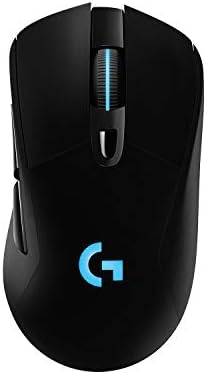
| Sensor | HERO, 12,000 DPI |
| Battery | 250 hr on 1 AA |
| Buttons | 6 programmable |
| Rating | 4.6 (40,368) |
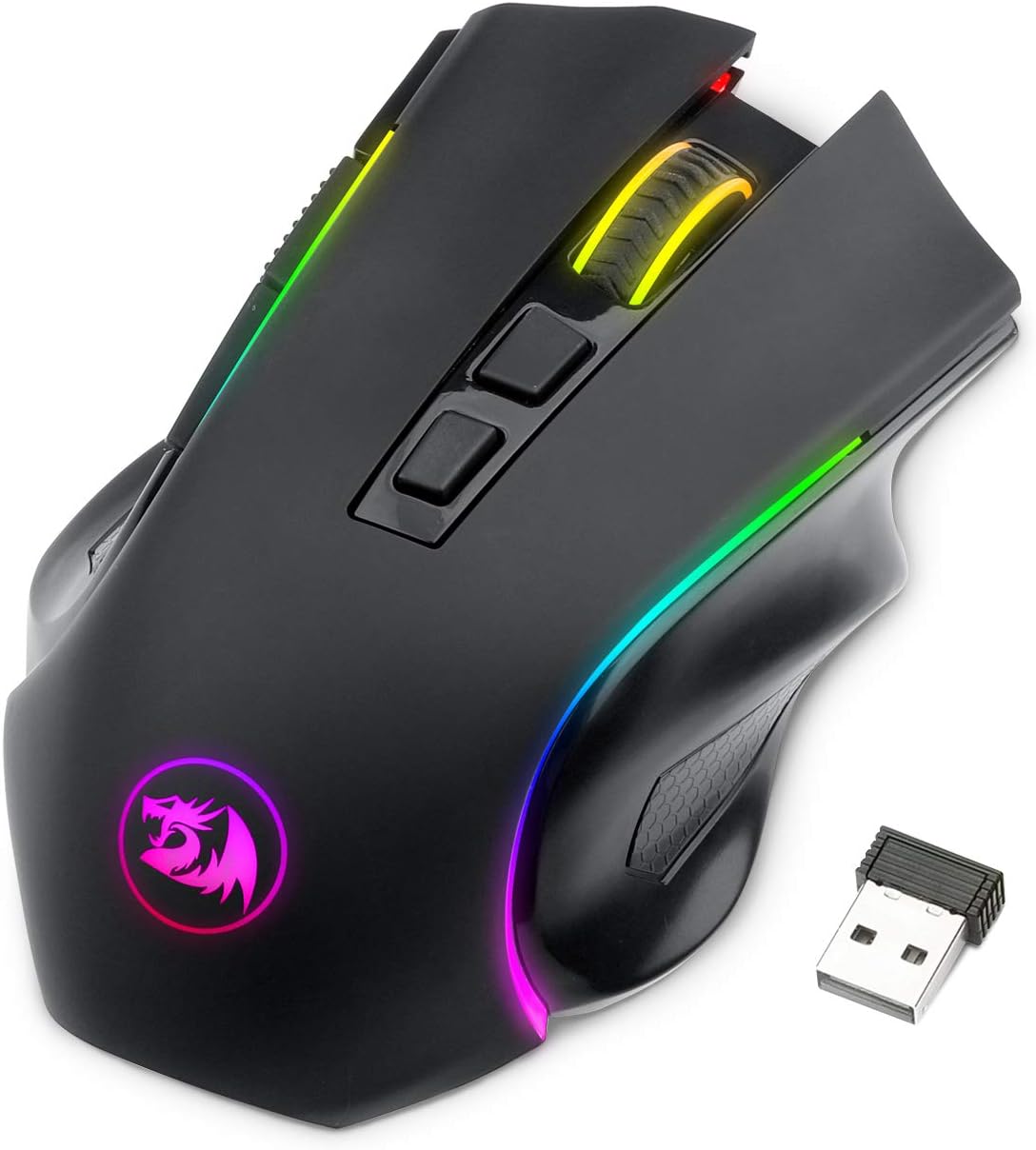
| Sensor | 250–8,000 DPI |
| Connection | 2.4G / BT / USB-C |
| Buttons | All programmable |
| Rating | 4.4 (2,091) |

| Weight | Under 60g |
| Battery | 950 hr Bluetooth |
| Sensor | 18K DPI |
| Rating | 4.4 (5,656) |
| Sensor | HERO 25K |
| Weight | 95g, +10g option |
| Charging | POWERPLAY capable |
| Rating | 4.5 (7,703) |
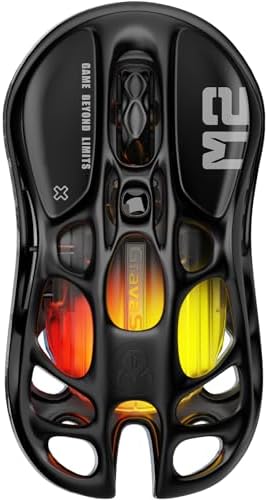
| Sensor | PAW3395DM |
| Weight | 79g |
| Polling | 1,000 Hz |
| Rating | 4.6 (2,187) |

| Sensor | HERO 25K |
| Buttons | 11 programmable |
| Weights | Adjustable |
| Rating | 4.6 (13,679) |

| Weight | 36g |
| Polling | 8,000 Hz |
| Sensor | MARKSMAN S |
| Rating | 4.2 (308) |

| Weight | 55g |
| Polling | 8,000 Hz |
| Battery | 95 hours |
| Rating | 4.6 (2,285) |
How we chose these eight
Every candidate needed a live price from a real seller, a 4.0 star minimum, and enough reviews for that rating to carry weight.
This category loaded more cleanly than any other we have researched. Twelve products were validated and twelve returned a live price. For comparison, our headset guide lost six of seventeen at the same stage. Mice listings are stable in a way headset listings are not, which is worth knowing if you are cross-shopping.
We also ranked on weight, shape and switch quality rather than on DPI, for the reason below.
Why the DPI number on the box does not matter
DPI, or dots per inch, is how far the cursor travels for a given movement of your hand. Higher DPI means the cursor moves further for the same physical motion. That is all it means.
The mice in this guide advertise 8,000, 12,000, 18,000, 25,600, 26,000, 33,000 and 35,000 DPI. Competitive players overwhelmingly play somewhere between 400 and 1,600, because at higher settings a small hand tremor becomes a large cursor movement and precise aim becomes impossible. Every mouse here passed the point of usefulness several generations ago.
Look at the budget pick to see it plainly. The Redragon M602 Griffin adjusts from 250 up to 8,000 DPI. Its top setting is a number nobody will select. The bottom of that range is where people actually play. A mouse advertising 35,000 DPI has the same relationship to a 1,600 DPI player as a car with a 200mph speedometer has to a commute.
What actually separates these mice is weight, shape, switch feel, sensor consistency at normal settings, battery, and button count. Those are the things this guide ranks on, and they are the things you will notice within an hour of using one.
Weight is the specification that matters
The mice here run from 36 grams to about 96 grams, a difference of more than two and a half times, and unlike DPI you feel it constantly.
A lighter mouse is easier to flick, easier to stop precisely, and less tiring across a long session. That is why competitive shooters have driven the whole market downward in weight, and why our FPS picks are the two lightest. Below roughly 60 grams the mouse essentially stops resisting you.
Lighter is not automatically better, though, and this is where a lot of advice goes wrong. A heavier mouse is steadier for slow, deliberate tracking, which suits strategy games and creative work, and some people simply prefer the planted feel. The Logitech G703 ships at 95 grams and includes an optional 10 gram weight, which tells you the manufacturer expects some buyers to want it heavier still.
Match the weight to the game. Fast shooters reward light. Slower, precision-heavy games and long working days often reward heft.
If you are still assembling the desk around it, our best gaming keyboards guide and best gaming headsets guide cover the other two peripherals, and the best gaming monitors guide covers what you are aiming at.
1. Logitech G305 Lightspeed: the best gaming mouse for most people
- The next-generation optical HERO sensor delivers incredible performance and up to 10x the power efficiency over previous…
- Ultra-fast LIGHTSPEED wireless technology gives you a lag-free gaming experience, delivering incredible responsiveness a…
- G305 wireless mouse boasts an incredible 250 hours of continuous gameplay on just 1 AA battery; switch to Endurance mode…
HERO sensor, 12,000 DPI, six programmable buttons, $29.99, 4.6 stars from 40,368 ratings. That is an unusually deep owner sample for a peripheral at this price.
Everything here is chosen well rather than chosen large. The HERO sensor delivers 400+ IPS tracking with up to ten times the power efficiency of the generation before it, and LIGHTSPEED wireless gives a 1ms report rate that is indistinguishable from wired in play. Six programmable buttons and on-board memory mean your settings travel with the mouse to another machine.
The battery arrangement is the quietly brilliant part. It runs on a single AA battery for up to 250 hours, with an endurance mode in Logitech G HUB that extends it further. No charging cable, no dock, no dead mouse in the middle of a session: when it eventually stops, you put in a new AA and carry on. It weighs 3.4 ounces, roughly 96 grams, with the battery in.
Thirty nine thousand ratings at 4.6 stars is the kind of evidence no specification sheet can manufacture. This mouse has been on sale long enough for the verdict to be settled.
- 40,368 ratings at 4.6, the deepest evidence in this guide
- 250 hours on one AA battery, no charging at all
- HERO sensor and 1ms LIGHTSPEED wireless at a budget price
- On-board memory carries settings between machines
- About 96g, one of the heavier mice here
- No RGB and no rechargeable cell
- Six buttons, fewer than the MMO pick
2. Redragon M602 Griffin: the budget pick

- 【𝐅𝐮𝐥𝐥𝐲 𝐏𝐫𝐨𝐠𝐫𝐚𝐦𝐦𝐚𝐛𝐥𝐞 𝐆𝐚𝐦𝐢𝐧𝐠 𝐌𝐨𝐮𝐬𝐞】- Redragon Wireless Gaming Mouse All buttons can be programmed with the driver and supp…
- 【𝐄𝐧𝐡𝐚𝐧𝐜𝐞 𝐘𝐨𝐮𝐫 𝐆𝐚𝐦𝐢𝐧𝐠 𝐈𝐦𝐦𝐞𝐫𝐬𝐢𝐨𝐧】UP to 9 RGB light effects can be chosen, you also can adjust backlit effects with 16.8 mi…
- 【𝟑-𝐌𝐨𝐝𝐞 𝐂𝐨𝐧𝐧𝐞𝐜𝐭𝐢𝐨𝐧】Type-C Wired, Bluetooth and 2.4GHz 3 connectivity modes can easily and seamlessly connect with device…
Tri-mode wireless, DPI adjustable from 250 to 8,000, $29.99, 4.4 stars from 2,091 ratings. Better specified than the price suggests.
Three connection modes is unusual at this price: 2.4GHz for gaming, Bluetooth, and USB-C wired, so it moves between a laptop and a desktop rather than just being cheap.
Every button is programmable through Redragon’s driver with macro support, the sensor runs from 250 to 8,000 DPI, and the polling rate steps through 125, 250, 500 and 1,000 Hz. The RGB is configurable if you want it, with nine effects, and it recharges rather than running on a cell: 70 hours with the lighting off, 35 with it on.
Set expectations correctly. At $29.99 you are getting competent sensor performance and a usable shape, not the switch quality or the sensor consistency of the picks four times its price. What you are not sacrificing is the thing that matters most at this level, which is a real 2.4GHz connection rather than Bluetooth alone.
- A genuine 2.4GHz mode at a budget price
- Three connection modes, including USB-C wired
- Every button programmable, with macro support
- 2,091 ratings, a real sample for a budget product
- Switch and build quality reflect the price
- Neither the weight nor the shell material is published
- The configuration driver is Windows only
3. Razer Orochi V2: the best battery life and the best travel mouse
- OUTLAST THE COMPETITION – Up to 950 hours of battery life on Bluetooth and up to 425 hours on Razer HyperSpeed Wireless …
- PLAY FASTER WITH LOW-LATENCY WIRELESS – Dual wireless connectivity gives you efficient Bluetooth for everyday productivi…
- LAND EVERY SHOT WITH PIXEL-PRECISE ACCURACY – Razer 5G Advanced 18K DPI Optical Sensor delivers responsive tracking with…
Under 60 grams, 18K DPI, Bluetooth and 2.4GHz, $39.99, 4.4 stars from 5,656 ratings.
The battery figure is the headline and it is genuinely absurd in the best way: up to 950 hours on Bluetooth and up to 425 hours on Razer HyperSpeed wireless. Like the G305 it runs on a replaceable cell, taking either an AA or a AAA depending on whether you want more runtime or less weight. That choice is a nice piece of design: the same mouse can be the lighter one or the longer-lasting one.
At under 60 grams it is among the lighter mice here despite the battery, with an ambidextrous shape that suits either hand and a small footprint built for a bag. Razer’s second generation mechanical switches use gold-plated contacts for click consistency.
The compromise is size. This is a small, portable mouse, and if you have large hands or use a palm grip it will feel cramped over a long session. For a laptop bag, a second desk, or anyone with smaller hands, it is close to ideal.
- Up to 950 hours on Bluetooth, the longest battery in this guide by far
- Under 60g, and takes AA or AAA so you choose weight or runtime
- Ambidextrous, small and genuinely portable
- 5,656 ratings
- Small shape is cramped for large hands or a palm grip
- 4.4 stars, at the lower end here
- 1,000 Hz polling rather than the 8,000 Hz of the FPS picks
4. Logitech G703 Lightspeed: the best value and the most comfortable
- HERO 25K Sensor: our most advanced, with 1:1 tracking, 400+ IPS, and 100-25,600 max DPI sensitivity — plus zero smoothin…
- LIGHTSPEED Wireless: pro-level responsiveness and connectivity for long lasting, high performance gameplay — with a weig…
- POWERPLAY wireless charging: Never worry about your battery life again. Add the POWERPLAY wireless charging system to ke…
HERO 25K sensor, 95 grams with an optional 10 gram weight, $55.99, 4.5 stars from 7,703 ratings.
The HERO 25K tracks at 400+ IPS across 100 to 25,600 DPI with zero smoothing, filtering or acceleration, which is the specification that actually matters: the cursor goes exactly where your hand went, with nothing interpreting in between. LIGHTSPEED wireless handles the connection.
This is the comfortable one. A contoured right-handed shape with rubber side grips, sized for a palm or claw grip, and at 95 grams it sits deliberately at the heavier end. The optional 10 gram weight is there for people who want it heavier still, which is the opposite of where the market has gone and exactly right for anyone who prefers a planted feel.
It is also POWERPLAY compatible, meaning it charges continuously from a compatible mouse mat and never needs plugging in. That system costs extra and is worth knowing about rather than assuming.
- HERO 25K with zero smoothing, filtering or acceleration
- 7,703 ratings at 4.5 stars
- Comfortable contoured shape with rubber side grips
- Optional 10g weight and POWERPLAY continuous charging
- 95g is heavy next to the FPS picks here
- Right-handed shape only
- POWERPLAY charging requires buying the mat separately
5. GravaStar Mercury M2: the best looking mouse here
- Precision in Play: 1K Hz Polling Rate for Sharp Accuracy -Equipped with a 1K Hz polling rate and 26,000 DPI, the M2 capt…
- Experience the unique blend of style and practicality with the M2’s hollowed-out design. This creative approach not only…
- With the TUROSPEED Wireless technology, the M2 offers versatile connection options – from the ultra-fast 2.4G to the agi…
PAW3395DM sensor, 79 grams, five programmable buttons, $79.95, 4.6 stars from 2,187 ratings.
The PAW3395 family is a genuinely respected sensor, used across a lot of enthusiast mice, so the tracking here is not a compromise made for the sake of appearance. The hollowed-out shell brings it to 79 grams, mid-weight for this guide, and TUROSPEED handles 2.4GHz, Bluetooth and wired.
The reason to buy it is the way it looks, and there is nothing wrong with that. The exposed skeletal construction and five-mode GLOWSYNC RGB make it the most distinctive object on this page, and on a desk built to be looked at that counts for something real.
One specification to be clear about: polling is 1,000 Hz, not the 8,000 Hz of the Corsair and Razer picks that cost similar money. For the overwhelming majority of players that is irrelevant, since 1,000 Hz has been the competitive standard for years. If you are specifically shopping for 8,000 Hz, this is not the one.
- PAW3395DM, a well regarded enthusiast sensor
- Genuinely distinctive skeletal design
- 2,187 ratings at 4.6 stars
- 2.4GHz, Bluetooth and wired
- 1,000 Hz polling where similarly priced rivals offer 8,000 Hz
- 79g is mid-weight, not light
- You are paying something for the styling
6. Logitech G502 Lightspeed: the best mouse for MMO and heavy keybinds
- PowerPlay wireless charging: Never worry about your battery life again. Add the power play wireless charging system to k…
- Light speed wireless gaming mouse: Exclusive Logitech G ultra-fast wireless technology used by Pro gamers in competition…
- Hero 25K sensor through a software update from G HUB, this upgrade is free to all players: Our most advanced, with 1:1 t…
HERO 25K sensor, 11 programmable buttons, adjustable weights. 4.6 stars from 13,679 ratings.
Eleven buttons is the entire argument. For MMO, MOBA or any game where you are managing a dozen abilities, moving them off the keyboard and onto the mouse is a genuine change in how you play, not a novelty. Each is assignable to a macro or shortcut per game through G HUB.
The hyper-fast scroll wheel is the other signature feature: it unlocks to spin freely, so a long document or inventory scrolls in one flick and then re-engages with a click for precise notching. Combined with adjustable physical weights and POWERPLAY charging support, this is the most configurable mouse here.
It is a large, heavy, right-handed mouse and it does not pretend otherwise. If you play competitive shooters, the two lightest picks in this guide will serve you better. If you play anything with an ability bar, nothing else here comes close.
- 11 programmable buttons, by far the most here
- 13,679 ratings at 4.6 stars
- Hyper-fast free-spinning scroll wheel
- Adjustable weights and POWERPLAY support
- Large and heavy, poorly suited to competitive FPS
- Right-handed only
- Eleven buttons is clutter if you will not use them
7. Corsair Sabre v2 PRO: the lightest mouse in this guide
- Ultralight 36g design: Built from the ground up for elite FPS players, the 36g design delivers maximum agility and contr…
- Maximize every millisecond: 8,000Hz hyper-polling for latency-defying input delivery up to eight times faster than stand…
- Phenomenal precision: Equipped with CORSAIR’s MARKSMAN S sensor for true 33,000 DPI tracking, 750 IPS speed, and 50G acc…
36 grams, MARKSMAN S sensor, 8,000 Hz polling, $69.99, 4.2 stars from 308 ratings.
Thirty six grams is the number worth pausing on. That is roughly a third of the weight of the G305 and lighter than anything else on this page by a clear margin. At that weight the mouse effectively disappears: flicks require almost no force and stopping precisely takes almost no effort. For rapid target switching in a shooter, that is the single largest hardware advantage available.
The rest matches: 8,000 Hz hyper-polling reports position eight times more often than the 1,000 Hz standard, the MARKSMAN S sensor tracks at 750 IPS and 50G acceleration, and Corsair uses custom-tuned tactile mechanical switches rather than optical. Battery runs up to 70 hours.
Two honest caveats. 308 ratings is the thinnest sample in this guide, on a recent product, so you have far less owner evidence than on the Logitech picks. And an ultralight shell is a preference, not an upgrade: some people find this little mass unsettling and want something to push against.
- 36g, lighter than anything else here by a wide margin
- 8,000 Hz polling and a 750 IPS sensor
- Tactile mechanical switches rather than optical
- 70 hour battery despite the weight
- 308 ratings, the thinnest evidence in this guide
- Ultralight is divisive, not universally better
- No Bluetooth mode
8. Razer Viper V3 Pro: the best mouse for competitive FPS
- 55 G ULTRA LIGHTWEIGHT DESIGN — Designed in collaboration with world-class esports pros, the Viper V3 Pro’s perfectly ba…
- FOCUS PRO 35K OPTICAL SENSOR GEN-2 — Experience pro grade tracking performance on a wider variety of surfaces including …
- 8000 Hz HYPERPOLLING TECHNOLOGY — By combining Razer HyperPolling with the ultra smooth connection of Razer HyperSpeed, …
55 grams, Focus Pro 35K Gen-2 sensor, 8,000 Hz polling, $124.97, 4.6 stars from 2,285 ratings. The most expensive mouse here and the one esports players actually use.
The shape was developed with professional players and it shows in the balance: at 55 grams it is light enough to move effortlessly while retaining enough mass to feel controlled, which is a different and arguably better answer than the Corsair’s 36 grams. Eight programmable controls, Gen3 optical switches, and 95 hours of battery, which is remarkable for an 8,000 Hz mouse.
The sensor detail worth knowing is that the Focus Pro Gen-2 tracks on a wider range of surfaces including glass, which removes the mouse mat from the equation entirely if your desk is glass or unusual.
On the 35K DPI figure: it is real and it is irrelevant, for all the reasons at the top of this page. You are buying this mouse for the weight, the shape, the switches and the 8,000 Hz connection, and those are worth the money if you play competitively. If you do not, the G305 delivers most of the practical experience for a quarter of the price.
- 55g with a shape developed alongside professional players
- 8,000 Hz polling with 95 hours of battery
- Tracks on glass and unusual surfaces
- 4.6 stars from 2,285 ratings
- The most expensive mouse here by a clear margin
- Only 8 programmable controls, few for non-FPS games
- The headline 35K DPI is marketing rather than benefit
Compared side by side
| Mouse | Weight | Sensor | Polling | Buttons | Price | Rating | Best for |
|---|---|---|---|---|---|---|---|
| Logitech G305 | ~96g | HERO 12K | 1,000 Hz | 6 | $29.99 | 4.6 (40,368) | Best overall |
| Redragon M602 Griffin | Not stated | 250–8,000 DPI | 1,000 Hz | All prog. | $29.99 | 4.4 (2,091) | Best budget |
| Razer Orochi V2 | Under 60g | 18K DPI | 1,000 Hz | 6 | $39.99 | 4.4 (5,656) | Best battery |
| Logitech G703 | 95g +10g | HERO 25K | 1,000 Hz | 6 | $55.99 | 4.5 (7,703) | Best value |
| GravaStar Mercury M2 | 79g | PAW3395DM | 1,000 Hz | 5 | $79.95 | 4.6 (2,187) | Best design |
| Logitech G502 | Adjustable | HERO 25K | 1,000 Hz | 11 | Check price | 4.6 (13,679) | Best for MMO |
| Corsair Sabre v2 PRO | 36g | MARKSMAN S | 8,000 Hz | 6 | $69.99 | 4.2 (308) | Lightest |
| Razer Viper V3 Pro | 55g | Focus Pro 35K | 8,000 Hz | 8 | $124.97 | 4.6 (2,285) | Best for FPS |
Grip style: the thing nobody checks and everybody feels
How you hold a mouse determines which shapes suit you, and it is more useful than any specification for narrowing the field.
Palm grip rests your whole hand on the mouse, with the base of your palm in contact. It is the most relaxed and the most common, it suits larger contoured shapes, and it favors arm movement over wrist. The G703 and G502 are built for it.
Claw grip arches your fingers so only the fingertips and the rear of the palm touch. It gives faster clicks and quicker small adjustments, and suits medium mice with a pronounced hump.
Fingertip grip touches the mouse with fingertips alone, with the palm lifted entirely. It is the fastest and the most tiring, it rewards very light mice, and it is why the Corsair at 36 grams and the Orochi at under 60 exist.
Hand size matters as much as grip. The Orochi V2 is deliberately small, which is excellent for smaller hands and cramped for larger ones. There is no correct answer, only a fit, and it is worth knowing yours before spending a hundred dollars on a shape somebody else liked.
What we left out, and why
Mouse pads, grip tape and accessories
Filtered at the search stage. This category has a specific complication: a mouse pad listing contains the word “mouse”, so a keyword filter alone cannot separate them. We required a mouse-specific specification such as a DPI figure or a named sensor, which pads do not carry.
Anything below 4.0 stars
Applied before any other consideration, as in every guide we publish.
Refurbished and renewed listings
Excluded as standard. Switch wear is the most common failure in a mouse and it is exactly what a refurbished listing cannot certify.
Nothing was lost to pricing
Worth recording because it is unusual. Twelve products were put through our final price check and twelve passed. In our headset guide six of seventeen failed the same test. Mice listings appear to be considerably more stable.
Frequently asked questions
What is the best gaming mouse in 2026?
The Logitech G305 Lightspeed for most people. It holds more owner ratings than any other product we recommend, uses Logitech’s HERO sensor with 1ms LIGHTSPEED wireless, and runs 250 hours on a single AA battery. For competitive shooters the Razer Viper V3 Pro at 55g with 8,000Hz polling is the stronger choice, and the Corsair Sabre v2 PRO is lighter still at 36g.
Does DPI actually matter on a gaming mouse?
Far less than the marketing suggests. DPI sets how far the cursor travels for a given hand movement, and competitive players overwhelmingly play between 400 and 1,600 DPI because higher settings turn small hand tremors into large cursor jumps. The mice in this guide advertise between 8,000 and 35,000 DPI, all of which passed the useful threshold years ago. Weight, shape and switch quality matter much more.
How much should a gaming mouse weigh?
It depends on what you play. Under about 60 grams suits fast shooters, because a light mouse is easier to flick and stop precisely and less tiring over long sessions. Heavier mice around 90 to 100 grams are steadier for slow deliberate tracking and suit strategy games and desk work. Lighter is not automatically better; the Logitech G703 even ships with an optional 10 gram weight for people who want more heft.
Is a wireless gaming mouse as good as wired?
For gaming, yes, provided it uses 2.4GHz rather than Bluetooth alone. Modern 2.4GHz implementations report at 1ms and are indistinguishable from wired in play, which is why every mouse in this guide is wireless. Bluetooth carries noticeably more delay and should be treated as a convenience mode for laptops and travel rather than a gaming connection.
What is polling rate and do I need 8000Hz?
Polling rate is how many times per second the mouse reports its position. 1,000 Hz has been the competitive standard for years and is what most of these mice use. 8,000 Hz reports eight times more often, which reduces input latency by a fraction of a millisecond. It is a genuine improvement and a very small one, worth paying for only if you play competitively.
How do I know which grip style I use?
Palm grip rests your whole hand on the mouse including the base of your palm, and suits larger contoured shapes. Claw grip arches the fingers so only fingertips and the rear palm touch. Fingertip grip lifts the palm entirely and uses only fingertips, which rewards very light mice. Watch your hand for a minute while playing, then match the shape and weight to what you find.
How many buttons does a gaming mouse need?
Six is plenty for shooters, where extra buttons mostly add clutter. Games with large ability bars are different: the Logitech G502 in this guide has 11 programmable buttons, and for MMO or MOBA play moving abilities off the keyboard onto the mouse genuinely changes how you play. Buy the button count your games actually use.
Are replaceable AA batteries better than rechargeable?
They have real advantages. The Logitech G305 runs 250 hours on one AA and the Razer Orochi V2 up to 950 hours on Bluetooth, and neither can ever be caught flat mid-session since you simply swap the cell. The trade is added weight and the ongoing cost of batteries. Rechargeable mice are lighter and cheaper to run but need planning around charge cycles.
Do I need an expensive gaming mouse?
No. Our top pick is one of the cheapest here and has more owner evidence than the rest combined. Spending more buys lower weight, higher polling rates, better switches and more refined shapes, all of which are real but incremental. If you play competitively those margins are worth paying for. If you do not, a well built budget mouse with a good sensor covers almost everything.
The bottom line
The Logitech G305 Lightspeed at $29.99 is the best gaming mouse for most people. A HERO sensor, 1ms wireless, 250 hours on a single AA, and 40,368 owner ratings, which is a deep body of owner evidence.
On a budget the Redragon M602 Griffin at $29.99 gets you genuine tri-mode wireless for less. For competitive shooters the Razer Viper V3 Pro at $124.97 is the one professionals use, or the Corsair Sabre v2 PRO at $69.99 if you want the absolute lowest weight. For MMO players the Logitech G502 and its 11 buttons is not close to being matched here.
If the machine behind the mouse is still being decided, our prebuilt gaming PC guide and graphics card guide cover what actually produces the frames you are aiming at. A mouse cannot help you hit something the machine has not drawn yet.
And the advice most likely to save you money: ignore the DPI figure entirely and buy the shape and weight that fit your hand. Every mouse on this page has a sensor far beyond what any human can use. The number on the box is the easiest specification to print and the least useful one to compare.
Prices and ratings on this page update automatically. Every other figure was accurate when this guide was last reviewed and carries no guarantee beyond that. Check the current price before you buy.
Aim is steadier when your posture is. Our best gaming chairs guide compares six chairs on capacity, recline and adjustment.
Building the machine behind the mouse? Our $2,000 gaming PC build is a complete parts list with every price checked.
A sensor does not care what it is plugged into. Pairing a cheap mouse with a carefully costed machine is the wrong economy, and our budget gaming PC build reaches about $930 for the tower specifically so the peripherals do not have to be an afterthought.
This applies double if you game on a laptop. Nobody plays competitively on a trackpad, and a mouse from this page costs a fraction of any machine in our gaming laptop guide. It is the first thing to buy alongside one and the cheapest meaningful upgrade available.
Some games are simply better on a pad, and the two live happily side by side on one desk. Our gaming controller guide covers eight from $34.68 to $199.00, including the two with magnetic sticks that do not develop drift, which is the failure that ends most controllers.
If your setup is heard as well as seen, the microphone matters more than the mouse. Our gaming microphone guide compares eight from $40 to $169.
Gamers Tech Guide participates in the Amazon Services LLC Associates Program. As an Amazon Associate we earn from qualifying purchases.