
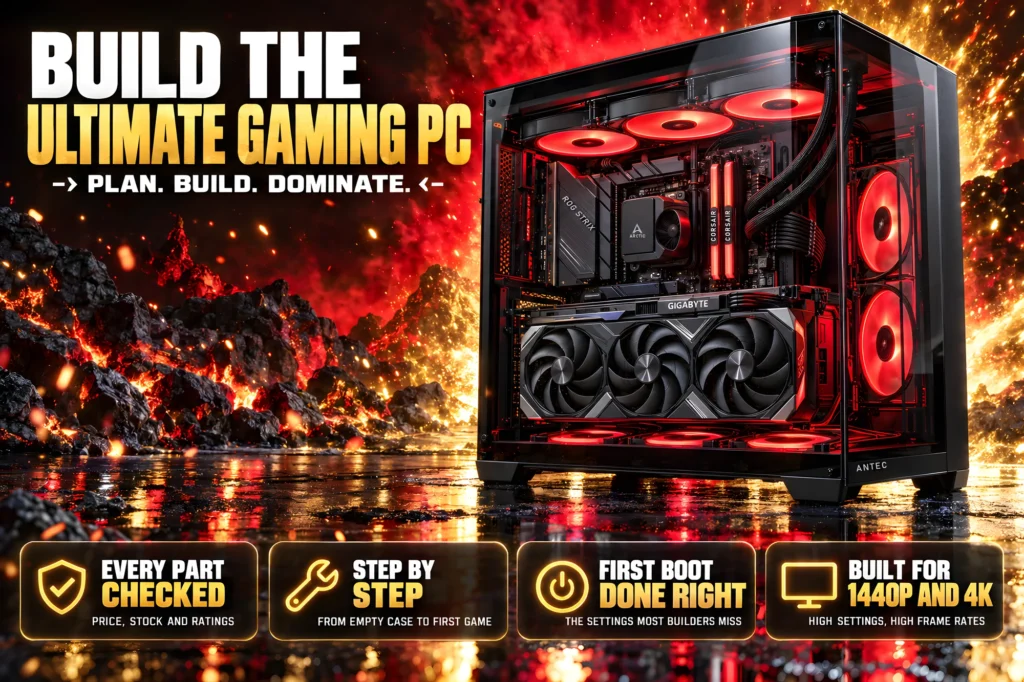
The fastest gaming processor, the fastest graphics card you can buy cleanly, and every step from the empty case to your first game.
- The heart of it: a Ryzen 7 9850X3D and an RTX 5080.
- The cost: about $3,800 for the parts, around $4,000 with Windows and tools.
- The time: an afternoon for the build, an evening for Windows, drivers and settings.
- The step most guides skip: the first-boot checklist that turns on the memory speed and the security settings new games demand.
How to build the ultimate gaming PC comes down to two choices and an afternoon of careful work. The two choices are the processor and the graphics card: here, AMD’s Ryzen 7 9850X3D and NVIDIA’s GeForce RTX 5080. Everything else in the build exists to feed those two parts power, keep them cool and give them room.
This guide gives you all of it in one place: a complete parts list where every product was checked on its own Amazon listing for price, stock, Prime delivery and owner ratings; the reasons behind each pick; every step of the build in order; and the first-boot checklist that most build guides leave out, which is where a new PC actually becomes fast. If you want a cheaper tier, our high-end gaming PC build under $3,000 is one step down.
The ultimate gaming PC parts list
This 9850X3D 5080 build uses nine parts. Prices update from Amazon, so the total moves a little day to day; at the time of writing it comes to about $3,800 before Windows.
| Part | Pick | Price |
|---|---|---|
| CPU | AMD Ryzen 7 9850X3D | $476.98 |
| Graphics card | GIGABYTE RTX 5080 Gaming OC 16G | $1,653.99 |
| Motherboard | ASUS ROG Strix X870E-E Gaming WiFi | $399.99 |
| Memory | Corsair Vengeance RGB 32GB (2 x 16GB) DDR5-6000 CL30 | $549.99 |
| Storage | Samsung 9100 PRO 2TB PCIe 5.0 | $399.99 |
| Power supply | NZXT C1000 Gold, 1000W, ATX 3.1 | $124.99 |
| Case | Antec C8 Full-Tower | $99.99 |
| CPU cooler | ARCTIC Liquid Freezer III Pro 360 A-RGB | $76.99 |
| Case fans | ARCTIC P12, 5 pack | $23.99 |

| Cores | 8C / 16T |
| L3 cache | 96MB |
| Socket | AM5 |
| Rating | 4.8 (479) |

| Memory | 16GB GDDR7 |
| Fans | 3 |
| Power | 12V-2×6 |
| Rating | 4.6 (187) |

| Chipset | X870E |
| M.2 | 5 (3 PCIe 5.0) |
| Wi-Fi | Wi-Fi 7 |
| Rating | 4.4 (628) |

| Kit | 2 x 16GB |
| Speed | 6000 CL30 |
| Profile | AMD EXPO |
| Rating | 4.7 (4,299) |

| Interface | PCIe 5.0 x4 |
| Read | 14,700 MB/s |
| Capacity | 2TB |
| Rating | 4.7 (1,862) |

| Standard | ATX 3.1 |
| Rating | 80 PLUS Gold |
| GPU cable | 12V-2×6 |
| Rating | 4.6 (321) |

| Size | Full tower, E-ATX |
| GPU length | Up to 440mm |
| Fans | Not included |
| Rating | 4.8 (458) |

| Radiator | 360mm |
| Fans | 3 x P12 PRO |
| Extra | VRM fan |
| Rating | 4.5 (2,014) |

| Size | 120mm |
| Count | 5 |
| Max speed | 1800 RPM |
| Rating | 4.6 (3,360) |
Add Windows 11 Home ($119.99), a 64GB USB stick to install it from, a precision screwdriver set and, if you ever remove the cooler, a tube of ARCTIC MX-4 thermal paste. That brings the whole project to around $4,000.
Why these parts make the ultimate gaming PC
Processor: AMD Ryzen 7 9850X3D

For gaming, the fastest processors are AMD’s X3D chips, which stack extra cache on top of the cores. The 9850X3D carries eight Zen 5 cores, sixteen threads, 96MB of L3 cache and a boost clock of up to 5.6GHz on the AM5 socket, at $476.98. 4.8 stars from 479 owners. Our X3D vs non-X3D explainer covers why the cache matters so much in games.
Why not a 16-core chip for an “ultimate” build? Because games do not use the extra cores. Tom’s Hardware tested AMD’s 16-core X3D flagship as no faster than the eight-core X3D in games, so the money goes further in the graphics card. Our CPU and GPU pairing chart shows the 9850X3D is the right match for an RTX 5080 at 1080p and 1440p.
- The fastest type of gaming processor you can buy
- AM5 socket, so later chips drop into the same board
- 4.8 stars from 479 owners
- No cooler in the box; AMD recommends liquid cooling
- More than a 4K-only build strictly needs
Graphics card: GIGABYTE GeForce RTX 5080 Gaming OC

- Powered by the NVIDIA Blackwell architecture and DLSS 4
- Powered by GeForce RTX 5080
- Integrated with 16GB GDDR7 256bit memory interface
The graphics card decides how good your games look and how fast they run at 1440p and 4K, so it takes the biggest share of the budget: $1,653.99, more than 40% of the parts. This GIGABYTE model carries the RTX 5080’s 16GB of GDDR7 memory, a three-fan WINDFORCE cooler and a 12V-2×6 power connector, with an adapter and a support bracket in the box. 4.6 stars from 187 owners.
Why not the RTX 5090? We would have used one. But every RTX 5090 we found on Amazon was sold by a third-party reseller at several times NVIDIA’s $1,999 list price, with no Prime delivery, and we do not send readers to listings like that. The 5080 is the fastest card we can recommend from a clean listing. If you would rather have ASUS, the ASUS TUF Gaming RTX 5080 OC also passed our checks at $1,817.42. Our best graphics cards guide compares the whole range.
- 16GB of GDDR7 for 1440p and 4K
- Native 12V-2×6 power, adapter included
- 4.6 stars from 187 owners
- The most expensive part of the build
- A long card: check your case if you swap it
Motherboard: ASUS ROG Strix X870E-E Gaming WiFi

- Ready for Advanced AI PC: Designed for the future of AI computing, with the power and connectivity needed for demanding …
- AMD AM5 Socket: Ready for AMD Ryzen 9000, 8000 and 7000 series desktop processors.
- Intelligent Control: ASUS-exclusive AI Overclocking, AI Cooling II, AI Networking and AEMP to simplify setup and improve…
An ultimate build deserves a board that never holds it back. ASUS lists five M.2 slots, with the first three running at PCIe 5.0 on Ryzen 9000 processors, two USB4 ports at 40Gbps, Wi-Fi 7, and a BIOS FlashBack button that updates the firmware from a USB stick without a working processor. $399.99, 4.4 stars from 628 owners. If you want to save, the GIGABYTE X870E AORUS Elite WiFi 7 at $275.00 keeps PCIe 5.0 and Wi-Fi 7 for less. Our best gaming motherboards guide covers both.
- Five M.2 slots, three of them PCIe 5.0
- BIOS FlashBack, USB4 and Wi-Fi 7
- Tool-free release for the graphics card and drives
- Costs more than the gaming gain alone justifies
- Full ATX size needs a roomy case
Memory: Corsair Vengeance RGB 32GB DDR5-6000 CL30

- Disclaimer: Maximum Speed requires overclocking/PC BIOS adjustments. Maximum speed and performance depend on system comp…
- Dynamic Ten-Zone RGB Lighting: Illuminate your system with ten individually addressable, ultra-bright RGB LEDs per modul…
- Onboard Voltage Regulation: Enables easier, more finely-tuned, and more stable overclocking through CORSAIR iCUE softwar…
Thirty-two gigabytes in two 16GB sticks, at 6000MHz with CL30 timings, is the sweet spot for AM5: fast enough for the processor, without the instability of chasing higher speeds. This kit carries an AMD EXPO profile, which you switch on in the BIOS during the first boot (step two of the checklist below). $549.99, 4.7 stars from 4,299 owners. Our best RAM for gaming guide explains the 6000MHz rule.
- The speed AM5 is happiest at
- AMD EXPO profile for one-setting setup
- 4,299 owner ratings
- Memory prices are high right now
- The RGB lighting needs Corsair software to set up
Storage: Samsung 9100 PRO 2TB

- BREAKTHROUGH PCIe 5.0 PERFORMANCE: Supercharge your workflow and gaming with PCIe 5.0, boasting up to 14,700/13,400 MB/s…
- EVERY TASK, TURBOCHARGED: Speed past productivity limits. With random read/write speeds up to 1,850K/2,600K IOPS*, enjoy…
- THINK FAST, CREATE FASTER: With random read/write speeds of up to 1,850K/2,600K IOPS*, the 9100 PRO SSD fuels seamless A…
A PCIe 5.0 drive rated by Samsung at up to 14,700MB/s reads and 13,400MB/s writes, which Samsung describes as twice as fast as its 990 PRO. Two terabytes holds Windows and a large game library. It goes in the top M.2 slot, the one wired to the processor at PCIe 5.0. $399.99, 4.7 stars from 1,862 owners. Our best M.2 NVMe SSD guide has cheaper options.
- PCIe 5.0 speed
- Room for a big game library
- 4.7 stars from 1,862 owners
- Games load only a little faster than on a good PCIe 4.0 drive
- Runs warm: use the board’s heatsink
Power supply: NZXT C1000 Gold
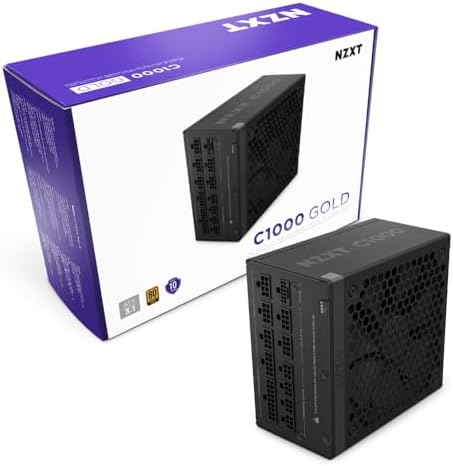
- ATX 3.1 — Compliant with the ATX 3.1 standard to fuel high-performance PC components with stability, efficiency, and pow…
- 40 SERIES READY — Durable, heat-resistant 12V-2×6 connector pumps up to 600 watts to NVIDIA GeForce RTX 40 Series graphi…
- HIGH EFFICIENCY, LOW NOISE — Awarded certifications of 80 PLUS Gold Efficiency, Cybenetics Gold Efficiency, and Cybeneti…
NVIDIA lists 850W as the required system power for an RTX 5080. A 1000W unit gives headroom for the processor, the drives and future upgrades, and runs quieter because it rarely works hard: NZXT says its 135mm fan stays completely silent under 50% load. It meets ATX 3.1 and has a native 12V-2×6 connector, so the graphics card plugs in with one cable and no adapter. $124.99, 4.6 stars from 321 owners. Our PSU wattage guide explains the math.
- Native 12V-2×6 cable for the graphics card
- Fully modular: plug in only the cables you use
- 80 PLUS Gold efficiency
- More watts than this exact build needs today
Case, cooler and fans: Antec C8, ARCTIC Liquid Freezer III Pro 360, ARCTIC P12

- Fans not included.Full-View PC Case with Seamless Edge on Front & Side Panel.
- Dual Chamber Design.
- Space for Three 140mm Fans or Two 160mm Fans on Top and Bottom.
A full tower makes the build easier and the parts cooler. Antec lists room for graphics cards up to 440mm and 360mm radiators on the top, side or bottom, and its dual-chamber layout hides the power supply and cables. It ships with no fans, which is why the build includes a five-pack. Case $99.99, 4.8 stars from 458 owners.

- CONTACT FRAME FOR INTEL LGA1851 | LGA1700: Optimized contact pressure distribution for longer CPU life and better heat d…
- ARCTIC’s P12 PRO FAN: More power at any speed – more powerful and quieter than the P12, especially at low speeds. Higher…
- NATIVE OFFSET MOUNTING FOR INTEL AND AMD: Shifting the cold plate center towards the CPU hotspot ensures more efficient …
AMD recommends liquid cooling for the 9850X3D. ARCTIC’s 360mm cooler adds offset mounting that moves the cold plate toward the hottest part of the chip, a small fan that cools the motherboard’s power delivery, and fan cables routed inside the tubes so only one cable reaches the board. Cooler $76.99, 4.5 stars from 2,014 owners. The ARCTIC P12 five-pack ($23.99) fills the case’s intake and exhaust positions. Our best CPU cooler and best PC case guides have alternatives.
- Huge clearance makes building easy
- 360mm liquid cooling, as AMD recommends
- Offset cooler mounting aimed at the hottest part of the chip
- The case ships with no fans
- A full tower takes real desk space
Ultimate gaming PC compatibility: will it all fit together?
Nothing stops a first build faster than two parts that will not physically or electrically agree, and the places it happens are always the same handful: the socket, the memory type, the length of the graphics card, the radiator mount and the power connector. Every part in an ultimate gaming PC has to clear all five against the parts around it. The table below is the compatibility check we ran on this list before publishing it, and it doubles as the checklist to repeat on any substitution you make.
| Pairing | Parts | What has to match | Why this list clears it |
|---|---|---|---|
| Processor + board | 9850X3D + X870E-E | Socket and chipset | AM5 chip, AM5 X870E board |
| Memory + board | Vengeance DDR5 | DDR5, never DDR4 | DDR5 kit, DDR5-only board |
| Memory + processor | 32GB 6000 CL30 | Rated speed | 6000 is the AM5 sweet spot |
| SSD + board | 9100 PRO 2TB | M.2 size and PCIe generation | PCIe 5.0 drive, PCIe 5.0 slot |
| Card + case | RTX 5080 + Antec C8 | Card length vs clearance | Case takes up to 440mm |
| Cooler + case | Freezer III 360 + Antec C8 | Radiator size vs mounts | 360mm rad, 360mm mounts |
| Cooler + processor | ARCTIC AM5 kit | Bracket and plate position | AM5 hardware, offset included |
| Card + power supply | RTX 5080 + C1000 Gold | Connector and wattage | Native 12V-2×6, 1000W over 850W |
| Fans + case | P12 five-pack + Antec C8 | Size and count | Five 120mm, case ships with none |
| Board + case | X870E-E + Antec C8 | Form factor | ATX board, E-ATX tower |
Two of those rows are worth saying out loud, because they are where substitutions bite. The first is card length. A 440mm allowance sounds enormous, and it is, but 5080s from different makers are not the same length, and the measurement that matters is the one in the listing you actually buy, not the one in this guide. The second is the power connector. The NZXT C1000 Gold has a native 12V-2×6 cable, so the card takes one cable straight from the supply. An older supply gets you an adapter splitting into four 8-pin plugs, which works but adds bulk behind a card that already fills the chamber.
There is one compatibility trap the table cannot show you, because it is not about the parts at all: the firmware already on the board. A board that has sat in a warehouse can ship with a BIOS older than the processor you bought, and an ultimate gaming PC built on a brand-new chip is exactly the case where that bites. It looks like a dead build — no display, no beep, nothing — when the real problem is a board that does not recognize the chip yet. This is the specific reason we chose a board with BIOS FlashBack: it reflashes the firmware from a USB stick with no processor, no memory and no graphics card installed, so the fix is twenty minutes rather than borrowing an older chip from somebody. If you substitute a cheaper board, check that it lists support for your processor, and check whether it can update without a working CPU.
One more rule covers everything the table cannot: if you change the processor, recheck the cooler; if you change the case, recheck the card and the radiator; if you change the card, recheck the power supply. Our best PC case guide and best CPU cooler guide cover the alternatives we recommend, and our PSU wattage guide does the power math for any graphics card you land on.
What an ultimate gaming PC costs, and where the money goes
The nine parts above come to about $3,800, and roughly $4,000 once you add Windows and the few tools you need. Those are live prices pulled from each listing, so the total moves a little day to day. What does not move is the shape of the spending, and understanding that shape is what separates an ultimate gaming PC from an expensive one.
The graphics card is the biggest single line on the list by a wide margin, at $1,653.99. That is the right place for the money to go, because at 1440p and 4K the graphics card sets both how fast your games run and how good they look, and no other upgrade changes either as much. The Ryzen 7 9850X3D at $476.98 is the second priority rather than the first for the same reason: past a certain point the processor is feeding the card rather than limiting it, which is exactly why we picked an eight-core X3D chip over a sixteen-core one. Our CPU and GPU pairing chart shows where that balance sits for other cards.
After those two come the parts that decide whether the build is pleasant to own. The motherboard at $399.99 buys expansion room rather than frames: five M.2 slots, Wi-Fi 7, USB4 and a BIOS you can reflash without a working processor. The 32GB memory kit at $549.99 and the 2TB PCIe 5.0 SSD at $399.99 are both sized so you are not revisiting them in a year. And the quiet end of the list — the power supply at $124.99, the case at $99.99, the cooler at $76.99 and the five-pack of fans at $23.99 — comes to less than the processor alone, while doing the most for noise, temperatures and how long the whole thing lasts. Spending less here is the most common false economy in high-end builds.
Then there is the part people forget to budget: Windows 11 Home at $119.99, a USB stick to install it from, a precision screwdriver set, and a tube of thermal paste if you ever take the cooler back off. That is the gap between the parts total and the roughly $4,000 the project really costs. If that number is higher than you want, the honest answer is not to shave the power supply or the cooling: it is to drop one tier on the graphics card, which is exactly what our high-end gaming PC build under $3,000 does.
Before you start: tools and software
You need very little, but have it on the table before you open a box:
- A Phillips screwdriver, ideally magnetic. A precision screwdriver set covers the tiny M.2 screws too.
- A USB stick of 8GB or more for the Windows installer. The SanDisk 64GB Ultra Flair is plenty.
- A Windows 11 license. Windows 11 Home is all a gaming PC needs. This System Builder copy ships as a DVD with a product key; you only need the key, because you install from the USB stick.
- Thermal paste, only if you remove and refit the cooler. ARCTIC MX-4 is the long-time standard.
- A second computer or phone for the manuals and for building the Windows installer.
- A large table, not carpet, and good light.
Build the Windows USB stick first, on any other PC: download Microsoft’s Media Creation Tool, choose “Create installation media,” and point it at the stick. It takes about twenty minutes and means the new PC can install Windows the moment it boots.
How to build a high end gaming PC, step by step
Work in this order. The order matters more than speed: every step below assumes the one before it is done, and the three or four places an ultimate gaming PC build goes wrong are all steps that get rushed. Set aside an afternoon, keep the manuals open on a phone, and expect the whole thing to feel slower than it looks on video. The first three steps happen with the motherboard flat on its box, which is far easier than reaching into a case. Touch a bare metal surface before you handle parts, and hold boards and cards by their edges.
Step 1: Install the processor
You need: Ryzen 7 9850X3D · ASUS ROG Strix X870E-E
Lift the socket’s lever and open the metal load plate. Find the small gold triangle on one corner of the processor and line it up with the triangle marked on the socket. Lower the chip straight down; it should drop in with no pressure at all. Close the load plate and lock the lever. The plastic socket cover pops off as you do; keep it in case you ever return the board.
Step 2: Install the SSD
You need: Samsung 9100 PRO 2TB
Remove the heatsink over the top M.2 slot, the one nearest the processor. It is one of the three PCIe 5.0 slots on this board. Peel any protective film off the heatsink’s thermal pad, slide the drive into the slot at a slight angle, press it flat, and secure it with the board’s latch. Refit the heatsink.
Step 3: Install the memory
You need: Corsair Vengeance RGB 32GB DDR5-6000
With two sticks on a four-slot board, use the pair of slots your motherboard manual marks for two modules; on most boards that is the second and fourth slot counting from the processor. Open the latches, line up the notch in each stick with the key in the slot, and press down firmly at both ends until the latches click. A half-seated stick is the most common reason a new build will not start.
Step 4: Prepare the case and fans
You need: Antec C8 · ARCTIC P12 5 pack
Take off the glass panels and set them somewhere safe. Plan the airflow before you mount anything: the radiator goes on the top as exhaust, and the P12 fans go in the bottom and side as intake, with one at the rear as exhaust. Fans push air out of the side with the frame struts, so check the arrows on each fan frame before you screw it in.
Step 5: Install the power supply
You need: NZXT C1000 Gold
Mount the power supply in its chamber, fan facing the vent, following the case manual. Because it is fully modular, plug in only the cables this build needs before you route them: the 24-pin motherboard cable, the processor power cables (this board has two 8-pin sockets along its top edge), and the 12V-2×6 cable for the graphics card.
Step 6: Mount the motherboard
You need: ASUS ROG Strix X870E-E
Check that the case standoffs line up with every screw hole in the board, and that there is no standoff where the board has no hole. This board’s I/O shield comes already fitted, so lower the board in at an angle until the rear ports sit in their opening, then screw it down. Snug is enough; do not overtighten.
Step 7: Fit the liquid cooler
You need: ARCTIC Liquid Freezer III Pro 360
Screw the radiator to the top of the case with its fans blowing out. Fit ARCTIC’s AMD mounting hardware using the offset position its manual shows, then lower the pump onto the processor and tighten the screws a little at a time, in a cross pattern. Check whether the cold plate already has thermal paste on it; if it does, do not add more. Plug the single fan and pump cable into the header marked CPU_FAN.
Step 8: Install the graphics card
You need: GIGABYTE RTX 5080 Gaming OC
Remove the case’s slot covers for the card’s width, line the card up with the top long slot, and press until the slot latch clicks. Screw the bracket to the case. Plug in the 12V-2×6 cable and push until it clicks and sits completely flush, with no gap, then route the cable without a sharp bend right at the connector. Fit the support bracket from the box so the card does not sag.
Step 9: Connect everything else
Connect the case’s front-panel cables: the power switch, the USB-C and USB 3 headers, and front audio. The power switch pins are tiny and labeled in the manual; this is the step everyone checks twice. Plug the case fans into the motherboard’s fan headers, then tidy the cables behind the motherboard tray with ties so nothing touches a fan.
Step 10: The first power-on
Plug your monitor into the graphics card, not the motherboard’s ports; this is the classic first-build mistake. Switch on the power supply and press the case’s power button. Be patient: a new DDR5 system trains its memory on the first start and the screen can stay black for several minutes. Do not switch it off during that time. When the BIOS screen appears, the build worked.
If you get to the end and nothing happens, do not start pulling parts out. A build that will not display is the normal outcome of one of about six small mistakes, not evidence of a dead component, and the no-display checklist further down works through them in the order they actually occur. The single most common one is the monitor cable in the motherboard instead of the graphics card. The second is memory that looks seated but is not. Both take seconds to fix and neither costs anything.
The first-boot checklist: where your new PC gets fast
A new PC does not run at full speed out of the box. These settings take ten minutes in the BIOS (press Delete as the PC starts) and Windows, and skipping them is how people end up with an ultimate gaming PC that performs like a cheaper one.
- Check that everything is detected. The BIOS main page should show the Ryzen 7 9850X3D, 32GB of memory and the Samsung drive.
- Turn on EXPO. Out of the box the Corsair DDR5-6000 kit runs well below its rated 6000MHz. Find the EXPO setting, switch it to the profile, save and restart. This one setting is free performance. If your board is not the ASUS one here, our guide to how to enable EXPO and XMP has the path for MSI, Gigabyte and ASRock too.
- Update the BIOS if a newer one exists. Download it from ASUS’s support page for this board and use BIOS FlashBack or the built-in updater, following ASUS’s instructions exactly. Never switch off during an update.
- Check that Resizable BAR is on. It lets the processor use all of the graphics card’s memory at once. On most current boards it is already enabled; confirm it.
- Turn on TPM and Secure Boot. Battlefield 6 and Call of Duty: Black Ops 7 refuse to run without TPM 2.0 and Secure Boot. On AMD boards TPM is called fTPM; Secure Boot needs Windows installed in UEFI mode, which is the default on a new board.
- Install Windows from your USB stick, onto the Samsung 9100 PRO. You will need a Windows 11 license to activate it.
- Install the drivers: the AMD chipset driver from AMD’s site, then the NVIDIA driver through the NVIDIA app, then run Windows Update until it finds nothing new.
- Check temperatures in a long gaming session with a monitoring tool. If the processor runs unusually hot, recheck the cooler’s mounting pressure, and use fresh thermal paste if you remove it.
The evidence behind every ultimate gaming PC part
A parts list is only worth as much as the checking behind it, so here is exactly what we did. Every product in this guide was opened on its own Amazon listing and read field by field: who the seller is, whether it ships with Prime, whether it is in stock, whether the price in the buy box agrees with the price in the listing, and how many owners have rated it. A part that fails any of those does not get a caveat under its card. It comes off the list and something else takes the slot.
That is why there is no RTX 5090 in this build; the graphics card section above has the detail. What the checking cannot do is make a young listing old, and that is why the owner-rating counts below are printed rather than summarized: a strong score from a couple of hundred owners is a different kind of evidence from the same score from several thousand, and you deserve to see which one you are getting.
It is worth being concrete about what happens when something fails that screen, because it is the part most guides leave vague. We do not footnote it and move on. The part comes out of the list, we screen a replacement for the same slot, and the surrounding copy gets rewritten to match — which sometimes means a sentence elsewhere in the article stops being true and has to change too. That is slower than publishing a caveat, and it is the reason every part of this ultimate gaming PC is one we would buy at the price shown.
Two readings are worth drawing out. The Corsair memory kit and the ARCTIC P12 fans both carry records in the thousands of ratings, which is what you would expect from parts that have been on sale a long time and barely change. The graphics card has the youngest record of the parts above, because current-generation cards simply have not been in enough hands yet. That is not a mark against it; it is a reason to read its rating as a newer signal than the others on the same page.
If it will not boot: the no-display checklist
Most first builds that do not start have a simple cause. Work down this list before you suspect a faulty part:
- Monitor plugged into the motherboard? Move it to the graphics card.
- Did you wait? First-time memory training can take several minutes with a black screen.
- Memory not fully seated. Reseat both sticks until both latches click.
- Missing power cables. Check the 24-pin, both processor cables and the graphics card cable, at both ends. With the NZXT C1000 the graphics card needs only its one 12V-2×6 cable.
- Front-panel pins. If nothing happens at all when you press the button, recheck the power switch connector.
- Status lights. This ASUS board has Q-LEDs that stop on the stage that failed (CPU, DRAM, VGA or boot device) and a Q-Code display that shows an error number. The manual explains each code.
Spend less, or spend more
To save: the GIGABYTE X870E AORUS Elite WiFi 7 ($275.00) saves around $100 over the ASUS with no loss in gaming speed. For a full cheaper tier with the parts already matched, see our high-end gaming PC build under $3,000.
To spend more: the ASUS TUF Gaming RTX 5080 OC ($1,817.42) is the premium version of the same graphics chip. Beyond that, the next real step up is the RTX 5090, once one is sold at a fair price on a clean listing. Thinking about skipping the build entirely? Our prebuilt vs build your own guide does the math.
Build it yourself, or buy it prebuilt?
At this tier, building an ultimate gaming PC is usually the cheaper route and always the better-specified one, and it is worth being precise about why. When you buy a prebuilt at around this price, the parts you can see are competitive — the processor and the graphics card have to be, because they are what the listing advertises. The savings come out of the parts you cannot see from the product photo: the power supply, the cooler, the case airflow and the motherboard. Those are exactly the parts that decide whether the machine is quiet, whether it throttles in a long session, and whether you can upgrade it in three years.
Building also means no surprises in the specification. A prebuilt listing that says 32GB of DDR5 rarely says at what speed, and memory running at its default rather than its rated 6000MHz is measurably slower for no visible reason. Ours is a Corsair DDR5-6000 CL30 kit with an EXPO profile, and the first-boot checklist above turns it on. The same goes for storage: a PCIe 5.0 drive in a slot wired for PCIe 5.0 is a different machine from the same capacity on a slower bus.
What you give up is a single warranty and an afternoon of your time. With a prebuilt, one phone call covers the whole machine; with a build, each part has its own return window, and diagnosing a fault is on you — which is what the no-display checklist above is for. If that trade does not appeal, that is a completely reasonable answer, and our best gaming PCs guide covers the prebuilt machines that pass the same listing checks we use here. Our prebuilt vs build your own comparison is where we settle the price argument properly.
One middle path is worth knowing about. You can build this list and keep the GIGABYTE X870E AORUS Elite WiFi 7 instead of the ASUS board, which holds on to PCIe 5.0 and Wi-Fi 7 while taking roughly a hundred dollars off the total, and put that toward the ASUS TUF Gaming RTX 5080 OC if you prefer its cooler. Neither swap changes anything in the build steps.
What to upgrade first, and when
An ultimate gaming PC is not finished so much as paused, and the point of choosing an AM5 board with room in it is that the next few years are cheap. Here is the order the upgrades actually make sense in.
Storage comes first, and soonest. Two terabytes sounds like plenty until the largest modern games have each taken a serious slice of it. The ASUS board has five M.2 slots, so adding a second drive means opening the side panel and nothing else — no cables, no reinstalling Windows, no cloning. Put the new drive in a slot that is not the top one, leave Windows where it is, and point your game launcher at the new volume. Our best M.2 NVMe SSD guide has the drives worth adding, including cheaper PCIe 4.0 options that are perfectly good as a games library.
Memory is second, and only if you need it. 32GB is the right amount for gaming today, and a second matched kit takes you to 64GB for work that genuinely wants it — large project files, virtual machines, heavy multitasking alongside a game. Be aware that filling all four slots on AM5 can mean settling for a lower memory speed, so if 64GB is the goal, a single 64GB kit is the cleaner route than adding to this one. Our best RAM for gaming guide covers the four-slot trade.
The graphics card is third, and it is the one that will tempt you first. Resist it for a generation. A 16GB RTX 5080 has enough memory and enough speed that the next card genuinely worth buying is likely two generations out rather than the very next one, and our VRAM guide covers how much video memory current games actually ask for. When you do upgrade, the 1000W power supply already has the headroom and the right connector, which is a large part of why we specified it. Our best graphics cards guide tracks what is worth buying as that changes.
The processor is last, and that is the whole point of AM5. The socket takes AMD’s next generation, so when a faster X3D chip arrives you drop it into this same board after a BIOS update — no new motherboard, no new memory, no reinstall. Our X3D vs non-X3D explainer and best gaming CPUs guide are where to look when that day comes. What you should not upgrade is the case or the cooler: a 360mm radiator in a full tower is already more cooling than a chip of this class asks for.
Frequently asked questions
How much does it cost to build a high-end gaming PC?
The parts in this guide come to about $3,800, or around $4,000 with Windows 11 and a few tools. The graphics card is the biggest single cost at more than 40 percent of the parts. A strong high-end build that drops to a slightly slower card costs closer to $3,000.
Is the RTX 5090 worth it for a gaming PC?
It is the fastest graphics card, but every RTX 5090 we found on Amazon was sold by a third-party reseller at several times NVIDIA’s $1,999 list price, without Prime delivery. At those prices the RTX 5080 is the better buy, and it is the fastest card we can recommend from a clean listing.
What is the best CPU for a high-end gaming PC?
An AMD X3D processor. The Ryzen 7 9850X3D has eight cores and 96MB of L3 cache, and for gaming it beats chips with twice as many cores. Tom’s Hardware found AMD’s 16-core X3D flagship no faster than the eight-core X3D in games.
Do I need a 1000W power supply for an RTX 5080?
NVIDIA lists 850W as the required system power for an RTX 5080, so 850W is the minimum. A 1000W unit like the NZXT C1000 Gold adds headroom for upgrades and runs quieter because it rarely works hard.
How long does it take to build a gaming PC?
Plan an afternoon for a first build, around three to four hours if you take it slowly and read the manuals. Allow another evening for installing Windows, drivers and the BIOS settings in the first-boot checklist.
Is it cheaper to build your own gaming PC?
Usually, at the high end, and you choose every part. Our prebuilt vs build your own guide compares the two routes with real parts lists.
Why will my new PC not show anything on the screen?
The most common causes are the monitor plugged into the motherboard instead of the graphics card, memory not fully seated, a missing power cable, or simply not waiting: a new DDR5 system can take several minutes to train its memory on the first start.
What BIOS settings should I change on a new gaming PC?
Turn on the memory profile (EXPO on AMD, XMP on Intel), confirm Resizable BAR is on, update the BIOS if a newer version exists, and enable TPM and Secure Boot, which games such as Battlefield 6 and Call of Duty: Black Ops 7 require.
Do I need thermal paste for an AIO cooler?
Often not for the first install, because many coolers ship with paste already applied. Check the cold plate before you mount it. You need fresh paste only if you remove the cooler and refit it.
The full bill of materials
| Part | Pick | Price |
|---|---|---|
| CPU | AMD Ryzen 7 9850X3D | $476.98 |
| Graphics card | GIGABYTE RTX 5080 Gaming OC 16G | $1,653.99 |
| Motherboard | ASUS ROG Strix X870E-E Gaming WiFi | $399.99 |
| Memory | Corsair Vengeance RGB 32GB (2 x 16GB) DDR5-6000 CL30 | $549.99 |
| Storage | Samsung 9100 PRO 2TB PCIe 5.0 | $399.99 |
| Power supply | NZXT C1000 Gold, 1000W, ATX 3.1 | $124.99 |
| Case | Antec C8 Full-Tower | $99.99 |
| CPU cooler | ARCTIC Liquid Freezer III Pro 360 A-RGB | $76.99 |
| Case fans | ARCTIC P12, 5 pack | $23.99 |
| Windows | Windows 11 Home | $119.99 |
| Installer | SanDisk 64GB Ultra Flair USB stick | Check price |
| Tools | STREBITO 142-piece precision screwdriver set | Check price |
| Paste | ARCTIC MX-4, 4g | Check price |
About $3,800 for the PC and around $4,000 with Windows and tools. Live prices are in the table above.
Related guides
- What CPU Should You Pair With Your GPU? — why the 9850X3D and the RTX 5080 belong together.
- High End Gaming PC Build Under $3,000 — the next tier down, with every part matched.
- Best Graphics Cards 2026 — the full graphics card roundup.
- Best Gaming CPUs 2026 — every processor worth buying.
- What PSU Wattage Do You Need — the power math for any card.
- X3D vs Non-X3D — what the stacked cache does for games.
- Prebuilt vs Build Your Own PC — whether building really saves money.
The bottom line on the ultimate gaming PC
The ultimate gaming PC is not the one with the most expensive part in every slot. It is the one where the processor and the graphics card are the fastest you can buy cleanly, and everything else is chosen to keep them fed, cool and stable. That is a Ryzen 7 9850X3D and an RTX 5080, about $3,800 of parts, an afternoon of careful building, and ten minutes of BIOS settings that most people forget. Do all of it, and you have a machine built for 1440p and 4K gaming that will keep up for years.
Gamers Tech Guide participates in the Amazon Services LLC Associates Program. As an Amazon Associate we earn from qualifying purchases.