
Eight memory kits that survived a hard filter: a live price with a real seller, a 4.0 star minimum with enough reviews to mean something, and a clear answer to the only question that matters first, which is what your motherboard will actually accept.
- Check your socket before anything else. DDR4 and DDR5 are not interchangeable, and right now the price gap between them is enormous.
- Best DDR5 for gaming: the TEAMGROUP T-Force Delta RGB 32GB at 6000 CL30, $599.99.
- Best DDR4 for gaming: the Corsair Vengeance LPX 32GB at $242.12, with over twenty thousand ratings behind it.
- 32GB is the target in 2026, and 16GB is the floor.
Buying the best RAM for gaming is unusually easy to get wrong, because the specification that matters most is not speed, and it is not brand, and it is not the color of the lighting. It is whether the kit physically fits and runs in your motherboard at all.
DDR4 and DDR5 use different slots. They are not compatible in either direction, and no adapter exists. Buy the wrong one and it will not go in. That sounds obvious written down, and it is still the single most common expensive mistake in this category.
We verified eight kits through Amazon’s own product data: current price, star rating, and the number of reviews behind that rating. Everything below is a desktop kit. Laptop memory was filtered out deliberately, because it ranks alongside desktop memory in search and will not fit a desktop board.
If you are still choosing a processor, our best gaming CPUs guide explains which socket each chip uses, and that decision dictates everything on this page.
The best RAM for gaming at a glance
Every price, rating and review count below was read from Amazon’s product data. Memory pricing is more volatile than most PC components, so check the current figure before you buy.

| Type | DDR5 |
| Kit | 32GB (2×16) |
| Speed | 6000 CL30 |
| Rating | 4.7 (1,491) |

| Type | DDR4 |
| Kit | 32GB (2×16) |
| Speed | 3200 CL16 |
| Rating | 4.8 (20,183) |

| Type | DDR5 |
| Kit | 32GB (2×16) |
| Speed | 6000 CL30 |
| Rating | 4.7 (806) |

| Type | DDR5 |
| Kit | 32GB (2×16) |
| Speed | 6000 CL30 |
| Rating | 4.5 (670) |
| Type | DDR4 |
| Kit | 16GB (2×8) |
| Speed | 3200 CL16 |
| Rating | 4.8 (6,248) |

| Type | DDR5 |
| Kit | 32GB (2×16) |
| Speed | Up to 6000 |
| Rating | 4.7 (4,299) |

| Type | DDR4 |
| Kit | 16GB (2×8) |
| Speed | 3200 CL22 |
| Rating | 4.5 (555) |

| Type | DDR5 |
| Kit | 16GB (1×16) |
| Speed | 6000 CL30 |
| Rating | 4.1 (261) |
Read this before you buy anything: DDR5 currently costs a fortune
This is the most useful thing on the page, so it goes near the top rather than buried in a buying guide section at the bottom.
At the time of writing, a 32GB DDR5 kit costs between $539.99 and $639.99. A 32GB DDR4 kit costs $242.12, and a 16GB DDR4 kit costs $109.97.
Put differently: a single 32GB DDR5 kit at $489.99 costs a serious fraction of the price of the RTX 5060 Ti 16GB graphics card we recommend as the best buy for most people. Memory is not usually a component you agonize over. Right now it is, and it can be a larger line in the budget than buyers expect.
There are two practical consequences. If you are already on DDR4, there is a strong argument for staying there and putting the difference into a graphics card. And if you are building fresh on DDR5, buy the capacity you actually need rather than the capacity that sounds impressive, because the premium for overbuying is unusually steep.
How we chose these eight
Desktop kits only
Laptop memory, sold as SODIMM, ranks alongside desktop memory in almost every search and physically will not fit a desktop motherboard. One highly rated kit made our shortlist before we noticed it was a 262-pin laptop module. Desktop memory is 288-pin and is usually labeled DIMM or UDIMM.
A live price, with a real seller
Every kit here returned a live offer when we pulled its data. A listing with no price is not something you can buy.
A 4.0 star minimum, with the review count to back it
Memory attracts extremely deep review samples, which makes this filter unusually powerful here. The kits below carry anywhere from a few hundred ratings to many thousands. When a component has twenty thousand reviews at 4.8 stars, that is about as close to certainty as this category offers.
Both memory generations, honestly
Five DDR5 kits and three DDR4. That split is not nostalgia. DDR4 remains the correct purchase for a large number of people, and at current prices it is often the smarter one.
1. TEAMGROUP T-Force Delta RGB DDR5 32GB: the best RAM for gaming
32GB (2x16GB), DDR5-6000, CL30, Intel XMP 3.0 and AMD EXPO. $599.99. 4.7 stars from 1,491 ratings.
- DDR5 – Leading the way into a new OC generation, supports Intel XMP3.0 for one-click overclocking. Compatible with Intel…
- RGB colors & 120° ultra-wide lighting. Equipped with smart RGB IC controller that supports various lighting effect softw…
- Strengthened PMIC cooling design. On-die ECC for stable system. High-Quality ICs Selected for Stability & Reliability.
DDR5-6000 at CL30 is the specification to aim for on a current AMD build, and this kit hits it exactly. That combination is not marketing: AMD’s AM5 platform runs its memory controller in step with the memory at 6000MHz, and moving faster than that often makes performance worse rather than better because the controller has to drop to a slower ratio.
CL30 is the latency, and lower is better. Plenty of cheaper 6000MHz kits are CL36 or CL40, which look identical on a product title and are measurably slower in practice. This is the number worth checking that most buyers skip.
It carries both Intel XMP 3.0 and AMD EXPO profiles, which means one setting in the BIOS gets you the advertised speed on either platform. Where that setting lives differs by board brand, and our guide to how to enable EXPO and XMP walks through each one. Without that, memory runs at a slow default and a lot of people never realize.
Buy it if: you are building on AM5 or a current Intel platform and want the specification that actually matters.
Skip it if: your motherboard takes DDR4. It will not fit.
- DDR5-6000 at CL30, the specification that matters on AM5
- Carries both Intel XMP 3.0 and AMD EXPO profiles
- 4.7 stars from 1,491 ratings
- 32GB, the right capacity for gaming plus everything else
- Will not fit a DDR4 motherboard
- Tall RGB heat spreader can clash with large air coolers
- DDR5 pricing is high across the board right now
2. Corsair Vengeance LPX DDR4 32GB: the best DDR4 kit, and the most trusted here
32GB (2x16GB), DDR4-3200, CL16, low profile heat spreader. $242.12. 4.8 stars from 20,183 ratings.
- Disclaimer: Maximum Speed requires overclocking/PC BIOS adjustments. Maximum speed and performance depend on system comp…
- Hand-sorted memory chips ensure high performance with generous overclocking headroom
- VENGEANCE LPX is optimized for wide compatibility with the latest Intel and AMD DDR4 motherboards
20,183 ratings at 4.8 stars. Nothing else in this guide is close, and very few PC components anywhere carry a sample that deep. If you are on DDR4 and want to stop thinking about it, this is the kit.
DDR4-3200 CL16 is the sweet spot for the AM4 platform, the same way 6000 CL30 is for AM5. It is fast enough that going higher produces very little, and cheap enough that going lower saves almost nothing.
The low profile heat spreader matters more than it sounds. Tall RGB memory frequently collides with large air coolers, and LPX is designed to avoid exactly that. If you are running a big tower cooler, this removes a real compatibility headache.
At $242.12 for 32GB, it is roughly half what an equivalent DDR5 kit costs. That is the whole argument for staying on DDR4 if your board allows it.
Buy it if: your motherboard takes DDR4 and you want the safest purchase on this page.
Skip it if: you are on AM5 or a current Intel platform. DDR4 will not fit those boards.
- 20,183 ratings at 4.8 stars, a very deep review sample
- DDR4-3200 CL16 is the sweet spot for AM4
- Low profile, so it clears large tower coolers
- Roughly half the price of an equivalent DDR5 kit
- DDR4 only, so it will not fit AM5 or LGA 1851
- No RGB lighting
- An older memory generation with no upgrade path
3. TEAMGROUP T-Create Expert DDR5 32GB: the best value DDR5
32GB (2x16GB), DDR5-6000, CL30. $539.99. 4.7 stars from 806 ratings.
- TEAMGROUP T-CREATE EXPERT 32GB KIT 2 X 16GB DDR5-6000 PC5-48000 CL30 DUAL CH
The same 6000 CL30 specification as our top pick, from the same manufacturer, without the RGB lighting.
That last point is the entire trade. If you do not have a windowed case, or you simply do not want lights, you are paying for illumination you will never see. This kit removes that cost and keeps everything that affects performance.
The review sample is shallower than the Delta RGB above, 806 against 1,491, which is why it sits here rather than at the top. Both are comfortably deep enough to trust.
Buy it if: you want the correct DDR5 specification and do not care about lighting.
Skip it if: your build is on display and the lighting matters to you.
- Same 6000 CL30 specification as our top pick
- Same manufacturer as our top pick
- No RGB, so you are not paying for lighting you cannot see
- 4.7 stars from 806 ratings
- Shallower review sample than the Delta RGB
- No lighting if your build is on display
- Less familiar brand than Corsair or G.SKILL
4. Patriot Viper Venom DDR5 32GB: the plain, dependable DDR5 kit
32GB (2x16GB), DDR5, 6000MT/s CL30. $489.99. 4.5 stars from 670 ratings.

- Capacity: 32GB (2 x 16GB) 6000MHz
- Tested Timings: 30-40-40-76
- Feature Overclock: XMP 3.0 / EXPO overclocking supported
This is the plain, no-lighting route to the specification that suits AM5 best: 6000MT/s at CL30 on 1.35V, with both AMD EXPO and Intel XMP profiles on board.
Note which Patriot kit this is. This is the matched two-stick 32GB kit. The Patriot Viper Venom at number eight is a single 16GB module from the same family, and a single stick runs in single channel, which costs real frame rates. Same name, different products, different jobs. This is the one to buy if you are filling two slots.
It is one of the no-lighting kits on this page. If the build is on display, the Corsair Vengeance RGB further down adds ten zones for more money; if the case lives under the desk, this is the same class of memory without paying for LEDs.
Patriot rates it at 6000MT/s CL30, but reaching that speed still requires enabling the XMP or EXPO profile in the BIOS. Out of the box it will run slower, and a surprising number of machines run their whole lives that way.
Buy it if: you want a dependable DDR5 kit at the right AM5 specification with no lighting.
Skip it if: you want the deepest owner history on the page, which the Corsair kits have.
- 4.5 stars across 670 ratings
- 32GB as a matched pair, so it runs in dual channel from the start
- 6000 CL30 with EXPO and XMP, the right specification for AM5
- No lighting to configure or disable
- Rated speed requires enabling XMP or EXPO in the BIOS
- Smaller review sample than the Corsair kits here
- Easy to confuse with the 16GB single stick of the same name
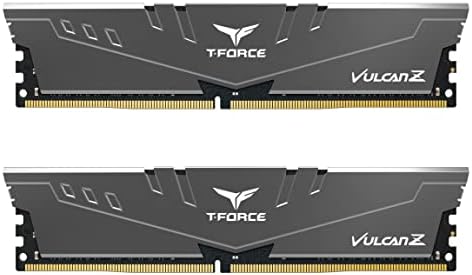
5. TEAMGROUP T-Force Vulcan Z DDR4 16GB: the best budget kit here
16GB (2x8GB), DDR4-3200, CL16, XMP. $129.99. 4.8 stars from 6,248 ratings.
- Simple design to perfectly protect the cooling module
- High thermal conductive adhesive
- Supports Intel & AMD motherboards
16GB of properly specified DDR4 with over six thousand ratings behind it, and CL16 rather than the slower CL18 or CL22 that budget kits often ship.
16GB is the floor for gaming in 2026 rather than the target. It is genuinely sufficient for games alone, and it starts to hurt the moment you add a browser, a voice call and a recording running alongside. If you only play, this is enough. If you multitask while playing, step up to 32GB.
Pair this with something like the budget AMD chip in our CPU guide and the total platform cost is dramatically lower than any DDR5 equivalent.
Buy it if: you are on DDR4, on a budget, and mostly just play games.
Skip it if: you stream, record, or keep a lot open while playing.
- 6,248 ratings at 4.8 stars
- CL16 rather than the looser CL18 or CL22 budget kits often ship
- A low-cost way to get CL16 on DDR4
- Pairs well with a budget AM4 build
- 16GB is the floor, not the target, for 2026
- Not enough if you stream or record while playing
- DDR4 only
6. Corsair Vengeance RGB DDR5 32GB: the ten-zone RGB kit
32GB (2x16GB), DDR5, up to 6000MHz, ten-zone RGB. $639.99. 4.7 stars from 4,299 ratings.
- Disclaimer: Maximum Speed requires overclocking/PC BIOS adjustments. Maximum speed and performance depend on system comp…
- AMD EXPO & Intel XMP 3.0 Compatible Only: Dual memory profiles allow you to easily select optimized settings for your pl…
- Dynamic Ten-Zone RGB Lighting: Illuminate your system with ten individually addressable, ultra-bright RGB LEDs per modul…
Thousands of owner ratings, and the one to buy if you want lighting from the most established name in the category.
The honest problem is the price. At $639.99 it carries a real premium, and the non-RGB Corsair kit above it is largely the same memory for meaningfully less. You are paying a real premium for ten-zone lighting.
If your case has a window, your build is on display and you want the lighting to match the rest of it, that premium is a legitimate thing to pay. If not, buy the plain version and put the difference somewhere it changes performance.
Buy it if: lighting matters and you want it from an established name.
Skip it if: the case is not on display. You are paying for something you will not see.
- 4,299 ratings behind it
- Ten-zone addressable RGB lighting
- Corsair Vengeance line with a long track record
- 32GB matched kit
- A real premium for the lighting
- The non-RGB version is largely the same memory for less
- Rated speed needs XMP or EXPO enabled
7. Silicon Power DDR4 16GB: the no-frills budget kit
16GB (2x8GB), DDR4-3200, CL22, 288-pin UDIMM. $109.97. 4.5 stars from 555 ratings.
- Complies with JEDEC standards
- Low voltage of 1.2V for less power consumption
- Strict test and verification procedures are performed for products
A no-frills kit that still clears our ratings floor. For a first build, an older machine being brought back to life, or a second PC, this does the job.
The compromise is in the latency. CL22 is noticeably looser than the CL16 of the Vulcan Z kit above, and at the same 3200MHz that means slower real-world memory performance. The difference is not dramatic in games, but it is real, and the Vulcan Z kit costs only a little more.
We include it because a no-frills defensible option deserves to be named rather than left out. We would take the Vulcan Z if the budget stretches.
Buy it if: the budget is absolutely fixed and you need working DDR4 now.
Skip it if: you can stretch the budget a little. CL16 is the better buy.
- No-frills DDR4 that clears the ratings floor
- 555 ratings at 4.5 stars
- 288-pin UDIMM, correctly a desktop module
- Enough to bring an older machine back to life
- CL22 is noticeably looser than CL16 at the same speed
- The Vulcan Z kit is better for a little more
- 16GB, and DDR4 only
8. Patriot Viper Venom DDR5 16GB: a single-stick way onto DDR5, with a real catch
16GB as a single 16GB module, DDR5-6000, CL30. $244.99. 4.1 stars from 261 ratings.
- Capacity: 16GB (1 x 16GB) 6000MHz
- Tested Timings: 30-40-40-76
- Feature Overclock: XMP 3.0 / EXPO overclocking supported
This is a low-cost route onto DDR5, and it comes with a compromise we are going to state plainly rather than leave in a spec line.
It is one stick, not two. Memory performs best in dual channel, which requires two matched modules. A single module runs in single channel, and in games that costs real frame rates, not a rounding error. Buying one 16GB stick is measurably worse than buying two 8GB sticks of the same total capacity.
So there is exactly one situation where this is the right purchase: you already own a matching Viper Venom 16GB module and you are adding a second to reach 32GB in dual channel. In that case it is a good buy at a good price. As a standalone purchase for a new build, it is not, and the 4.1 star rating from 261 ratings is also thinner evidence than we would like.
Buy it if: you are adding a second matching stick to an existing one.
Skip it if: this would be the only memory in the machine. Buy a two-stick kit instead.
- A low-cost route onto DDR5
- DDR5-6000 CL30, the correct specification
- Genuinely good if you are adding to a matching existing stick
- It is a SINGLE 16GB module, so it runs in single channel
- Single channel costs real frame rates in games, not a rounding error
- 4.1 stars from 261 ratings, thinner evidence than we would like
- Wrong purchase as the only memory in a new build
Compared side by side
| Kit | Type | Capacity | Speed | Price | Rating | Best for |
|---|---|---|---|---|---|---|
| TEAMGROUP T-Force Delta RGB | DDR5 | 32GB (2×16) | 6000 CL30 | $599.99 | 4.7 (1,491) | Best overall |
| Corsair Vengeance LPX | DDR4 | 32GB (2×16) | 3200 CL16 | $242.12 | 4.8 (20,183) | Best DDR4 |
| TEAMGROUP T-Create Expert | DDR5 | 32GB (2×16) | 6000 CL30 | $539.99 | 4.7 (806) | Best value DDR5 |
| Patriot Viper Venom 32GB | DDR5 | 32GB (2×16) | 6000 CL30 | $489.99 | 4.5 (670) | Plain and dependable |
| TEAMGROUP T-Force Vulcan Z | DDR4 | 16GB (2×8) | 3200 CL16 | $129.99 | 4.8 (6,248) | Best budget |
| Corsair Vengeance RGB DDR5 | DDR5 | 32GB (2×16) | Up to 6000 | $639.99 | 4.7 (4,299) | Ten-zone RGB DDR5 |
| Silicon Power DDR4 | DDR4 | 16GB (2×8) | 3200 CL22 | $109.97 | 4.5 (555) | No-frills DDR4 |
| Patriot Viper Venom 16GB | DDR5 | 16GB (1×16) | 6000 CL30 | $244.99 | 4.1 (261) | Adding a second stick |
What we left out, and why
Laptop memory that ranks as desktop memory
A Crucial 32GB DDR5 kit with 2,780 ratings at 4.8 stars was on our shortlist until we read the full title and found 262-pin SODIMM, which is laptop memory. It is a good kit for a laptop and will not physically fit a desktop board. This is the single easiest mistake to make in this category and search results actively encourage it.
Kits with thin review samples
Several cheap DDR5 kits looked attractive on price and carried fewer than thirty ratings. At that sample size a high average tells you very little, so none of them made the list.
Very high capacity kits
64GB and larger kits exist and some of them are excellent. For gaming they are unnecessary, and at current DDR5 prices they are expensive in a way that is hard to justify unless you are doing professional work that genuinely needs the capacity.
How much RAM do you actually need for gaming
16GB is the floor
Games alone still run well on 16GB in 2026. If your machine plays and does very little else, this is genuinely enough, and on DDR4 it is inexpensive.
32GB is the target
The moment you add anything alongside the game, 16GB starts to run out. A browser with a lot of tabs, a voice call, a recording or a stream, all at once, is where 32GB earns its money. You notice memory running out as stutter rather than as lower frame rates, which is why it is more irritating than a slower GPU.
64GB is for work, not play
No current game benefits from 64GB. If you render, edit video or run virtual machines, that is a different conversation and a different budget. For gaming, spending the extra on a better graphics card will do more.
Speed, latency and what actually matters
Three numbers appear on every memory product title, and they are not equally important.
Capacity matters most. 32GB of slower memory beats 16GB of faster memory for anyone who multitasks, every time.
Speed, the MHz figure, matters next, and only up to a point. On AM5 the sweet spot is DDR5-6000, and going faster frequently makes things worse because the memory controller drops to a less efficient ratio. On AM4 the equivalent is DDR4-3200. Buying beyond those numbers usually buys nothing.
Latency, the CL figure, is the one most people ignore and it is more useful than the MHz number once you are at the right speed. CL30 at 6000MHz is meaningfully quicker than CL36 at the same 6000MHz, and the product titles look nearly identical.
And one thing that is not a number at all: always buy a matched kit rather than two separate sticks. Kits are tested together. Two individually bought modules are not, and mismatched memory is a common cause of instability that people spend weekends diagnosing.
Will it fit your motherboard
Three checks, in order of how often they catch people out.
DDR4 or DDR5. They use physically different slots and are not interchangeable. AM5 and Intel LGA 1851 take DDR5. AM4 takes DDR4. Intel LGA 1700 boards exist in both flavors, so on that platform you must check the specific board rather than the socket.
Desktop or laptop. Desktop memory is 288-pin DIMM. Laptop memory is 262-pin SODIMM and is shorter. If a listing says SODIMM, it is not for your desktop.
Physical clearance. Tall memory with big heat spreaders can collide with large air coolers. If you run a substantial tower cooler, low profile memory like the Vengeance LPX avoids the problem entirely. The same motherboard check applies to storage, which we cover in our best M.2 NVMe SSD guide.
Frequently asked questions
How much RAM do I need for gaming in 2026?
32GB is the target and 16GB is the floor. Games alone still run well on 16GB, and it starts to hurt the moment you add a browser with a lot of tabs, a voice call, or a recording running alongside. You notice memory running out as stutter rather than as lower frame rates, which is why it is more irritating than a slower graphics card.
Is DDR5 worth it over DDR4 for gaming?
Only if your motherboard requires it, and right now that is the honest answer. DDR4 and DDR5 use physically different slots and are not interchangeable. At current prices a 32GB DDR5 kit costs roughly twice what an equivalent DDR4 kit costs, so if you are already on a working DDR4 board the money is better spent on a graphics card.
What RAM speed should I buy?
On AMD AM5, DDR5-6000 is the sweet spot and going faster often makes performance worse because the memory controller drops to a less efficient ratio. On AMD AM4, DDR4-3200 is the equivalent. Buying beyond those numbers usually buys nothing measurable in games.
What does CL mean and does it matter?
CL is the latency, and lower is better. It matters more than most buyers realize once you are at the right speed. CL30 at 6000MHz is meaningfully quicker than CL36 at the same 6000MHz, and the two product titles look almost identical. It is the number most people skip.
Can I mix RAM sticks or brands?
You can, and you should not. Matched kits are tested together as a set. Two individually purchased modules are not, and mismatched memory is a common cause of instability that people spend a weekend diagnosing. Always buy a kit rather than assembling one.
Is one 32GB stick as good as two 16GB sticks?
No. Memory performs best in dual channel, which needs two matched modules. A single stick runs in single channel and that costs real frame rates in games, not a rounding error. Two 16GB sticks beat one 32GB stick of the same total capacity.
Will laptop RAM work in a desktop?
No. Laptop memory is 262-pin SODIMM and is physically shorter. Desktop memory is 288-pin DIMM. They will not fit each other, and laptop kits routinely appear in desktop memory search results, so read the full product title before you buy.
Do I need to do anything after installing RAM?
Yes, and a lot of people never do. Memory runs at a slow default speed until you enable its XMP profile on Intel or EXPO profile on AMD in the motherboard BIOS. Without that step you paid for speed you are not getting.
Is more expensive RAM faster in games?
Rarely by enough to notice, once you are at the right speed and latency for your platform. Capacity matters most, then speed up to the platform sweet spot, then latency. Beyond that you are mostly paying for heat spreaders and lighting.
The bottom line
The best RAM for gaming in 2026 depends entirely on what your motherboard accepts, and that is not a cop-out, it is the actual answer.
On a current DDR5 platform, the TEAMGROUP T-Force Delta RGB 32GB at $599.99 hits the 6000 CL30 specification that matters, and the T-Create Expert at $539.99 is the same specification without lighting for less.
On DDR4, the Corsair Vengeance LPX 32GB at $242.12 has twenty thousand ratings behind it and costs roughly half what DDR5 does, and the TEAMGROUP T-Force Vulcan Z 16GB at $129.99 is the budget pick worth having.
And the advice most likely to save you money: at current prices, memory is a bigger share of a build budget than it usually is. If you are already on DDR4 and it is working, the money is better spent on a graphics card than on switching platforms for memory alone.
Prices and ratings on this page update automatically. Every other figure was accurate when this guide was last reviewed and carries no guarantee beyond that. Check the current price before you buy.
Your motherboard socket is what decides whether you are shopping for DDR4 or DDR5 in the first place. Our best gaming motherboards guide covers the current AM5 and LGA 1851 boards and what each one supports.
Memory is one of the cheaper parts of a build, which makes it a sensible place to save if the money is better spent on the screen. Our best gaming monitors guide covers eight panels from under a hundred dollars upward.
Memory is where a build should save money, and a headset is a good place to spend some of it. Our best gaming headsets guide starts at about the price of a single game.
Memory is where a build saves money, and a keyboard is one of the better places to spend it. Our best gaming keyboards guide starts at twenty six dollars for genuine mechanical switches.
Memory is a sensible place to save, and a good mouse is a sensible place to spend it. Our best gaming mice guide starts at under thirty dollars.
Memory is the cheapest part of a build to get right. A chair is the part most worth spending on. Our best gaming chairs guide starts at under forty dollars.
DDR5 pricing does not just affect your memory choice, it reshapes the whole build. Our $2,000 gaming PC build shows what that costs in practice and the compromise it forces.
The DDR4 against DDR5 question is not academic at the bottom of the market, and it is the single decision that shapes a cheap build. Our budget gaming PC build runs 16GB of DDR4 in dual channel for $109.97, against $244.99 for one DDR5 stick in our $2,000 machine. At that spread the older standard is not a compromise, it is the correct answer.
Memory is one of the few components that does not change your power budget at all, whatever kit you choose. The parts that do move that number are covered in our best gaming power supply guide, along with why the connector on the cable now matters more than the wattage on the box.
There is one physical conflict worth knowing about before you order a kit with tall heatsinks: large air coolers overhang the first memory slots. Our best CPU cooler guide flags the one pick that states full memory clearance outright, and explains why a liquid cooler removes the problem entirely.
If you want to see what these prices do to a real budget, our $3,000 build spends $549.99 on 32GB of DDR5 CL30, against $339.00 for its processor. Memory is a big slice of that machine. It is also the first of our three builds able to run a matched pair rather than a single stick.
Not sure which generation your build even takes? Our guide to DDR5 vs DDR4 for gaming explains why the socket decides it for you, and what the performance gap is genuinely worth.
Memory also decides the bigger question. Our prebuilt vs build your own PC comparison prices eight parts against six complete machines, and 32GB of DDR5 is one of the biggest line items in that build — the clearest single reason buying beats building at most budgets right now.
Gamers Tech Guide participates in the Amazon Services LLC Associates Program. As an Amazon Associate we earn from qualifying purchases.