
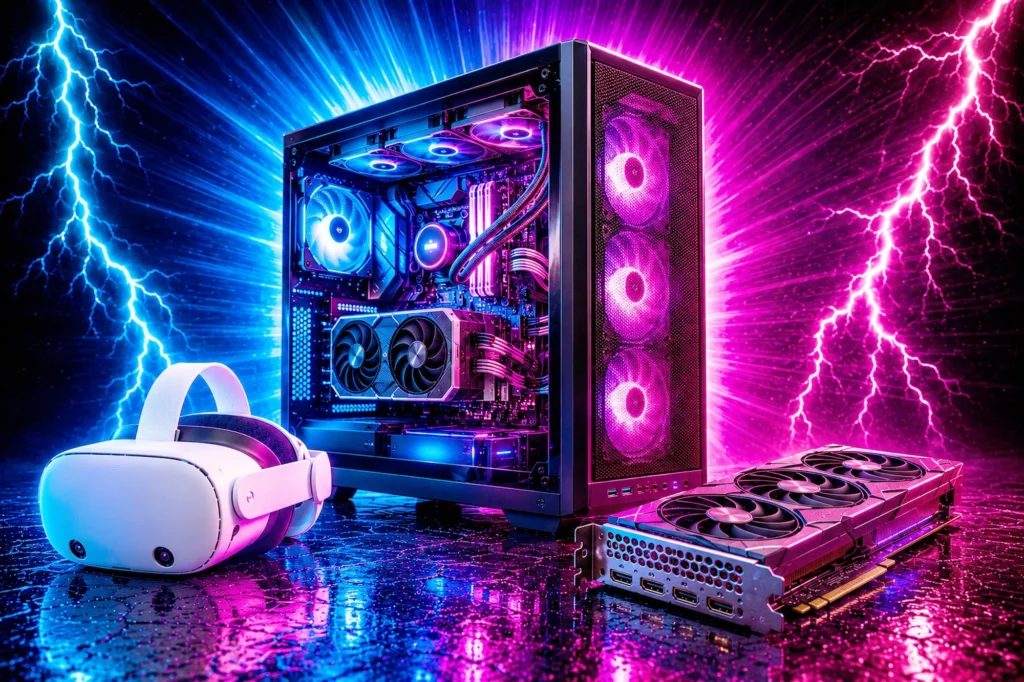
The best VR and AI gear for 2026, in one place: six products that survived a hard filter of in stock, a 4.0 star minimum with a review count that means something, and sold direct by the retailer rather than a marketplace seller.
- Meta Quest 3S 128GB, $349.00 is how you get into VR, and nothing else comes close at the price.
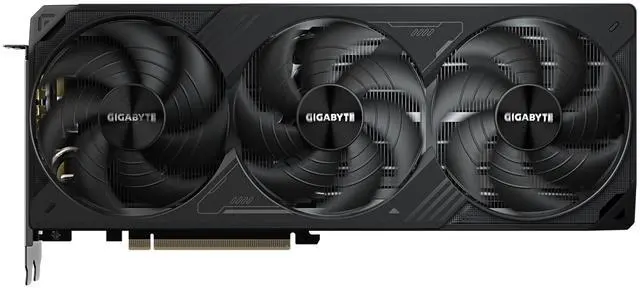
- GIGABYTE WindForce RTX 5070 Ti is a 16GB card at the 5070 Ti tier, a step below the 5080, and 16GB is the number that decides which models you can run at all.
- Lenovo Legion Tower 5i is the one machine that does both without you having to think about it.
- Every price and rating here was read off the retailer page.
- The best VR and AI gear at a glance
- VR and AI are not the same thing, but they buy the same hardware
- What actually matters when buying for VR or AI
- 1. Meta Quest 3S 128GB: the one to buy first
- 2. GIGABYTE WindForce RTX 5070 Ti 16GB: 16GB at the 5070 Ti tier
- 3. GIGABYTE RTX 5080 Gaming OC 16GB: the faster 16GB step up
- 4. ASUS TUF Gaming RTX 5080 16GB: the quiet alternative
- 5. Lenovo Legion Tower 5i: the whole machine, decided for you
- 6. Skytech King 95: the same card, cooled harder
- Every VR and AI pick compared
- How much video memory each job actually needs
- Do you need a PC for VR at all?
- What we left out, and why
- What we would not worry about
- Who this page is not for
- A note on buying graphics cards at these prices
- How to decide in one minute
- What VR and AI actually cost beyond the hardware
- The mistakes that cost the most money
- What changes when you move from gaming to VR
- What changes when you move from gaming to local AI
- Running both on one machine
- Reading a graphics card name, because that is where the money goes
- Where to spend if your budget is fixed
- What we checked, and what we did not
- Two things that will change this page within a year
- Frequently asked questions
- Related buying guides
- The bottom line on the best VR and AI gear
The best VR and AI gear at a glance
This is the best VR and AI gear we would actually buy right now. Every price, rating and review count below was read off the live retailer page. Prices on graphics cards and prebuilt machines move constantly, so treat these as accurate at the time of writing and check the current figure before you buy.

| Class | Standalone headset |
| Key spec | Snapdragon XR2 Gen 2 |
| Memory | 128GB storage |
| Rating | 4.6 (6,699) |
| Class | Graphics card |
| Key spec | GDDR7 |
| Memory | 16GB VRAM |
| Rating | See ratings at Newegg |

| Class | Graphics card |
| Key spec | GDDR7 |
| Memory | 16GB VRAM |
| Rating | 4.7 (196) |

| Class | Graphics card |
| Key spec | GDDR7 |
| Memory | 16GB VRAM |
| Rating | 4.7 (293) |

| Class | Prebuilt PC |
| Key spec | RTX 5070 Ti 16GB |
| Memory | 32GB DDR5 |
| Rating | 4.6 (100) |

| Class | Prebuilt PC |
| Key spec | Ryzen 7 9800X3D |
| Memory | 32GB DDR5 |
| Rating | 4.2 (73) |
VR and AI are not the same thing, but they buy the same hardware
Virtual reality is a rendering problem. Local AI is a memory problem. They have almost nothing in common as technologies, and yet they send you to the same shelf, because both break an ordinary gaming build in the same place: the graphics card.
VR asks for sustained framerate. A headset running 90Hz per eye is drawing two images rather than one, and a frame that arrives late is not a stutter you shrug at, it is nausea. That is why a card comfortable at 1440p can still struggle in VR, and why headroom matters more here than a benchmark average suggests.
Local AI asks for capacity instead. Video memory is a hard wall: a model either fits in VRAM or it does not, and when it does not, performance does not degrade gently, it collapses. That is why 16GB is the number that matters on this page, and why a 32GB card is a specialist purchase that costs more than most complete gaming PCs.
If you want the full reasoning on the memory side, our guide to how much VRAM you need works through it properly. If you are still deciding whether VR is worth buying into at all, we answered that separately. And if you would rather buy a finished machine than parts, our best gaming PCs guide covers the wider field.
What actually matters when buying for VR or AI
Video memory, first and last. For AI it is the only spec that decides whether something runs. For VR it decides how long the card stays useful as headset resolution climbs. Everything on this page except the standalone headsets carries at least 16GB, and that is deliberate.
A real review count. A 4.8 average from twelve buyers tells you less than a 4.4 from eighty. We print the count beside every score rather than letting the star rating do the talking on its own.
Who is actually selling it. Everything here is sold direct by Amazon or by Newegg, not by a marketplace seller operating through their storefront. That is what makes returns and warranty predictable, and it is the single most common thing cheaper listings get wrong.
1. Meta Quest 3S 128GB: the one to buy first
- CARDBOARD MONKENAUT — Get our best Gorilla Tag bundle yet with this Amazon exclusive deal. Purchase Meta Quest 3S to get…
- NO WIRES, MORE FUN — Break free from cords. Game, play and explore immersive worlds — untethered and without limits.
- 2X GRAPHICAL PROCESSING POWER — Enjoy lightning-fast load times and next-gen graphics for smooth gaming powered by the S…
Standalone headset, Snapdragon XR2 Gen 2, 128GB. $349.00. 4.6 stars from 6,699 ratings.
This headset has a very deep owner record: 6,699 ratings. When a product has been bought that many times and still holds 4.6, you are not gambling.
It runs without a PC at all, which is the reason it belongs at the top of a page that otherwise talks about graphics cards. You do not need any of the other hardware here to use it. That makes it the cheapest honest way to find out whether VR is something you will actually keep using, and our VR explainer is blunt about how many people do not.
The 128GB is the one to buy. A 256GB version of the same headset exists, but Amazon is not selling it new itself at the moment, so it is not a pick here. The only trade-off with 128GB is how many large titles you keep installed at once; performance is identical.
- 6,699 ratings at 4.6
- Works standalone, no PC required
- Cheapest way into VR that we would recommend
- Sold and shipped by Amazon
- 128GB fills up faster than you expect
- Standalone visuals do not match a PC-driven headset
- VR is not for everyone, and returns are a real consideration
2. GIGABYTE WindForce RTX 5070 Ti 16GB: 16GB at the 5070 Ti tier
If you only want the memory for games, 16GB costs less than this. The GIGABYTE RX 9060 XT 16G carries the same sixteen gigabytes. The reason this card costs more is that almost every local AI tool is built for NVIDIA first, so the AMD card is the better gaming buy and the weaker AI one.
- NVIDIA GeForce RTX 5070 Ti with 16GB GDDR7 memory
- PCI Express 5.0, triple-fan WindForce cooling
- DLSS 4 support
Graphics card, 16GB GDDR7, PCI Express 5.0. See price and ratings at Newegg. Sold by Newegg.
This is the entry point to everything this page is about, and owners rate it highly. Sixteen gigabytes of video memory is the line where local AI stops being a toy: below it you are restricted to small quantised models, and above it a great many of the useful open models fit without contortions.
For VR the argument is different but points the same way. The 5070 Ti has the headroom to hold a stable frame at headset refresh rates, which is the thing that separates a comfortable session from a queasy one. It is a card we would put behind a headset without qualifying the recommendation.
The catch is honest and it is about the future rather than the present. Sixteen gigabytes is comfortable today. It is not generous, and the direction of travel in both VR resolution and model size is upward. If you expect to keep this card for four or five years, read the case for the 5080 below before deciding.
- A strong owner rating for a card at this tier
- 16GB of VRAM at the 5070 Ti tier
- Enough headroom for comfortable VR framerates
- Triple-fan cooling, PCI Express 5.0
- 16GB is adequate rather than generous for AI
- Chosen for value at 16GB, not for speed
- A moderate review sample, not a deep one
3. GIGABYTE RTX 5080 Gaming OC 16GB: the faster 16GB step up
- Powered by the NVIDIA Blackwell architecture and DLSS 4
- Powered by GeForce RTX 5080
- Integrated with 16GB GDDR7 256bit memory interface
Graphics card, 16GB GDDR7, 256-bit, PCIe 5.0, WINDFORCE cooling. $1,653.99. 4.7 stars from 196 ratings. Sold and shipped by Amazon.
The same 16GB of memory as the 5070 Ti above, for more money. What you are buying is not capacity but speed: more of everything that turns those sixteen gigabytes into finished frames and finished tokens. In VR that is the difference between hitting refresh comfortably and hitting it exactly.
Whether the extra is worth it depends entirely on what you are driving. On a mid-range headset or a 1440p screen it is money you will not see. On a high-resolution headset, or if you are running models rather than just chatting with them, you will.
- 16GB GDDR7 on a 256-bit bus
- Substantially faster than the 5070 Ti at the same 16GB
- Comfortable headroom for high-resolution VR
- WINDFORCE cooling, sold and shipped by Amazon
- A significant premium for no extra memory
- Wasted on a mid-range headset or 1440p screen
- 196 ratings, a solid sample rather than a deep one
4. ASUS TUF Gaming RTX 5080 16GB: the quiet alternative
- Powered by the NVIDIA Blackwell architecture and DLSS 4. System Requirements: Minimum 850W PSU with 16-pin 12V-2×6 (12VH…
- Military-grade components deliver rock-solid power and longer lifespan for ultimate durability. Compatibility: 348mm (13…
- Protective PCB coating helps protect against short circuits caused by moisture, dust, or debris
Graphics card, 16GB GDDR7, 256-bit, PCI-Express 5.0. $1,899.99. 4.7 stars from 293 ratings. Sold and shipped by Amazon.
The same class of card as the GIGABYTE above it, and on paper a coin toss between the two, which we would not pretend otherwise.
The reason it earns a place is that ASUS TUF cards have a long reputation for running quietly under sustained load, and sustained load is exactly what both of this page subjects produce. A VR session is not a benchmark run, it is an hour. An AI workload is not a burst, it is however long the job takes. A card that stays quiet through that is worth something that a spec sheet does not capture.
If the two are within a few dollars when you look, take whichever is cheaper. If one is meaningfully more, the cheaper card does the same job.
- 4.7 stars from 293 owners
- Reputation for staying quiet under long loads
- 16GB GDDR7 on a 256-bit bus
- Sold and shipped by Amazon
- A large 3.6-slot card, so check your case first
- No meaningful performance gap between the two
5. Lenovo Legion Tower 5i: the whole machine, decided for you
- EMPOWER YOUR PASSIONS ELEVATE YOUR GAME – Whether you’re dominating the leaderboard, streaming your gameplay live, or ta…
- BEYOND FAST – The Intel Core Ultra 7 265F CPU is designed to give you the power boost you need to dominate the latest an…
- GAME CHANGER – The NVIDIA GeForce RTX 5070 Ti GPU is beyond fast for gamers and creators. Experience lifelike virtual wo…
Prebuilt PC, Intel Core Ultra 7 265F, RTX 5070 Ti 16GB, 32GB DDR5, 1TB. $2,483.15. 4.6 stars from 100 ratings. Sold and shipped by Amazon.
Everything above this point is a component you still have to put somewhere. This is the finished answer: the 16GB RTX 5070 Ti from entry three, in a complete machine with an Intel Core Ultra 7 265F, 32GB of DDR5 and a 1TB drive.
For AI, the 32GB of system memory alongside the 16GB of video memory is the combination that stops you hitting a second wall the moment you get past the first, and Lenovo lists the memory as expandable to 128GB. The side panel is tool-less, so adding a drive later does not mean taking the machine apart.
The honest comparison is against building it. Buy the card alone and you still need a processor, board, memory, storage, case, cooler and power supply. By the time that is done you are close to this number without the warranty or the assembly. Our high-end build guide works that arithmetic through properly.
- 16GB RTX 5070 Ti with 32GB of DDR5
- Memory expandable to 128GB, per Lenovo
- Tool-less side panel for later upgrades
- Sold and shipped by Amazon
- 1TB of storage, which fills fast with models and VR titles
- Air-cooled, where the Skytech below uses a 360mm liquid cooler
- An Intel processor rather than the X3D chip VR rewards
6. Skytech King 95: the same card, cooled harder

- AMD Ryzen 7 9800X3D 4.7GHz (5.2GHz Turbo Boost) CPU Processor | 1TB Gen4 NVMe M.2 SSD – Up to 30x Faster Than Traditiona…
- NVIDIA GeForce RTX 5070 Ti 16GB GDDR7 Graphics Card (Brand may vary) | 32GB DDR5 RAM 6000 RGB Gaming Memory with Heat Sp…
- Wi-Fi 5 802.11ac & Bluetooth Support | No Bloatware | Graphic output options: 1 x HDMI, 1 x DisplayPort (additional port…
Prebuilt PC, Ryzen 7 9800X3D, RTX 5070 Ti 16GB, 32GB DDR5-6000, 1TB NVMe, 360mm AIO, 850W Gold. $2,799.99. 4.2 stars from 73 ratings. Sold and shipped by Amazon.
The same 16GB RTX 5070 Ti as the Lenovo above. What sets it apart is the processor and the thermal headroom: the Ryzen 7 9800X3D, a 360mm liquid cooler, and an 850W Gold supply.
That is not decoration on a page about VR and AI. Both workloads are sustained rather than bursty. A benchmark finishes in a minute; a VR session runs for an hour and a model keeps the card busy until the job is done. Clocks that hold steady in hour three are worth more here than a higher number in minute one.
The 9800X3D is the other half of the case. In VR, frame consistency matters more than peak frame rate, and the stacked cache on X3D chips is unusually good at keeping frame times flat. Our X3D explainer covers why.
- Ryzen 7 9800X3D with a 16GB RTX 5070 Ti
- 360mm liquid cooling and an 850W Gold supply
- 32GB of DDR5-6000
- Sold and shipped by Amazon
- 1TB of storage, the first thing to add to
- Wi-Fi 5, so use a cable for a PC-tethered headset
- Skytech notes the graphics card brand may vary
Every VR and AI pick compared
| Product | Class | Memory | Price | Rating |
|---|---|---|---|---|
| Meta Quest 3S 128GB | Standalone headset | 128GB storage | $349.00 | 4.6 (6,699) |
| GIGABYTE WindForce RTX 5070 Ti | Graphics card | 16GB GDDR7 | See price at Newegg | See ratings at Newegg |
| GIGABYTE RTX 5080 Gaming OC | Graphics card | 16GB GDDR7 | $1,653.99 | 4.7 (196) |
| ASUS TUF Gaming RTX 5080 | Graphics card | 16GB GDDR7 | $1,899.99 | 4.7 (293) |
| Lenovo Legion Tower 5i | Prebuilt PC | 16GB VRAM / 32GB DDR5 | $2,483.15 | 4.6 (100) |
| Skytech King 95 | Prebuilt PC | 16GB VRAM / 32GB DDR5 | $2,799.99 | 4.2 (73) |
How much video memory each job actually needs
This is the section that decides your purchase, so it is worth being specific rather than gesturing at bigger numbers.
For local AI, memory is a wall and not a slope
When a model fits in video memory it runs at the speed of the card. When it does not fit, it does not run slowly, it falls back to system memory and slows by an order of magnitude, or it refuses to load at all. There is no gentle middle. That single fact is why every recommendation on this page is built around capacity first and speed second.
Eight gigabytes handles small models and quantized versions of mid-size ones. It is where most people start and it is genuinely useful, but you will meet the ceiling quickly and you will meet it as a hard stop.
Sixteen gigabytes is the practical line, and it is why five of the six products here carry exactly that. A large share of the open models people actually want to run locally fit here in quantized form. This is the number to buy if you want to experiment seriously without planning your life around video memory.
Thirty-two gigabytes is a different category of purchase. It removes the ceiling for most local work rather than raising it. It is also very expensive, and no 32GB card clears our checks right now: the RTX 5090 this page listed moved to a marketplace seller, so there is no 32GB card here until one passes.
For VR, the number that matters is the one that does not move
VR is less about capacity and more about consistency. A headset at 90Hz per eye needs a frame every eleven milliseconds, twice, and it needs that reliably. An average framerate is close to meaningless here; what you feel is the worst one percent.
That is why we would not put anything below the RTX 5070 Ti behind a headset without qualifying it. Not because cheaper cards cannot hit the number, but because they hit it with nothing spare, and nothing spare is where discomfort lives.
It is also why the Skytech King 95, which pairs its card with the Ryzen 7 9800X3D, is our pick for a machine built around a headset. In VR the processor feeding the card is a real part of frame consistency, and the X3D chips are unusually good at exactly that. Our X3D explainer covers why.
Do you need a PC for VR at all?
No, and this is the most useful thing on the page for a lot of readers. The Meta Quest 3S runs standalone. No graphics card, no tower, no cables. You can spend $349.00 and be in VR this week.
A PC-driven headset offers better visuals and access to a different library, and for some people that is the whole point. But it is a second purchase on top of the first, and the honest advice is to find out whether you use a headset at all before building a machine around one. A great many headsets end up on a shelf, and our VR guide says so plainly rather than pretending otherwise.
The graphics cards on this page earn their place for AI regardless of whether you ever put a headset on. That is the honest framing: buy the headset to find out about VR, buy the card for what you already know you want to do.
What we left out, and why
The MSI Aegis ZS2. A genuinely strong specification, RTX 5080 with a Ryzen 9 9900X and 64GB of memory, and its own listing markets it as AI-Ready and VR-Ready. It rates 3.9. Every page on this site holds a 4.0 minimum and we are not going to make an exception for a machine whose marketing copy happens to match the topic.
Every refurbished RTX 5090 machine. There are a lot of them, several look like value, and all of them were either refurbished, out of stock, or both when we checked. Refurbished stock does not go on this site.
The four picks this page carried before. The MSI Gaming Trio RTX 5090 is now offered on Newegg only through a marketplace seller, and no other RTX 5090 cleared our checks. The GIGABYTE WINDFORCE RTX 5080 is out of stock at Newegg. The ABS Kaze II Ruby link now leads to a different machine, which is also out of stock. The STORMCRAFT Valkyrie is in stock, but on fourteen reviews, too few to stand behind at this price.
Valve Index and PC-tethered headsets generally. Not carried by the retailers we buy from, at prices we could verify, in stock, on the day we checked. We would rather name the gap than fill it with something we cannot stand behind.
What we would not worry about
Brand of graphics card, within reason. The GIGABYTE and the ASUS 5080 on this page are the same chip with different coolers. Buy whichever is cheaper on the day unless you have a specific reason to care about noise.
System memory beyond 32GB, for now. Both machines here carry 32GB and that is comfortable for VR and for running models that fit in video memory. Sixty-four gigabytes helps in specific workflows and is wasted in most.
The last two hundred megahertz. Factory overclocked editions cost more and deliver a difference you will not perceive in a headset or in a model load time. Spend it on memory capacity instead, every time.
Who this page is not for
If you are buying purely to play flat-screen games, almost nothing here is the right purchase. The cards on this page are chosen for memory capacity and sustained load, and a gaming buyer is better served by our graphics card guide or the machines in our best gaming PCs roundup, several of which cost considerably less.
If you want to train models rather than run them, this page stops short of your requirements. Training is a different problem with different economics, and at that point rented compute usually beats buying hardware outright by a wide margin. Everything here is chosen for local inference, which is what the overwhelming majority of people actually mean when they say they want to run AI at home.
If you are waiting for prices to fall, that is a defensible position and we are not going to talk you out of it. Graphics card pricing in this class has been volatile, the figures on this page moved while we were writing it, and nothing here is a purchase that needs making this week. The Quest 3S is the one exception, because it sits at a price that has been stable and it does not depend on the rest.
A note on buying graphics cards at these prices
Every card on this page costs more than a complete games console. That deserves a word of caution that a buying guide does not usually give.
Prices in this category move more than in any other hardware we cover. The figures here were accurate when this guide was last reviewed and we have watched cards in this exact class move by a hundred dollars inside a week in either direction. A guide that tells you today is always the day to buy is not being straight with you.
What does not move is the reasoning. Sixteen gigabytes is the capacity line at any price. The 5070 Ti and the 5080 carry the same memory whatever they cost this week. Buy on the specification that decides your outcome, then buy on the day the price is reasonable, and those are two separate decisions that a lot of guides collapse into one.
How to decide in one minute
You are curious about VR and have not tried it. Meta Quest 3S 128GB, $349.00, and stop reading. It needs nothing else on this page.
You want to run AI models locally and have a machine already. GIGABYTE WindForce RTX 5070 Ti. Sixteen gigabytes of video memory at the 5070 Ti tier, a step below the 5080, on a strong owner sample.
You want the same thing but faster and expect to keep it longer. GIGABYTE RTX 5080 Gaming OC, on a solid owner sample.
You are starting from nothing. Lenovo Legion Tower 5i. A 16GB RTX 5070 Ti and 32GB of DDR5, assembled with one warranty.
You have hit a wall at 16GB and know it. A 32GB card, and none clears our checks right now. We will add one here when one does.
What VR and AI actually cost beyond the hardware
The purchase price is not the whole number, and a buying guide that stops there is not being straight with you.
For VR
Games are the obvious one, and VR titles are not cheap. Beyond that, most people end up buying a better head strap within a month, because the ones included with headsets are almost universally the first thing owners replace. Budget for it rather than being surprised by it.
Space matters more than accessories. Room-scale VR wants clear floor, and the most common reason a headset gathers dust is not the hardware, it is that there is nowhere convenient to use it. That costs nothing and it decides everything.
For local AI
Storage fills quickly. Model files are large, and a 1TB drive holding Windows disappears faster than you expect once you keep a few of them around. Both machines on this page ship with 1TB, so plan on a second drive.
Power and heat are real. A card of this class under sustained load pulls hard and dumps that into the room. It is why the 850W supply and the 360mm cooler on the Skytech King 95 are not decoration on a machine that will be running jobs rather than benchmarks.
The mistakes that cost the most money
Buying capacity you cannot use. The single most expensive error on this page is a 32GB card bought by someone whose actual workload fits comfortably in 16GB. That is thousands of dollars for nothing.
Buying a headset for a PC you do not own. The corollary. If the plan involves a machine you have not built yet, buy the standalone headset first and find out whether you use it.
Trusting a star rating without the count behind it. A high average resting on a dozen ratings and a 4.6 resting on 6,699 are not the same claim. The bar chart above exists precisely so that difference is visible rather than buried.
Assuming a marketing badge is a specification. AI-Ready and VR-Ready appear on machines across the whole price range. Read the memory figure instead.
What changes when you move from gaming to VR
A machine that plays games well is not automatically a machine that drives a headset well, and the gap catches people out because it does not show up in any of the numbers they are used to reading.
The first change is that you are rendering twice. Two eyes, two images, every frame. That is not quite double the work because a lot is shared, but it is far more than the single-screen figure on any benchmark chart implies.
The second change is that the target is fixed and unforgiving. On a monitor, a frame arriving late is a stutter you notice and forget. In a headset, your inner ear notices, and what it produces is nausea rather than irritation. There is no tolerance band. A machine that averages well but dips is worse in VR than a slower machine that never dips.
The third change is that the processor matters more than gamers expect. Frame delivery has to be even, and evenness is where a strong processor earns its money. That is the specific reason we point headset buyers at the Skytech King 95, which uses the Ryzen 7 9800X3D rather than something cheaper with a similar core count. The extra cache is unusually good at keeping frame times flat, which is exactly the thing a headset punishes you for getting wrong.
Put together, that is why the recommendation on this page starts at the RTX 5070 Ti rather than lower. It is not that cheaper cards cannot reach the number. It is that they reach it with nothing in reserve, and reserve is what comfort is made of.
What changes when you move from gaming to local AI
Local AI inverts almost everything a gaming buyer has learned, and that is the single most common source of expensive mistakes in this category.
In gaming, more speed produces more frames, smoothly and predictably. Spend twenty percent more and you get some fraction of that back in performance. The relationship is gradual and the worst outcome of buying too little is that you turn a setting down.
In local AI there is no equivalent of turning a setting down. Capacity is binary. A model either fits in video memory or it does not, and the moment it does not, you are not running a slightly worse version, you are running something an order of magnitude slower or nothing at all. The buying implication is stark: a slower card with more memory beats a faster card with less, every time, for this job.
That is the reverse of the advice any gaming guide would give you, including ours, and it is why this page exists as a separate thing rather than a section bolted onto a gaming roundup. If you take one idea away from the whole page, take that one.
It is also why a 32GB card, when one clears our checks, belongs at the bottom of a page like this rather than the top. It is the correct purchase for a specific, nameable problem, and an extremely poor one for anybody else.
Running both on one machine
The good news is that the two sets of requirements overlap more than they conflict. A card with 16GB and the headroom for stable VR frames is also a card that runs a wide range of local models. The two prebuilt machines here are exactly that overlap, deliberately.
Where they do pull apart is heat and time. A gaming session is bursty and a benchmark is short. VR runs for an hour at a stretch, and an AI job runs until it finishes, which might be considerably longer. Both keep the card at load in a way that ordinary gaming does not, and sustained load is what separates a machine that holds its clocks from one that quietly throttles.
That is the honest case for the Skytech King 95 over the Lenovo Legion Tower 5i: a 360mm liquid cooler and an 850W supply are not specification padding when the workload is measured in hours. It is also the reason we would not push anyone toward the smallest case or the cheapest supply that technically fits a card of this class.
Storage is the other practical overlap. VR titles are large and model files are larger. Both machines here ship with 1TB, and a 1TB drive holding Windows will feel small within months if you are doing both. Budget for a second drive.
Reading a graphics card name, because that is where the money goes
Graphics card names are deliberately confusing and the confusion is expensive. Three of the six products on this page are cards, and the difference between picking the right one and the wrong one is several hundred dollars for performance you will never notice.
The number is the tier. In the RTX 50 series, a 5070 sits below a 5080, which sits below a 5090. That much is honest. The Ti suffix marks a step up within a tier, which is why the 5070 Ti on this page is much closer to a 5080 than its name suggests, and why it is the value pick rather than the budget one.
The memory figure is separate from the tier, and it is the one that matters here. A 5070 Ti and a 5080 both carry 16GB. The 5090 carries 32GB. For gaming the tier matters most; for local AI the memory figure matters most, and those two facts point at different cards. That is the single most useful thing on this page for anyone buying with AI in mind.
Everything after the tier is the manufacturer. WindForce, WINDFORCE, TUF and so on are cooler designs and factory clock settings from GIGABYTE and ASUS. They are the same chip underneath. A different cooler changes noise and sustained clocks a little. It does not change what will run.
So when you compare the GIGABYTE RTX 5080 Gaming OC at $1,653.99 against the ASUS TUF Gaming RTX 5080 at $1,899.99, you are not comparing performance. You are comparing price against a slightly different fan arrangement and a slightly different owner sample. That is the whole decision.
Where to spend if your budget is fixed
Most people arrive at a page like this with a number in mind rather than a shopping list. Here is how we would divide it.
Around $350
Buy the Meta Quest 3S 128GB and nothing else. At this budget there is no AI conversation worth having, and there is a complete VR experience that needs no other hardware. This is the best value purchase on the page by a distance.
Around $1,200
Buy the GIGABYTE WindForce RTX 5070 Ti, assuming you have a machine to put it in. Sixteen gigabytes of video memory changes what is possible locally, and the 5070 Ti tier is where the AI software actually works well. If you do not have a machine to put it in, this budget does not stretch to one and the headset is the better purchase.
Around $1,600
Two real options. The GIGABYTE RTX 5080 Gaming OC at $1,653.99 gives you meaningfully more speed at the same 16GB. Or buy the 5070 Ti and put the difference toward a headset, which buys you a whole second capability rather than a faster version of the first.
We would take the second option more often than not. A faster card doing the same jobs is a smaller change than a headset you did not previously own.
Around $3,000
The Lenovo Legion Tower 5i at $2,483.15, complete, assembled, warranted, or the Skytech King 95 at $2,799.99 if you want the X3D processor and the bigger cooler. At this budget you are no longer choosing a component, you are choosing whether to spend a weekend building. Both are defensible and the price difference is smaller than people expect once every part is counted.
Around $5,000 and up
Only one reason: you have hit the 16GB wall and know exactly which models you cannot run. If you cannot name them, this is not your tier and the money does more good almost anywhere else. Even if you can, no 32GB card clears our checks right now, so this page has nothing to recommend at this tier yet.
What we checked, and what we did not
Every product here was verified on its own retailer page for four things: the current price, the star rating, the number of ratings behind it, and whether it was actually in stock and buyable. Anything that failed one of those is not on the page, and the ones we rejected are named in the section above rather than quietly dropped.
We also checked who holds the sale. Everything here is sold direct by Amazon or Newegg rather than by a marketplace seller operating through their storefront, because that is what makes returns and warranty predictable when something goes wrong.
What we did not do is bench these ourselves. We are not going to pretend otherwise. There are no measured frame rates on this page and no model load times, because we did not run them. What this page offers instead is verified purchase facts, a consistent standard applied to every product, and the reasoning behind which specification actually decides your outcome. Where a number is directional rather than measured, the page says so.
That distinction matters more in this category than most, because VR and AI are both areas where marketing language runs well ahead of what the hardware does. AI-Ready is not a specification. VR-Ready is not a specification. A memory figure is.
Two things that will change this page within a year
Memory requirements will rise, not fall. Every generation of local model has been more capable and hungrier, and headset resolution has climbed steadily. The 16GB that is comfortable today is the 8GB of two years ago. If you are buying to keep for four or five years rather than two, that argues for the 5080 over the 5070 Ti, and it is the strongest case for spending more that this page contains.
Standalone headsets keep absorbing what used to need a PC. The reason the Quest 3S sits at the top of this page with no machine behind it is that the standalone category has taken over most of what a mid-range PC-driven setup used to offer. That trend has not finished. The case for buying a graphics card specifically for VR is weaker now than it was, and will likely be weaker again next year.
Which is why the honest framing of this whole page is the one we opened with: buy the headset to find out about VR, and buy the card for the AI work you already know you want to do. Those are two separate purchases with two separate justifications, and the only thing they truly share is the shelf they sit on.
Frequently asked questions
What is the best VR and AI gear in 2026?
For VR the Meta Quest 3S 128GB is the one to buy first, because it runs standalone and carries a very deep owner record. For AI the GIGABYTE WindForce RTX 5070 Ti is a 16GB card at the 5070 Ti tier, and 16GB is the capacity that decides what you can run at all. If you want a single finished machine that does both, the Lenovo Legion Tower 5i pairs a 16GB RTX 5070 Ti with 32GB of memory.
How much VRAM do you need for local AI?
Sixteen gigabytes is the practical line. Eight gigabytes runs small and quantized models and is genuinely useful to start with, but you meet the ceiling quickly and it arrives as a hard stop rather than a slowdown. Thirty-two gigabytes removes the ceiling for most local work, but it is an expensive way to get there, and no 32GB card clears our checks right now.
Do you need a gaming PC to use VR?
No. The Meta Quest 3S runs standalone with no PC at all, which is why it sits at the top of this page. A PC-driven headset gives better visuals and a different library, but that is a second purchase on top of the first. Find out whether you use a headset before building a machine around one.
Is an RTX 5070 Ti enough for VR?
Yes, and it is a card we would recommend behind a headset without qualifying it. VR rewards consistency rather than peak performance, because a headset needs a frame every eleven milliseconds per eye and what you feel is the worst one percent rather than the average. The 5070 Ti has enough headroom to hold that reliably.
Is the RTX 5090 worth it for gaming?
No. Nothing in gaming or VR needs a 32GB card today, and no headset currently on sale can use what it does. It only makes sense for local AI, where 32GB runs models that will not load on 16GB at any speed. If that is not a problem you have, buy the 5070 Ti and spend the difference elsewhere.
What does AI-Ready mean on a PC listing?
Very little on its own. It is a marketing label that appears on a great many machines and it is not a specification. What matters is the amount of video memory on the graphics card, because that is the hard limit on what will run. We excluded one machine from this page that markets itself as AI-Ready and VR-Ready, because it rates 3.9 stars and every page on this site holds a 4.0 minimum.
Should you buy a graphics card or a complete PC?
If you already own a machine with a modern processor and a power supply with headroom, buy the card. If you are starting from nothing, the two prebuilt machines here are close to what the parts cost once you add a processor, board, memory, storage, case, cooler and power supply, and they come with one warranty instead of eight.
How often do these prices change?
Constantly. Graphics card and prebuilt PC pricing moves week to week and sometimes faster. Every figure on this page was read from the retailer page and carries no guarantee beyond that. Check the current price before you buy.
Related buying guides
If you are working out the memory question in more depth, our guide to how much VRAM you need for gaming goes through it at length. For the question of whether VR is worth buying into at all, we answered that separately and honestly.
If you would rather buy a complete machine, our best gaming PCs guide covers the wider field including both machines listed here. If you would rather build one, the high-end build guide works through the parts and the arithmetic. And the processor argument behind the Skytech pick is in our X3D explainer.
The bottom line on the best VR and AI gear
If you want one recommendation and no further reading, the Meta Quest 3S 128GB at $349.00 is the best VR purchase on this page and it is not close. It needs no other hardware, it carries 6,699 owner ratings at 4.6 stars, and it is the cheapest honest way to find out whether VR is something you will keep using.
For AI the answer is the GIGABYTE WindForce RTX 5070 Ti. Sixteen gigabytes of video memory is the line where local models stop being a curiosity, and this card crosses it at the 5070 Ti tier, a step below the 5080.
If you want one machine that handles both without you thinking about the parts, the Lenovo Legion Tower 5i is the complete answer, and the Skytech King 95 is the same graphics card with an X3D processor and better cooling if you intend to run it hard for hours at a time.
And the thing worth repeating: capacity decides what runs, and consistency decides whether VR is comfortable. Neither of those is the biggest number on a box. Buy for the job you actually have.
Prices and ratings on this page were read from each retailer page and carry no guarantee beyond that.
Gamers Tech Guide participates in the Amazon Services LLC Associates Program. As an Amazon Associate we earn from qualifying purchases.