
Seven true 60% keyboards that passed the same filter as everything else on this site: a real named switch, a live price with Prime delivery, a 4.0 star minimum on a real sample, and in stock when we checked. From a budget hot-swap board to a magnetic-switch board you can tune key by key.
- Best 60% keyboard for most people: the HyperX Alloy Origins 60 at $79.99, with an aluminum body and 3,667 ratings behind it.
- Best budget: the Redragon K617 at $34.99, hot-swappable, with 834 ratings.
- Best wireless: the Royal Kludge RK61 at $45.99, Bluetooth, 2.4GHz and wired in one board.
- A true 60% has no arrow keys and no function row. Check the key count before you buy: 61 keys means both live on a layer.
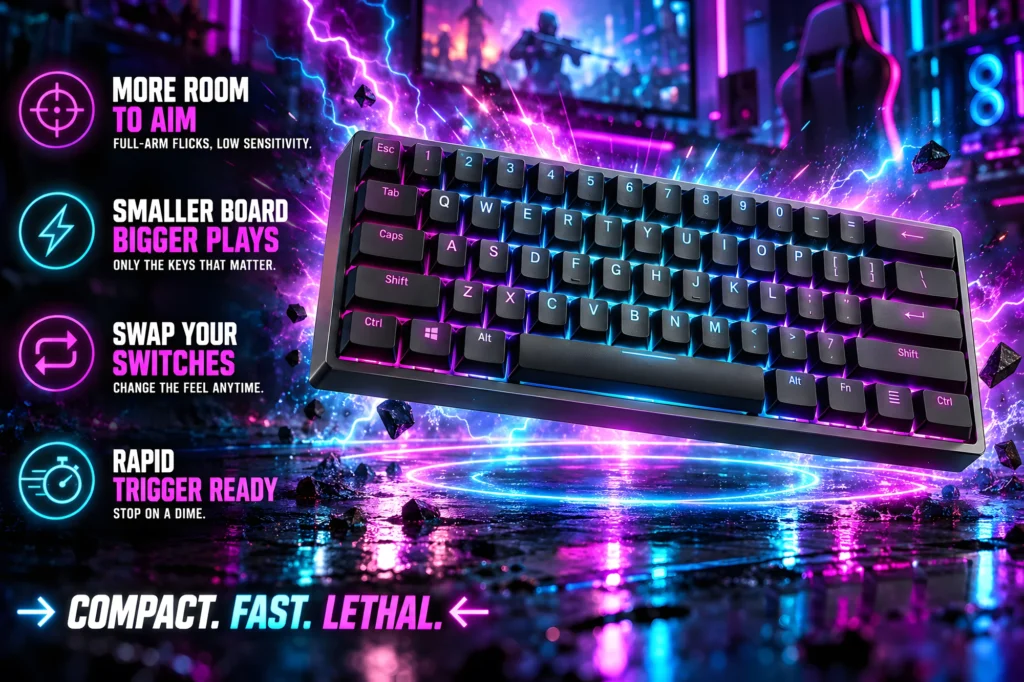
A 60% keyboard is the smallest layout most gamers will ever want, and the reason people buy one is simple: it gives your mouse room. Take the number pad, the function row, the arrow keys and the navigation cluster off a keyboard and what is left is about eleven and a half inches wide, which is several inches of extra desk for low-sensitivity mouse swipes.
The catch is that everything you removed still exists. F1 to F12, the arrows, Delete, Home and End all move onto a second layer that you reach by holding a function key. Some people adapt in a day. Some people never do. This guide covers both halves of that decision: which boards are worth buying, and whether a 60% is right for you in the first place.
We checked seven 60% keyboards against their own Amazon listings: price, star rating, the number of ratings behind it, who ships it, and whether it carries Prime delivery. If you want to compare full-size, tenkeyless and 75% boards as well, our best gaming keyboards guide covers every layout.
The best 60% keyboards at a glance
Every price, rating and review count below updates from Amazon’s product data. Keyboard prices move often, so check the current figure before you buy.

| Keys | 61 |
| Switch | HyperX Red linear |
| Connection | Wired USB-C |
| Rating | 4.7 (3,667) |

| Keys | 61 |
| Switch | Red linear, hot-swap |
| Connection | Wired USB-C |
| Rating | 4.4 (834) |
| Keys | 61 |
| Switch | Hot-swap, linear or tactile |
| Connection | BT 5.0 / 2.4GHz / USB-C |
| Rating | 4.5 (9,753) |
| Keys | 63 |
| Switch | Red linear |
| Connection | BT 5.0 / 2.4GHz / USB |
| Rating | 4.3 (3,954) |

| Keys | 61 |
| Switch | Magnetic (Hall Effect) |
| Connection | Wired USB-C |
| Rating | 4.5 (1,036) |

| Keys | 61 |
| Switch | Linear optical |
| Connection | Wired, detachable cable |
| Rating | 4.6 (320) |

| Keys | 61 |
| Switch | OmniPoint 2.0 magnetic |
| Connection | 2.4GHz / BT 5.0 / USB-C |
| Rating | 4.3 (334) |
What 60% actually means, and what you give up
Keyboard sizes are named by roughly what share of a full-size board is left. The names are loose, so the key count is the number that tells you what you are actually getting.
60%, about 61 keys. The main typing block and nothing else. No function row, no arrow keys, no Insert, Delete, Home, End, Page Up or Page Down as separate keys. All of them are still there, on a layer you reach by holding Fn. Six of the seven keyboards on this page are exactly this.
60% with arrows, about 63 to 64 keys. The same footprint with the arrow keys squeezed into the bottom right corner, usually by shrinking the right Shift key. The DIERYA DK63 below is one of these, and it is the easiest 60% to live with if you use arrows for work.
65%, about 66 to 68 keys. A separate arrow cluster and a column of navigation keys down the right side. Slightly wider than a 60%. If you already know you will miss the arrows, a 65% is usually the better buy, and our main keyboards guide includes one.
75% and tenkeyless. Function row back, arrows back, and more width. These are not 60% boards and we have left them out of this list on purpose.
The honest test is how you use the keys that move. If you play games and chat, you will rarely touch F-keys or Delete and a 60% costs you almost nothing. If you edit documents, write code or work in spreadsheets on the same keyboard, you will be holding Fn for arrows all day, and that is the single most common reason people send a 60% back.
How we chose these seven
Every keyboard on this page passed the same checks we use across the site.
A real 60% layout. Plenty of listings use 60% as a search term for keyboards that are 65% or larger. We read the key count on each listing and kept the boards that are 61 to 63 keys.
A named switch. Each pick states what switch it uses: a named linear switch, an optical switch, or a magnetic Hall Effect switch. A keyboard that only promises a mechanical feeling was not considered.
Prime delivery from a real seller. Each board ships from Amazon with Prime delivery when we checked. Some are sold by the brand’s own store rather than Amazon itself, and we say which below.
A 4.0 star minimum on a real sample. Several newer 60% boards from big brands carried fewer than fifty ratings when we checked. They may be excellent, and they may not, and at that sample size nobody can tell yet, so they are not here.
Mechanical, optical and Hall Effect: what the switch changes
Mechanical switches register a press when two metal contacts touch inside the switch. The feel comes in three flavors: linear, which is smooth all the way down; tactile, which has a small bump; and clicky, which adds a sound. Every mechanical pick here uses linear switches by default, which is the usual choice for gaming.
Optical switches, like the ones in the Razer Huntsman Mini, register a press when the key breaks a beam of light instead of closing a contact. Razer lists an actuation point of 1.0mm on its linear optical switch, which is shorter than a typical linear switch.
Hall Effect, or magnetic, switches are the reason 60% boards have become interesting again. A magnet in each key and a sensor underneath measure exactly how far the key is pressed, which makes two things possible. The first is adjustable actuation: you decide how far down a key has to travel before it counts. The second is rapid trigger: the key resets the instant you start lifting it, instead of waiting to pass a fixed point. In shooters that means a movement key stops the moment you let go. The AULA WIN60 HE and the SteelSeries Apex Pro Mini both work this way.
Hot-swap is a separate feature. It means the switches pull out of sockets and new ones push in without soldering, so you can change the feel of the board later. The Redragon K617, the Royal Kludge RK61 and the AULA WIN60 HE all list hot-swappable sockets.
1. HyperX Alloy Origins 60: the best 60% keyboard for most people
61 keys, HyperX Red linear switches, aluminum body, wired USB-C. $79.99. 4.7 stars from 3,667 ratings, sold and shipped by Amazon.
- [Petite 60% form factor]: Free up more room for your mouse with this supremely compact keyboard.
- [Full aircraft-grade aluminum body]: The aluminum casing keeps the keyboard structurally sound and stable when the actio…
- [Double shot PBT keycaps with side printing]: The keycaps are designed with durable PBT material that is resistant to we…
The thing a small keyboard most often gets wrong is how it feels on the desk. A light plastic 60% slides when you lean on it and flexes when you type hard. The Alloy Origins 60 has a full aircraft-grade aluminum body, and that one decision is most of why it is the pick.
The details that matter on a 60% are also right. The keycaps are double-shot PBT with the secondary functions printed on the sides, so the arrows, F-keys and navigation keys on the Fn layer are labeled where you can actually see them. That makes the first week on a 60% much easier.
HyperX rates its own Red linear switches for 80 million keypresses, the lighting is per-key RGB, and the NGENUITY software handles macros, per-key lighting and a Game Mode. The feet give you three typing angles, and the USB-C cable detaches, which is useful because a 60% is the keyboard people are most likely to carry to a friend’s place or a LAN.
Buy it if: you want a 60% that feels like a premium keyboard and you play on one PC.
Skip it if: you need wireless, or you want to swap switches later. Neither is on this board.
- Full aluminum body, so it stays planted on the desk
- Double-shot PBT keycaps with side-printed Fn functions
- 4.7 stars from 3,667 ratings
- Detachable USB-C cable and three tilt angles
- Wired only
- Switches are not hot-swappable
- No arrow keys, like every true 60%
2. Redragon K617: the best budget 60% keyboard
61 keys, hot-swappable red linear switches, RGB, wired USB-C. $34.99. 4.4 stars from 834 ratings. Shipped by Amazon and sold by Redragon’s own store.
- 60% compact layout with 61 keys, dropping the numpad and navigation cluster for mouse room.
- Hot-swap socket accepts almost any 3-pin or 5-pin switch, no soldering required.
- Up to 20 preset RGB lighting modes with adjustable brightness and flow speed.
If you are not sure a 60% is for you, this is the one to find out on. It is a genuine mechanical keyboard with named red linear switches, it has hundreds of ratings behind it, and it costs about what a game does.
The feature that makes it better than most budget boards is the hot-swap socket. Redragon says it accepts almost any 3-pin or 5-pin switch, so if you decide later that you want a quieter switch or a tactile one, you change the switches and keep the keyboard. At this price that is unusual.
Redragon rates the switches for 50 million keypresses, there are 20 lighting modes, and the software handles macros and custom key bindings. The black case with its red inner frame shows through the RGB.
Buy it if: you want to try a 60% layout without spending much, or you want a board you can change switches on later.
Skip it if: you want a metal case or wireless. This is a plastic, wired board.
- Hot-swap sockets for 3-pin and 5-pin switches
- 834 ratings at 4.4 stars
- Named red linear switches, not a mechanical feeling
- Macro and lighting software
- Plastic case, lighter than the metal boards here
- Wired only
- Macros and custom lighting need the desktop software
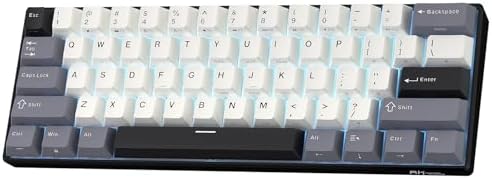
3. Royal Kludge RK61: the best wireless 60% keyboard
61 keys, hot-swappable switches, Bluetooth 5.0, 2.4GHz and USB-C. $45.99. 4.5 stars from 9,753 ratings. Shipped by Amazon.
- 60% Compact, Portable Size — The ultra-minimalist 61-key layout reclaims precious desk space, providing more space for l…
- Versatile 3-Mode Connectivity — Seamlessly toggle between Bluetooth 5.0, 2.4GHz wireless, and USB-C wired modes. This co…
- Thocky Typing Experience — Engineered with dual-layer thick silencing foam and spacebar sound-absorbing foam, the RK61 s…
The RK61 has thousands of owner ratings behind it, and it earns its place as the wireless pick by doing all three connections well. It switches between Bluetooth 5.0, a 2.4GHz receiver and a USB-C cable, and it can pair with up to three devices, so one board can move between a gaming PC, a laptop and a tablet.
Royal Kludge has put real effort into how it sounds. The listing describes two layers of silencing foam, foam under the space bar and factory-lubricated stabilizers, which is what separates a board that sounds solid from one that sounds hollow. The keycaps are double-shot PBT in a Cherry profile.
The sockets are hot-swap for 3-pin and 5-pin switches, and Royal Kludge offers the board with a choice of linear, tactile or silent linear switches. The battery is 1450mAh and rated for up to 200 hours with the lights off. The backlight on this version is a single color rather than full RGB, which is the one trade-off to know about.
Buy it if: you want one small keyboard for several devices, or you want to get the cable off your desk.
Skip it if: RGB lighting matters to you. This version has single-color backlighting.
- Bluetooth 5.0, 2.4GHz and wired, up to three devices
- 9,753 ratings at 4.5 stars
- Hot-swap sockets and a choice of switches
- Sound-dampening foam and lubricated stabilizers
- Single-color backlight, not RGB
- Use the 2.4GHz receiver or the cable for competitive play, not Bluetooth
- No arrow keys
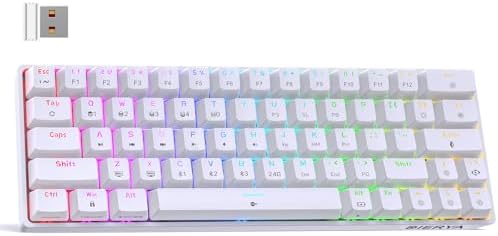
4. DIERYA DK63: the wireless 60% that keeps the arrow keys
63 keys including arrows, red linear switches, Bluetooth 5.0, 2.4GHz and wired. $39.99. 4.3 stars from 3,954 ratings. Shipped by Amazon and sold by DIERYA’s own store.
- 【Fashionable Design】The DK63 is a compact 60% mechanical keyboard with 63 keys, including directional keys. It utilizes …
- 【Red Switch – Silent & Smooth】Built with our custom Red switches for a light, linear feel (45g). Smooth keystrokes with …
- 【Three Connection Modes】Supporting 2.4G/Bluetooth 5.0/wired USB, the DK63 wireless keyboard allows seamless switching be…
The DK63 answers the most common complaint about 60% keyboards. It has 63 keys instead of 61, and the extra two go to real arrow keys in the bottom right corner. Everything else still lives on the Fn layer, but the arrows, the keys you reach for most when you are not gaming, are right there.
It is also tri-mode wireless: 2.4GHz, Bluetooth 5.0 and a wired USB connection. DIERYA lists a 3000mAh battery, rated for about 8 hours with the backlight at full brightness and about 90 hours with it off, so turning the RGB down makes a big difference to how often you charge it.
The switches are DIERYA’s own red linear switches, listed at 45g of force and around 40dB, so it is light and fairly quiet. There are 18 lighting modes and software for customizing them, and DIERYA lists support for Windows, Mac and Linux.
Buy it if: you want a small wireless keyboard but you use arrow keys every day.
Skip it if: you want hot-swap. The DK63 does not list it.
- Real arrow keys on a 60% footprint
- 2.4GHz, Bluetooth 5.0 and wired
- Light, quiet red linear switches
- Works with Windows, Mac and Linux
- Battery runs down fast with the lighting at full brightness
- Switches are not listed as hot-swappable
- Smaller right Shift key to make room for the arrows
5. AULA WIN60 HE: the best value Hall Effect 60% keyboard
61 keys, magnetic Hall Effect switches, rapid trigger, adjustable actuation, wired USB-C. $39.99. 4.5 stars from 1,036 ratings. Shipped by Amazon and sold by CORBOBO Direct.
- High-Performance Hall Effect Magnetic Switch Keyboard: The AULA Win60 HE 60% keyboard features advanced, self-developed …
- Optimized for FPS Games: Designed for FPS titles like Valorant and CS2, the Win60 HE’s magnetic switches enable faster p…
- Rapid Trigger Gaming Keyboard: Featuring an ultra-low RT step distance of just 0.02mm, the Win60 HE ensures lightning-fa…
Magnetic switches used to be a premium feature. The WIN60 HE brings them to a price close to an ordinary mechanical board, and for anyone who plays Valorant, Counter-Strike 2 or any shooter where you stop and shoot, that is the most useful upgrade a keyboard can give you.
AULA lists a rapid trigger step as small as 0.02mm, adjustable actuation, and a polling rate of up to 8000Hz. In practice rapid trigger is the feature you will feel: a movement key stops registering the instant you begin to lift it, which is what makes counter-strafing feel immediate.
The switches are AULA’s own Graywood V3 magnetic switches and they are hot-swappable. The keycaps are PBT with RGB lighting underneath, and setup runs through a web-based driver rather than an installed app, so you can configure it from any computer with a browser.
Buy it if: you play shooters and want rapid trigger without paying premium-brand prices.
Skip it if: you mostly type. Adjustable actuation is a gaming feature, and a standard board will serve you as well.
- Rapid trigger and adjustable actuation
- Up to 8000Hz polling rate
- Hot-swappable magnetic switches
- Web-based driver, nothing to install
- Wired only
- Sold by a third-party store, shipped by Amazon
- AULA is a newer name than Razer or SteelSeries
6. Razer Huntsman Mini: the best 60% keyboard for FPS
61 keys, Razer linear optical switches, aluminum top frame, Snap Tap. $69.00. 4.6 stars from 320 ratings, sold and shipped by Amazon.
- FASTER THAN TRADITIONAL MECHANICAL SWITCHES — Razer Linear Optical switch technology uses optical beam-based actuation, …
- ULTIMATE PERSONALIZATION & GAMING IMMERSION WITH RAZER CHROMA RGB LIGHTING — Fully syncs with popular games, Razer hardw…
- QUALITY, ALUMINUM CONSTRUCTION — Covered with a matte, aluminum top frame for increased structural integrity
The Huntsman Mini is the brand-name choice for a fast 60%. Its linear optical switches register a press with a light beam rather than a metal contact, and Razer lists the actuation point at 1.0mm, shorter than a typical linear switch.
It also has Snap Tap. When you hold two opposing movement keys, Snap Tap gives priority to whichever you pressed last, so switching from strafing left to right is instant instead of passing through a neutral moment. It is off by default and you turn it on in Razer Synapse 4. Some competitive games restrict this kind of feature, so check the rules of anything you play in tournaments.
The top frame is aluminum, the keycaps are doubleshot PBT, lighting is full Razer Chroma RGB, and Hypershift lets you remap any key or combination. The cable detaches, which makes it easy to pack.
Buy it if: you want a fast, well-built 60% from a major brand and you play shooters.
Skip it if: you want adjustable actuation. That needs a magnetic board like the AULA or the SteelSeries.
- Linear optical switches with a 1.0mm actuation point
- Snap Tap for faster direction changes
- Aluminum top frame and doubleshot PBT keycaps
- Sold and shipped by Amazon
- No adjustable actuation
- Wired only
- 320 ratings, a smaller owner sample than the budget picks
7. SteelSeries Apex Pro Mini Wireless: the best premium 60% keyboard
61 keys, OmniPoint 2.0 adjustable magnetic switches, 2.4GHz and Bluetooth 5.0 wireless, aluminum top plate. $239.99. 4.3 stars from 334 ratings, sold and shipped by Amazon.
- FULLY CUSTOMIZABLE & STUPIDLY FAST with OmniPoint 2.0 Adjustable HyperMagnetic switches
- RAPID TRIGGER — Eradicate latency arising from the physical movement of the switch through dynamic activation and deacti…
- ULTIMATE CONTROL — 40 levels of per-key actuation (0.1 – 4.0mm) – set WASD for light, ultra-fast movements and set abili…
The Apex Pro Mini is what you buy when you want every feature a 60% can have in one board. Its OmniPoint 2.0 switches are magnetic, with rapid trigger and 40 levels of actuation per key, from 0.1mm to 4.0mm. You can set WASD to fire at a light touch and put abilities on a deep press so you never trigger them by accident.
SteelSeries also lets you put two actions on one key, one at a light press and another at a full press, such as walking and sprinting on the same key. That depends on a switch that can measure how far it is pressed, which is the reason this board costs what it does.
Unlike the other magnetic board on this page, it is wireless: Quantum 2.0 on 2.4GHz for gaming and Bluetooth 5.0 for everything else, plus a detachable USB-C cable. The top plate is aluminum. It has a smaller owner sample than the budget boards and costs several times as much, so this is a board for someone who will actually use the tuning.
Buy it if: you play competitively, want per-key actuation and rapid trigger, and want it wireless.
Skip it if: you do not plan to tune your keys. The AULA WIN60 HE gives you rapid trigger for far less.
- Per-key actuation from 0.1mm to 4.0mm, plus rapid trigger
- Two actions on one key
- 2.4GHz and Bluetooth 5.0 wireless, plus USB-C
- Aluminum top plate, sold and shipped by Amazon
- A premium price for a small keyboard
- 334 ratings, a smaller owner sample than the budget picks
- Most of the value is in tuning you have to set up yourself
Compared side by side
| Keyboard | Keys | Switch | Connection | Price | Rating | Best for |
|---|---|---|---|---|---|---|
| HyperX Alloy Origins 60 | 61 | HyperX Red linear | Wired | $79.99 | 4.7 (3,667) | Best overall |
| Redragon K617 | 61 | Red linear, hot-swap | Wired | $34.99 | 4.4 (834) | Best budget |
| Royal Kludge RK61 | 61 | Linear or tactile, hot-swap | BT / 2.4GHz / wired | $45.99 | 4.5 (9,753) | Best wireless |
| DIERYA DK63 | 63 | Red linear | BT / 2.4GHz / wired | $39.99 | 4.3 (3,954) | Wireless with arrows |
| AULA WIN60 HE | 61 | Magnetic, hot-swap | Wired | $39.99 | 4.5 (1,036) | Hall Effect value |
| Razer Huntsman Mini | 61 | Linear optical | Wired | $69.00 | 4.6 (320) | FPS |
| SteelSeries Apex Pro Mini Wireless | 61 | OmniPoint 2.0 magnetic | 2.4GHz / BT / wired | $239.99 | 4.3 (334) | Premium |
What we left out, and why
65% boards sold as 60%. A search for 60% keyboards returns plenty of 66 to 68 key boards with a separate arrow cluster. Those are good keyboards, they are just a different size. The MageGee MK-Box is a well-reviewed example, and it is in our best gaming keyboards guide.
Thin review samples. Several 60% boards from major brands had fewer than fifty ratings when we checked. A high average on a small sample tells you very little, so they wait until more owners have weighed in.
Keyboards that do not name a switch. Very cheap compact keyboards often advertise a mechanical feel without naming a switch. That usually means a membrane board shaped like a mechanical one. Every pick here states its switch.
Tips for living with a 60% keyboard
Learn the Fn layer first. Look at the side printing or the manual and find the arrows, Delete and the F-keys before you start a game. Most people are comfortable within a few days.
Remap what you miss. Every pick here has software or a driver that lets you move keys. Many people put arrows on a layer they can reach with one hand, or turn Caps Lock into a second Fn key.
Use the right connection for games. On the wireless boards, use the 2.4GHz receiver or the cable for competitive play and save Bluetooth for laptops and tablets.
Pair it with a bigger mouse area. The whole point of a 60% is desk space. A large mouse pad and a low sensitivity setting are what turn that space into better aim. Our best gaming mouse guide covers the other half of that setup.
Frequently asked questions
What is a 60% keyboard?
A 60% keyboard keeps the main typing block and drops the number pad, the function row, the arrow keys and the navigation cluster. Most have about 61 keys. The missing keys are still available on a second layer that you reach by holding a function key.
Does a 60% keyboard have arrow keys?
A true 61-key 60% keyboard does not have separate arrow keys. They live on the Fn layer instead. Some boards, like the DIERYA DK63, squeeze arrows into a 63-key layout, and 65% keyboards add a separate arrow cluster.
Is a 60% keyboard good for gaming?
Yes, for most games. The main benefit is desk space for your mouse, which helps if you play at a low sensitivity. Games rarely need the function row or the navigation keys. If a game needs keys you use often from the Fn layer, remap them in the keyboard software.
Is a 60% keyboard good for work?
It depends on the work. Writing and chatting are fine. Editing documents, coding and spreadsheets use arrow keys, Home, End and Delete constantly, and holding Fn for all of them gets tiring. If you work and game on one keyboard, consider a 60% with arrows or a 65%.
What is the difference between 60% and 65%?
A 65% keyboard is slightly wider and adds a separate arrow cluster and a column of navigation keys on the right side, usually 66 to 68 keys. A 60% is about 61 keys and puts those on a function layer.
What does Hall Effect mean on a keyboard?
Hall Effect keyboards use magnetic switches. A sensor measures exactly how far each key is pressed, which allows adjustable actuation and rapid trigger, where a key resets the moment you start to lift it. The AULA WIN60 HE and the SteelSeries Apex Pro Mini on this page both use magnetic switches.
What does hot-swappable mean?
Hot-swappable keyboards have sockets that let you pull the switches out and push new ones in without soldering. It means you can change how the keyboard feels later. The Redragon K617, the Royal Kludge RK61 and the AULA WIN60 HE list hot-swap sockets.
Are wireless 60% keyboards fast enough for gaming?
Over a 2.4GHz receiver or a cable, yes. Bluetooth adds latency and is better saved for laptops and tablets. The Royal Kludge RK61, the DIERYA DK63 and the SteelSeries Apex Pro Mini Wireless all offer a 2.4GHz mode.
The bottom line
A 60% keyboard is worth it if you want more room for your mouse and you rarely use the arrows or the function keys. If that is you, the choice mostly comes down to budget and how serious you are about competitive play.
For most people, the HyperX Alloy Origins 60 at $79.99 is the one to buy: aluminum body, side-printed keycaps that make the Fn layer easy to learn, and thousands of ratings behind it. If you want to try the layout first, the Redragon K617 at $34.99 is a genuine hot-swap mechanical board for very little.
For wireless, the Royal Kludge RK61 at $45.99 connects to three devices, and the DIERYA DK63 at $39.99 keeps the arrow keys. For shooters, the AULA WIN60 HE at $39.99 brings rapid trigger to a budget price, and the SteelSeries Apex Pro Mini Wireless at $239.99 is the board to buy if you want to tune every key and lose the cable.
Prices and ratings on this page update automatically. Every other detail comes from each keyboard’s own listing and was accurate when this guide was last reviewed. Check the current price before you buy.
Want a bigger layout after all? Our best gaming keyboards guide covers full-size, tenkeyless and 75% boards. And if you are building out the rest of the desk, our best gaming headsets guide and best gaming monitors guide use the same checks.
Gamers Tech Guide participates in the Amazon Services LLC Associates Program. As an Amazon Associate we earn from qualifying purchases.