
Seven parts, and one finding that surprised us: this machine has better configured memory than our $2,000 build does. Sixteen gigabytes in dual channel for $109.97, against sixteen in single channel for $239.99. The cheaper computer wins that particular argument.
- Comes in under the $1,000 budget.
- It runs DDR4, and that is the entire reason it works. Dual-channel 16GB for less than half the price of one DDR5 stick.
- The socket is a deliberate dead end. AM4 has no upgrade path left, and we explain why we took it anyway.
- This is a 1080p machine. Honest about it, and good at it.
This budget gaming PC build comes in under $1,000 and it is built on a decision most guides at this price will not make explicitly: it uses the previous-generation AMD platform, on purpose, because DDR5 memory pricing has made the current one a bad deal at the bottom of the market.
The consequence is worth stating up front because it is genuinely strange. Our gaming PC build under $2,000 runs 16GB of DDR5 as a single stick, because a matched pair costs far more than this build spends on memory in total. This machine runs 16GB of DDR4 as a matched pair for $109.97. The cheaper computer has the better memory configuration, and it is not close.
Every price below was checked against Amazon. Every compatibility question is worked through rather than asserted, and the one real cost of this approach, a socket with no future, is set out plainly rather than buried.
The full parts list
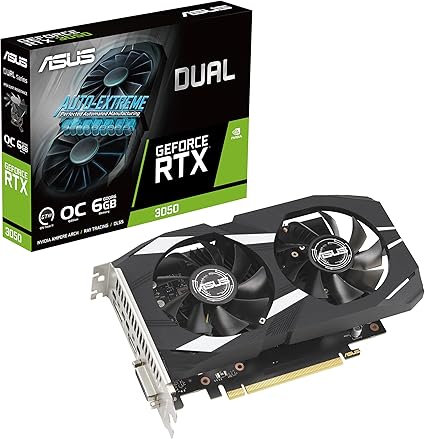
| VRAM | 6GB GDDR6 |
| Target | 1080p |
| Cooling | Dual fan |
| Rating | 4.7 (1,140) |
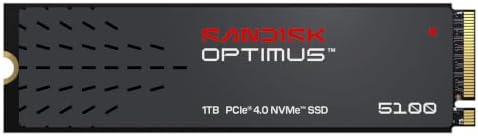
| Capacity | 1TB |
| Interface | PCIe 4.0 NVMe |
| Form | M.2 2280 |
| Rating | 4.7 (197) |

| Capacity | 16GB (2x8GB) |
| Speed | 3200MHz |
| Channels | Dual |
| Rating | 4.5 (557) |
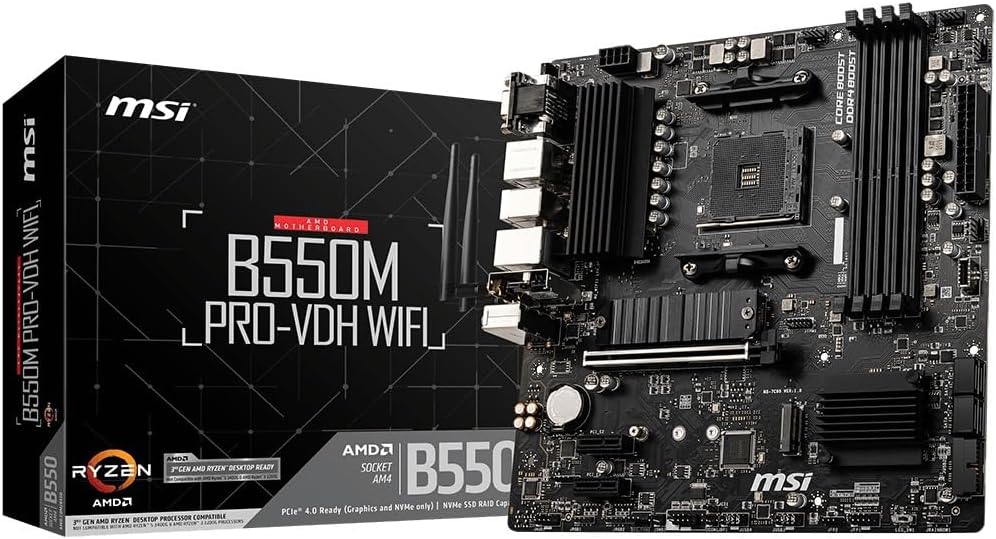
| Socket | AM4 |
| Size | Micro ATX |
| Memory | DDR4 |
| Rating | 4.5 (4,865) |

| Cores | 6C / 12T |
| Socket | AM4 |
| Cooler | Included |
| Rating | 4.8 (30,194) |
| Output | 750W |
| Efficiency | 80+ Bronze |
| Cabling | Semi-modular |
| Rating | 4.6 (150) |
| Form | Mid-tower ATX |
| Fans | Not stated |
| Share | 6% of budget |
| Rating | 4.7 (71) |
The finding: this build has better memory than our $2,000 one
We did not set out to demonstrate this. It fell out of the pricing.
Our RAM guide prices DDR4 kits far below DDR5. That gap is large enough to change what platform makes sense, and at this budget it changes it completely.
The $2,000 build uses AM5, which accepts only DDR5. A 32GB DDR5 kit costs a large share of that build’s total, so it runs a single 16GB stick at $239.99 instead. One stick means single channel, which halves memory bandwidth and costs real frame rates. It is a compromise that build takes deliberately and explains at length.
This build uses AM4, which takes DDR4. A matched 2x8GB kit at 3200MHz is $109.97. That is dual channel, for less than half the price of the single DDR5 stick, in a machine built to half the budget.
So the cheaper computer has the better memory arrangement. That is not a clever trick, it is what happens when one memory standard is priced sensibly and the other is not, and it is the single strongest argument for building at this budget on the older platform rather than stretching to the newer one.
The real cost: this socket has no future
Here is what the DDR4 saving actually costs, stated plainly, because a budget guide that hides this is not worth reading.
AM4 is at the end of its life. The Ryzen 5000 series is the last generation it takes. There is no future chip to drop into this board in two years, so when this processor is no longer enough, you replace the motherboard, the processor and the memory together. That is effectively a new machine.
By contrast our best gaming motherboards 2026 guide found that every AM5 board supports three processor generations, and the $2,000 build was chosen partly for that. You pay more now and you upgrade cheaply later.
A necessary clarification, because our own motherboard guide calls AM4 boards a trap. They are, and the trap is specific: AM4 boards still rank highly in searches for current parts, so somebody shopping for a modern Ryzen chip can easily buy a board that physically cannot accept it. That is a real hazard and we excluded two AM4 boards from that guide for exactly this reason.
Deliberately choosing AM4 with an AM4 processor is a different thing entirely. It is a coherent budget platform with cheap memory and cheap chips, and it works perfectly well as long as you know you are buying the end of a line rather than the start of one. The trap is the mismatch, not the socket.
Where the money goes
The proportions look different from a higher-budget build in ways that are worth understanding. The figures below are the live prices for the parts above, and they come to a little under $1,000.
- Graphics card: $257.22. A smaller share than the 35 to 45 percent a healthy gaming build usually allocates. Not by choice.
- Storage: $199.99. For a 1TB drive.
- Processor: $173.98. Unusually high for a budget build, and the reason is below.
- Memory: $109.97.
- Motherboard: $89.99.
- Power supply: $79.99.
- Case: $49.99.
The graphics card share is the number to notice. At $2,000 the GPU takes a far larger share, which is correct. Here it takes far less, because the fixed costs of a computer, a case, a power supply, a board, a drive, do not shrink proportionally with the budget. A large share of this build is spent before the processor or the graphics card gets anything, and that floor is why the jump from $1,000 to $2,000 buys so much more than it looks like it should.
Compatibility: every part checked against every other
Processor to motherboard. The Ryzen 5 5600X is socket AM4. The MSI B550M PRO-VDH WiFi is an AM4 board listing support for Ryzen 5000 series processors. The 5600X is a 5000 series part. Match.
Motherboard to memory. B550 is a DDR4 platform. The Silicon Power kit is DDR4 3200MHz. The board lists dual channel DDR4 up to 128GB, and the kit is a matched pair, which is what enables dual channel.
Motherboard to storage. The SanDisk drive is M.2 2280, the standard desktop length, running PCIe 4.0. The board lists a Gen 4 M.2 slot, so the drive runs at its full interface speed, though for game loading that matters less than the marketing implies, as our SSD guide explains in detail.
Motherboard to graphics card. The RTX 3050 is a dual-fan card in a standard PCIe x16 slot. It is a physically small card, and the A31 lists room for graphics cards up to 380mm long.
Power supply to everything. A Ryzen 5 5600X and an RTX 3050 together draw well under 400W. The 750W supply here is substantial overprovisioning and it is deliberate, for the reason in its review below.
Case to motherboard. The B550M PRO-VDH WiFi is micro ATX and the ASUS A31 is a mid-tower ATX case. A smaller board fits a larger case without issue, because the mounting holes are a subset of the larger standard. The reverse is not true.
Cooling. The Ryzen 5 5600X ships with a Wraith Stealth cooler in the box that is adequate for it at stock speeds, so no separate purchase is needed. This is one of the quiet advantages of the older platform: several current chips do not include one.
1. ASUS Dual RTX 3050 6GB: the graphics card

- NVIDIA Ampere Streaming Multiprocessors: The all-new Ampere SM brings 2X the FP32 throughput and improved power efficien…
- 2nd Generation RT Cores: Experience 2X the throughput of 1st gen RT Cores, plus concurrent RT and shading for a whole ne…
- 3rd Generation Tensor Cores: Get up to 2X the throughput with structural sparsity and advanced AI algorithms such as DLS…
6GB GDDR6, dual fan, $257.22, 4.7 stars from 1,140 ratings. This is the cheapest sensible entry point into current-generation gaming, and it carries more owner evidence than any other part in this build bar the processor.
This is a 1080p card and the guide is honest about it. Six gigabytes of video memory is enough for 1080p in current titles at sensible settings, and it is not enough for 1440p in demanding ones. Buying it while expecting 1440p performance is the mistake to avoid; buying it knowing it targets 1080p is a perfectly sound decision at this budget. The alternatives at other budgets are in our best graphics cards 2026 guide.
The physical size helps more than the specification sheet suggests. It is a two-slot dual-fan card, which matters in a budget case where internal clearance is tighter and airflow is less generous than in a mid-range chassis.
If your budget can stretch, this is the part to stretch on. The ASUS Dual RTX 5060 8GB at $469.99 is a meaningfully faster card, though it would push this build well past $1,000 and out of the range this guide covers. The graphics card is where additional money produces the most visible return, every time.
- 1,140 ratings at 4.7, the deepest evidence of any graphics card at this tier
- Genuinely capable at 1080p, which is what this build targets
- Two-slot dual-fan design suits a tight budget case
- Low power draw, which keeps the rest of the build cheap
- 6GB of VRAM is a 1080p allocation, not a 1440p one
- Previous-generation Ampere silicon
- Only 26 percent of the budget, below where a GPU should sit
2. SanDisk Optimus 5100 1TB: the storage
- SPEED UP PROJECTS. Launch creator applications fast with uncompromising PCIe 4.0 read speeds up to 7,100MB/s,[2] (1TB an…
- CREATE AND STORE MORE. Make more room for your 4K videos and high-resolution images with capacities from 500GB[1] up to …
- IT GOES WHERE YOU GO. With an all-new power efficient design, your drive delivers high performance with low power, givin…
1TB, PCIe 4.0, M.2 2280, $199.99, 4.7 stars from 197 ratings. The second most expensive part in this build, which tells you something about current storage prices.
This is a Gen4 drive, and the speed is not the reason to buy it. Our SSD guide’s central finding was that game loading is thousands of small scattered reads rather than one long sequential one, so the headline 7,100 MB/s matters far less than the marketing implies. The practical difference between a Gen3 and a Gen4 drive when loading a game is frequently under a second. What the SanDisk actually buys you at this budget is a five-year limited warranty, rather than raw sequential speed.
1TB is the honest minimum and it will feel tight. A single large modern game can occupy 150GB, so plan on roughly six installed at once alongside Windows. The board has a second M.2 slot, so adding storage later is straightforward and does not require replacing this drive.
Its 4.7 stars rest on 197 ratings, a modest sample for the second most expensive part here, which is the honest caveat on this pick. The 1TB is simply the capacity this budget allows.
- 1TB of PCIe 4.0 storage with a five-year limited warranty
- Sold and shipped by Amazon directly
- M.2 2280 standard length, no adapter needed
- Gen4 speed the board’s first M.2 slot can actually use
- 19 percent of the build budget for storage is a lot
- 197 ratings, a modest sample so far
- QLC flash, which usually slows on very long sustained writes
- 1TB fills faster than most people expect
3. Silicon Power DDR4 16GB: the part that makes this build work
- Complies with JEDEC standards
- Low voltage of 1.2V for less power consumption
- Strict test and verification procedures are performed for products
16GB as a matched 2x8GB kit, 3200MHz, $109.97, 4.5 stars from 557 ratings. The single most consequential part in this list.
It is a matched pair, so it runs in dual channel. Desktop memory has two channels to the processor and populating both roughly doubles the bandwidth between them. That is worth real frame rates in games, and it is the specification our $2,000 build gives up because DDR5 pricing forced it to. Here it costs $109.97 and requires no compromise at all.
3200MHz is the sweet spot for the Ryzen 5000 series. Faster DDR4 exists and produces very little additional benefit on this platform, so paying more for it is not a good use of a tight budget.
The honest limitation is the ceiling rather than the configuration. This is DDR4 on a dying socket, so it is not memory you carry forward into your next machine. Two DIMM slots remain free if you want 32GB later, which at DDR4 prices is a genuinely cheap upgrade, unlike everything else in this comparison.
- Dual channel out of the box, which our $2,000 build cannot manage
- Less than half the price of a single 16GB DDR5 stick
- 3200MHz is the correct speed target for Ryzen 5000
- Two free slots for a cheap 32GB upgrade later
- DDR4 does not carry forward to a future AM5 machine
- 557 ratings, a moderate sample
- Slower in absolute terms than DDR5, though better configured here
4. MSI B550M PRO-VDH WiFi: the motherboard

- Support for 3rd Gen AMD Ryzen processors and future AMD Ryzen processors with BIOS update.Audio ports (Rear): Realtek AL…
- Supports dual channel DDR4 memory up to 128 GB (4400 MHz)
- Lightning Fast Game experience: PCIe 4.0, Lightning Gen 4 M.2 with M.2 Shield Frozr, AMD Turbo USB 3.2 GEN 2
AM4, micro ATX, DDR4, $89.99, 4.5 stars from 4,865 ratings.
This is the cheapest AM4 board we would put in this build, and it still has built-in Wi-Fi, which saves buying an adapter and is the kind of thing budget builders forget to budget for. It is also sold and shipped by Amazon directly, which keeps the return path simple on the component whose failure is hardest to diagnose, and it carries the largest owner base of any board we looked at.
This B550 board gives you PCIe 4.0 on the graphics slot, a Gen 4 M.2 slot under a heatsink, dual channel DDR4 and a micro ATX footprint. MSI lists its Core Boost power delivery, and a 65W 5600X asks little of it.
Read the socket line before you buy anything else. This is an AM4 board. It will not accept a Ryzen 7000, 8000 or 9000 processor, and no update changes that. Pair it with the 5600X in this list or another AM4 Ryzen chip, and nothing newer.
- Built-in Wi-Fi, which saves a separate adapter purchase
- Sold and shipped by Amazon directly
- PCIe 4.0 graphics slot and a Gen 4 M.2 slot under a heatsink
- Dual channel DDR4, up to 128GB
- AM4 is an end-of-life socket with no upgrade path
- USB 3.2 Gen 1 on the rear, not Gen 2
- A D-SUB video output a modern build will never use
- Micro ATX limits expansion slots
5. AMD Ryzen 5 5600X: the processor
- AMD’s fastest 6 core processor for mainstream desktop, with 12 processing threads. System Memory Type: DDR4
- Can deliver elite 100+ FPS performance in the world’s most popular games
- Bundled with the quiet, capable AMD Wraith Stealth cooler
6 cores, 12 threads, AM4, $173.98, 4.8 stars from 30,194 ratings. That is the deepest owner evidence of any part in this build, and it is 18 percent of the cost.
Six cores and twelve threads is a genuinely capable gaming configuration, and it is the same core count as the Ryzen 5 9600X in our $2,000 build. The 5600X is an older generation with less cache and a lower boost clock, 4.6GHz against 5.4GHz, so it is meaningfully behind in absolute terms, but it is not a compromised part. It is a very good processor that costs what it does because its platform is old, not because it is bad.
It includes a Wraith Stealth cooler in the box, which is one of the practical reasons the older platform stretches a budget further.
Where it will show its age is anything CPU-bound: streaming while you play, large simulation games, and high frame rate competitive titles where the processor rather than the graphics card sets the ceiling. For 1080p gaming paired with an RTX 3050, the graphics card is the limit long before this chip is.
- 30,194 ratings at 4.8 stars, the deepest owner evidence of any part here
- Six cores and twelve threads, the same count as our $2,000 pick
- Wraith Stealth cooler included
- Sold by Amazon directly
- Previous-generation architecture with less cache and lower clocks
- End-of-life socket, so no processor upgrade path
- 18 percent of the budget, high for a build at this price
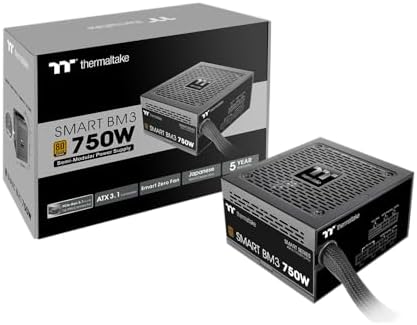
6. Thermaltake Smart BM3 750W: the power supply
- 80Plus Bronze certified and fully compatible with Intel ATX 3.1 standards to power up next generation hardware
- PCIe Gen. 5 compliant
- High quality Japanese 105°C/221°F main capacitor
750W, 80 PLUS Bronze, semi-modular, $79.99, 4.6 stars from 150 ratings. The part we most deliberately overspent on.
This build draws well under 400W and we specified 750W anyway. That is not an error. The graphics card is the part most likely to be upgraded in this machine, and a much faster card needs a much larger supply. Buying 750W now means that upgrade is a single component swap rather than a swap plus a full teardown to replace the power supply underneath everything else.
80 PLUS Bronze rather than Gold is the concession to budget. It is slightly less efficient, which means marginally more waste heat and a slightly higher electricity bill, and it is entirely fine. Thermaltake lists it as fully compatible with the ATX 3.1 standard and PCIe Gen 5 compliant, with a Japanese main capacitor rated to 105 degrees Celsius and a five-year warranty.
It is semi-modular, meaning the main cables are fixed and the rest attach only if you need them, which keeps unused cables out of the case. The caveat is the evidence: 150 ratings is a thinner sample than we would like on a power supply.
- 750W leaves ample headroom for a much larger future graphics card
- Listed as ATX 3.1 compatible and PCIe Gen 5 compliant
- Semi-modular, so unused cables stay out of the case
- Five-year warranty
- Bronze rather than Gold efficiency
- 150 ratings, a thin sample for a power supply
- Far more wattage than this build actually uses
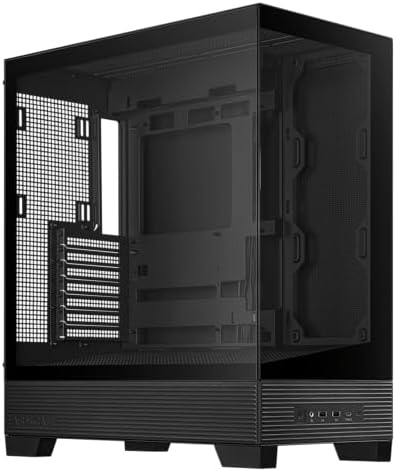
7. ASUS A31: the case
- Easy Build, Direct Performance: ASUS A31 provides mainstream users the great compatibility with 360mm AIO and RTX 5090/4…
- Real Panorama, Direct View: The A31 features dual-sided tempered glass panels and a frameless, pillar-free design, offer…
- BTF Hidden Connector Design: For a pristine, clutter-free build, all modular cables are concealed behind the motherboard…
Mid-tower ATX, dual-sided tempered glass, $49.99, 4.7 stars from 71 ratings. The cheapest part in the build at 6 percent of the total.
A case is the easiest place to save money in a build because it does nothing for performance, and it is the easiest place to save too much. ASUS lists room for graphics cards up to 380mm long, 360mm radiators and CPU air coolers up to 165mm tall, far more than this build needs, so the micro ATX board inside has room to work in.
Budget the extra for fans. This is where a cheap case costs you: our $2,000 build’s Antec C5 ships with seven ARGB fans pre-installed, and the A31’s listing does not state any included fans. Two 120mm fans cost around $20 to $30 and are the first thing to add, and that is where we would spend the headroom left under the $1,000 target before anywhere else.
71 ratings at 4.7 is the thinnest evidence in this build. It is adequate rather than reassuring, and a case is the component where a poor one is annoying rather than dangerous, which is why we accepted it here.
- Room for 380mm graphics cards and 360mm radiators
- Roomy for a micro ATX board, which makes a first build easier
- Only 6 percent of the total budget
- 4.7 stars from 71 ratings, the thinnest sample in this build
- This version ships without fans, so budget for two, around $20 to $30
The full bill of materials
| Part | Component | Key spec | Price | Rating | Share |
|---|---|---|---|---|---|
| Graphics card | ASUS Dual RTX 3050 6GB | 6GB GDDR6, 1080p | $257.22 | 4.7 (1,140) | 27% |
| Storage | SanDisk Optimus 5100 1TB | PCIe 4.0, M.2 2280 | $199.99 | 4.7 (197) | 20% |
| Processor | AMD Ryzen 5 5600X | 6C/12T, cooler included | $173.98 | 4.8 (30,194) | 18% |
| Memory | Silicon Power DDR4 | 16GB 2×8, dual channel | $109.97 | 4.5 (557) | 11% |
| Motherboard | MSI B550M PRO-VDH WiFi | AM4, mATX, Wi-Fi | $89.99 | 4.5 (4,865) | 9% |
| Power supply | Thermaltake Smart BM3 750W | 750W, 80+ Bronze, semi-modular | $79.99 | 4.6 (150) | 8% |
| Case | ASUS A31 | Mid-tower ATX, 380mm GPU clearance | $49.99 | 4.7 (71) | 7% |
| Total | Under $1,000 at the live prices | ||||
This build against our $2,000 build
| This build | Our $2,000 build | |
|---|---|---|
| Processor | Ryzen 5 5600X, 6C/12T | Ryzen 5 9600X, 6C/12T |
| Platform | AM4, end of life | AM5, three CPU generations |
| Graphics | RTX 3050 6GB | RTX 5060 Ti 16GB |
| Memory | 16GB DDR4, dual channel | 16GB DDR5, single channel |
| Storage | 1TB Gen4 | 1TB Gen4 |
| GPU share of budget | 26% | 44% |
| Target resolution | 1080p | 1440p |
| Upgrade path | Graphics card only | Graphics card and processor |
What to upgrade first
1. Two case fans, about $20 to $30. The cheapest meaningful improvement and the first thing we would buy with the headroom against the $1,000 target. A budget case with poor airflow throttles a graphics card that would otherwise be fine.
2. The graphics card, whenever you can. This is the one upgrade that transforms the machine, and the 750W power supply was chosen specifically so it can happen without touching anything else. Moving to the ASUS Dual RTX 5060 8GB at $469.99 is the natural step.
3. A second kit like this one, $109.97. Two DIMM slots are free. At DDR4 prices this is the cheapest 32GB upgrade available anywhere in either of our build guides.
4. A second M.2 drive, whenever 1TB runs out. Which it will.
What you cannot upgrade is the processor, and that is the trade this build makes. When the 5600X is no longer enough, the board and memory go with it.
What this build does not include
An operating system
Windows is not in the build total. Budget for it separately or install a free alternative.
Peripherals
No monitor, keyboard, mouse, headset or chair. Our monitor, keyboard, mouse, headset and chair guides cover those, and at this budget a 1080p monitor is the correct pairing rather than the 1440p screens that suit the larger build.
A CPU cooler
Not needed. The Ryzen 5 5600X includes one, which is one of the reasons this platform stretches a tight budget.
A prebuilt alternative
If assembling it is not appealing, our prebuilt gaming PC guide covers machines that arrive assembled and warrantied.
Frequently asked questions
Can you build a gaming PC for under $1,000 in 2026?
Yes. This parts list comes in under $1,000: a Ryzen 5 5600X, an RTX 3050 6GB, 16GB of dual-channel DDR4, a 1TB NVMe drive, a B550M motherboard with Wi-Fi, a 750W power supply and a mid-tower case. It is a 1080p gaming machine and it is honest about that.
Why does this budget build use DDR4 instead of DDR5?
Because DDR5 pricing makes the current platform a bad deal at this budget. A matched 16GB DDR4 kit costs less than half what a single 16GB DDR5 stick costs, and a 32GB DDR5 kit costs several times more again. Choosing DDR4 means this build runs dual channel, which our own $2,000 build cannot afford to do. The cheaper machine has the better memory configuration.
Is AM4 still worth buying in 2026?
For a budget build, yes, provided you understand what you are buying. AM4 is at the end of its life and Ryzen 5000 is the last generation it accepts, so there is no processor upgrade path. In exchange you get cheap chips, cheap DDR4 memory and included coolers. It is a coherent budget platform as long as you treat it as the end of a line rather than the start of one.
Our motherboard guide calls AM4 boards a trap. Why recommend one here?
Because the trap is the mismatch, not the socket. AM4 boards rank highly in searches for current parts, so somebody shopping for a modern Ryzen chip can easily buy a board that physically cannot accept it. Deliberately choosing an AM4 board alongside an AM4 processor is a different decision entirely, and a sound one at this budget.
What resolution is a $1,000 gaming PC good for?
1080p. The RTX 3050 with 6GB of VRAM is a capable 1080p card at sensible settings and it is not a 1440p card. Pairing it with a 1440p monitor would waste both. If 1440p is the goal, our $2,000 build is the honest starting point rather than a stretched version of this one.
Why is the power supply bigger than this build needs?
Deliberately. This machine draws well under 400W and the supply is 750W. The graphics card is the part most likely to be upgraded, and a much faster card needs a much larger supply. Buying the headroom now means that upgrade is one component swap rather than a swap plus dismantling the machine to replace the power supply underneath.
Do I need a separate CPU cooler for this build?
No. The Ryzen 5 5600X includes a Wraith Stealth cooler in the box that handles it adequately at stock speeds. This is a practical advantage of the older platform, since several current-generation processors do not include one, and that is a cost people forget to budget for.
What should I upgrade first on a budget gaming PC?
Two case fans, at around $20 to $30, because a budget case with poor airflow will throttle a graphics card that would otherwise be fine. After that, the graphics card itself, which is the upgrade that transforms the machine. The power supply here was chosen specifically so that swap needs nothing else changed.
Is it better to save up for the $2,000 build instead?
If you can, the jump buys more than the price difference suggests. A computer has fixed costs, a case, a power supply, a board and a drive, that do not shrink with the budget, so in this build those four take $423.97, before the processor or the graphics card gets anything. At $2,000 a far larger share reaches the parts that determine frame rates. If you cannot wait, this build is a genuine 1080p gaming machine rather than a compromise.
The bottom line
Seven parts, under $1,000, every price verified against Amazon, every compatibility question worked through above. It is a 1080p gaming machine built on the previous-generation AMD platform, and that choice is the reason it works rather than a corner cut.
The finding worth carrying away: this machine has better configured memory than our build costing twice as much. Sixteen gigabytes in dual channel for $109.97 against sixteen in single channel for $239.99. DDR5 pricing has made the older platform genuinely competitive at the bottom of the market, which is not something that is usually true.
The cost is honest and it is real: AM4 has no future. When this processor is no longer enough, the board and memory are replaced with it. If you expect to upgrade the processor in two or three years rather than the whole machine, spend the extra and read our $2,000 build instead. If you want the most gaming performance available for under a thousand dollars today, this is it.
Prices and ratings on this page update automatically. The build total, the shares and the seven part prices were verified. The DDR5 comparison prices were verified, and figures quoted from our other guides are as those guides state them. Every other figure was accurate when this guide was last reviewed and carries no guarantee beyond that. Component prices move quickly, and budget parts move fastest. Check each one before you buy.
One deliberate inconsistency worth explaining. The Thermaltake Smart BM3 specified here is not one of the eight in our best gaming power supply guide, and that is on purpose. Every unit there is 80 Plus Gold or better, and this one is Bronze, chosen to keep the build under budget. Thermaltake does list it as ATX 3.1 compatible and PCIe Gen 5 compliant, and the RTX 3050 in this build does not use a 12V-2×6 connector at all.
The ASUS A31 in this build is not one of the eight in our best PC case guide, which is worth reading before you order any case because it counts the fans that come in the box. Its listing does not state any included fans, so budget for two on top of the price above.
The Ryzen 5 5600X in this build includes a cooler, which is part of why the total lands where it does. It is also the cheapest meaningful upgrade available: our best CPU cooler guide starts at $17.90 for a cooler that comfortably outperforms any bundled unit, which is close to free against what it replaces.
At the other end of our range, the $3,000 build costs nearly three times this machine and makes a useful comparison on exactly one component. It spends several times as much on memory as the $109.97 here, for twice the capacity. That is DDR5 pricing in 2026, and it is the strongest argument for the DDR4 platform this build uses.
If portability matters more than value, a laptop is the alternative, though it costs considerably more for less performance. Our gaming laptop guide starts well above this entire build, for a machine you cannot upgrade.
Worth a sanity check before you build. Our gaming console guide covers the consoles worth buying, and an Xbox Series X at $748.00 costs less than this entire build. The console is finished and supported; this machine upgrades, plays a far larger library and doubles as a computer. Both are reasonable answers.
Building at this budget is where the saving is largest, but it is not automatic. Our guide to prebuilt vs building your own PC puts real numbers on both sides.
Gamers Tech Guide participates in the Amazon Services LLC Associates Program. As an Amazon Associate we earn from qualifying purchases.