
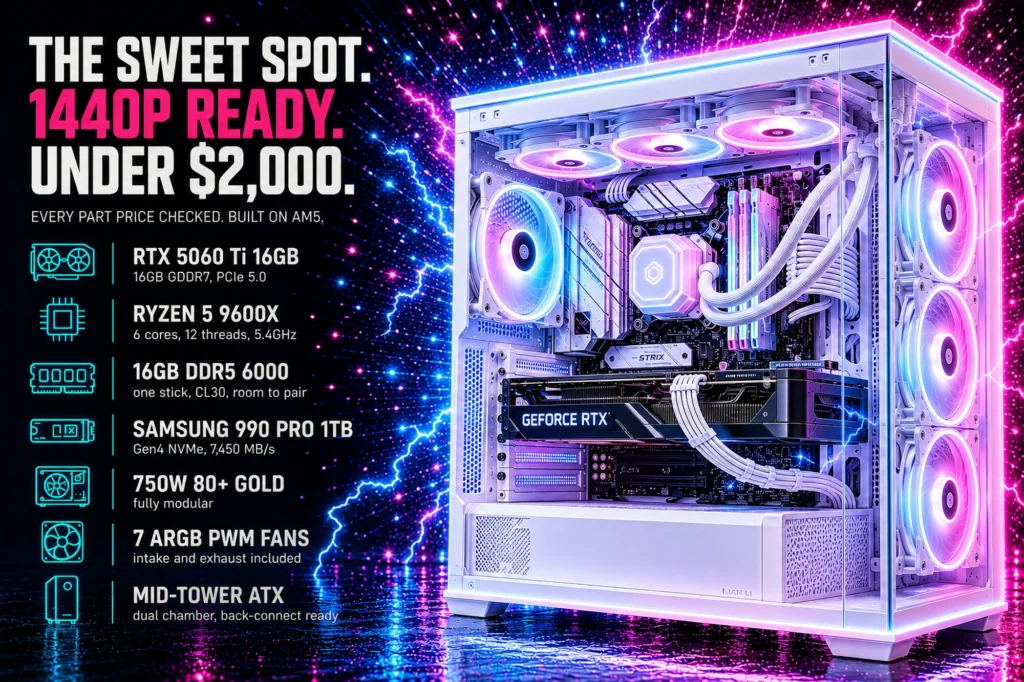
Seven parts, $1,760.42 total, every one of them a pick from a guide we have already published or a component we researched for this build. Every socket, slot, cable and clearance checked against every other part, and the compatibility work shown rather than assumed.
- Total: $1,760.42, which is $206.90 under budget. Prices verified August 26, 2026.
- The graphics card takes 45% of it and that is the correct allocation.
- Memory takes 13% for a single 16GB stick, and that is not correct, it is just current reality.
- Nothing here is a placeholder. Every part has a live price and a real review history.
This gaming PC build costs $1,760.42 and it is shaped by one uncomfortable fact: memory now costs more than the processor. A single 16GB stick of DDR5 in this list is $221.99, against $174.99 for the CPU. A 32GB kit would be $489.99, which is nearly a third of the entire budget and more than the gap between a mid-range graphics card and a good one.
That single price is the reason this build looks the way it does, and pretending otherwise would produce a worse machine. What we have done instead is spend the memory savings on the graphics card, take the 16GB single-stick compromise deliberately, and tell you exactly what it costs you and how to fix it later for about two hundred dollars.
Every price below was checked against Amazon on August 19, 2026. Every part is either a pick from one of our existing guides or was researched specifically for this list, and the full compatibility chain is worked through further down rather than left for you to trust.
The full parts list

| VRAM | 16GB GDDR7 |
| Interface | PCIe 5.0 |
| Features | DLSS 4 |
| Rating | 4.9 (54) |

| Capacity | 16GB (1x16GB) |
| Speed | 6000MHz CL30 |
| Profile | XMP 3.0 / EXPO |
| Rating | 4.0 (217) |

| Cores | 6C / 12T |
| Boost | 5.4 GHz |
| Socket | AM5 |
| Rating | 4.9 (3,978) |

| Socket | AM5 |
| Size | Micro ATX |
| DIMM slots | 4 |
| Rating | 4.2 (176) |

| Capacity | 1TB |
| Interface | PCIe Gen4 |
| Read | 7,450 MB/s |
| Rating | 4.7 (13,314) |

| Form | Mid-tower ATX |
| Fans | 7 pre-installed |
| Airflow | High airflow front |
| Rating | 4.6 (513) |

| Output | 750W |
| Efficiency | 80+ Gold |
| Cabling | Fully modular |
| Reviews | 4.6 (1,400) |
What this build costs and where the money goes
The total is $1,760.42. Here is how that divides, because the proportions tell you more than the parts list does.
- Graphics card: $809.99, or 45 percent. This is correct. The GPU determines your frame rate and your resolution more than every other component combined.
- Storage: $239.99, or 14 percent. A premium 1TB Gen4 drive, and the second largest line item.
- Memory: $224.99, or 13 percent. This is not correct in any normal sense. It buys a single 16GB stick, and it costs more than the processor.
- Processor: $174.99, or 10 percent. Less than the memory.
- Motherboard: $157.99, or 9 percent.
- Case: $99.99, or 6 percent.
- Power supply: $89.99, or 5 percent.
A healthy gaming build usually puts 35 to 45 percent into the graphics card and around 8 to 10 percent into memory. This one is at 13 percent on memory and the CPU costs less than the RAM. That is not a mistake in the parts selection. It is what current DDR5 pricing does to a fixed budget, and the next section is about what to do with it.
The DDR5 problem, and the decision it forces
When we researched our RAM guide we found DDR4 kits at $99 to $249 and DDR5 kits at $479 to $619. That gap is the single most consequential fact in building an AM5 machine right now, because AM5 does not accept DDR4 at all. Choose a current AMD processor and you are buying DDR5 whether the price is sensible or not.
That leaves exactly two honest options at this budget.
Option one: a 32GB DDR5 kit at $489.99. Two sticks, dual channel, 32GB, no compromise on memory at all. It costs $270 more than what we chose, and that money has to come from somewhere. The only line item big enough is the graphics card, which would drop from the RTX 5060 Ti 16GB to the RTX 5060 8GB at $469.99. You would be halving your video memory to double your system memory.
Option two: a single 16GB stick at $224.99, which is what this build does. You give up dual-channel memory bandwidth, which costs real frame rates, and you keep the better graphics card.
We chose option two, and here is the reasoning. 16GB is still enough for essentially every current game. Dropping from 16GB of VRAM to 8GB is a limitation you hit immediately at 1440p in modern titles, and it cannot be fixed later. Single-channel memory is a performance penalty you can erase for about $218 whenever you like, by buying a second identical stick and putting it in the board’s second slot. One compromise is reversible and one is not.
That is the whole argument. If DDR5 were priced the way it was two years ago this build would have 32GB and the same graphics card, and we would not be having this conversation.
Compatibility: every part checked against every other
This is the section a parts list lives or dies on, so here is the actual chain rather than an assurance.
Processor to motherboard. The Ryzen 5 9600X is socket AM5. The GIGABYTE B850M Gaming X states support for AMD Ryzen 9000, 8000 and 7000 series on socket AM5. The 9600X is a 9000 series part. Match.
Motherboard to memory. AM5 is a DDR5-only platform and the B850M lists four DDR5 DIMM slots. The Patriot Viper Venom is DDR5 at 6000MHz CL30 with both XMP 3.0 and EXPO profiles, and EXPO is AMD’s own profile standard. One stick occupies one slot and leaves three slots free, which is the upgrade path.
Motherboard to storage. The Samsung 990 PRO is M.2 2280, the standard 80mm desktop length. The B850M has two M.2 slots. One drive fits with a spare slot remaining.
Motherboard to graphics card. The B850M provides a PCIe 5.0 x16 slot. The RTX 5060 Ti is a PCIe 5.0 card. It is a 2.5-slot design, so it occupies its own slot plus one and a half below it, which the micro ATX layout accommodates.
Power supply to everything. A Ryzen 5 9600X and an RTX 5060 Ti together sit comfortably inside a 750W budget with substantial headroom, which matters because that headroom is what lets you install a much larger graphics card later without replacing the power supply. The MSI unit is ATX 3.1 and PCIe 5.1 ready with a native 12V-2×6 connector, so it is built for current and next-generation cards rather than adapted to them.
Case to motherboard, and this is the one people ask about. The B850M is micro ATX. The Antec C5 is a mid-tower ATX case. A smaller board fits a larger case without any issue, because the mounting holes are a subset, and you simply have unused standoffs and a little more room to work in. The reverse is not true: a full ATX board will not fit a micro ATX case. Buying the larger case here costs nothing in compatibility and makes the build noticeably easier to assemble.
1. ASUS Dual RTX 5060 Ti 16GB: where 42 percent of the budget goes
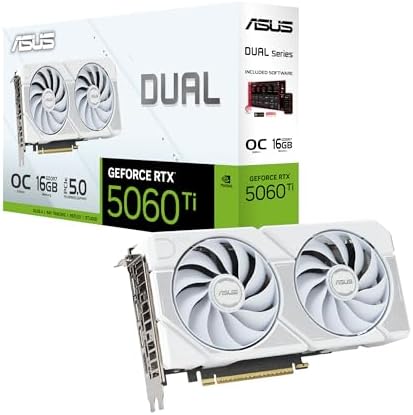
- OC mode: 2632 MHz (OC mode)/ 2602 MHz (Default mode)
- Powered by the NVIDIA Blackwell architecture and DLSS 4
- Axial-tech fan design features a smaller fan hub that facilitates longer blades and a barrier ring that increases downwa…
16GB GDDR7, PCIe 5.0, DLSS 4, $763.85, 4.9 stars from 47 ratings. This is the part the rest of this build is arranged around.
The 16GB of video memory is the reason it is here rather than the 8GB card below it. VRAM is the specification that ages worst: when a game exceeds your card’s video memory it does not run slightly slower, it stutters, and no settings adjustment recovers it cleanly except dropping texture quality. At 1440p in current titles, 8GB is already the constraint on several releases and 16GB is not.
Beyond the memory it is a Blackwell-architecture card with DLSS 4, HDMI 2.1b and DisplayPort 2.1b. The ASUS Dual is the two-fan, 2.5-slot variant, which is the sensible physical format for a mid-tower rather than the enormous triple-fan designs that need clearance checks. This is the White OC edition, which is the same card in a different finish and, on the day we checked, the only ASUS Dual 5060 Ti 16GB variant shipping on Prime.
Pairing note: this card is well matched to a 1440p monitor, which is the resolution our monitor guide recommends for exactly this class of hardware.
- 16GB of VRAM, the specification that ages worst if you skimp
- PCIe 5.0 and DLSS 4 on the current Blackwell architecture
- 2.5-slot dual-fan design fits a mid-tower without clearance drama
- 4.9 stars, the highest rating of any part in this build
- Consumes 42 percent of the build budget
- 47 ratings, a thin sample for a recent card
- Overkill if you only ever play at 1080p
2. Patriot Viper Venom 16GB DDR5: the compromise
- Capacity: 16GB (1 x 16GB) 6000MHz
- Tested Timings: 30-40-40-76
- Feature Overclock: XMP 3.0 / EXPO overclocking supported
16GB as a single 16GB module, 6000MHz CL30, $234.99, 4.1 stars from 194 ratings. The most consequential decision in this build and the one we want you to understand fully before ordering.
The specification is the right one. 6000MHz at CL30 is precisely the sweet spot for AM5, and it carries both XMP 3.0 and EXPO profiles so it will run at rated speed on this motherboard with a single setting in the BIOS. Timings are 30-40-40-76 at 1.35v. If this were sold as a 2x8GB kit at this price it would be an easy recommendation.
It is one stick, and that means single channel. Desktop memory runs in dual channel when you install two matched modules, which doubles the bandwidth between the processor and memory. One stick halves it. In practice that costs frame rates in games, and it costs more on AMD than on Intel because of how the platform handles memory. This is a real penalty and we are not going to soften it.
Why we accepted it. The board has four DIMM slots and three are free. Buying a second identical Patriot module, at the same price, converts this to 32GB in dual channel and removes the penalty entirely. That is the first upgrade we recommend below, and it is the reason this compromise is acceptable while an 8GB graphics card would not be: one is a check you can write later, the other is soldered to the card forever.
- 6000MHz CL30 is the correct speed and latency target for AM5
- Both XMP 3.0 and EXPO profiles, so it runs at rated speed easily
- Leaves three DIMM slots free for a straightforward upgrade
- Half the cost of the cheapest 32GB kit we could verify
- Single channel, which costs real frame rates until you add a second stick
- 4.1 stars from 194 ratings, the weakest evidence in this build
- 16GB is adequate today and will not feel generous in three years
3. AMD Ryzen 5 9600X: the processor
- Pure gaming performance with smooth 100+ FPS in the world’s most popular games
- 6 Cores and 12 processing threads, based on AMD “Zen 5” architecture
- 5.4 GHz Max Boost, unlocked for overclocking, 38 MB cache, DDR5-5600 support
6 cores, 12 threads, 5.4 GHz boost, $174.00, 4.9 stars from 3,898 ratings. The highest rated component in this entire build.
Six cores is the right count for a gaming machine at this budget and it is worth saying why, because core counts are the most oversold number in PC building. Games overwhelmingly use between four and eight cores well, and beyond that additional cores sit idle during play. A 16-core processor costs nearly three times this one and produces almost identical frame rates in games. Spending the difference on the graphics card is not a compromise, it is the correct allocation.
This is Zen 5 architecture with 38MB of cache, unlocked for overclocking, boosting to 5.4 GHz. AMD quotes smooth 100+ FPS in the most popular titles, which is a marketing figure but a defensible one at this class.
The AM5 socket is the other reason it is here. Our motherboard guide found that every AM5 board supports three processor generations, so the upgrade path from this chip runs several years without a new board. If you later want the Ryzen 7 9800X3D from our CPU guide, it drops into this same motherboard.
- 4.9 stars from 3,898 ratings, the best rated part in this build
- Six cores is the right count for gaming, and the savings go to the GPU
- Zen 5, 5.4 GHz boost, 38MB cache, unlocked
- AM5 socket supports three CPU generations for a later upgrade
- Six cores is limiting if you stream and play simultaneously
- No X3D cache, so it trails the 9800X3D in CPU-bound games
- Costs less than the memory, which says more about the memory
4. GIGABYTE B850M Gaming X WIFI6E: the motherboard
- AMD Socket AM5: Supports AMD Ryzen 9000 / Ryzen 8000 / Ryzen 7000 Series Processors
- DDR5 Compatible: 4*DIMMs
- Power Design: 10+2+2
AM5, micro ATX, four DDR5 slots, two M.2 slots, $155.00, 4.4 stars from 169 ratings. The budget pick from our motherboard guide and the right call here.
Our motherboard guide’s central finding was that every AM5 board runs the identical range of processors, and the money you spend above the entry tier buys expansion and connectivity rather than performance. This build is the practical demonstration: the B850M runs the 9600X exactly as a $371 X870E board would, and the $214 saved is sitting in the graphics card.
What you get is genuinely sufficient: four DDR5 DIMM slots, a PCIe 5.0 graphics slot, two M.2 slots, WiFi 6E, 2.5GbE ethernet, 10+2+2 power delivery and a five-year warranty. The four DIMM slots matter more than usual in this build, because three of them are the memory upgrade path.
The honest limitations: 169 ratings is a modest sample, WiFi 6E rather than WiFi 7, and 10+2+2 power delivery leaves less headroom than a higher board if you later fit a 16-core processor and push it hard. For a 9600X it is ample.
- Runs the same processors as boards costing more than twice as much
- Four DDR5 slots, which is the memory upgrade path in this build
- PCIe 5.0 graphics slot and two M.2 slots
- Five-year warranty
- 169 ratings, the thinnest evidence of any part here
- WiFi 6E rather than WiFi 7
- 10+2+2 power is fine for six cores, tight for sixteen
5. Samsung 990 PRO 1TB: the storage
- HUGE SPEED BOOST: Get random read/write speeds that are 40%/55% faster than 980 PRO; Experience up to 1400K/1550K IOPS, …
- BREAKTHROUGH POWER EFFICIENCY: Use less power and get more performance; Enjoy up to 50% improved performance per watt ov…
- SMART THERMAL CONTROL: Samsung’s own nickel-coated controller delivers effective thermal control; With its slim size, 99…
1TB, PCIe Gen4, M.2 2280, 7,450 MB/s read, $239.99, 4.8 stars from 13,315 ratings. The deepest review history in this build.
Gen4 rather than Gen5 is deliberate, and our SSD guide explains the reasoning at length: Gen5 roughly doubles the sequential read figure on the box, but game loading is thousands of small scattered reads rather than one long sequential one, so the real difference is frequently under a second. Gen5 also runs considerably hotter. Buying Gen4 and putting the difference elsewhere is the right trade in almost every build.
This is the one part in the list bought on reputation rather than price. Cheaper 1TB Gen4 drives exist and several were checked for this guide; the ones close to this price either shipped through third-party sellers with no Prime delivery, or carried fewer than thirty owner ratings. On the component that holds every game you own, 13,315 ratings at 4.8 is worth the difference.
1TB is the honest minimum in 2026 and it is a genuine constraint worth naming. A single large modern game can occupy 150GB, so this holds perhaps six of them alongside Windows. The second M.2 slot on the motherboard exists for exactly this, and adding a second drive later is the cheapest meaningful upgrade in the whole machine.
- 13,315 ratings at 4.8 stars, the deepest evidence in this build
- 7,450 MB/s Gen4 read, which is all a game loader can use
- M.2 2280, the standard desktop length, no adapter needed
- Leaves a second M.2 slot free
- The most expensive 1TB drive in any of our builds
- 1TB fills faster than most people expect
- No heatsink included, though the board provides thermal coverage
6. Antec C5 ARGB: the case

- Full-View PC Case with Seamless Edge on Front & Side Panel.
- Dual Chamber Design.
- Supports Back-Connect Motherboards.
Mid-tower ATX, seven pre-installed ARGB PWM fans, $99.97, 4.6 stars from 513 ratings.
Seven fans in the box is the whole argument for this case. A case at this price usually ships with one rear fan, and you spend another forty or fifty dollars fixing the airflow before the machine runs quietly. Here intake and exhaust are both done before you start.
The fans are PWM rather than three-pin, so the motherboard can actually slow them down instead of running them flat out, which is the difference between a well-cooled machine and a loud one. High airflow front paneling rather than a solid glass front is the specification that determines temperatures.
It is a full ATX mid-tower housing a micro ATX board, which as covered above is entirely fine and makes the build easier. If you want the machine smaller, a micro ATX case would suit this parts list and save desk space, at the cost of a tighter build and usually worse airflow.
- Seven ARGB PWM fans included, so intake and exhaust are both sorted
- PWM control, so the motherboard can quieten them
- High airflow front panel rather than restrictive solid glass
- Roomy for a first build
- Larger than this micro ATX board requires
- 513 ratings is a moderate sample next to the parts around it
- Cheaper cases exist if the budget is tighter
7. MSI MAG A750GL 750W: the power supply
- 80 PLUS GOLD CERTIFIED
- 10-year limited warranty, guaranteeing long term reliable operation
- Fully modular design
750W, 80 PLUS Gold, fully modular, $89.99, 4.6 stars from 1,344 ratings. The part it is least sensible to economize on and the cheapest place to do real damage.
750W is deliberate overprovisioning. A 9600X and a 5060 Ti do not need it. What the headroom buys is a future graphics card: if you later fit something substantially larger, this supply carries it without being replaced, and replacing a power supply means dismantling the machine. Buying to your current draw is the most common false economy in a first build.
80 PLUS Gold is the efficiency rating and it means less waste heat and a quieter fan under load. Fully modular means unused cables stay in the box rather than being stuffed behind the motherboard tray, which is worth real money in build sanity for a first-timer. It is ATX 3.1 and PCIe 5.1 ready with a native 12V-2×6 connector, so a modern card plugs in directly rather than through an adapter.
The detail that settles it is the ten-year warranty. A power supply is the component whose failure can take other components with it, and a manufacturer offering a decade of cover is making a statement about the internals.
- 10-year warranty on the part most worth insuring
- 80 PLUS Gold, fully modular, ATX 3.1 and PCIe 5.1 ready
- Native 12V-2×6 connector, no adapter needed for modern cards
- 750W leaves ample headroom for a much larger future GPU
- More wattage than this build actually draws
- Cheaper Bronze units exist if the budget is absolutely fixed
- Modular cabling adds a little assembly time
The full bill of materials
| Part | Component | Key spec | Price | Rating | Share of budget |
|---|---|---|---|---|---|
| Graphics card | ASUS Dual RTX 5060 Ti 16GB | 16GB GDDR7, PCIe 5.0 | $763.85 | 4.9 (54) | 45% |
| Storage | Samsung 990 PRO 1TB | Gen4 NVMe, 7,450 MB/s | $239.99 | 4.7 (13,332) | 13% |
| Memory | Patriot Viper Venom | 16GB 1×16, 6000 CL30 | $234.99 | 4.0 (217) | 13% |
| Processor | AMD Ryzen 5 9600X | 6C/12T, 5.4GHz, AM5 | $174.00 | 4.9 (3,987) | 10% |
| Motherboard | GIGABYTE B850M Gaming X | AM5, mATX, 4 DIMM, 2 M.2 | $155.00 | 4.2 (176) | 9% |
| Case | Antec C5 ARGB | Mid-tower ATX, 7 fans | $99.97 | 4.6 (513) | 6% |
| Power supply | MSI MAG A750GL | 750W, 80+ Gold, modular | $89.99 | 4.6 (1,400) | 5% |
| Total | $1,760.42 as verified on August 19, 2026 | ||||
What to upgrade first
This build is deliberately arranged so that its compromises are the reversible ones. In order of value:
1. A second identical memory stick, about $218. This is the big one. It takes you to 32GB and, more importantly, to dual channel, removing the single-channel penalty entirely. The board has three free DIMM slots. Buy the same Patriot module rather than a different one, because matched pairs are what dual channel wants.
2. A second M.2 drive, from about $153. The second slot is free and 1TB fills quickly. A 2TB Gen4 drive from our SSD guide roughly triples your usable game library.
3. A rear exhaust fan, around $15 to $25. The case ships with three front intakes and no rear exhaust. Adding one balances the airflow and is the cheapest thermal improvement available.
4. The processor, in two or three years. The AM5 socket supports three generations, so a future X3D chip drops into this same board without replacing anything else. That is the argument for AM5 over the Intel alternative and it is worth real money at upgrade time.
5. The graphics card, whenever you like. The 750W supply and the PCIe 5.0 slot were chosen so this can happen without touching anything else.
What this build does not include
An operating system
Windows is not in the $1,760.42 and it is the most common omission in build guides. Budget for it separately or install a free alternative.
A CPU cooler
The Ryzen 5 9600X is a 65W part and AMD’s bundled cooler handles it adequately at stock speeds. If you intend to overclock, or you want the machine quieter, budget $30 to $90 for an aftermarket cooler. We did not include one because the build does not require one.
Peripherals
No monitor, keyboard, mouse, headset or chair. Those are covered in our monitor, keyboard, mouse, headset and chair guides, and a sensible full setup adds roughly $400 to $600 on top of the tower.
A prebuilt alternative
If assembling it yourself is not appealing, our prebuilt gaming PC guide covers machines that arrive assembled and warrantied as a unit. You pay for that convenience, but it is a legitimate choice rather than a worse one.
Frequently asked questions
What can you build a gaming PC for under $2,000 in 2026?
A Ryzen 5 9600X, an RTX 5060 Ti with 16GB of VRAM, 16GB of DDR5, a 1TB Gen4 NVMe drive, a B850 motherboard, a 750W Gold power supply and an Antec C5 ARGB case, for $1,760.42 as verified on August 19, 2026. That is a machine built for 1440p gaming. The main compromise is a single memory stick rather than a matched pair, which is a deliberate choice explained in the guide.
Why does the memory cost more than the processor?
Because DDR5 prices are unusually high right now. In this build a single 16GB DDR5 stick is $224.99 against $174.99 for the Ryzen 5 9600X, and a 32GB kit would be $489.99, nearly a third of the total budget. AM5 does not accept DDR4 at all, so a current AMD build has no cheaper memory option available.
Is a single 16GB stick of RAM bad for gaming?
It costs you real frame rates compared to two matched sticks, because one module runs in single channel and halves the memory bandwidth. We accepted it here because it is reversible: adding a second identical stick later, for about $218, converts the machine to 32GB in dual channel and removes the penalty. A graphics card with too little VRAM cannot be fixed the same way.
Will a micro ATX motherboard fit in an ATX case?
Yes. A smaller board always fits a larger case, because the mounting holes are a subset of the larger standard. You simply have unused standoffs and more room to work in. The reverse is not true: a full ATX board will not fit a micro ATX case. Putting this micro ATX board in a mid-tower costs nothing and makes assembly considerably easier.
How many watts does this gaming PC build need?
A Ryzen 5 9600X and an RTX 5060 Ti draw well under 750W together, so the power supply here is deliberately overprovisioned. That headroom is what allows a much larger graphics card to be fitted later without replacing the supply, which would mean dismantling the machine. Buying a power supply sized exactly to current draw is a common false economy.
Does this build include Windows?
No. The $1,760.42 covers the seven hardware components only. An operating system is the most commonly omitted cost in build guides, so budget for a Windows license separately or install a free alternative.
Do I need a separate CPU cooler?
Not for this build. The Ryzen 5 9600X is a 65W processor and the cooler AMD includes in the box handles it adequately at stock speeds. If you plan to overclock, or you want a quieter machine, an aftermarket cooler costs roughly $30 to $90 and is a worthwhile addition rather than a requirement.
Should I build a PC or buy a prebuilt?
Building gets you more hardware for the money and full control over every part, which is what this guide is for. A prebuilt arrives assembled, tested and warrantied as a single unit, which has genuine value if you do not want to troubleshoot a machine you assembled yourself. Neither is wrong; our prebuilt guide covers the alternative.
What resolution is this gaming PC build for?
1440p. The RTX 5060 Ti with 16GB of VRAM is well matched to a 1440p high refresh monitor, which is the resolution that suits the widest range of graphics cards. It will run 1080p comfortably above most refresh rates, and it can manage 4K in less demanding titles, but 1440p is where this hardware sits naturally.
The bottom line
$1,760.42 for seven parts, every price verified against Amazon on August 19, 2026, and every compatibility question worked through above rather than assumed. It is a 1440p gaming machine built around an RTX 5060 Ti with 16GB of VRAM, on a socket that supports two more processor generations.
The one thing to understand before you order: the single memory stick is a deliberate trade, not an oversight. Current DDR5 pricing meant choosing between 32GB of memory and 16GB of video memory, and we chose the video memory because a graphics card cannot be upgraded in place while a second stick of RAM costs about $220 and takes four minutes to fit. If your budget can stretch, buy the second stick with the build and treat the total as roughly $1,908.
And the advice that applies to every build at every budget: put the money in the graphics card, buy the socket with a future, and never economize on the power supply. Everything else is adjustable later.
Prices and ratings on this page update automatically and were last refreshed on August 26, 2026. Every other figure was accurate on August 19, 2026 and carries no guarantee beyond that. Component prices move quickly. Check each one before you buy.
If that total is beyond what you want to spend, we built the same way at half the price: our budget gaming PC build comes to $846.90, and it is worth reading for one reason in particular. It runs 16GB of DDR4 as a matched pair for $99.97, so the cheaper machine actually has the better memory configuration of the two.
The MSI unit specified in this build is our second-ranked pick in the best gaming power supply guide, where it is compared against seven alternatives from $50.99 to $114.99. It earns that place on track record: 1,344 ratings, far more than any other modern unit we found.
The case specified here is an Antec C5 ARGB at $99.97. It is not one of the eight in our best PC case guide, which did not return it, but that guide compares eight alternatives from $54.99 to $121.49 on the things that matter at this budget: fan count, graphics card clearance and whether the board has to match.
This build budgets for the cooler that comes with the processor, which is the first thing we would upgrade. Our best CPU cooler guide puts the Thermalright Peerless Assassin 120 SE at $34.90 as the change we would make first, a six-heatpipe dual-tower cooler that costs $85.05 less than the highest-rated unit on the page.
If this budget stretches, our $3,000 build is what the extra $780.06 buys, and the honest answer is not raw speed. It is the end of the memory compromise above: that machine runs 32GB of DDR5 in a matched pair at CL30, where this one runs a single 16GB stick because a pair costs more than two graphics card tiers apart.
The honest comparison for this machine is a laptop, so we made it. Our gaming laptop guide covers eight from $999.99 to $1,999.99, and the most reviewed one costs $1,568.99, which is $118.79 less than this build for a mobile RTX 5060 rather than a desktop RTX 5060 Ti. The laptop folds shut and goes in a bag. That is the whole trade.
One more thing worth adding to this build. Our gaming controller guide covers eight pads from $35.09 to $199.00, and on a Windows machine the Xbox pad needs no configuration at all. The cheapest official listing is $51.57 and includes a USB-C cable that the pricier colors leave out.
If you are still deciding whether to assemble this yourself, our guide to prebuilt vs building your own PC weighs the saving against the single warranty a prebuilt gives you.
The supply in this list is sized to the card deliberately. Our guide to what PSU wattage you need shows the working, if you want to swap the graphics card and keep the rest.
Gamers Tech Guide participates in the Amazon Services LLC Associates Program. As an Amazon Associate we earn from qualifying purchases.