
Eight drives that survived a hard filter: a live price with a real seller, a 4.0 star minimum with enough reviews to mean something, and the correct M.2 2280 form factor that actually fits a desktop motherboard.
- Best M.2 NVMe SSD for most people: the Corsair MP600 PRO LPX 2TB at $574.99, with 10,663 ratings behind it and a heatsink already fitted.
- Best value: the Lexar NM790 2TB at $406.57, faster on paper for meaningfully less.
- Best budget: the Lexar NQ780 1TB at $184.99.
- Buy 2TB if you can. A single modern game can occupy 150GB, and 1TB fills faster than anyone expects.
The best M.2 NVMe SSD for gaming is almost never the fastest one, and that is the single most expensive misunderstanding in this category. Drive manufacturers compete on a sequential read number printed in large type on the box, and that number has very little to do with how quickly a game loads.
What actually matters is capacity, because games have become enormous, and after that reliability, because a drive holding your entire library is not a component you want to replace. Speed matters third, and only up to a point that most drives here already clear.
We verified eight drives through Amazon’s own product data: current price, star rating, and the number of reviews behind it. Every drive below is M.2 2280, the standard desktop length. Shorter 2230 drives, which are built for handhelds like the Steam Deck, were filtered out deliberately because they appear in the same searches and will leave you with a mounting problem.
If you are building the whole machine, our best gaming PCs guide covers prebuilts, and the graphics card is still where your money makes the biggest difference to frame rates.
The best M.2 NVMe SSDs at a glance
Every price, rating and review count below was read from Amazon’s product data. Storage pricing moves, so check the current figure before you buy the best M.2 NVMe SSD for your build.

| Capacity | 2TB |
| Interface | PCIe Gen4 |
| Read | 7,100 MB/s |
| Rating | 4.8 (10,663) |

| Capacity | 2TB |
| Interface | PCIe Gen4 |
| Read | 7,400 MB/s |
| Rating | 4.8 (1,318) |

| Capacity | 1TB |
| Interface | PCIe Gen4 |
| Cache | DRAM-less |
| Rating | 4.6 (128) |

| Capacity | 2TB |
| Interface | PCIe Gen4 |
| Read | 7,450 MB/s |
| Rating | 4.7 (13,420) |

| Capacity | 1TB |
| Interface | PCIe Gen4 |
| Read | 7,000 MB/s |
| Rating | 4.8 (520) |

| Capacity | 2TB |
| Interface | PCIe Gen5 |
| Read | 10,000 MB/s |
| Rating | 4.8 (321) |

| Capacity | 1TB |
| Interface | PCIe Gen5 |
| Read | 14,700 MB/s |
| Rating | 4.7 (1,859) |

| Capacity | 2TB |
| Interface | PCIe Gen5 |
| Read | 14,900 MB/s |
| Rating | 4.8 (1,096) |
How we chose the best M.2 NVMe SSD for each budget
Choosing the best M.2 NVMe SSD is mostly a matter of ruling drives out. Four filters removed almost everything before we compared what was left.
M.2 2280 only
M.2 drives come in several lengths and the number is the size: a 2280 drive is 22mm wide and 80mm long, which is what desktop motherboards are built for. A 2230 drive is 30mm long and is designed for handheld consoles and some laptops. Both appear in the same search results and both are called M.2 NVMe. One of them will not mount properly in your PC.
A live price, with a real seller
Every drive here returned a live offer when we pulled its data. Storage listings are unusually prone to going dark, and a listing with no price is not a purchase.
A 4.0 star minimum, with the review count behind it
Storage attracts the deepest review samples of any component category, which makes this filter unusually strong here. Five of the eight drives below carry more than a thousand ratings, and the two Gen4 leaders carry more than ten thousand each. When a drive has thirteen thousand reviews behind it, reliability has effectively been crowd-tested for you.
Capacity that matches how big games actually are
Six of the eight are 2TB. That is not padding, it is the honest recommendation. A single flagship title can occupy 150GB, and a 1TB drive also holding Windows realistically stores six or seven of them before you start uninstalling things to make room.
Gen4 or Gen5, and why the big number on the box is misleading
This is the part worth reading before you spend, because it is where most of the money gets wasted in this category.
A PCIe Gen4 drive like the MP600 PRO LPX reads at around 7,100 MB/s. A Gen5 drive like the Samsung 9100 PRO reads at around 14,700 MB/s. Twice the number, and in a benchmark that gap is completely real.
In games it is nearly invisible. Game loading is not one long sequential read; it is thousands of small scattered reads, and that work is limited by the drive’s random performance and by your processor, not by peak sequential throughput. The practical difference between a good Gen4 drive and a good Gen5 drive when loading a game is frequently under a second.
Gen5 also runs considerably hotter and generally needs a substantial heatsink, which is a real physical consideration if your motherboard puts its main M.2 slot under the graphics card.
So the honest advice: buy Gen4 unless you have a specific professional reason to want Gen5. Put the difference into capacity, which you will notice every week, rather than into sequential speed you will not notice at all.
1. Corsair MP600 PRO LPX 2TB: the best M.2 NVMe SSD for most people
2TB, PCIe Gen4, M.2 2280, up to 7,100 MB/s read. $574.99. 4.8 stars from 10,663 ratings, a deep owner sample for this category.
- Extreme Gen4 Storage Performance on PS5: Expand your PS5 storage capacity with a PCIe Gen4 x4 SSD that delivers up to 7,…
- High-speed PCIe Gen4 x4 M.2 NVMe 1.4 Interface: Using PCIe Gen4 technology for maximum bandwidth, the MP600 PRO LPX deli…
- Capacities to Store Your Collection: Expand your console’s storage by 500GB, 1TB, 2TB, or a massive 4TB, fitting the nee…
10,663 ratings at 4.8 stars. For a component whose main job is to not fail while holding everything you own, that is the number that matters most, and the sample behind it runs into five figures.
The MP600 PRO LPX has been a default recommendation for a while and the specification explains why: 7,100 MB/s read with a DRAM cache rather than the cheaper DRAM-less design used further down this list, and a low-profile aluminum heatsink already fitted, which matters if your board does not provide one. It is also the drive Corsair sells specifically for PS5 expansion, so it fits that job without a separate purchase.
It is not a budget drive, and the Lexar NM790 below it is faster on paper for less. What you are paying the premium for is the track record and the fitted heatsink.
Buy it if: you want the safest 2TB purchase available and the evidence to back it.
Skip it if: the budget is tight. The NM790 delivers more speed for less money.
- 10,663 ratings at 4.8 stars
- DRAM cache rather than the cheaper DRAM-less design
- Low-profile heatsink already fitted
- Sold specifically for PS5 expansion as well as PC
- A premium price for a Gen4 drive
- The Lexar NM790 is faster on paper for less
- 7,100 MB/s is good rather than class-leading for Gen4
2. Lexar NM790 2TB: the best value 2TB drive
2TB, PCIe Gen4, M.2 2280, up to 7,400 MB/s read. $406.57. 4.8 stars from 1,318 ratings.
- [2TB] Exceptional performance up to 7400MB/s read, 6500MB/s write; 1500TBW
- 2x faster than PCIe Gen 3 SSDs
- Designed with a heatsink to keep your rig cool for better performance and power efficiency
Less than the MP600 PRO LPX, and faster on paper at 7,400 MB/s read against 7,100. That is the unusual part: the value pick here is not the slower one.
This is the drive we would buy with our own money for a gaming build. It ships with a heatsink, it is single-sided so it fits thin laptops and the PS5 bay, and 1,318 ratings at 4.8 stars is a real sample.
The compromise is the cache. The NM790 uses host memory buffer rather than its own DRAM, which costs it nothing in games and shows up only when you write hundreds of gigabytes in a single go.
Buy it if: you want 2TB of fast Gen4 storage and would rather not pay for the badge.
Skip it if: you want the deepest review sample available and the extra is affordable.
- Faster on paper than the pricier pick above it, at 7,400 MB/s
- Less than the MP600 PRO LPX
- Heatsink included and single-sided, so it fits tight bays
- Full 2TB, the right capacity for a game library
- Host memory buffer rather than its own DRAM cache
- Smaller review sample than the drive above it
- Less brand recognition than Samsung or WD_BLACK
3. Lexar NQ780 1TB: the best budget NVMe SSD
1TB, PCIe Gen4, M.2 2280, up to 6,500 MB/s read. $184.99. 4.6 stars from 128 ratings.
- Delivers read/write speeds up to 6500/2500 MB/s for fast gameplay and boot-ups
- High-quality 8-channel Gen 4 controller provides better sustained write performance while HMB and SLC cache technologies…
- Great for laptops too thanks to its single-sided design and Intelligent Power Control
The budget pick here. If you need working NVMe storage and the budget is fixed, this is the one.
The NQ780 is a DRAM-less design, which is the compromise at this price. In practice that means it relies on your system memory for its mapping table rather than a dedicated cache on the drive. For games and general use the difference is small. Under sustained heavy writes, moving hundreds of gigabytes at once, it slows down more than a DRAM drive would — and its 2,500 MB/s write figure is the lowest here.
The honest caveat is the review sample: 128 ratings is thin next to the thousands behind the drives above it. The rating is good, but there is less evidence behind it, and at this price that is the trade you are making.
Buy it if: you want reliable NVMe storage on a fixed budget.
Skip it if: you routinely write hundreds of gigabytes in one go, or you want a deep review history.
- The budget option here
- PCIe Gen4 and M.2 2280, the correct desktop specification
- 4.6 stars, and 6,500 MB/s read is quick for the money
- Plenty for a games drive that mostly reads
- Only 128 ratings, far less evidence than the drives above
- DRAM-less, and 2,500 MB/s write is the slowest here
- 1TB fills fast if you keep large games installed
4. Samsung 990 PRO 2TB: the premium Gen4 drive
2TB, PCIe Gen4, M.2 2280, up to 7,450 MB/s read. $389.99. 4.7 stars from 13,420 ratings.
- MEET THE NEXT GEN: Consider this a cheat code; Our Samsung 990 PRO Gen4 SSD helps you reach near max performance with li…
- REACH THE NEXT LEVEL: Gen4 steps up with faster transfer speeds and high-performance bandwidth; With a more than 55% imp…
- THE FASTEST SSD FROM THE WORLD’S FLASH MEMORY BRAND: The speed you need for any occasion; With read and write speeds up …
The fastest Gen4 drive here on paper at 7,450 MB/s, from the manufacturer with the strongest reputation in consumer storage, and with thirteen thousand ratings behind it.
Samsung’s advantage is not really the speed, since the top Gen4 drives are all within a few percent of each other. It is the software and the consistency: Samsung Magician is the most mature drive utility of any brand, and Samsung makes its own controllers and NAND rather than sourcing them.
At $389.99 it sits at the premium end of the Gen4 drives here, and the honest comparison is against the MP600 PRO LPX rather than against the cheaper drives. Both are excellent. The Samsung is marginally faster on paper and has the deeper review sample; the Corsair arrives with its heatsink already fitted, which the Samsung does not.
Buy it if: you want the best Gen4 drive available and prefer Samsung’s ecosystem.
Skip it if: you are choosing on value. Two drives above deliver nearly the same for less.
- The fastest Gen4 drive here on paper at 7,450 MB/s
- 13,420 ratings at 4.7 stars
- Samsung makes its own controllers and NAND rather than sourcing them
- Samsung Magician is the most mature drive utility of any brand
- A premium price among the Gen4 drives here
- The speed advantage over other Gen4 drives is within a few percent
- No heatsink included
5. Corsair MP600 Elite 1TB: the best 1TB drive
1TB, PCIe Gen4, M.2 2280, up to 7,000 MB/s read. $260.00. 4.8 stars from 520 ratings.
- PS5-compatible M.2 SSD storage expansion: Expand your PS5 storage capacity with a PCIe Gen4 x4 SSD that delivers up to 7…
- High-speed PCIe Gen4 Performance: Leveraging PCIe Gen4 technology for maximum bandwidth, the MP600 ELITE delivers incred…
- Expand your console’s storage: Expand your console’s storage, fitting the needs of nearly any game library, whether you …
The 1TB drive to buy if 2TB is genuinely beyond the budget, or if this is a second drive purely for games. It ships with a heatsink already fitted and is sold for PS5 expansion as well as PC.
It carries a DRAM cache, which the cheaper Lexar above it does not, so it holds its speed better under sustained writes. The only real question is whether 1TB is enough, and the answer depends entirely on how many games you keep installed.
Worth doing the arithmetic before you decide: 1TB minus Windows and its updates leaves roughly 900GB usable. Six flagship titles at 150GB each fills that. If your library is larger than that, buying 1TB now means buying 2TB later.
Buy it if: you keep a small library, or this is a secondary games drive alongside an existing one.
Skip it if: this is your only drive and you install more than half a dozen large games.
- DRAM cache, unlike the cheaper 1TB option above
- Heatsink fitted, and sold for PS5 expansion too
- 4.8 stars from 520 ratings
- Good as a dedicated second drive for games
- 1TB leaves roughly 900GB usable after Windows
- Six or seven flagship titles fills it
- Costs more than a 1TB drive strictly needs to
6. Corsair MP700 Elite 2TB: the Gen5 drive that runs cool
2TB, PCIe Gen5, M.2 2280, up to 10,000 MB/s read. $459.99. 4.8 stars from 321 ratings.
- Gen5 Storage Performance: The PCIe 5.0 x4 controller delivers up to 10,000MB/sec sequential reads and up to 8,500MB/sec …
- Your PC Made Faster: Load games, boot Windows, open and transfer files, all faster than ever
- High-Density 3D TLC NAND: Provides the ideal mix of performance and endurance to keep your drive performing at its best …
The Gen5 drive here that does not need aggressive cooling. At 10,000 MB/s it is not as quick as the two Gen5 flagships below it, which reach nearly 15,000, and it does not undercut them on price either. What it does is run cooler, for exactly the reason it is slower.
That trade is the point. The drives that push Gen5 to its limit generate real heat and often need a substantial heatsink or active cooling. A Gen5 drive that stops short of the ceiling is easier to fit and easier to keep cool, and in games you will not notice the difference between 10,000 and 15,000 MB/s.
It is DirectStorage compatible, which is the feature that will eventually matter for game loading. It also carries a premium price, and that is the honest catch: you are paying for a cooler-running Gen5 drive, not a faster one. Buy it because your board puts its Gen5 slot somewhere awkward, not because you expect faster frame rates.
Buy it if: your motherboard has a Gen5 M.2 slot in a tight or poorly ventilated spot, such as directly under the graphics card.
Skip it if: you have a Gen4 board. Nothing here will be faster in a game.
- No active cooling or bulky heatsink required
- Runs cooler than the Gen5 flagships because it stops short of the ceiling
- DirectStorage compatible
- 4.8 stars from 321 ratings
- A premium price, and not the fastest drive here
- Pointless on a Gen4 motherboard
- Smaller review sample than the Gen4 picks
7. Samsung 9100 PRO 1TB: the best Gen5 drive
1TB, PCIe Gen5, M.2 2280, up to 14,700 MB/s read. $249.99. 4.7 stars from 1,859 ratings.

- BREAKTHROUGH PCIe 5.0 PERFORMANCE: Supercharge your workflow and gaming with PCIe 5.0, boasting up to 14,700/13,300 MB/s…
- EVERY TASK, TURBOCHARGED: Speed past productivity limits. With random read/write speeds up to 1,850K/2,600K IOPS*, enjoy…
- THINK FAST, CREATE FASTER: With random read/write speeds of up to 1,850K/2,600K IOPS*, the 9100 PRO SSD fuels seamless A…
Twice the sequential read speed of every Gen4 drive on this page, and the best executed Gen5 drive we found. If you want the fastest storage available, this is it.
We have already made the case above and it applies here: in games you will not notice the difference. Where Gen5 genuinely earns its money is professional work involving very large sequential transfers, such as high resolution video editing, or moving hundreds of gigabytes between drives regularly.
Two practical notes. Gen5 requires a motherboard with a Gen5 M.2 slot, which many current boards have only one of. And these drives run hot enough that thermal management is not optional; check that your board’s heatsink covers the right slot.
\n\nOne note on which capacity we link. We point at the 1TB, not the 2TB. The 2TB listing is currently held without Prime delivery, and the 1TB ships from Amazon with it. The drive is otherwise identical, and the same 14,700 MB/s read applies.
Buy it if: you do heavy sequential work, or you want the fastest drive available and know why.
Skip it if: this is a gaming machine. The money is better spent on capacity or a graphics card.
- Twice the sequential read speed of any Gen4 drive here
- The best executed Gen5 drive we found
- Genuinely useful for large sequential transfers and video work
- Samsung ecosystem and software
- In games the difference over Gen4 is close to invisible
- Runs hot enough that thermal management is not optional
- Needs a motherboard with a Gen5 M.2 slot
- 1,859 ratings is far shallower than the Gen4 leaders
8. WD_Black SN8100 2TB: the Gen5 alternative
2TB, PCIe Gen5, M.2 2280, up to 14,900 MB/s read. $491.95. 4.8 stars from 1,096 ratings.
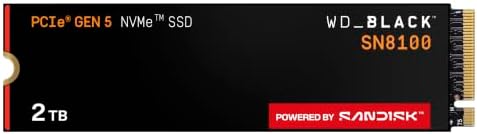
- This product has been replaced by our latest generation. Please search for the SANDISK Optimus GX PRO 8100 PCIe 5.0 NVMe…
- EXPERIENCE PCIe Gen 5: Drastically enhance your gaming and content creation experience with this PCIe Gen 5.0×4 NVMe M.2…
- BREAKNECK SPEEDS: Your drive reaches sequential read speeds up to an astonishing 14,900MB/s, sequential write speeds up …
WD’s Gen5 flagship, at the same price as the Samsung 9100 PRO, rated 4.8 stars from a shallower sample of 1,096 ratings.
The two Gen5 drives here are close enough that choosing between them is largely brand preference. The Samsung has more reviews behind it. Both are considerably faster than anything Gen4 in a benchmark and both will feel identical while loading a game.
If you have already decided on Gen5 and your motherboard supports it, either is a defensible purchase. We would lean toward whichever is cheaper on the day.
Buy it if: you want Gen5 and prefer WD, or it is cheaper than the Samsung when you look.
Skip it if: you are buying for gaming. Gen4 is the sensible choice.
- The highest sequential read figure in this guide
- 4.8 stars on Amazon
- WD_Black build quality and support
- A defensible Gen5 choice if it is cheaper on the day
- 1,096 ratings, a thin sample for a Gen5 flagship
- Same invisible-in-games caveat as all Gen5 drives
- Requires a Gen5 slot and serious cooling
- Priced the same as the Samsung with fewer reviews
The best M.2 NVMe SSD picks compared side by side
| Drive | Capacity | Interface | Read speed | Price | Rating | Best for |
|---|---|---|---|---|---|---|
| Corsair MP600 PRO LPX | 2TB | Gen4 | 7,100 MB/s | $574.99 | 4.8 (10,663) | Best overall |
| Lexar NM790 2TB | 2TB | Gen4 | 7,400 MB/s | $406.57 | 4.8 (1,318) | Best value |
| Lexar NQ780 | 1TB | Gen4 | DRAM-less | $184.99 | 4.6 (128) | Best budget |
| Samsung 990 PRO | 2TB | Gen4 | 7,450 MB/s | $389.99 | 4.7 (13,420) | Premium Gen4 |
| Corsair MP600 Elite 1TB | 1TB | Gen4 | 7,000 MB/s | $260.00 | 4.8 (520) | Best 1TB |
| Corsair MP700 Elite | 2TB | Gen5 | 10,000 MB/s | $459.99 | 4.8 (321) | Cool-running Gen5 |
| Samsung 9100 PRO | 1TB | Gen5 | 14,700 MB/s | $249.99 | 4.7 (1,859) | Best Gen5 |
| WD_Black SN8100 | 2TB | Gen5 | 14,900 MB/s | $491.95 | 4.8 (1,096) | Gen5 alternative |
What we left out, and why
M.2 2230 drives
Several well rated 2230 drives appeared in our searches, some with over two thousand ratings. They are 30mm long rather than 80mm, built for handheld consoles and some ultrabooks, and they are not what a desktop motherboard expects. A good drive in the wrong form factor is still the wrong drive.
SATA and external drives
2.5 inch SATA SSDs and portable USB drives rank in the same searches and are a different product entirely. SATA tops out at roughly a sixth of the speed of the drives here.
Drives with thin review samples
Several inexpensive 2TB drives from less established brands carried fewer than 150 ratings. In a category where the whole point is that the drive does not fail, a shallow sample is a poor trade for a small saving. The budget pick here has a thin sample too, at 128 ratings, and we say so plainly in its section; the difference is that it comes from an established brand with a long track record in NVMe storage.
How much storage do you actually need
1TB is the practical floor
After Windows and its updates you have roughly 900GB usable. Modern flagship games run from 80GB to over 150GB each. That is six or seven large titles before you are uninstalling something to install something else.
2TB is the right answer for most people
It roughly doubles that to a dozen or more large games, which for most players is the difference between managing a library and simply having one. The price gap between 1TB and 2TB is smaller than the gap in usefulness.
4TB is for large libraries and creators
If you keep dozens of games installed, or you edit video alongside gaming, 4TB drives exist and are worth considering. For most gaming machines it is more than the situation requires.
Will it fit, and will it run at full speed
Three checks that catch people out after the drive has arrived.
Form factor. Desktop motherboards want M.2 2280. Check the number in the product title, not just the phrase “M.2 NVMe”.
Slot generation. A Gen5 drive works in a Gen4 slot, but it runs at Gen4 speed, so you would be paying for performance you cannot access. Equally, a Gen4 drive in a Gen4 slot is running at its full rated speed already. Check what your motherboard actually provides before buying up a generation.
Heatsinks and clearance. Many motherboards include M.2 heatsinks. If yours does, you generally do not want a drive with its own bulky heatsink as well, because the two will not fit together. If your board has no heatsink and you are buying a fast Gen4 or any Gen5 drive, thermal throttling is a real possibility.
Will these work in a PS5
The drives here are the right type, and Sony’s requirement is a PCIe Gen4 M.2 2280 drive with a heatsink fitted.
The critical word is heatsink. The bare drives on this page are sold without one, and a PS5 needs heat dissipation on the drive to run reliably in that enclosure. Several of these models are also sold in a heatsink version, and that is what you want for a console rather than the bare drive plus a guess.
Check Sony’s current requirements before buying for a console, since they have been revised more than once.
Frequently asked questions
What is the best M.2 NVMe SSD in 2026?
The Corsair MP600 PRO LPX 2TB for most people. It holds 4.8 stars from 10,663 ratings and ships with a low-profile heatsink already fitted, which in a category where the drive mainly needs to not fail is what matters most. If value matters more, the Lexar NM790 2TB delivers more speed on paper for meaningfully less.
Is PCIe Gen5 worth it for gaming?
No, for almost everyone. Gen5 doubles the sequential read figure on the box, but game loading is thousands of small scattered reads rather than one long sequential one, so the real difference when loading a game is frequently under a second. Gen5 also runs much hotter. Buy Gen4 and put the money into capacity.
How much SSD storage do I need for gaming?
2TB is the right answer for most people. A single flagship game can occupy 150GB, and a 1TB drive also holding Windows leaves roughly 900GB usable, which is six or seven large titles before you start uninstalling. The price gap between 1TB and 2TB is smaller than the gap in usefulness.
What is the difference between M.2 2280 and 2230?
The number is the size. A 2280 drive is 22mm by 80mm and is what desktop motherboards expect. A 2230 drive is only 30mm long and is built for handheld consoles and some ultrabooks. Both are sold as M.2 NVMe and both appear in the same searches, so check the number before you buy.
Does a DRAM-less SSD matter for gaming?
Rarely. A DRAM-less drive uses your system memory for its mapping table instead of a dedicated cache on the drive. For games, which mostly read, the difference is small. It shows up under sustained heavy writes, such as moving hundreds of gigabytes at once or editing video.
Will these SSDs work in a PS5?
They are the right type, but the PS5 requires a PCIe Gen4 M.2 2280 drive with a heatsink fitted, and the drives on this page are sold bare. Several of these models are also available in a heatsink version, which is what you want for a console. Check Sony current requirements before buying, as they have been revised more than once.
Do I need a heatsink on my SSD?
It depends on your motherboard. Many boards include M.2 heatsinks, and if yours does you generally do not want a drive with its own bulky heatsink as well, because the two will not fit together. If your board has no heatsink and you are fitting a fast Gen4 or any Gen5 drive, thermal throttling is a real possibility.
Will a Gen5 SSD work in a Gen4 slot?
Yes, but it runs at Gen4 speed, so you would be paying for performance you cannot access. Check what your motherboard actually provides before buying up a generation. Many current boards have only one Gen5 M.2 slot, and some have none.
Is a higher star rating always better?
No. A rating is only as reliable as the sample behind it, and storage attracts the deepest samples of any component category. A 4.7 from 13,420 ratings is far stronger evidence than a 4.9 from thirty. In a category where the point is that the drive does not fail, sample depth is worth more than a decimal place.
The bottom line on the best M.2 NVMe SSD
The best M.2 NVMe SSD for most people in 2026 is the Corsair MP600 PRO LPX 2TB at $574.99, because 10,663 ratings at 4.8 stars, a DRAM cache and a heatsink already fitted is the most complete package here, in a category where reliability is the whole point.
If value matters more, the Lexar NM790 2TB at $406.57 is the drive we would actually buy: faster on paper, meaningfully cheaper. On a fixed budget, the Lexar NQ780 1TB at $184.99 costs the least here.
And the advice most likely to save you money when picking the best M.2 NVMe SSD for your build: buy Gen4 and spend the difference on capacity. Gen5 doubles a number on the box that games do not use. A 2TB Gen4 drive will improve your daily experience considerably more than a 1TB Gen5 drive at the same price, and you will notice the space every single week.
Prices and ratings on this page update automatically. Every other figure was accurate when this guide was last reviewed and carries no guarantee beyond that. Check the current price before you buy.
How many of these drives you can actually fit is decided by your motherboard, which is why M.2 slot count is worth checking before you buy. Our best gaming motherboards guide lists the slot count for all eight boards.
Storage decides how fast a game loads. The monitor decides what it looks like once it has. Our best gaming monitors guide compares eight screens on resolution, refresh rate and panel type.
Fast storage gets you into the game; a good headset tells you where everyone else is once you are there. Our best gaming headsets guide covers eight sets across wired and 2.4GHz wireless.
Storage decides load times, but the keyboard is what you touch for every hour after that. Our best gaming keyboards guide covers eight boards across every layout.
Fast storage gets you in the game. Our best gaming mice guide covers what you use once you are there, ranked on weight and shape rather than DPI.
Load times matter for seconds; your chair matters for hours. Our best gaming chairs guide compares six seats on capacity, recline and airflow.
See how storage fits into a complete machine: our $2,000 gaming PC build explains why Gen4 rather than Gen5.
Storage is usually the first thing squeezed on a tight budget, and we chose not to squeeze it. Our budget gaming PC build spends more on storage than most builds at that price, and the Gen3 against Gen4 reasoning above is precisely why that was affordable.
An NVMe drive draws so little that it never changes which power supply you need, which is useful to know when you are apportioning a budget. Our best gaming power supply guide covers the components that do move that figure, and the eight units we would buy.
Storage is where our $3,000 build made its one real compromise. It fits a 1TB 990 PRO rather than the 2TB version, because the 2TB costs $150.00 more and storage is the only component you can add later without replacing anything. That page shows exactly what the saving bought.
An internal drive is not the only storage worth owning. For a drive that travels, backs up a console or records straight from a phone, our external SSD guide compares eight 1TB portable drives.
Gamers Tech Guide participates in the Amazon Services LLC Associates Program. As an Amazon Associate we earn from qualifying purchases.