
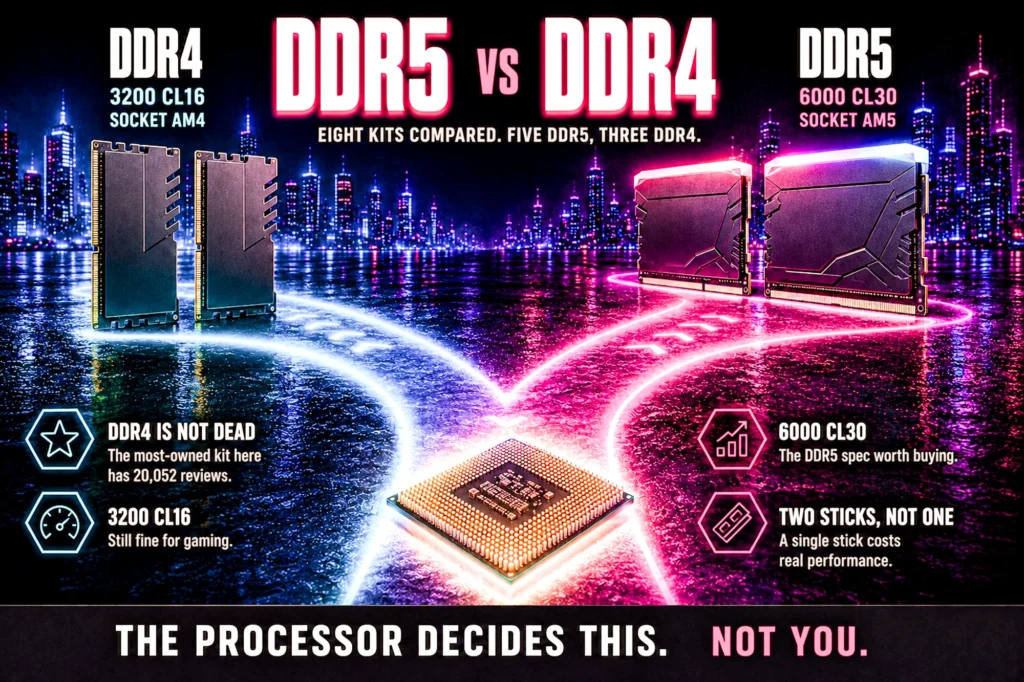
The DDR5 versus DDR4 argument is mostly settled before you start, because the socket you are building on has already chosen for you.
- You usually do not get to pick. AM5 and current Intel take DDR5 only. AM4 takes DDR4 only. The board decides.
- New build: DDR5, because the platform requires it, not because the memory is transformative.
- Existing AM4 machine: keep DDR4. Changing generation means a new board and a new processor too.
- Capacity beats generation. 16GB to 32GB is a bigger improvement than DDR4 to DDR5 at the same size.
DDR5 vs DDR4 gets argued as though it is a purchase decision. For most people it is not. Memory type is dictated by the motherboard, the motherboard is dictated by the processor socket, and by the time you have chosen a processor the memory question has answered itself.
What follows is what each generation actually gives you, the one situation where you genuinely do have a choice, and eight real kits arranged by generation rather than by price. Every one was verified on its own Amazon product page for our gaming memory guide. No figure here was typed from memory.
Every kit at a glance

| Type | DDR5 |
| Kit | 32GB (2×16) |
| Speed | 6000 CL30 |
| Rating | 4.4 (695) |

| Type | DDR5 |
| Kit | 32GB (2×16) |
| Speed | 6000 CL30 |
| Rating | 4.6 (819) |

| Type | DDR5 |
| Kit | 32GB (2×16) |
| Speed | 6000 CL30 |
| Rating | 4.7 (1,501) |

| Type | DDR5 |
| Kit | 32GB (2×16) |
| Speed | Up to 6000 |
| Rating | 4.7 (4,323) |

| Type | DDR5 |
| Kit | 16GB (1×16) |
| Speed | 6000 CL30 |
| Rating | 4.1 (276) |

| Type | DDR4 |
| Kit | 32GB (2×16) |
| Speed | 3200 CL16 |
| Rating | 4.8 (20,256) |

| Type | DDR4 |
| Kit | 16GB (2×8) |
| Speed | 3200 CL16 |
| Rating | 4.8 (1,726) |

| Type | DDR4 |
| Kit | 16GB (2×8) |
| Speed | 3200 CL22 |
| Rating | 4.5 (557) |
DDR5 vs DDR4: you probably do not get to choose
This is the part that resolves most of the confusion, and it is worth stating plainly: DDR4 and DDR5 are not interchangeable. The modules are physically keyed differently and will not seat in the wrong slot. A board takes one type or the other, never both.
- AMD AM5 (Ryzen 7000, 8000 and 9000) — DDR5 only.
- AMD AM4 (Ryzen 5000 and older) — DDR4 only.
- Current Intel boards — DDR5 in practice.
So the real sequence is: pick the processor, which fixes the socket, which fixes the board, which fixes the memory. If you are choosing a processor now, our gaming CPU guide and motherboard guide are where that decision actually happens.
The one genuine choice point is whether to stay on an existing AM4 machine or move platform entirely. That is not a memory upgrade, it is a new computer, and it should be costed as one.
DDR5 vs DDR4: what you actually get in games
More bandwidth, at higher latency. DDR5 moves considerably more data per second, but each individual request takes marginally longer to answer, and games care about both. The net result is a real gain that is smaller than the specification gap implies.
Where it shows up most: minimum frame rates and frame consistency in simulation-heavy and open-world games, and in anything CPU-bound at 1080p. Where it shows up least: anywhere you are limited by the graphics card, which at 1440p and above is most of the time. If your frame rate is decided by your GPU, faster memory changes very little, and our guide to how much VRAM you need covers the specification that actually is deciding it.
Capacity matters more than generation
If you take one number from this page, take this one: 32GB. Moving from 16GB to 32GB is a bigger practical improvement than moving from DDR4 to DDR5 at the same capacity, and it usually costs less.
That is why five of the eight kits below are 32GB, and why the two 16GB DDR4 kits are positioned as budget options rather than recommendations. Sixteen gigabytes still runs games perfectly well. Thirty two is what stops you thinking about memory when a game, a browser with forty tabs and a voice client are all open at once.
The speed to aim for is 6000MHz CL30 on DDR5 and 3200MHz CL16 on DDR4. Both are the sweet spot their platform is tuned around, and paying past them buys very little in games.
1. Patriot Viper Venom DDR5: the DDR5 pick for most builds
32GB as 2×16, 6000MHz at CL30. $484.99. 4.4 stars from 695 ratings. This is the specification the entire AM5 platform is tuned around, in the capacity that stops mattering.

- Capacity: 32GB (2 x 16GB) 6000MHz
- Tested Timings: 30-40-40-76
- Feature Overclock: XMP 3.0 / EXPO overclocking supported
6000 CL30 is worth understanding as a pairing rather than two numbers. On an AMD build the memory controller runs most comfortably at 6000, and CL30 is a tight timing at that speed. Kits advertised well above 6000 frequently loosen timings to get there and can be harder to run stably, which is the opposite of what you want from the part that decides whether the machine boots.
If you are building on AM5 and do not want to think about memory again, this is the kit. Tested timings are 30-40-40-76 at 1.35V, both XMP 3.0 and EXPO profiles are supported, and Patriot lists a limited lifetime warranty.
- A plain 32GB DDR5 kit with no RGB premium
- 6000 CL30, the sweet spot AM5 is tuned around
- 32GB, the capacity that stops being a constraint
- 4.4 stars from 695 ratings
- Intel XMP 3.0 and AMD EXPO profiles
- Patriot appears twice on this page, here and as the 16GB single stick at 5
- A thinner review sample than the T-Create Expert below it
- DDR5 only, so no use on an AM4 board
2. TEAMGROUP T-Create Expert: the same spec without the lighting
32GB as 2×16, 6000MHz CL30. $539.99. 4.6 stars from 819 ratings. Functionally the same recommendation as the kit above with the lighting removed, which usually means a lower price and always means a lower profile.
- TEAMGROUP T-CREATE EXPERT 32GB KIT 2 X 16GB DDR5-6000 PC5-48000 CL30 DUAL CH
The low profile matters more than it sounds. Large air coolers overhang the first memory slot on most boards, and tall RGB modules are the single most common reason a cooler will not fit. If you are running a big tower cooler, this is the safer buy.
- Identical 6000 CL30 specification, usually cheaper
- Low profile clears large air coolers
- 4.6 stars from 819 ratings
- No lighting to configure or disable
- Plain looks in a windowed case
- Fewer ratings than the Corsair kits here
- DDR5 only
3. TEAMGROUP T-Force Delta RGB DDR5: the lit kit at the right spec
32GB as 2×16 at 6000 MT/s CL30. $599.99. 4.7 stars from 1,501 ratings. A published, fixed timing rather than a range you have to verify, with lighting and white heat spreaders if the build is on show.

- DDR5 – Leading the way into a new OC generation, supports Intel XMP3.0 for one-click overclocking. Compatible with Intel…
- RGB colors & 120° ultra-wide lighting. Equipped with smart RGB IC controller that supports various lighting effect softw…
- Strengthened PMIC cooling design. On-die ECC for stable system. High-Quality ICs Selected for Stability & Reliability.
This listing quotes a fixed 6000 MT/s at CL30 with both AMD EXPO and Intel XMP 3.0 support, rather than an up to figure covering several variants. That is the specification you can rely on when you add it to the basket, and it is why it sits here rather than a kit you would have to verify.
The trade against the plainer kits above is physical rather than electrical: the light bar sits along the top of each module, so measure your cooler before you commit. The heat spreaders are white, which suits a light build and stands out in a dark one.
- 4.7 stars from 1,501 ratings
- Fixed 6000 CL30 with EXPO and XMP 3.0, not an up to figure
- White heat spreaders and addressable lighting
- 32GB at the sensible speed tier
- 1,501 ratings is a thinner sample than the Corsair kits here
- The light bar adds height, so check cooler clearance first
- DDR5 only
4. Corsair Vengeance RGB DDR5: the most-reviewed DDR5 kit here
32GB as 2×16, up to 6000MHz. $569.99. 4.7 stars from 4,323 ratings, the deepest evidence base of any DDR5 kit in this lineup.

- Disclaimer: Maximum Speed requires overclocking/PC BIOS adjustments. Maximum speed and performance depend on system comp…
- Dynamic Ten-Zone RGB Lighting: Illuminate your system with ten individually addressable, ultra-bright RGB LEDs per modul…
- Onboard Voltage Regulation: Enables easier, more finely-tuned, and more stable overclocking through CORSAIR iCUE softwar…
If lighting is part of the build, this is the kit with the most owners behind it. The same caveat about “up to 6000MHz” applies, and the panoramic light bar adds height, so check cooler clearance first.
- 4,323 ratings at 4.7, the deepest DDR5 evidence here
- 32GB at the sensible speed tier
- Well-supported lighting software
- Taller modules, check air cooler clearance
- “Up to 6000MHz” covers multiple variants
- The rating count is shared across the color variants, so it describes the line rather than this exact kit
5. Patriot Viper Venom 16GB: the single stick, with a caveat
16GB as a single module, 6000MHz CL30. $239.99. 4.1 stars from 276 ratings, the lowest score and the smallest sample in this lineup, and that needs saying rather than burying.
- Capacity: 16GB (1 x 16GB) 6000MHz
- Tested Timings: 30-40-40-76
- Feature Overclock: XMP 3.0 / EXPO overclocking supported
The reason it is here at all is the single-module format, which lets you start at 16GB and add a second stick later. The reason to hesitate is that a single stick runs in single-channel mode until you add the second one, and single-channel memory measurably hurts gaming performance.
Our honest recommendation: buy a 2×16 kit instead if you can. Matched pairs are tested together, run in dual channel from the first boot, and avoid the compatibility problems that come from pairing modules bought months apart.
- 6000 CL30, the right specification
- Single module leaves room to expand to 32GB
- A low-cost route onto DDR5
- Runs single-channel until you add a second stick, which costs performance
6. Corsair Vengeance LPX DDR4: the most-reviewed kit on this site
32GB as 2×16, 3200MHz CL16. $247.00. 4.8 stars from 20,256 ratings — a very deep evidence base for a memory kit.
- Disclaimer: Maximum Speed requires overclocking/PC BIOS adjustments. Maximum speed and performance depend on system comp…
- Hand-sorted memory chips ensure high performance with generous overclocking headroom
- VENGEANCE LPX is optimized for wide compatibility with the latest Intel and AMD DDR4 motherboards
Twenty thousand ratings at 4.8 is the kind of number that settles an argument. If you are on AM4 and wondering whether upgrading to 32GB is worth it before you consider a whole new platform, this is the kit that answers it, at 3200 CL16 which is exactly the AM4 sweet spot.
It is also low profile, which matters on older builds where the cooler was chosen years ago.
- 20,256 ratings at 4.8, a very deep evidence base
- 3200 CL16, the AM4 sweet spot
- 32GB, the upgrade that actually changes things
- Low profile, clears almost any cooler
- DDR4 is a platform with no future upgrades
- No lighting
- Useless on an AM5 or current Intel board
7. TEAMGROUP T-Force Vulcan Z DDR4: the budget 16GB kit
16GB as 2×8, 3200MHz CL16. $129.99. 4.8 stars from 1,726 ratings. The cheap way to get a tired AM4 machine to a sensible speed and a sensible capacity.
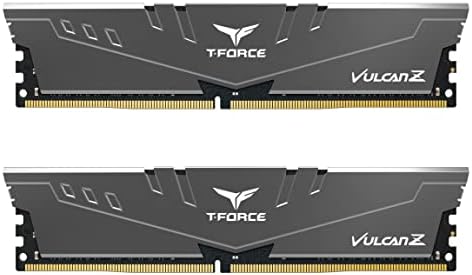
- Simple design to perfectly protect the cooling module with high thermal conductive adhesive
- Supports Intel & AMD motherboards
- Selected high-quality IC
Sixteen gigabytes is enough to game on and no longer enough to be comfortable with a browser, a voice client and a game open together. If the budget stretches, the 32GB Vengeance LPX above is the better spend. If it does not, this is a proper 3200 CL16 kit with a deep review base behind it.
- 1,726 ratings at 4.8
- 3200 CL16, the correct AM4 timing
- Inexpensive route to a dual-channel pair
- XMP 2.0, so the rated speed is one setting
- 16GB is workable rather than comfortable in 2026
- 2×8 leaves no easy upgrade path on a two-slot board
- DDR4 only
8. Silicon Power DDR4: the cheapest kit worth buying
16GB as 2×8, 3200MHz CL22. $109.97. 4.5 stars from 557 ratings. The floor of what we would recommend, and it is here because the alternative at this price is unbranded memory with no warranty.
- Complies with JEDEC standards
- Low voltage of 1.2V for less power consumption
- Strict test and verification procedures are performed for products
The specification to notice is CL22 rather than CL16. Same 3200MHz speed, looser timings, so each request takes longer to answer. In games the difference is small but it is real, and it is the reason this sits last rather than competing with the TEAMGROUP kit above.
Buy it when the budget is fixed and the alternative is staying on 8GB. Do not buy it expecting the same result as a CL16 kit.
- A budget kit we would still recommend
- 4.5 stars from 557 ratings
- Proper dual-channel pair rather than a single stick
- 288-pin desktop modules, correctly specified
- CL22 timings, looser than the CL16 kits at the same speed
- 16GB rather than 32GB
- Smallest review base of the DDR4 kits here
DDR5 vs DDR4 is decided by your processor, not you
The single most useful thing to understand about DDR5 versus DDR4 is that for most people it is not a choice at all. You do not pick a memory generation and then find hardware to suit it. You pick a processor, the processor determines the socket, and the socket determines which memory will physically fit.
AM5 boards take DDR5 and nothing else. AM4 boards take DDR4 and nothing else. The modules are keyed differently, so a DDR4 stick will not seat in a DDR5 slot no matter how firmly you press — which is a mercy, because the alternative would be far more expensive than a wasted evening.
Below are the two processors that sit at either end of that fork on this site, and they make the consequence concrete.

| Clock | 4.7 GHz |
| Cache | 3D V-Cache |
| Socket | AM5 |
| Rating | 4.8 (505) |

| Cores | 6C / 12T |
| Socket | AM4 |
| Memory | DDR4 |
| Rating | 4.8 (30,194) |
Ryzen 7 9850X3D — the DDR5 fork
$474.90, AM5, and an X3D chip, the stacked-cache design our processor guide argues for in games. Choose it and the memory conversation is over: you are buying DDR5, and the only remaining questions are capacity and speed. 4.8 stars from 505 owners.
Worth noting what that means for the total. This processor cannot be paired with any of the three DDR4 kits further down this page. If you have DDR4 sitting in a drawer from a previous build, it does not come with you.
- 3D V-Cache, the stacked-cache design our CPU guide argues for in games
- 4.8 stars from 505 owners
- AM5 has a genuine upgrade road ahead of it
- Removes the memory decision entirely: DDR5, no alternatives
- $474.90, a big step up from the Ryzen 5 5600X
- Commits you to DDR5 pricing whether you like it or not
- Existing DDR4 modules cannot come with you
Ryzen 5 5600X — the DDR4 fork
$173.98, AM4, and 4.8 stars from 30,194 owners — a deep sample for a processor at this price. This is the chip that makes the DDR4 argument, and the argument is entirely about the total rather than about memory bandwidth.
Add it up. This processor plus the $247.00 Corsair Vengeance LPX 32GB kit comes to about $428 for processor and memory together. The 9850X3D plus the Corsair Vengeance RGB 32GB DDR5 kit comes to about $1,034 for the same two parts. That is roughly $606 of difference before you have bought a motherboard, and it buys a graphics card tier or two.
⚠ One honest gap you should know about: our motherboard guide currently carries no AM4 boards — every board we have verified is AM5 or current Intel. If you go the DDR4 route with this processor you will be sourcing the board somewhere we have not checked, and we would rather say that than quietly leave you to discover it.
- AMD’s fastest 6 core processor for mainstream desktop, with 12 processing threads. System Memory Type: DDR4
- Can deliver elite 100+ FPS performance in the world’s most popular games
- Bundled with the quiet, capable AMD Wraith Stealth cooler
- $173.98, and it includes a Wraith Stealth cooler in the box
- 30,194 ratings at 4.8 stars, a very deep owner sample
- Keeps you on the cheaper memory generation
- Processor plus 32GB of DDR4 comes to about $428 all in
- AM4 is a mature socket with very little upgrade road left
- Six cores, and no 3D V-Cache
- We do not currently carry a verified AM4 motherboard
- Locks you out of DDR5 permanently without a full platform change
The motherboard is where the decision becomes final
The processor picks the fork; the board is where you commit to it. Both boards below are AM5, which means both are DDR5-only, and the gap between them tells you something useful: the cheapest route onto DDR5 is not as expensive as the flagship parts make it look.

| Socket | AM5 |
| Chipset | B850 |
| Size | ATX |
| M.2 slots | 4 |
| Rating | 4.4 (459) |

| Socket | AM5 |
| Chipset | B850 |
| Size | Micro ATX |
| M.2 slots | 2 |
| Rating | 4.6 (300) |
ASUS ROG Strix B850-A Gaming WiFi — the one to grow into
$196.99, full ATX, four M.2 slots, and a listing that states Ryzen 9000, 8000 and 7000 support explicitly — which is the line that makes the 9850X3D above a safe pairing rather than an assumption. Four drive slots is the specification that decides whether this machine is still useful in four years.
- Ready for Advanced AI PCs: Designed for the future of AI computing, with the power and connectivity needed for demanding…
- AMD AM5 Socket: Ready for AMD Ryzen 9000, 8000 and 7000 series desktop processors
- Intelligent Control: ASUS AI Advisor, AI Networking II and AEMP to simplify setup and improve performance
- Four M.2 slots, one of them PCIe 5.0
- Ryzen 9000 / 8000 / 7000 support stated on the listing itself
- Wi-Fi included
- Full ATX, so nothing is compromised for size
- $196.99, more than the micro ATX board below
- 459 ratings is a modest sample
- Needs a case sized for full ATX
- DDR5 only, like every AM5 board
GIGABYTE B850M AORUS Elite WIFI6E — the budget route onto DDR5
$159.99. This is the board that reframes the whole cost argument, so it is worth doing the arithmetic properly. Pair it with the Ryzen 9 7900X from our processor guide at about $315 and the Patriot Viper Venom 32GB DDR5 kit at about $488, and the DDR5 platform comes to about $963. That is a real number, and it is a lot less than the flagship pairing suggests.
Two M.2 slots rather than four, and micro ATX rather than full size. Both are real reductions and neither affects whether your memory runs at its rated speed.

- AMD Socket AM5: Supports AMD Ryzen 9000 / Ryzen 8000 / Ryzen 7000 Series Processors
- DDR5 Compatible: 4*DIMMs
- Power Design: 12+2+2
- $159.99, the budget route onto AM5 and DDR5 here
- Same B850 chipset as the ROG Strix B850-A above
- PCIe 5.0 and Wi-Fi 6E
- Micro ATX fits considerably more cases
- Two M.2 slots against the ASUS board’s three
- 4.6 stars from only 300 ratings, a thin sample for a board
- Micro ATX limits expansion slots
- Still DDR5 only, so the memory premium applies
Every kit compared
| Kit | Type | Capacity | Speed | Price | Rating |
|---|---|---|---|---|---|
| Patriot Viper Venom DDR5 | DDR5 | 32GB (2×16) | 6000 CL30 | $484.99 | 4.4 (695) |
| TEAMGROUP T-Create Expert | DDR5 | 32GB (2×16) | 6000 CL30 | $539.99 | 4.6 (819) |
| TEAMGROUP T-Force Delta RGB | DDR5 | 32GB (2×16) | 6000 CL30 | $599.99 | 4.7 (1,501) |
| Corsair Vengeance RGB DDR5 | DDR5 | 32GB (2×16) | Up to 6000 | $569.99 | 4.7 (4,323) |
| Patriot Viper Venom | DDR5 | 16GB (1×16) | 6000 CL30 | $239.99 | 4.1 (276) |
| Corsair Vengeance LPX | DDR4 | 32GB (2×16) | 3200 CL16 | $247.00 | 4.8 (20,256) |
| TEAMGROUP T-Force Vulcan Z | DDR4 | 16GB (2×8) | 3200 CL16 | $129.99 | 4.8 (1,726) |
| Silicon Power DDR4 | DDR4 | 16GB (2×8) | 3200 CL22 | $109.97 | 4.5 (557) |
DDR4 is not dead
If you already own an AM4 machine, DDR4 remains an entirely reasonable place to be. The platform still runs current games well, the memory is inexpensive, and the money you would spend switching generations is better spent on the graphics card, which decides far more of your frame rate.
The evidence backs that up rather than contradicting it. The Corsair Vengeance LPX above carries 20,256 ratings at 4.8, which is not the profile of a dead standard. It is the profile of a part that an enormous number of people are still buying and are still happy with.
The one caveat: DDR4 is a platform with no future upgrades. You are buying the last memory that board will ever take. That is fine if the machine is doing its job, and a poor reason to start a new build.
What 6000 CL30 actually means
Every DDR5 kit on this page is quoted as something like 6000 CL30, and the two numbers pull in opposite directions. Understanding which one to care about takes about a minute and saves you from overpaying for a specification that will not change how anything feels.
The first number is speed, in megatransfers per second. 6000 means the memory can move data six thousand million times a second. Higher moves more.
The second number is latency — how long the memory takes to respond. CL stands for CAS latency, and here lower is better. CL30 responds faster than CL36 at the same speed.
Neither number means anything on its own, which is the part people get wrong. A 6400 CL40 kit is not obviously better than a 6000 CL30 kit, because you bought more speed and paid for it in response time. This is why every kit in our memory guide is quoted as a pair rather than a headline speed — a speed figure with no latency beside it is marketing, not a specification.
Why 6000 CL30 specifically? It is the pairing that has settled as the sensible default on AM5, and it is what four of the five DDR5 kits on this page are rated at. Going faster on paper frequently means the memory controller has to work harder to stay stable, and the practical gain over a good 6000 CL30 kit is small enough that most people would not identify it without a frame counter on screen.
And the number does nothing until you switch it on. Memory ships running at a conservative baseline speed, well below what is printed on the box. The rated figure only applies once you enable the profile in your motherboard firmware — XMP on Intel boards, EXPO on AMD, and some boards list both. It is one setting, though every board maker names its page something different: our guide to how to enable EXPO and XMP has all four. A kit running at its default instead of its rated speed is the single most common reason a new build feels slower than expected, and it costs nothing to fix.
One stick or two? The mistake that costs real performance
This matters more than the generation debate, and far more than the difference between CL30 and CL32.
Memory runs in channels, and two sticks let it use two. A single module runs in single channel, which roughly halves the bandwidth available to the system. Two matched modules run in dual channel. The performance difference is not subtle and it shows up most in exactly the place gamers care about — minimum frame rates, the dips rather than the average.
This is why the Patriot Viper Venom 16GB kit on this page carries a caveat. At $239.99 it is one 16GB stick rather than two 8GB sticks. It is not a bad module. It is a compromised configuration, and the listing does not shout about it.
Compare honestly: the Silicon Power DDR4 kit is $109.97 for two 8GB sticks, and the TEAMGROUP T-Force Vulcan Z is $129.99 for the same arrangement. Both run dual channel out of the box. The DDR5 single stick costs roughly twice as much and runs in single channel until you buy a second one.
The rule is simple: buy memory in pairs. A 2x16GB kit rather than 1x32GB, a 2x8GB kit rather than 1x16GB. And buy them as a matched kit sold together rather than two separate sticks bought months apart — modules from the same kit are tested to run together at the rated speed, and two individually-purchased sticks with identical specifications on the label are not guaranteed to.
The one time a single stick makes sense is when you are deliberately buying half now and matching it later, and you have checked your board has the slots free. That is a plan. Ending up in single channel because the cheapest listing happened to be one module is not.
Should you upgrade an existing DDR4 machine?
Almost certainly not, and the reason is that it is not a memory upgrade — it is a platform replacement wearing a memory upgrade’s clothing.
Moving from DDR4 to DDR5 means a new motherboard and a new processor as well. The memory is the smallest part of that bill. If your current machine is AM4, the honest options are to add more DDR4 to it, or to replace the machine. There is no path where you keep the board and change the memory generation.
So the real question is whether your existing machine is short on capacity or short on speed, and those have very different answers:
If you have 16GB of DDR4 and games are stuttering, adding another 16GB kit is the cheapest meaningful upgrade available to you. The Corsair Vengeance LPX 32GB kit at $247.00 or the TEAMGROUP T-Force Vulcan Z at $129.99 will do considerably more for that machine than any platform change at ten times the cost. Check your board has free slots and that you are matching the speed of what is already installed.
If you have 32GB of DDR4 and the machine feels slow, memory is not your problem and more of it will not help. Look at the graphics card first, then storage. Our VRAM explainer covers how to tell the difference between a memory ceiling and a card that is simply not fast enough.
If you are replacing the machine anyway, then you are on the DDR5 side of the fork by default, because that is what current processors take. At that point the memory generation was never a decision — it came attached to the platform you already chose for other reasons.
What DDR5 actually costs you today
Here is the whole argument in one set of numbers, all read the same afternoon.
At 32GB: a 32GB DDR5 kit here runs $484.99 and the Corsair is $569.99. The DDR4 equivalent is $247.00. That is a premium of between about $238 and $300 for the same capacity.
At 16GB: DDR5 is about $246 for a single stick. DDR4 is about $113 or $130 for a matched pair. So the DDR5 option costs about twice as much and gives you the worse channel configuration described above.
Add the platform: the budget AM5 board here is $159.99 and the Ryzen 9 7900X from our CPU guide is about $315. Against the Ryzen 5 5600X at about $178, that is roughly another $297 before the memory is counted.
What you get for it. More bandwidth, a platform with an upgrade road ahead of it, and access to the current generation of processors — including the newest 3D V-Cache parts from AMD, which AM4 will never get.
What you do not get is a transformation in frame rate. As covered earlier on this page, the generational difference in games is real but modest, and it is comprehensively outweighed by which graphics card you bought. Nobody should pay the DDR5 premium expecting the memory itself to make games faster. You pay it because you want a current processor, and DDR5 is what current processors take.
That is the honest framing, and it is why this article opens by saying you probably do not get to choose. The memory generation is a consequence of a decision you make for other reasons — and if you are building new in 2026, that decision has almost certainly already been made for you.
How much memory do you actually need?
Capacity is the decision that changes how a machine feels. Generation is the one people argue about. It is worth being clear which is which, because the money usually goes to the wrong one.
8GB is not enough in 2026. Not for gaming, and increasingly not for a browser and a game at the same time. There is no kit on this page at that capacity and that is deliberate. If you are looking at a prebuilt machine advertising 8GB, treat the cost of a memory upgrade as part of its price.
16GB is the working minimum, and it is genuinely fine. The overwhelming majority of games run comfortably in 16GB with room for the operating system and a browser behind them. If your budget is tight, 16GB of a good kit in dual channel beats 32GB of a compromised one every time. Both DDR4 kits on this page at that capacity — about $113 and $130 — are matched pairs, which is exactly right.
32GB is the comfortable answer and where most builds should land. It stops you thinking about memory. It covers games that are heavier than average, streaming while you play, and having genuinely too many browser tabs open. Every 32GB kit on this page is a 2x16GB pair.
64GB is for work, not for games. Video editing, virtual machines, large datasets. No game currently benefits from it, and buying it for gaming is money that would do dramatically more good in a graphics card.
The honest ranking, if the budget is fixed: get to 16GB in dual channel first, then spend everything else on the graphics card, then come back for 32GB later. Capacity you are not using does nothing at all, and a faster card does something in every single game, every session.
Does memory speed matter for gaming?
Yes, but far less than the marketing implies, and much less than three other things you could spend the same money on.
Where it genuinely shows up: in minimum frame rates rather than averages, and in games that are limited by the processor rather than the graphics card. Simulation games, strategy titles with large maps, and competitive shooters running at very high frame rates on low settings are the places faster memory can be measured.
Where it does not show up at all: anywhere the graphics card is the limit — which is most games, at most settings, at 1440p and above. If your card is working flat out, the memory is waiting on it, and making the memory wait faster changes nothing.
So the practical order of spending is: the right capacity in dual channel, then a sensible speed and latency pairing like the 6000 CL30 that four kits here use, then stop. Chasing a higher number past that point costs real money for a difference you would need a frame counter to identify.
One exception worth knowing about. On AM5, memory speed interacts with the processor’s internal fabric, and there is a point past which pushing the memory faster forces the fabric out of its most efficient mode — so a faster kit can actually perform slightly worse. This is precisely why 6000 has settled as the recommended figure on this platform rather than the highest number available. It is not caution. It is where the platform works best.
And it is worth repeating the thing from the previous section, because it costs nothing: whatever speed you buy, enable the profile in firmware. A 6000 CL30 kit running at its conservative default is slower than a cheaper kit that has been switched on properly.
Three DDR5 quirks that are normal, not faults
If you are moving to DDR5 for the first time, these three behaviors surprise people and generate a lot of unnecessary support threads. All are expected.
1. The first boot takes a long time. On a new build with DDR5, the first power-on after installing memory can sit with a blank screen for a considerable stretch while the board works out stable settings for your specific modules. It can genuinely look like the machine has failed to start. Leave it alone. Powering off mid-way is more likely to cause a problem than waiting is. Subsequent boots are normal because the results get saved.
2. It happens again when you change anything. Enable the speed profile, add a stick, or update firmware, and you may get one more long boot while the board redoes that work. Also expected.
3. Four sticks are harder than two. Filling all four slots asks considerably more of the memory controller than two do, and it is common to need a slightly lower speed to stay stable with four modules than with two. This is another argument for buying the capacity you want as a single matched pair rather than adding a second kit later — two 16GB sticks are an easier ask than four 8GB sticks, at the same 32GB total.
What is not normal: random restarts under load, failing to post at all with a single stick installed, or errors that persist at the default speed with the profile disabled. Those are worth pursuing. A slow first boot is not.
What about streaming, recording and having everything open at once?
This is where capacity earns its money, and where the generation argument matters least of all.
Streaming while you play is a capacity problem before it is anything else. The game wants its memory, the broadcasting software wants its own, the browser with your chat and dashboard open wants more, and a music client sits behind all of it. That is the workload where 16GB starts to feel tight and 32GB stops the problem — not because DDR5 is faster, but because there is more room.
Modern browsers are the quiet culprit. A browser with a couple of dozen tabs can hold several gigabytes on its own, and it does not hand that back promptly when you launch a game. If your machine feels fine on its own and struggles once everything is running, you have a capacity problem, and the fix is more gigabytes rather than faster ones.
Recording locally rather than streaming shifts some of the load onto storage instead, which is a different bottleneck — our NVMe guide covers what a sustained write actually needs. But the memory headroom still has to be there while it happens.
The practical answer: if you stream, record, or simply refuse to close anything, go to 32GB and do not think about it again. At $247.00 for DDR4 or $484.99 for DDR5, it is the cheapest way to remove an entire category of problem — and on the DDR4 side it is genuinely inexpensive for what it fixes.
The five-point check before you buy any kit
Run these in order. They take a couple of minutes and they catch nearly every memory buying mistake we see.
1. Confirm the generation your board takes. Not the generation you would prefer — the one your socket accepts. AM5 means DDR5, AM4 means DDR4, and there is no adapter. If you are buying the board at the same time, this is decided by the processor you picked first.
2. Buy a matched pair, not a single stick. Two modules for dual channel. This matters more than speed, more than latency, and considerably more than which generation you are on.
3. Check the capacity against what you actually do. 16GB to play, 32GB to play and stream, 64GB only if you work with video or virtual machines. Do not buy 64GB for gaming.
4. Pick a sensible speed and latency pairing and stop. 6000 CL30 on AM5 is the well-trodden answer for good reasons. Reading a speed figure without its latency beside it tells you nothing, and paying for a higher number past this point is spending on a difference you will not perceive.
5. Enable the profile once it is installed. XMP or EXPO, one setting in firmware. Skip this and you have paid for a rated speed you are not receiving — which is, by some distance, the most common way people waste money on memory.
Do those five and the memory in your machine will be a solved problem rather than a recurring question. There is very little else in a build where that is true for so little effort.
Is DDR4 going to get harder to buy?
It is a fair worry and it deserves a straight answer: yes, eventually, but not on a timescale that should rush you into an unnecessary platform change.
DDR4 has been in production for over a decade and there are an enormous number of machines still running it. Memory manufacturers do not abandon a standard with that much installed base overnight, because the replacement market alone sustains it for years after new builds have moved on. The Corsair Vengeance LPX kit on this page has over twenty thousand ratings behind it, which tells you how many of these have shipped.
What does change is the mix. As production shifts toward DDR5, the cheapest DDR4 kits thin out first, choice narrows, and prices stop falling the way they used to. You are more likely to see fewer options at a steady price than a sudden cliff.
What this means practically. If you are running an AM4 machine and considering more memory, doing it sooner is mildly better than doing it later — not because of an imminent shortage, but because the best-value kits are the ones that disappear first.
What it does not mean is that you should replace a working AM4 machine now to get ahead of a supply problem. The platform change costs several hundred dollars; the memory availability risk over the next few years costs you, at worst, slightly less choice. Those are not comparable numbers, and swapping a real cost today for a hypothetical inconvenience later is a bad trade.
What we would not worry about
- Chasing very high clock speeds. Beyond 6000 on DDR5 and 3200 on DDR4, returns in games are close to nothing and the stability risk goes up.
- CAS latency in isolation. A lower CL number is only better at the same speed. CL30 at 6000 and CL16 at 3200 are both correct for their platform; comparing the raw numbers across generations tells you nothing.
- RGB. No performance effect whatsoever. Buy it if you want it, and never pay a premium expecting frames.
- Four sticks over two. Two larger modules are easier on the memory controller and more likely to run at their rated speed.
- Brand loyalty. Five of these eight kits come from three manufacturers and all are rated 4.6 or better. Buy on specification and review depth, not badge.
One thing that is worth doing and costs nothing: turn on EXPO or XMP in the BIOS. Memory ships running at a slow default speed, and a surprising number of machines never have the profile enabled, which means paying for 6000MHz and running at 4800. It is the single most commonly missed step after a build.
DDR5 vs DDR4: how to decide in one minute
If you are building new, you are on DDR5, so buy a 32GB kit at 6000 CL30 and stop reading. If you already have a DDR4 machine, add capacity rather than changing generation: 32GB at 3200 CL16 is the upgrade, and the money you save goes toward the graphics card.
If you are choosing between two complete builds where one is DDR4 and one is DDR5, pick on the processor and the GPU, because those decide the outcome and the memory will follow.
Frequently asked questions
Is DDR5 worth it over DDR4 for gaming?
On a new build the question is mostly settled for you, because current platforms only accept DDR5. The performance gain over DDR4 is real but modest in games, and it shows up mainly in minimum frame rates and in titles that are CPU-bound. If you are limited by your graphics card, which is common at 1440p and above, the difference is small.
Can I put DDR5 in a DDR4 motherboard?
No. The two are physically keyed differently and will not seat in the wrong slot, and no board accepts both. Changing memory generation means changing the motherboard and usually the processor as well, because the socket determines which memory the platform supports.
Which sockets use DDR5 and which use DDR4?
AMD AM5, covering Ryzen 7000, 8000 and 9000, is DDR5 only. AMD AM4, covering Ryzen 5000 and older, is DDR4 only. Current Intel platforms are DDR5 in practice. Pick the processor first and the memory type follows automatically.
What DDR5 speed should I buy for gaming?
6000MHz with CL30 timings is the sweet spot on an AMD build, and it is what the platform is tuned around. Paying for substantially faster kits buys very little in games and can make the system harder to run stably, because faster kits often loosen timings to reach their headline speed.
Is 16GB or 32GB more important than DDR5?
Capacity matters more than generation. Moving from 16GB to 32GB is a bigger practical improvement than moving from DDR4 to DDR5 at the same capacity, and it usually costs less. Buy 32GB before you buy speed.
Should I buy a single 16GB stick or a 2x8GB kit?
Buy the matched pair. A single module runs in single-channel mode until you add a second, and single-channel memory measurably hurts gaming performance. Matched kits are also tested together, which avoids the compatibility problems that come from pairing modules bought months apart.
Do I need to enable EXPO or XMP?
Yes, and it is free. Memory ships running at a slow default speed, so a kit rated at 6000MHz may be running at 4800 until you switch the profile on in the BIOS. It is the single most commonly missed step after a build.
What does CL30 or CL16 actually mean?
CAS latency is how many cycles the memory takes to answer a request. Lower is better at the same speed, but the number only means something within a generation. CL30 at 6000MHz on DDR5 and CL16 at 3200MHz on DDR4 are both the correct target for their platform, and comparing the raw numbers across generations is meaningless.
Should I upgrade my DDR4 system to DDR5?
Not as a memory upgrade. Because the socket decides the memory type, moving to DDR5 means a new motherboard, a new processor and new memory together, which is a new computer rather than an upgrade. If the machine is working, add capacity or put the money toward a graphics card instead.
Can I put DDR4 in a DDR5 motherboard?
No. The modules are physically keyed differently and a DDR4 stick will not seat in a DDR5 slot. There is no adapter and no firmware setting that changes this. Your socket decides the generation: AM5 boards take DDR5 only, AM4 boards take DDR4 only.
How much DDR5 do I need for gaming?
16GB is the working minimum and genuinely fine for most games. 32GB is the comfortable answer and where most builds should land, particularly if you stream or keep a lot of browser tabs open. 64GB is for video work and virtual machines rather than games, and buying it for gaming is money that would do far more good in a graphics card.
Is one 16GB stick as good as two 8GB sticks?
No, and this matters more than the generation debate. A single module runs in single channel, which roughly halves available bandwidth and shows up in minimum frame rates. Two matched modules run in dual channel. Always buy memory as a matched pair sold together rather than as a single stick or two sticks bought separately.
What does 6000 CL30 mean?
6000 is the speed in megatransfers per second, where higher is better. CL30 is the CAS latency, or how long the memory takes to respond, where lower is better. Neither number means much alone, which is why kits should always be quoted as a pair. 6000 CL30 has settled as the sensible default on AM5 because pushing faster can force the processor fabric out of its most efficient mode.
Why is my new RAM running slower than advertised?
Because the rated speed is not enabled by default. Memory ships at a conservative baseline and the figure on the box only applies once you turn on the profile in your motherboard firmware, called XMP on Intel boards and EXPO on AMD. It is one setting, it costs nothing, and skipping it is the most common way people waste money on memory.
Why does my DDR5 build take so long to boot the first time?
That is expected behavior, not a fault. On a new DDR5 build the board spends a long stretch working out stable settings for your specific modules, and the screen can stay blank throughout. Leave it alone rather than powering off. Later boots are normal because the results are saved, and it may happen once more after you enable the speed profile or change a stick.
Related buying guides
- Best RAM for Gaming 2026 — the full review of all eight kits above.
- Best Gaming CPUs 2026 — the processor decides the socket, which decides your memory.
- Best Gaming Motherboards 2026 — where DDR5 or DDR4 is actually fixed.
- How Much VRAM Do You Need — the memory that decides your frame rate is on the graphics card, not the board.
- Prebuilt vs Build Your Own PC — whether to assemble it yourself at all.
- Gaming PC Build Under $2,000 — a complete DDR5 parts list, already matched.
The bottom line
The memory generation is not a decision you make, it is a consequence of the socket you chose. Build new and you are on DDR5, so buy 32GB at 6000 CL30. Stay on AM4 and you are on DDR4, so buy 32GB at 3200 CL16 and spend the difference on the graphics card.
The only figure worth arguing about is capacity, and the answer there is 32GB on either generation. Everything else on the box is a smaller effect than the price difference suggests.
Gamers Tech Guide participates in the Amazon Services LLC Associates Program. As an Amazon Associate we earn from qualifying purchases.