
Eight 1TB portable drives from $137.74 to $271.30, every one verified on its own product page for price, rating and owner count, and every one Prime eligible.
- Best overall: the WD My Passport SSD at $209.99, with 8,970 owner ratings and hardware encryption built in.
- Best budget: the Lexar ES3 at $199.99, the cheapest 1050MB/s drive here.
- Fastest: the Samsung T9 at $239.99, rated 2,000MB/s.
- Check your USB port before you pay for speed. A 2,000MB/s drive on a normal 10Gbps port runs at roughly half its rating, and most PCs have the normal port.
The best external SSD is the rare upgrade with no downside: it makes a console bigger, a laptop faster to work from, and a backup something you actually do. The catch is that this category advertises one number harder than any other in computing, and that number is the one most likely to be wrong on your machine.
We compared eight contenders for the best external SSD, all 1TB, from $137.74 to $271.30, each verified on its own product page on the day of writing. Every one is Prime eligible, which matters more here than in most categories: portable storage is full of marketplace listings at inflated prices, and two drives were cut from this guide for exactly that.
The finding that runs through this guide: the speed on the box is a ceiling, not a promise, and the thing that decides whether you reach it is the port you plug into.
The 8 best external SSDs at a glance
Eight contenders for the best external SSD, each verified on its own product page. Sorted by the job they do rather than by price.

| Speed | 1050MB/s read |
| Security | 256-bit AES hardware |
| Drop rating | 6.5 ft |
| Rating | 4.5 (8,970) |

| Speed | 1050MB/s read |
| Weight | 42g, 10.5mm thick |
| Interface | USB 3.2 Gen 2 |
| Rating | 4.4 (1,022) |

| Speed | 1050MB/s read |
| Security | 256-bit AES hardware |
| Extras | USB-C and USB-A cables |
| Rating | 4.7 (12,211) |

| Speed | 500MB/s read |
| Interface | USB 3.2 Gen 2 |
| Build | Aluminum, shock resistant |
| Rating | 4.3 (3,272) |
| Speed | 2000MB/s |
| Mount | MagSafe compatible |
| Video | ProRes recording |
| Rating | 4.4 (190) |

| Speed | 2000MB/s |
| Interface | USB 3.2 Gen 2×2 |
| Cooling | Dynamic Thermal Guard |
| Rating | 4.6 (2,962) |

| Speed | 1050MB/s read |
| Rating (IP) | IP65 dust and water |
| Warranty | 3 years |
| Rating | 4.7 (16,399) |

| Speed | 2000MB/s |
| Rating (IP) | IP65 |
| Drop rating | 3 m |
| Rating | 4.6 (205) |
The 30-second answer
Buy the WD My Passport SSD. It reads at up to 1050MB/s, which is the ceiling of the USB port almost every computer actually has. It survives a 6.5 foot drop, and it encrypts itself with 256-bit AES hardware encryption behind a password. 8,970 owners rate it 4.5.
Buy the Lexar ES3 if you want the cheapest sensible 1TB. It hits the same 1050MB/s as drives costing far more, weighs 42g and is 10.5mm thick, and its only real shortfall is a smaller owner sample.
Buy the Samsung T9 only if you have checked that your machine has a USB 3.2 Gen 2×2 port. Without one you are paying for 2,000MB/s and receiving about half of it.
Your port decides your speed, not the drive
This is the most useful thing to understand before buying the best external SSD you can find, and it is arithmetic rather than opinion.
External drives connect over USB, and USB has tiers. USB 3.2 Gen 2 moves 10 gigabits per second, which works out to roughly 1,050 megabytes per second in practice. That is not a coincidence. Look at the ratings on the Lexar ES3 and the WD My Passport and both are quoted at exactly 1050MB/s. They are all sitting on the same ceiling, because that is what the port allows.
USB 3.2 Gen 2×2 moves 20 gigabits per second, which is what the 2,000MB/s drives need. The Samsung T9, the SanDisk Extreme and the OSCOO magnetic drive are all rated for it. The problem is that Gen 2×2 is uncommon. Plenty of current laptops and desktops, and most Macs, do not have it.
The manufacturers say so themselves, quietly. OSCOO notes on its magnetic drive that maximum speed requires a USB 3.2 Gen 2×2 port. That is not fine print to skip past, it is the whole question. Check your port before you pay for the faster tier, because on a 10Gbps port a 2,000MB/s drive and a 1,050MB/s drive perform the same and one of them costs more.
There is a second version of this trap that is worse, because the box does not even claim the speed. The Netac lists a USB 3.2 Gen 2 interface at 10Gbps in its title, and then states 500MB/s read and 450MB/s write in its own specifications. The interface is fast; the drive inside is not. Read the drive speed, not the interface speed.
What actually matters when choosing an external SSD
Once speed is settled, three things separate the best external SSD from the rest, and none of them appears in the headline.
Durability, stated as a rating rather than a word. Every listing calls itself rugged. Only some put a number on it. The SanDisk Extreme states IP65 and 3 meter drop protection, the WD My Passport states 6.5 feet, and the Samsung T7 Shield states IP65 and drop resistance without putting a height on it. An IP rating is a test result. The word durable is marketing. If a drive is going in a bag that gets thrown around, buy a number.
Hardware encryption, which almost nothing here has. The WD My Passport, the Samsung T7 and the T7 Shield are the three drives here with 256-bit AES hardware encryption, and on the My Passport it is password-enabled. If the drive holds anything you would mind a stranger reading, that single feature is worth more than any speed difference on this page, and it is why it is our overall pick rather than one of the faster drives.
The cable, which decides whether it works on day one. A USB-C only drive plugged into an older laptop needs an adapter you do not have. The WD My Passport and the Samsung T7 both ship USB-C and USB-A cables. Check this before you buy for someone else.
And one number that is not a defect. A 1TB drive shows as roughly 931GB on Windows. It is true of every drive here. Windows counts in binary and manufacturers count in decimal. Nobody is short-changing you.
Consoles, phones and what each drive can actually do
The best external SSD is not one product, it is three jobs, and the drives split along those lines.
Console storage. The Lexar ES3 lists PS4, PS5 and Xbox compatibility outright, and the Samsung T7 Shield lists gaming consoles among its compatible devices, and if you are still choosing the console itself our gaming console guide covers that decision. On a PlayStation 5 an external SSD stores PS5 games and plays PS4 games directly, which is the practical reason to own one: it keeps your library installed instead of forcing you to delete and redownload.
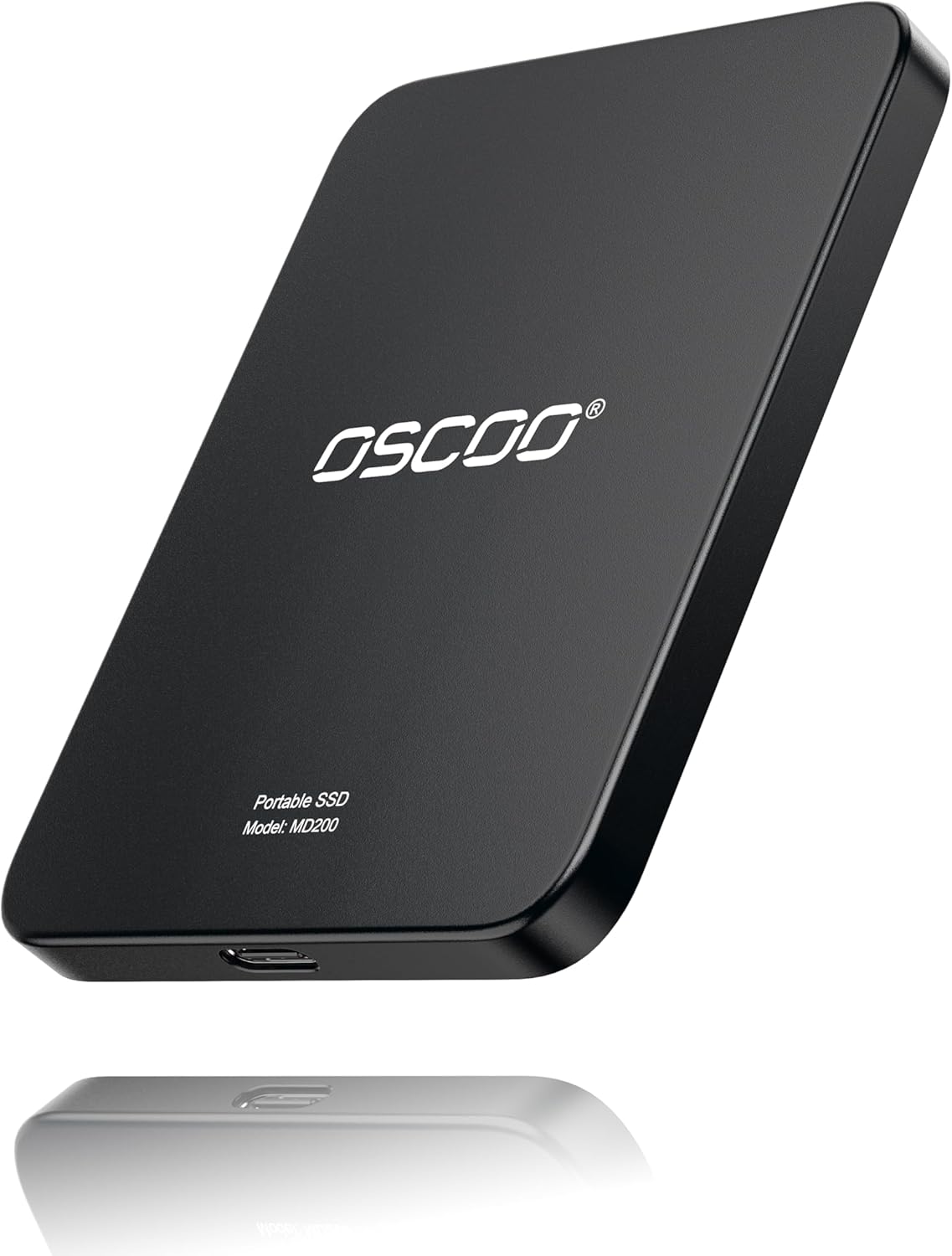
Recording straight from a phone. This is the newest job and only one of our eight picks is built for it. The OSCOO 1TB Magnetic SSD is MagSafe compatible, snaps onto the back of a recent iPhone, and supports recording Apple ProRes straight to the drive with compatible devices and apps. If you shoot video on a recent iPhone, ProRes fills internal storage frighteningly fast and recording to an attached drive is the fix.
Backups and file shuttling. The least glamorous job and the one most people actually need. Any drive here does it, which is why the cheap end of this list is perfectly defensible: for backup, 500MB/s versus 2,000MB/s changes a task you run overnight into a task you run overnight.
1. WD My Passport SSD — Best overall
- Blazing fast NVMe technology with speeds of up to 1050MB/s and write speeds of up to 1000MB/s. | Based on reading speed …
- Password enabled 256-bit AES hardware encryption
- Shock and vibration resistant. Drop resistant up to 6.5ft (1.98m)
At $209.99 this is the drive to buy if you are not going to think about it further. It reads at up to 1050MB/s and writes at up to 1000MB/s, which is the practical ceiling of a normal USB 3.2 Gen 2 port, so it delivers its full rated speed on the machine you already own rather than on one you might buy later.
The feature that decides it is password-enabled 256-bit AES hardware encryption. Encryption happens on the drive rather than in software, so it works the same on any machine you plug into. For a device whose entire purpose is leaving the house, that is the specification that should decide the purchase.
It is shock and vibration resistant and drop resistant to 6.5 feet, and it connects over USB 3.2 Gen 2 with USB-C and USB-A for older systems. 8,970 owners rate it 4.5.
- 8,970 ratings at 4.5, a deep evidence base
- Password-enabled 256-bit AES hardware encryption
- 1050MB/s is the real ceiling of a normal USB port, so no speed is wasted
- Works over USB-C and USB-A without an adapter
- No IP rating stated, only a drop figure
- Slower on paper than the 2,000MB/s drives, though not in practice on most machines
- Mid-priced rather than cheap
2. Lexar ES3 — Best budget
- Note: Magsafe is not available in this version
- High-speed Data Transfer: Lexar external SSD ES3 supports USB 3.2 Gen 2 up to 1050MB/s read and 1000MB/s write to transf…
- Wide Compatibility: Lexar Portable SSD ES3 compatibility with iPhone 17 series (Not supported on iPhone 14 and older mod…
The cheapest 1050MB/s drive here at $199.99, and the point worth making is what it does not give up. It reads at up to 1050MB/s and writes at up to 1000MB/s, the same figures as drives costing a hundred dollars more, because they are all limited by the same port.
It weighs 42g and is 10.5mm thick, which Lexar describes as smaller than a card. Compatibility is listed for Xbox Series X and S, PS4, PS5, laptops and cameras, and for iPhone 17 series, though Lexar states plainly that iPhone 14 and older are not supported.
One thing to note before buying: this version has no MagSafe, which Lexar states directly. If you want a magnetic phone attachment, that is the OSCOO further down this list, not this drive.
1,022 owners at 4.4, a thinner sample than the drives above it, and the reason it is the budget pick rather than the overall one.
- Cheapest drive here that hits the full 1050MB/s port ceiling
- 42g and 10.5mm, genuinely pocketable
- Console support listed for PS4, PS5 and Xbox
- 1,022 ratings, the smallest owner sample in this guide
- No MagSafe on this version, so it will not hang off a phone
- No IP rating or drop figure stated
3. Samsung T7 — Deep owner evidence
- MADE FOR THE MAKERS: Create; Explore; Store; The T7 Portable SSD delivers fast speeds and durable features to back up an…
- SHARE IDEAS IN A FLASH: Don’t waste a second waiting and spend more time doing; The T7 is embedded with PCIe NVMe techno…
- ALWAYS MAKE THE SAVE: Compact design with massive capacity; With capacities up to 4TB, save exactly what you need to you…
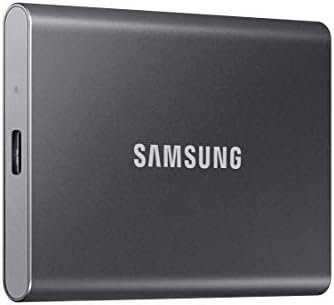
At $230.01 this drive carries the deepest owner evidence on this page: 12,211 ratings at 4.7. No other drive here is close, and for a component holding files you cannot shoot again, a sample that size is worth more than a spec sheet.
Speed is not the compromise here. Samsung rates it at up to 1,050MB/s read and 1,000MB/s write, the same ceiling the Lexar ES3 and the WD My Passport reach on the same port, which is as fast as an external drive gets on the USB port most machines actually have. What you give up against the Samsung T9 is the 2,000MB/s rating, and that needs a port most machines do not have.
The compromise is what it does not state. Samsung lists fall protection up to six feet on a solid aluminum unibody, but there is no IP rating for dust or water, so this is a drive for a bag rather than a building site. It does encrypt itself with 256-bit AES hardware encryption behind a password.
- 12,211 ratings at 4.7, the deepest owner sample on this page
- 1,050MB/s read, the ceiling of the port most machines have
- 256-bit AES hardware encryption behind a password
- Ships with both USB-C and USB-A cables
- No IP rating for dust or water, unlike the T7 Shield
- Costs more than the WD My Passport for the same port speed
- Six feet of fall protection is the only durability figure stated
4. Netac Zslim — Best for scheduled backups
- 1TB — MORE ROOM FOR WORK AND ENTERTAINMENT — Store larger photo and video collections, work projects, entertainment and …
- UP TO 550MB/S READ AND 450MB/S WRITE — Transfer photos, videos, documents and project files with read speeds up to 500MB…
- SLIM AND LIGHTWEIGHT — Measuring only 100 × 29.4 × 9mm and weighing approximately 30g, the Z Slim fits easily into a poc…
This one needs its headline number corrected before anything else. The title advertises USB 3.2 Gen 2 at 10Gbps, and the specification underneath states up to 500MB/s read and 450MB/s write. The interface is fast; the drive is not. Both facts are on the same listing.
Stated plainly, that makes it the slowest drive in this guide, and it costs $137.74, and on speed per dollar it loses to the Lexar ES3 and the Samsung T7 above it, both of which hit 1050MB/s.
What it has is evidence and build. 3,272 owners rate it 4.3, a far deeper sample than several pricier drives here, and the housing is shock-resistant aluminum with a reinforced inner frame. For backups, where the transfer runs while you are not watching, 500MB/s is genuinely sufficient.
Buy it for backups. Do not buy it to edit from.
- 3,272 ratings, a deeper sample than most drives here
- Shock-resistant aluminum housing
- 500MB/s is plenty for scheduled backups
- Roughly half the speed of every other drive in this guide
- The title advertises a 10Gbps interface the drive cannot saturate
- Costs more than faster drives on this list
5. OSCOO 1TB Magnetic — Best for shooting on a phone

- LIGHTNING-FAST 2000MB/S MAGNETIC SSD:Experience blazing-fast transfer speeds with USB 3.2 Gen 2×2, reaching up to 2000MB…
- STRONG MAGSAFE COMPATIBILITY & MAGNETIC ATTACHMENT:Instantly snap onto iPhone 15/16/17 Pro and other MagSafe-compatible …
- EXPAND IPHONE STORAGE & RECORD DIRECTLY:Free up your iPhone’s internal storage with high-speed external expansion. Suppo…
This is the only one of our eight picks built for a job the others cannot do. At $199.99 the OSCOO is MagSafe compatible and snaps onto the back of a recent iPhone, and its built-in magnet also holds it to metal surfaces such as a laptop lid or a monitor frame.
OSCOO states it supports recording Apple ProRes directly to the drive with compatible devices and apps. That matters because ProRes footage fills a phone alarmingly fast, and recording straight to an attached drive is the practical answer rather than deleting clips between takes.
It is rated up to 2000MB/s, with the same caveat that governs this whole guide, stated by OSCOO itself: maximum speed requires a USB 3.2 Gen 2×2 port. The shell is aluminum alloy, and the drive ships formatted exFAT, so it works with iPhone, Mac, Windows and Android out of the box.
190 owners at 4.4. OSCOO is a smaller brand than the others on this list, so weigh that against the specialized job it does.
- MagSafe attachment, the only one of the eight picks that mounts to a phone
- Direct Apple ProRes recording with compatible devices and apps
- The magnet also holds it to metal surfaces
- 2000MB/s rating on a Gen 2×2 port
- A smaller brand than the rest of this list
- The 2000MB/s figure needs a port most machines lack
- Little reason to choose it if you never shoot on a phone
Shooting a lot of ProRes? The 2TB upgrade. The Lexar ES5 2TB at $423.54 does the same job with double the room and a bigger name behind it. Lexar lists it as MagSafe compatible, with a metal ring for devices that are not magnetic, rated up to 2000MB/s, recording Apple ProRes at 4K120 and Samsung Pro Video at 8K30, IP65 rated and drop resistant to 3 meters. 4.5 stars from 213 owners. It sits outside our 1TB comparison, so judge it on capacity rather than against the drives above. Check the 2TB price on Amazon
6. Samsung T9 — Fastest
- NONSTOP SPEED: Race through projects with our fastest SSD for creators; Load, edit and transfer with sustained read and …
- DYNAMIC THERMAL GUARD: When you’re elbow-deep in a passion project, the T9 Portable SSD stays cool; Its advanced thermal…
- ADAPTS TO EVERY NEED: Whether you’re using a desktop, camera or a gaming console3, count on the T9 Portable SSD for exte…
At $239.99 the T9 is the speed pick, rated for sustained read and write of up to 2,000MB/s over USB 3.2 Gen 2×2. Samsung emphasizes sustained, and that word is the difference between a drive that starts fast and one that stays fast.
The reason it can is Dynamic Thermal Guard, an active thermal design that controls heat during long transfers. Small drives throttle when they get hot, which is why a long copy often starts quick and crawls by the end. This is the drive built against that.
Compatibility is listed across desktop, camera and console. 2,962 owners rate it 4.6.
The condition attached: without a USB 3.2 Gen 2×2 port you will see roughly half its rating, at which point the WD My Passport does the same work for less.
- 2,000MB/s sustained, the fastest rating here
- Dynamic Thermal Guard resists throttling on long transfers
- 4.6 stars
- Listed for desktop, camera and console use
- Needs USB 3.2 Gen 2×2, which most machines do not have
- No IP rating or drop figure stated
- Costs $80 more than the overall pick
7. Samsung T7 Shield — Best rugged

- GO THE DISTANCE: Withstand whatever adventure with the wildly reliable T7 Shield; It’s designed for the elements with wa…
- YOUR CONTENT CAPTURED: Take on the project, then transfer all your heavy files within seconds with the USB 3.2 Gen 2 Por…
- SHARE IDEAS IN A FLASH: The T7 is embedded with PCIe NVME technology that brings you fast read and write speeds up to 1,…
At $271.30 the T7 Shield is the drive for work that happens outdoors: IP65 dust and water resistance, a rubberized shell, and drop resistance the listing states but does not put a height on. Against the SanDisk Extreme at the bottom of this list it costs a little more, and it is backed by far deeper owner evidence.
Speed is where you pay for the ruggedness. It is rated to 1,050MB/s read over USB 3.2 Gen 2, which is the ceiling most machines can actually reach anyway, but it means the fastest drive on this page is the Samsung T9 above it at 2,000MB/s. If speed matters more than surviving a wet building site, buy that one instead.
Compatibility is listed for PC, Mac, Android, gaming consoles and iPhone 15 and 16 over USB-C. It carries AES 256-bit hardware encryption and a three-year warranty. 16,399 owners rate it 4.7, the deepest evidence base and the highest rating on this page.
- 16,399 ratings at 4.7, among the deepest evidence here
- IP65 dust and water resistance in a rubberized shell
- AES 256-bit hardware encryption and a three-year warranty
- Prime eligible
- 1,050MB/s, so the T9 above it is the faster drive
- The most expensive drive on this page
- IP65 covers water jets, not submersion, and no drop height is stated
8. SanDisk Extreme — Newest model
- NEARLY 2X FASTER THAN OUR PREVIOUS GENERATION(8) – move 1,000 high-res photos in under 60 seconds(6) with up to 2000MB/s…
- IP65 RATING AND UP TO 3M DROP PROTECTION(3) – protects against spills and drops.
- POCKET-SIZED – fits easily in pockets and small bags.
The new-model Extreme at $244.00 is the most expensive drive here and the one with the strongest durability claim: IP65 and up to 3 meter drop protection. That is the highest stated drop figure on this page.
SanDisk rates it at up to 2000MB/s, which it describes as nearly twice its previous generation, and states it will move 1,000 high-resolution photos in under 60 seconds. As with every 2,000MB/s drive here, that requires the faster port.
The caveat is the sample. This is the new model and it carries only 205 ratings, at 4.6. The rating is excellent and the evidence behind it is thin, which is the honest trade for buying the current generation rather than the previous one.
- IP65 and 3 m drop protection, the highest stated drop figure here
- 2000MB/s on a Gen 2×2 port
- 4.6 stars
- Pocket sized despite the rugged rating
- Only 205 ratings, the thinnest evidence in this guide
- Most expensive pick here
- Needs USB 3.2 Gen 2×2 to reach its rating
The best external SSDs compared side by side
Prices are live from each product page. Ratings and owner counts are read from the listing, not estimated. Speeds are the manufacturer read rating.
| Drive | Rated speed | Standout | Price | Rating |
|---|---|---|---|---|
| WD My Passport SSD | 1050MB/s | AES hardware encryption | $209.99 | 4.5 (8,970) |
| Lexar ES3 | 1050MB/s | Cheapest at 1050MB/s, 42g | $199.99 | 4.4 (1,022) |
| Samsung T7 | 1050MB/s | Deepest owner sample | $230.01 | 4.7 (12,211) |
| Netac Zslim | 500MB/s | Backup drive, deep sample | $137.74 | 4.3 (3,272) |
| OSCOO 1TB Magnetic | 2000MB/s | MagSafe, ProRes recording | $199.99 | 4.4 (190) |
| Samsung T9 | 2000MB/s | Sustained speed, thermal guard | $239.99 | 4.6 (2,962) |
| Samsung T7 Shield | 1050MB/s | IP65, rubberized shell | $271.30 | 4.7 (16,399) |
| SanDisk Extreme | 2000MB/s | IP65, 3 m drop | $244.00 | 4.6 (205) |
Getting it right on day one
Four things decide whether a new external SSD works properly or quietly disappoints, and none of them is the drive.
Use the cable it came with. This is the most common cause of a fast drive running slow. A USB-C cable that came with a phone charger may only carry USB 2.0 data, which is roughly 60MB/s, and it will look and fit identically. If your transfers are inexplicably slow, change the cable before you blame the drive.
Find the right port. On a desktop the fastest ports are usually on the back, wired straight to the motherboard, while the front-panel ports run through an internal header and are often slower. On a laptop, ports are frequently not equal to each other. If one port is marked with a number or a lightning symbol, that is the fast one.
Format it for the machines you actually use. Drives ship formatted for broad compatibility rather than for you. exFAT reads and writes on Windows, macOS and consoles, which is what you want for a drive that moves between devices. NTFS is faster on Windows and read-only on a Mac without extra software. If the drive lives with one computer, use that system native format; if it travels, use exFAT.
On a console, plug in before you install. A PlayStation or Xbox will format the drive itself and wipe whatever is on it, so move anything you care about off first. Once formatted for a console it is no longer a general-purpose drive until you reformat it back.
One last thing worth saying, because it is the reason most people buy one of these and then regret how they used it: an external SSD is not a backup on its own. A copy that lives on your desk next to the computer shares the same accidents as the computer. If the files matter, the drive is one copy and something offsite is the other.
If the drive is going inside the machine rather than in a bag, that is a different decision entirely and a different guide: our best M.2 NVMe SSD guide covers internal drives, where the port ceiling argument on this page does not apply.
What we left out of our best external SSD picks
Three groups were excluded deliberately.
Marketplace listings. Two drives were cut for being sold by third-party sellers rather than Amazon, including a SanDisk at $157 that was really $157 plus $7.17 shipping from a seller with three units left. Every drive above is Prime eligible.
Drives with no live offer. The SK Hynix Beetle X31 rates 4.7 across 1,416 owners and would have made this list on merit. It has no buyable listing, and the only Beetle X31 results now returned are carrying cases for it. A product whose accessories outlive it is not a recommendation.
Other capacities. This guide is 1TB only, so like is compared with like. 2TB and 4TB versions of several of these drives exist and cost roughly double per tier. The one larger drive we link is the Lexar ES5 2TB, as an upgrade under pick 5 for phone shooters who need more room.
Frequently asked questions
Do I need a 2,000MB/s external SSD?
Only if your computer has a USB 3.2 Gen 2×2 port, which most do not. On the standard 10Gbps port that nearly every machine has, a 2,000MB/s drive and a 1,050MB/s drive perform about the same. Check the port first, because that decision is worth roughly eighty dollars here.
Why is my 1TB drive showing as 931GB?
Nothing is wrong and nothing is missing. Windows counts storage in binary and manufacturers count in decimal, so 1TB reads as about 931GB. macOS reports the full 1TB because it counts the same way the manufacturer does.
Can I run PS5 games from an external SSD?
You can store PS5 games on one and play PS4 games directly from it. The practical benefit is keeping your library installed instead of deleting and redownloading. The Lexar ES3 lists PS4, PS5 and Xbox support outright, and the Samsung T7 Shield lists gaming consoles among its compatible devices.
What is the difference between USB 3.2 Gen 2 and Gen 2×2?
Bandwidth. Gen 2 moves 10 gigabits per second, roughly 1,050MB/s in practice. Gen 2×2 moves 20 gigabits per second, which is what the 2,000MB/s drives need. Gen 2×2 is far less common, and Macs in particular generally do not have it.
Is an IP rating worth paying for?
If the drive leaves a desk, yes, because it is a test result rather than a marketing word. IP65 on the SanDisk Extreme and the Samsung T7 Shield means dust tight and protected against water jets. A listing that says rugged with no rating has told you nothing.
Does hardware encryption matter on an external drive?
More than speed, if the drive holds anything private. Hardware encryption runs on the drive itself, so it protects the data on any machine you plug into rather than depending on software you installed. The WD My Passport and the T7 Shield both offer it.
Why do so many external SSDs quote exactly 1050MB/s?
Because that is the ceiling of the USB 3.2 Gen 2 port, not a coincidence between manufacturers. Two drives in this guide quote that figure. They are all limited by the same connection, which is why the cheaper ones are not slower in practice.
Can I record video from my phone straight to an external SSD?
Yes, on recent iPhones and some Android devices, and it is the practical fix for ProRes filling internal storage. The OSCOO 1TB Magnetic SSD in this guide is built for it, attaching by MagSafe and supporting direct Apple ProRes recording with compatible devices and apps.
Is a cheaper external SSD slower for backups?
Rarely in any way you would notice. A backup runs unattended, so the difference between 500MB/s and 2,000MB/s is a job you started and walked away from either way. Speed matters when you edit directly from the drive, not when you copy to it overnight.
The bottom line: the best external SSD for most people
The best external SSD is sold to you on one number, and it is the number your computer most often refuses to deliver. Check which USB port you have before you decide anything else.
The WD My Passport SSD at $209.99 is the drive to buy. It runs at the real ceiling of a normal port, it carries 8,970 owner ratings, and it encrypts itself in hardware behind a password.
The Lexar ES3 at $199.99 is the value pick, hitting the same 1050MB/s as drives costing far more, for the lowest price of any 1050MB/s drive here.
The Samsung T9 at $239.99 is the one to buy if, and only if, you have a Gen 2×2 port. With one it is the fastest sustained drive here, holding that speed under load. Without one, buy the My Passport and spend the difference on capacity.
Gamers Tech Guide participates in the Amazon Services LLC Associates Program. As an Amazon Associate we earn from qualifying purchases.